Introduction
Cascading Style Sheets (CSS) have become the foundation of modern web presentation. As HTML5 applications continue to grow richer and JavaScript frameworks introduce increasingly dynamic user interfaces, CSS has evolved from a simple styling language into a critical part of front-end architecture.
Large enterprise web applications often contain thousands of selectors spread across multiple stylesheets maintained by different development teams. Without a solid understanding of the CSS cascade and specificity, seemingly minor style changes can introduce difficult-to-diagnose rendering issues.
One of the most misunderstood aspects of CSS is specificity. Developers frequently assume that the last rule in a stylesheet always wins, when in reality browsers evaluate multiple factors before determining which declaration should be applied.
Understanding specificity is essential for creating maintainable, scalable, and predictable stylesheets that remain manageable as applications evolve.
Industry Background
Web applications have progressed significantly over the past decade. Rich Internet Applications (RIAs), AJAX-driven interfaces, responsive layouts, and JavaScript libraries such as jQuery have increased both the size and complexity of client-side codebases.
As applications grow, CSS often becomes increasingly difficult to maintain because:
- ◆Multiple developers contribute styles.
- ◆Third-party UI libraries introduce competing selectors.
- ◆Large applications accumulate legacy rules.
- ◆Multiple layouts share common components.
- ◆Browser compatibility requires occasional overrides.
Poor stylesheet organization frequently results in deeply nested selectors, excessive use of IDs, and widespread reliance on !important, making future maintenance increasingly difficult.
The Business Problem
In enterprise development, inconsistent CSS architecture can lead to:
- ◆Unexpected visual regressions
- ◆Difficult debugging sessions
- ◆Duplicate styling rules
- ◆Excessive selector complexity
- ◆Slower feature development
- ◆Higher maintenance costs
- ◆Reduced code readability
Unlike compilation errors in programming languages, CSS specificity conflicts often appear only during runtime, making them more expensive to identify and resolve.
Development teams therefore benefit from understanding how browsers determine which rule ultimately controls an element's appearance.
Understanding the CSS Cascade
CSS stands for Cascading Style Sheets because multiple style declarations may apply to the same HTML element.
Before evaluating specificity, browsers first consider the origin of a style.
Styles may originate from:
- ◆Browser default styles
- ◆External stylesheets
- ◆Internal style blocks
- ◆Inline styles
Once applicable rules have been identified, browsers use the cascade to determine which declaration takes precedence.
The cascade evaluates:
- 1.Importance.
- 2.Specificity.
- 3.Source order.
Only after these stages does the browser compute the final style applied to the document.
What Is CSS Specificity?
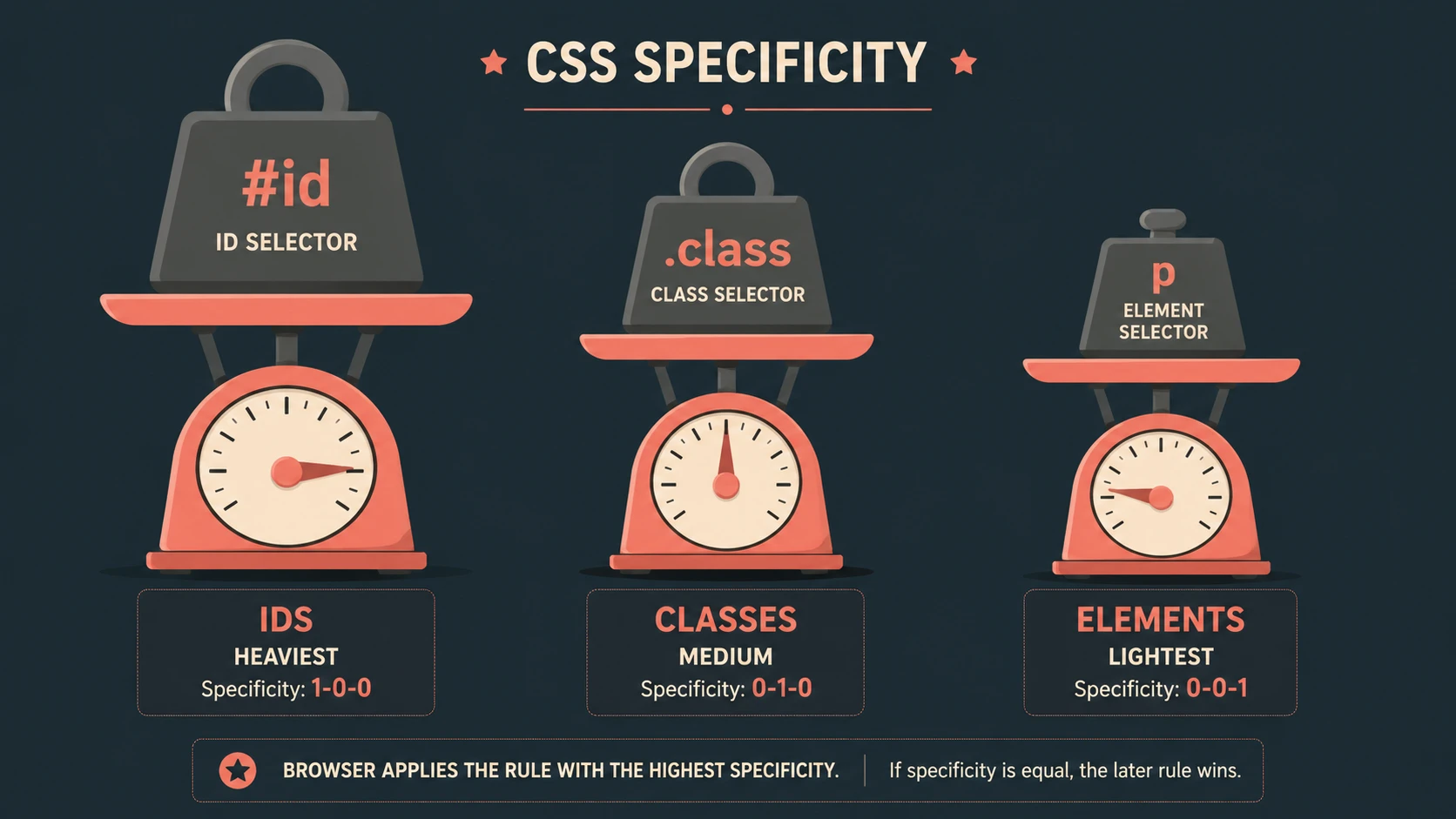
Specificity is a scoring system that browsers use to compare competing selectors.
Rather than evaluating selector length or complexity, browsers assign weight to different selector components.
Higher specificity generally overrides lower specificity when competing declarations target the same property.
Specificity allows developers to write both broad styling rules and highly targeted exceptions without requiring manual priority management.
How Browsers Compute Specificity
Browsers conceptually evaluate selectors using four categories.
| Selector Type | Relative Weight |
|---|---|
| Inline styles | Highest |
| ID selectors | Very High |
| Class selectors, attribute selectors, pseudo-classes | Medium |
| Element selectors and pseudo-elements | Low |
When comparing selectors, browsers evaluate each category independently rather than calculating a simple mathematical total.
For example:
#navigation .menu li a {
    color: blue;
}
This selector contains:
- ◆One ID selector
- ◆One class selector
- ◆Two element selectors
Its higher specificity allows it to override more general rules targeting links.
Selector Comparison
Consider the following selectors.
| Selector | Specificity Characteristics |
|---|---|
| p | Element selector |
| .article p | Class and element |
| #content p | ID and element |
| p.notice | Element and class |
| style attribute | Inline style |
When multiple declarations target the same property, the selector containing an ID generally overrides one containing only classes or element selectors.
Source Order
If competing selectors have identical specificity, browsers evaluate source order.
The rule appearing later in the stylesheet takes precedence.
For example:
.button {
    color: blue;
}

.button {
    color: green;
}
Both selectors have identical specificity.
Because the second declaration appears later, the text is rendered in green.
Source order should not be confused with specificity itself. It is evaluated only after specificity has been determined.
Inline Styles
Inline styles receive very high priority within the cascade because they are associated directly with an individual HTML element.
Example:
<div style="color:red;">Although inline styles may occasionally be useful, they reduce maintainability by mixing presentation with document structure.
Enterprise applications generally benefit from keeping presentation logic within centralized stylesheets.
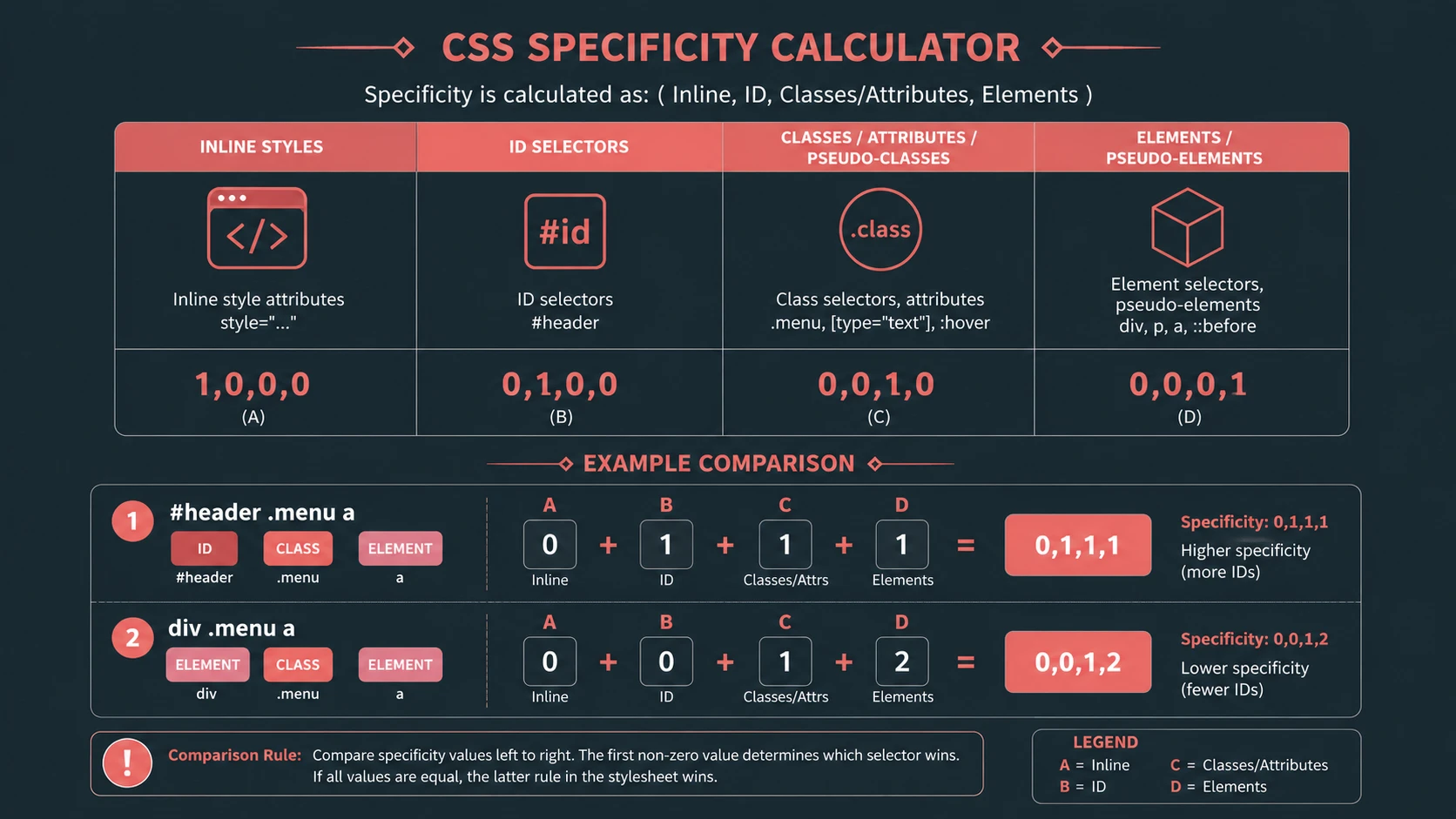
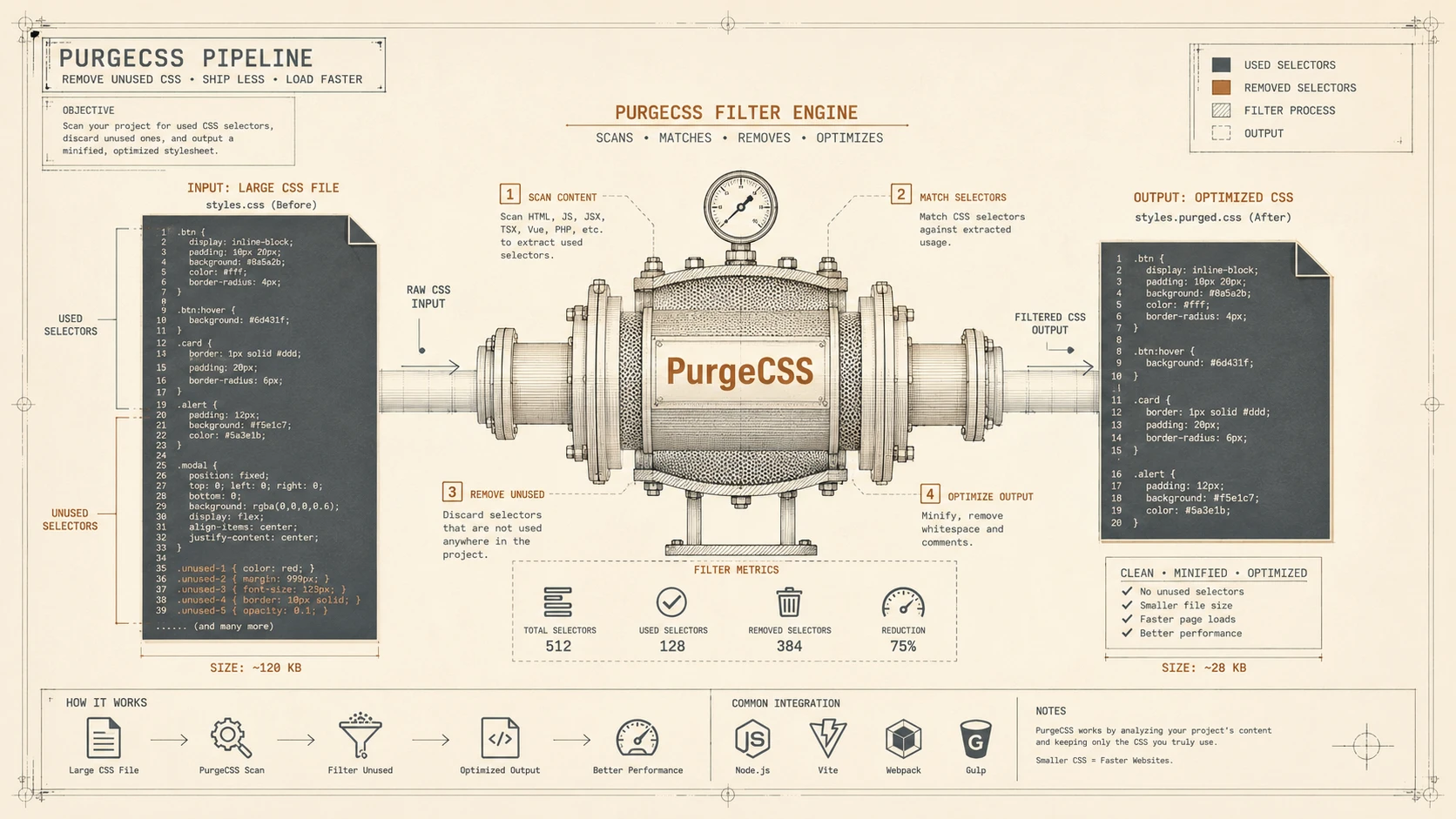
System architecture diagram and conceptual workflow layout for Understanding CSS Specificity.
The Role of !important
CSS also supports the !important annotation.
Declarations marked as important receive higher priority than ordinary declarations during cascade evaluation.
Example:
.warning {
    color: red !important;
}
While this mechanism can resolve exceptional cases, excessive use often indicates architectural problems within the stylesheet.
Overusing !important makes future maintenance considerably more difficult because developers must continually introduce even stronger overrides.
Building Maintainable Stylesheets
Specificity should be viewed as an architectural consideration rather than merely a browser rule.
Well-designed stylesheets generally exhibit:
- ◆Consistent selector patterns
- ◆Limited nesting
- ◆Reusable component classes
- ◆Minimal dependence on IDs
- ◆Predictable organization
Keeping selector complexity under control improves long-term maintainability.
Enterprise Use Cases
Understanding specificity is valuable across many enterprise projects.
| Scenario | Benefit |
|---|---|
| Corporate portals | Predictable styling |
| E-commerce applications | Easier maintenance |
| Content management systems | Reduced style conflicts |
| Responsive websites | Cleaner overrides |
| Internal business applications | Consistent UI behavior |
| Shared design systems | Improved scalability |
Large development teams particularly benefit from consistent specificity conventions.
Performance Considerations
Although modern browsers efficiently evaluate selectors, unnecessarily complex selector chains can increase stylesheet complexity and make debugging more difficult.
Recommendations include:
- ◆Avoid deeply nested selectors.
- ◆Minimize unnecessary descendant relationships.
- ◆Prefer reusable class selectors.
- ◆Keep stylesheet organization consistent.
Readable CSS often contributes more to long-term performance than micro-optimizing individual selectors.
Security Considerations
CSS specificity itself does not introduce security risks.
However, organizations should:
- ◆Separate presentation from business logic.
- ◆Avoid exposing sensitive information through client-side markup.
- ◆Validate dynamically generated CSS where applicable.
Security remains primarily the responsibility of application architecture rather than stylesheet design.
Scalability
As applications grow, stylesheet architecture becomes increasingly important.
Scalable CSS typically emphasizes:
- ◆Reusable components
- ◆Consistent naming conventions
- ◆Limited selector depth
- ◆Modular stylesheet organization
- ◆Predictable override strategies
These practices reduce maintenance effort across large development teams.
Best Practices
Organizations should establish CSS standards early in development.
Recommended practices include:
- ◆Prefer class selectors over IDs for reusable components.
- ◆Keep selectors concise.
- ◆Minimize nesting.
- ◆Organize stylesheets logically.
- ◆Reserve
!importantfor exceptional cases. - ◆Document styling conventions.
- ◆Review specificity during code reviews.
- ◆Test layouts across supported browsers.
Consistent engineering practices help prevent long-term stylesheet degradation.
Common Mistakes
Development teams frequently encounter several specificity-related issues.
Common mistakes include:
- ◆Excessive use of ID selectors.
- ◆Deeply nested selectors.
- ◆Overreliance on
!important. - ◆Duplicate style definitions.
- ◆Mixing unrelated responsibilities within selectors.
- ◆Assuming later rules always override earlier ones.
Many styling problems can be avoided through disciplined stylesheet architecture.
Technology Comparison
| Technique | Maintainability | Specificity Level | Recommended Usage |
|---|---|---|---|
| Element selectors | High | Low | Base styling |
| Class selectors | Excellent | Moderate | Components |
| ID selectors | Moderate | High | Unique page elements |
| Inline styles | Poor | Very High | Limited scenarios |
!important | Poor when overused | Highest priority among normal declarations | Exceptional overrides |
Choosing the appropriate selector type contributes significantly to long-term maintainability.
Adoption Strategy
Organizations maintaining large CSS codebases should consider an incremental improvement strategy.
Recommended approach:
- 1.Audit existing stylesheets.
- 2.Identify high-specificity selectors.
- 3.Reduce unnecessary nesting.
- 4.Replace excessive ID selectors with reusable classes where appropriate.
- 5.Eliminate unnecessary
!importantdeclarations. - 6.Introduce stylesheet organization standards.
- 7.Perform ongoing CSS reviews during development.
Gradual improvements reduce maintenance risk while improving code quality.
Limitations
Although specificity provides predictable rule evaluation, developers should recognize several considerations.
Current challenges include:
- ◆Legacy stylesheets may contain conflicting architectural patterns.
- ◆Third-party libraries sometimes require carefully planned overrides.
- ◆Excessive selector complexity reduces readability.
- ◆Large applications require consistent styling governance.
Understanding browser behavior remains essential for successful stylesheet maintenance.
Looking Ahead
As web applications continue increasing in sophistication, CSS architecture will play an increasingly important role in front-end engineering. Responsive design, reusable interface components, and larger client-side codebases all depend upon predictable styling behavior.
As of May 2013, mastering CSS specificity is no longer simply a front-end development skill but an architectural necessity for enterprise web applications. Development teams that establish clear selector conventions and understand how browsers compute the cascade will be better positioned to build maintainable user interfaces capable of evolving alongside changing business requirements.