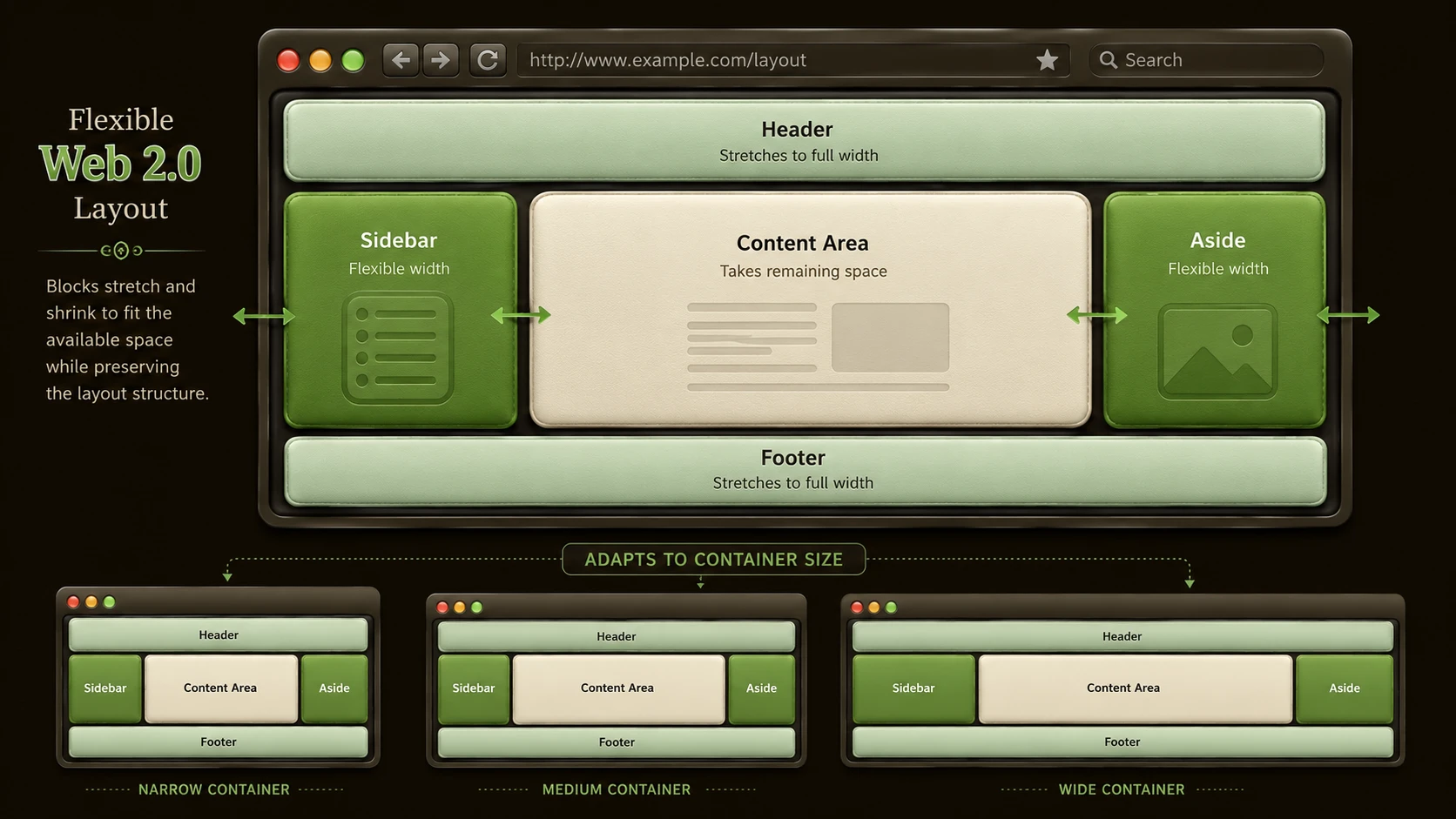
Introduction
For more than a decade, web designers and frontend developers have relied on techniques that were never originally intended to build complex application layouts. HTML tables, floating elements, inline-block positioning, and absolute positioning have each been used to solve layout problems, often resulting in verbose markup, browser-specific workarounds, and difficult maintenance.
As enterprise web applications become increasingly sophisticated, user interface requirements continue to grow. Administrative portals, customer relationship management systems, business intelligence dashboards, collaboration platforms, and Software-as-a-Service (SaaS) applications require flexible layouts that adapt to changing content while remaining maintainable across browsers.
The CSS3 Flexible Box Layout Module, commonly referred to as Flexbox, introduces a new layout model designed specifically for arranging interface elements. Instead of forcing developers to manipulate floats or manually calculate element positioning, Flexbox allows containers to distribute available space intelligently among child elements.
As of November 2011, Flexbox remains an emerging specification. Browser implementations are still evolving, and developers should expect differences between implementations. Nevertheless, the specification represents one of the most promising developments in CSS layout technology.
This article explores the design goals behind Flexbox, compares it with traditional layout techniques, discusses enterprise use cases, and offers practical guidance for organizations evaluating modern frontend architectures.
The Limitations of Traditional CSS Layouts
Before Flexbox, developers commonly relied on several layout techniques.
These include:
- ◆HTML tables
- ◆CSS floats
- ◆Inline-block elements
- ◆Absolute positioning
- ◆Nested containers
Although each method solves particular problems, none was designed specifically for application layout.
Common challenges include:
- ◆Vertical alignment difficulties
- ◆Equal-height columns
- ◆Clearing floated elements
- ◆Complex nested structures
- ◆Browser inconsistencies
- ◆Responsive adaptation
These issues increase development effort and complicate long-term maintenance.
Why Modern Web Applications Need Better Layouts
Enterprise applications increasingly contain:
- ◆Navigation panels
- ◆Toolbars
- ◆Dashboards
- ◆Data grids
- ◆Reporting interfaces
- ◆Search panels
- ◆Responsive forms
- ◆Dynamic content regions
These interfaces require layouts that can grow, shrink, and reorganize according to available screen space.
Traditional CSS often requires numerous workarounds to achieve these behaviors.
Understanding Flexbox
Flexbox introduces a container-based layout model.
Instead of positioning elements individually, developers define a flexible container that manages the placement of its child elements.
The layout engine determines how available space should be distributed.
This simplifies many tasks that previously required custom CSS techniques.
Core Flexbox Concepts
The Flexible Box Layout Module introduces several important concepts.
These include:
- ◆Flexible containers
- ◆Flexible items
- ◆Direction control
- ◆Alignment
- ◆Space distribution
- ◆Ordering
Rather than relying on document flow alone, layouts become more adaptable to changing content.
Example Flexbox Layout
A simplified example illustrates the overall structure.
.container {
    display: flex;
}
Child elements automatically participate in the flexible layout.
Additional properties can influence alignment, spacing, and sizing according to application requirements.
Because the specification continues to evolve, developers should verify browser support before relying on specific syntax in production environments.
Comparing Traditional Layouts and Flexbox
| Feature | Floats and Traditional CSS | CSS3 Flexbox |
|---|---|---|
| Primary Purpose | Document Flow | Flexible Layout |
| Equal Height Columns | Difficult | Built In |
| Vertical Alignment | Complex | Simplified |
| Element Ordering | Limited | Flexible |
| Space Distribution | Manual | Automatic |
| Nested Layouts | More Complex | Simpler |
| Dynamic Content | Limited | Better Supported |
Flexbox focuses specifically on solving interface layout problems rather than document formatting.
Alignment Improvements
One of the most significant advantages of Flexbox is simplified alignment.
Developers frequently need to:
- ◆Center content
- ◆Align buttons
- ◆Position toolbars
- ◆Distribute navigation items
- ◆Maintain consistent spacing
Traditional CSS often requires multiple wrapper elements or positioning techniques.
Flexbox introduces alignment capabilities directly within the layout model, reducing unnecessary markup.
Managing Dynamic Space
Enterprise applications frequently display information that changes throughout the day.
Examples include:
- ◆Notifications
- ◆Search results
- ◆Dashboards
- ◆Reports
- ◆Data grids
- ◆User-generated content
Flexible layouts allow interface components to expand or contract naturally as content changes.
This improves usability while reducing manual sizing adjustments.
Enterprise Architecture Considerations
Flexbox affects only the presentation layer.
A typical enterprise architecture may resemble:
Web Browser
      |
HTML
      |
CSS3 Flexbox
      |
JavaScript
      |
Application Server
      |
Business Services
      |
Enterprise Database
Business logic remains unchanged while frontend layout becomes easier to manage.
Enterprise Use Cases
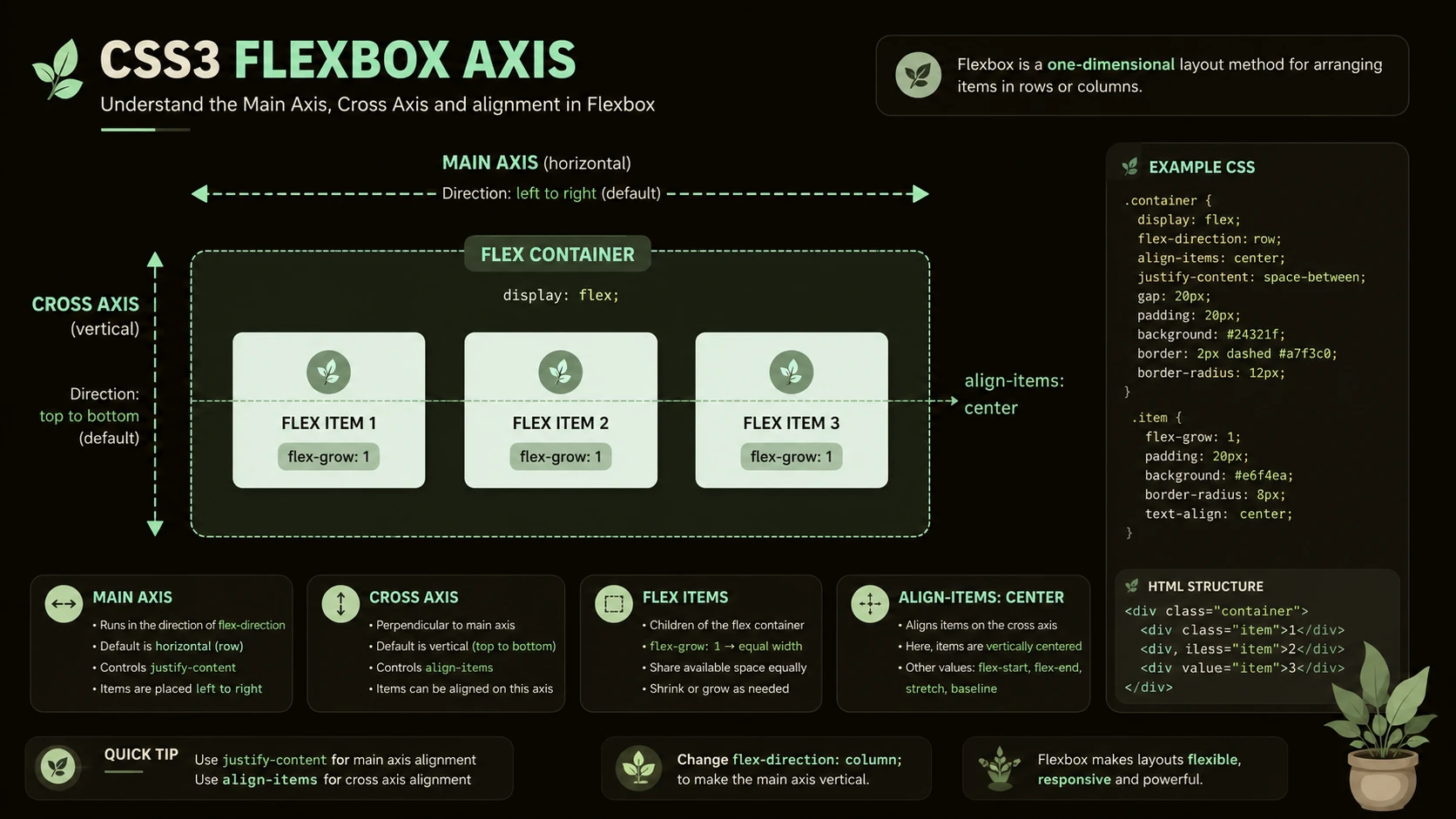
System architecture diagram and conceptual workflow layout for CSS3 Flexbox: The Layout Specification Web Designers Waited For.
Administrative Dashboards
Business dashboards often contain multiple widgets requiring flexible positioning.
Flexbox simplifies the arrangement of dashboard panels.
Customer Relationship Management Systems
CRM applications typically combine navigation, customer information, activity history, and reporting within a single interface.
Flexible layouts improve organization while accommodating varying amounts of content.
Employee Portals
Internal business portals frequently display announcements, reports, calendars, and workflow tasks.
Adaptive layouts improve readability across different browser window sizes.
Reporting Applications
Charts, summary panels, and filters benefit from layouts capable of redistributing available space.
Software-as-a-Service Platforms
Hosted business applications increasingly require interfaces that remain usable across desktop and emerging mobile devices.
Browser Support Considerations
Because Flexbox remains an evolving specification, browser implementations continue to mature.
Organizations should carefully evaluate:
- ◆Supported browsers
- ◆Vendor-specific implementations
- ◆Existing enterprise browser standards
- ◆Internal testing requirements
Production adoption should be guided by compatibility testing rather than specification availability alone.
Performance Considerations
Layout performance depends upon multiple factors.
Development teams should continue emphasizing:
- ◆Efficient CSS organization
- ◆Minimal DOM complexity
- ◆Optimized images
- ◆Compressed resources
- ◆Efficient JavaScript execution
Flexbox simplifies layout logic but does not replace general frontend optimization practices.
Best Practices
Organizations evaluating Flexbox should consider several recommendations.
- ◆Begin with internal prototypes.
- ◆Verify browser compatibility.
- ◆Maintain semantic HTML.
- ◆Keep layouts modular.
- ◆Separate presentation from business logic.
- ◆Test across supported enterprise browsers.
- ◆Document layout conventions.
- ◆Continue following accessibility guidelines.
- ◆Monitor specification evolution.
These practices reduce migration risk while encouraging maintainable frontend architectures.
Common Mistakes
Several implementation issues should be avoided.
Assuming Universal Browser Support
Browser implementations continue evolving and should be validated before production deployment.
Rewriting Stable Applications Immediately
Existing layouts that meet business requirements may not require immediate migration.
Ignoring Progressive Enhancement
Applications should remain usable even where newer layout capabilities are unavailable.
Mixing Layout with Business Logic
CSS improvements should remain independent of application services and business rules.
Overcomplicating Layouts
Flexbox simplifies interface construction but should not encourage unnecessary design complexity.
Adoption Recommendations
Organizations interested in Flexbox should proceed incrementally.
Phase 1
- ◆Evaluate current browser support.
- ◆Build prototype layouts.
- ◆Train frontend developers.
Phase 2
- ◆Apply Flexbox to internal applications.
- ◆Compare maintainability with existing CSS techniques.
- ◆Gather developer feedback.
Phase 3
- ◆Introduce Flexbox into selected new projects.
- ◆Establish frontend standards.
- ◆Document reusable layout patterns.
Phase 4
- ◆Expand adoption as browser implementations mature.
- ◆Continue reviewing specification updates.
- ◆Refine enterprise UI guidelines.
A gradual migration strategy allows organizations to benefit from modern layout techniques while maintaining compatibility with existing environments.
Flexbox and the Evolution of Web Design
The Flexible Box Layout Module represents a shift in how developers think about web layouts. Rather than adapting document-oriented CSS features to application interfaces, Flexbox introduces capabilities specifically designed for arranging user interface components.
Although browser support remains an important consideration during 2011, the underlying concepts provide valuable insight into how future frontend development may become simpler, more consistent, and easier to maintain.
Looking Ahead
CSS3 Flexbox introduces one of the most significant advances in web layout design since widespread adoption of CSS positioning. By simplifying alignment, spacing, ordering, and flexible sizing, the specification addresses long-standing challenges faced by frontend developers building enterprise web applications.
As organizations continue modernizing browser-based software throughout 2011, Flexbox deserves careful evaluation as an emerging layout technology. While production adoption should remain aligned with enterprise browser support requirements, development teams that begin experimenting with Flexbox today will be well prepared to leverage its capabilities as browser implementations continue to mature.