Introduction
Software development has steadily evolved from isolated teams working within centralized repositories to globally distributed engineering organizations collaborating across multiple locations and time zones. While distributed version control systems have already changed how developers manage source code, an equally important transformation is occurring in how teams collaborate.
GitHub has emerged as one of the most influential platforms supporting this evolution. Rather than functioning solely as a repository hosting service, GitHub combines distributed version control with collaboration features that encourage code review, transparency, knowledge sharing, and community participation.
Although many enterprises continue to rely on centralized systems such as Subversion, Perforce, or Team Foundation Server, engineering leaders are increasingly evaluating GitHub and Git as viable platforms for both internal development and open source engagement.
This article examines GitHub's collaborative model, its architectural foundations, enterprise implications, benefits, limitations, and adoption considerations from the perspective of early 2012.
Industry Background
For many years, enterprise software projects primarily relied on centralized version control systems. Developers checked files in and out of a central repository, often dealing with merge conflicts, restricted offline workflows, and long-lived feature branches.
The introduction of Git by Linus Torvalds demonstrated a fundamentally different approach. Every developer maintained a complete local repository containing the project's full history. Local commits became inexpensive operations, enabling experimentation without immediate coordination.
GitHub expanded upon Git by adding collaboration capabilities accessible through a web interface. Rather than replacing Git, GitHub simplified repository management while introducing mechanisms that encouraged team interaction.
Organizations are increasingly recognizing that successful software development depends not only on version control but also on communication surrounding code changes.
The Business Problem
Enterprise software development often encounters collaboration challenges that extend beyond source control.
Common issues include:
- ◆Limited visibility into ongoing work
- ◆Difficult code review processes
- ◆Knowledge silos among senior developers
- ◆Inconsistent branching strategies
- ◆Slow integration cycles
- ◆Email-driven patch reviews
- ◆Manual coordination between distributed teams
Traditional version control systems generally focus on storing revisions. Modern software projects require platforms that also facilitate discussion, traceability, and collaborative decision making.
GitHub addresses these challenges by integrating source code management with lightweight social collaboration mechanisms.
Understanding the Technology
GitHub is built around Git, a distributed version control system designed to provide fast branching, local history, efficient merging, and decentralized workflows.
GitHub extends Git with web-based collaboration features including:
- ◆Repository hosting
- ◆User profiles
- ◆Forking
- ◆Pull requests
- ◆Issue tracking
- ◆Wikis
- ◆Repository browsing
- ◆Activity feeds
- ◆Team management
Rather than changing Git's underlying architecture, GitHub improves how developers communicate around repositories.
Core Architecture
GitHub's collaboration model combines distributed repositories with centralized coordination.
| Component | Responsibility |
|---|---|
| Git Repository | Stores project history |
| Remote Repository | Shared collaboration point |
| Fork | Independent project copy |
| Pull Request | Proposed code integration |
| Issues | Bug and task tracking |
| Wiki | Project documentation |
| Team Permissions | Access control |
| Activity Feed | Collaboration visibility |
Developers continue using standard Git commands locally while GitHub provides visibility into repository activity.
How Social Coding Works
Unlike traditional development models where all contributors work directly against a single repository, GitHub encourages independent experimentation.
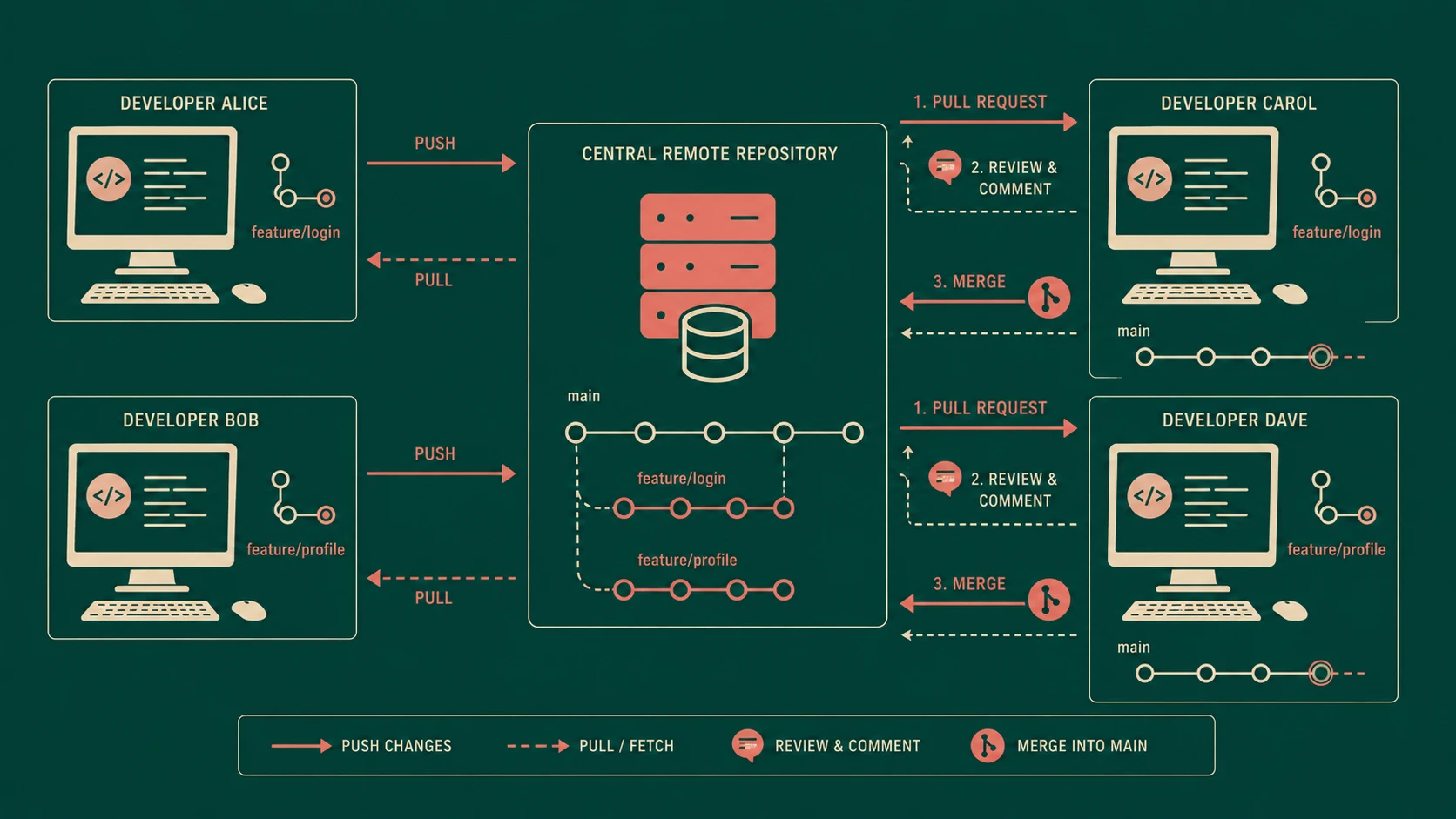
A typical workflow includes:
- 1.Clone or fork a repository.
- 2.Create a feature branch.
- 3.Commit changes locally.
- 4.Push changes to GitHub.
- 5.Open a pull request.
- 6.Discuss implementation details.
- 7.Review proposed modifications.
- 8.Merge approved changes.
This workflow separates implementation from integration, enabling better quality control.
Pull Requests
One of GitHub's most recognizable innovations is the pull request.
A pull request allows developers to propose changes before merging them into the primary codebase.
Rather than emailing patches or manually comparing revisions, reviewers can inspect:
- ◆Modified files
- ◆Line-by-line differences
- ◆Commit history
- ◆Comments
- ◆Discussion threads
Pull requests encourage collaborative review while preserving project history.
For enterprise development, this creates opportunities for peer review without introducing excessive process overhead.
Fork-Based Development
Forking enables developers to create independent copies of repositories.
This approach offers several advantages:
- ◆Safe experimentation
- ◆External contributions
- ◆Isolation of unfinished work
- ◆Independent release cycles
- ◆Reduced permission requirements
Open source communities have widely adopted this model, but enterprises may also benefit when external contractors or partner organizations contribute to shared projects.
Branching Strategies
# Standard Git commands for feature-branch workflow collaboration
# Checkout a new local feature branch from master
git checkout -b feature/user-auth-mfa

# Commit local changes and push to remote origin repository
git add .
git commit -m "feat: integrate MFA verification logic into user session"
git push -u origin feature/user-auth-mfa

# Open a new pull request on GitHub to merge into master
Git makes branching inexpensive compared to many centralized systems.
Teams can create branches for:
- ◆Features
- ◆Bug fixes
- ◆Release stabilization
- ◆Experimental work
- ◆Maintenance
GitHub complements this flexibility by providing visibility into active branches and pending integrations.
Organizations should define branching conventions to prevent repository fragmentation.
Issue Tracking
Software development extends beyond writing code.
GitHub integrates issue tracking alongside repositories.
Typical uses include:
- ◆Bug reporting
- ◆Enhancement requests
- ◆Documentation tasks
- ◆Project planning
- ◆Release milestones
Maintaining issues close to source code encourages better traceability between implementation and requirements.
Wikis and Documentation
Documentation often becomes outdated when maintained separately from source code.
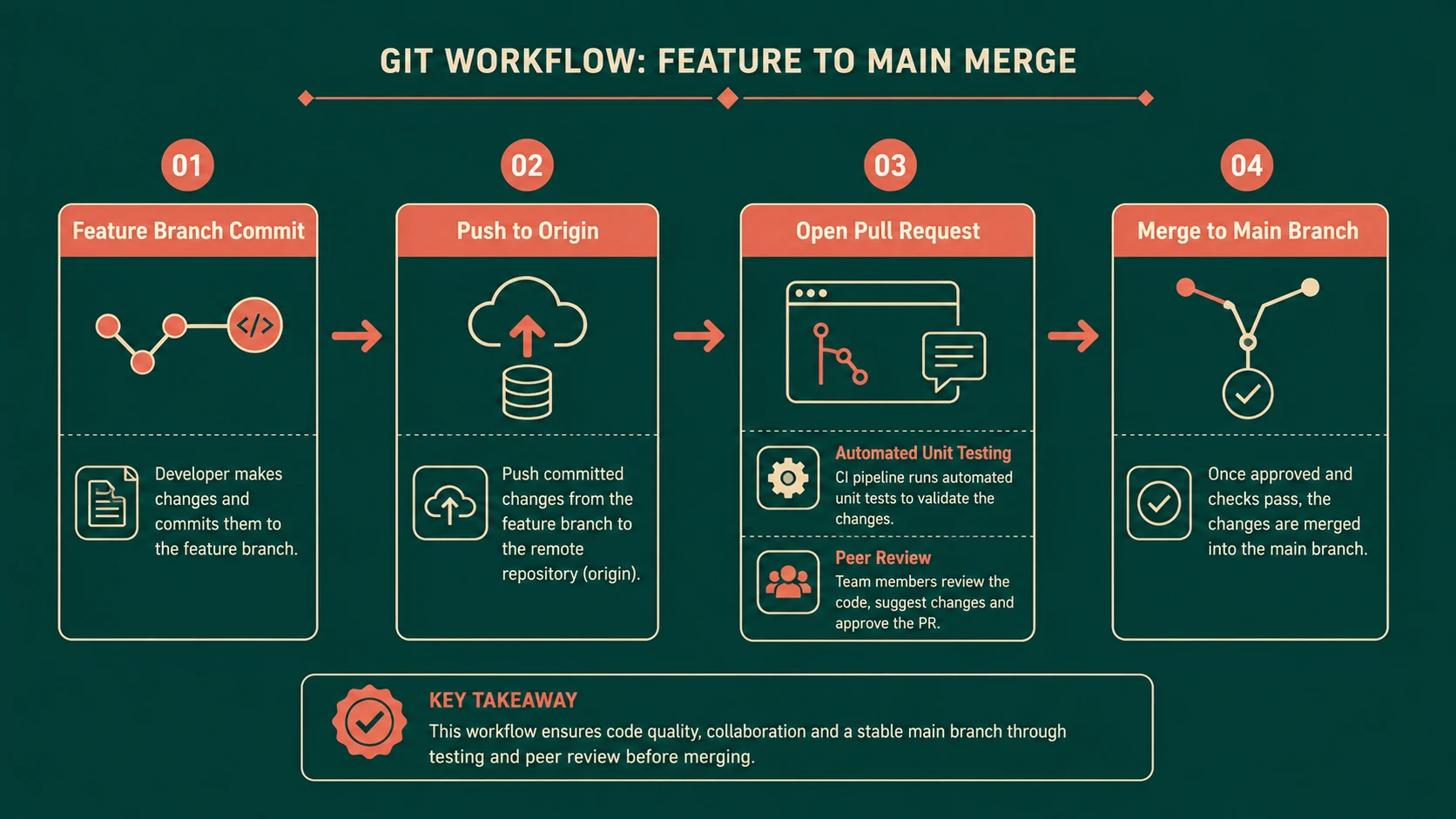
System architecture diagram and conceptual workflow layout for Social Coding: How GitHub is Redefining Team Collaboration.
GitHub provides project wikis that allow teams to maintain:
- ◆Architecture documentation
- ◆Installation guides
- ◆Development standards
- ◆Coding conventions
- ◆Deployment procedures
Centralizing documentation alongside repositories reduces information fragmentation.
Enterprise Collaboration Benefits
Organizations evaluating GitHub frequently identify improvements in collaboration.
Key advantages include:
- ◆Improved code visibility
- ◆Simplified onboarding
- ◆Better knowledge sharing
- ◆Faster peer reviews
- ◆Reduced dependency on email
- ◆Increased accountability
- ◆Transparent development activity
These improvements can shorten development cycles while improving software quality.
Enterprise Use Cases
GitHub can support multiple development scenarios.
| Scenario | Benefit |
|---|---|
| Internal application development | Improved collaboration |
| Open source participation | Community engagement |
| Distributed engineering teams | Simplified coordination |
| Consulting organizations | Client project management |
| Product development | Continuous feature integration |
| Framework development | External contributions |
While some enterprises may require private repository hosting, the underlying collaboration model remains applicable.
Performance Considerations
Git performs many operations locally, reducing reliance on network connectivity.
Benefits include:
- ◆Fast commit operations
- ◆Rapid branching
- ◆Efficient merges
- ◆Local history access
- ◆Offline development
Repository size and binary asset management should still be considered when planning long-term projects.
Large repositories may require disciplined maintenance practices.
Security Considerations
Enterprise adoption requires careful attention to repository governance.
Important considerations include:
- ◆Access permissions
- ◆Contributor authentication
- ◆Repository visibility
- ◆Sensitive information management
- ◆Credential protection
- ◆Auditability
Development teams should avoid storing passwords, private certificates, or confidential configuration values within repositories.
Organizations adopting GitHub should establish policies governing repository ownership and access management.
Scalability
Git's distributed architecture naturally supports geographically distributed development teams.
Each developer maintains a complete repository, reducing dependence on centralized infrastructure for everyday work.
GitHub scales collaboration by organizing:
- ◆Teams
- ◆Organizations
- ◆Repositories
- ◆Contributors
- ◆Projects
As engineering organizations expand, consistent workflows become increasingly important.
Best Practices
Organizations considering GitHub should establish development standards early.
Recommended practices include:
- ◆Use descriptive commit messages.
- ◆Keep feature branches focused.
- ◆Review all pull requests.
- ◆Merge frequently.
- ◆Maintain clear documentation.
- ◆Archive inactive repositories.
- ◆Define repository ownership.
- ◆Automate builds where possible.
- ◆Encourage constructive code reviews.
- ◆Document branching conventions.
Consistency is often more valuable than complexity.
Common Mistakes
Early Git adopters frequently encounter avoidable problems.
Common mistakes include:
- ◆Extremely large commits
- ◆Long-lived feature branches
- ◆Ignoring merge conflicts
- ◆Poor commit descriptions
- ◆Mixing unrelated changes
- ◆Insufficient code reviews
- ◆Weak repository organization
These issues are procedural rather than technological and can generally be addressed through team practices.
Technology Comparison
| Capability | GitHub | Traditional Centralized Systems |
|---|---|---|
| Distributed repositories | Yes | Typically No |
| Offline commits | Yes | Limited |
| Lightweight branching | Yes | Often slower |
| Pull request workflow | Yes | Usually external |
| Built-in collaboration | Extensive | Varies |
| Social discovery | Strong | Limited |
| Community contribution | Excellent | Often difficult |
Organizations should evaluate these capabilities alongside existing development processes and infrastructure investments.
Adoption Strategy
Enterprises should avoid migrating every project simultaneously.
A phased approach may include:
- 1.Pilot a non-critical project.
- 2.Train developers on Git fundamentals.
- 3.Establish branching policies.
- 4.Introduce pull request reviews.
- 5.Define repository governance.
- 6.Expand adoption across additional teams.
Successful adoption depends as much on cultural change as on technical implementation.
Limitations
Despite its advantages, GitHub is not without challenges.
Potential concerns include:
- ◆Learning curve for Git concepts
- ◆Merge complexity for inexperienced teams
- ◆Repository management at scale
- ◆Governance requirements
- ◆Integration with existing enterprise tooling
Organizations with deeply established centralized workflows may require gradual migration plans to minimize disruption.
Looking Ahead
As of early 2012, GitHub represents more than a convenient hosting platform for Git repositories. Its emphasis on transparency, collaborative review, and distributed development reflects a broader shift in software engineering practices.
Many organizations are beginning to recognize that effective collaboration can be as important as the underlying version control system itself. If current adoption trends continue, social coding principles may increasingly influence enterprise development methodologies, encouraging greater code review, shared ownership, and more active participation across engineering teams.
For enterprise architects evaluating the future of software development processes, GitHub demonstrates that version control platforms can evolve into collaborative engineering environments where communication and code coexist as essential parts of the development lifecycle.