Introduction
The Microsoft .NET platform has steadily matured into one of the most widely adopted enterprise development ecosystems. From ASP.NET web applications and Windows Forms desktop software to Windows Communication Foundation (WCF), Windows Workflow Foundation (WF), and enterprise services, organizations increasingly rely on .NET to build scalable business solutions.
Historically, C# has emphasized strong static typing. Compile-time type checking has provided developers with improved reliability, tooling support, and maintainability. However, static typing can also introduce additional complexity when interacting with technologies that rely heavily on runtime object discovery, such as COM automation, Office automation, scripting environments, and dynamic programming languages.
C# 4.0, introduced with Visual Studio 2010 and the .NET Framework 4.0, addresses many of these challenges by introducing the dynamic type. Rather than abandoning static typing, the language now provides developers with the flexibility to defer type resolution until runtime when appropriate.
For enterprise developers, this represents an important evolution in the language. Applications that previously required verbose reflection code or complex COM interoperability can now be implemented with significantly cleaner and more maintainable code.
This article explores the motivations behind dynamic binding, compares it with traditional static typing, discusses enterprise use cases, and provides recommendations for organizations considering adoption.
Why Static Typing Has Been So Successful
One of C#'s defining characteristics has always been strong compile-time type checking.
Benefits include:
- ◆Early error detection
- ◆IntelliSense support
- ◆Refactoring confidence
- ◆Improved maintainability
- ◆Better compiler optimization
- ◆Easer code reviews
Enterprise applications frequently contain hundreds of thousands of lines of code, making compile-time validation extremely valuable.
However, some integration scenarios remain cumbersome under purely static typing.
Challenges Before C# 4.0
Prior to C# 4.0, developers working with COM objects often encountered verbose code.
Office automation, for example, typically required:
- ◆Explicit casting
- ◆Reflection
- ◆Missing value placeholders
- ◆Numerous optional parameters
- ◆Complex interface definitions
Dynamic languages introduced additional complexity because object members were frequently determined only at runtime.
Although these scenarios were fully supported, the resulting code often became difficult to read and maintain.
Introducing the dynamic Keyword
The new dynamic type tells the compiler to defer member resolution until runtime.
Instead of validating every operation during compilation, the runtime determines which methods and properties should be invoked.
Example:
dynamic customer = GetCustomer();

Console.WriteLine(customer.Name);
customer.Save();
The compiler accepts these operations without requiring a compile-time type definition.
This provides greater flexibility when interacting with objects whose members may not be known during compilation.
Static Typing vs Dynamic Binding
| Feature | Static Typing | Dynamic Binding |
|---|---|---|
| Type Resolution | Compile Time | Runtime |
| IntelliSense | Full | Limited |
| Compile-Time Checking | Yes | Deferred |
| Flexibility | Lower | Higher |
| Performance | Generally Faster | Slight Runtime Overhead |
| Best Fit | Enterprise Business Logic | COM, Scripting, Dynamic APIs |
The two approaches are complementary rather than competing.
Improving COM Interoperability
One of the primary motivations for introducing dynamic binding is improving COM interoperability.
Enterprise organizations continue to rely heavily on Microsoft Office automation.
Typical automation scenarios include:
- ◆Excel report generation
- ◆Word document creation
- ◆PowerPoint presentation generation
- ◆Outlook integration
Historically, COM automation required extensive casting and optional parameter handling.
C# 4.0 significantly simplifies these scenarios.
Example:
dynamic excel = new Microsoft.Office.Interop.Excel.Application();

excel.Visible = true;
excel.Workbooks.Add();
The resulting code is substantially cleaner than previous approaches.
Optional Parameters
Another useful enhancement in C# 4.0 is support for optional and named parameters.
This feature complements dynamic binding and reduces unnecessary boilerplate.
Example:
PrintReport(
    copies: 2,
    preview: true
);
Developers no longer need to specify every argument when defaults are appropriate.
This is particularly valuable for Office automation APIs that expose numerous optional parameters.
Dynamic Language Integration
The .NET ecosystem increasingly supports multiple programming languages.
Examples include:
- ◆IronPython
- ◆IronRuby
- ◆JavaScript-based scripting engines
Dynamic binding simplifies interoperability with these environments by allowing objects to be consumed without rigid compile-time contracts.
Organizations experimenting with scripting engines may benefit from this increased flexibility.
Enterprise Architecture Considerations
Dynamic binding does not fundamentally change enterprise architecture.
Instead, it simplifies integration layers.
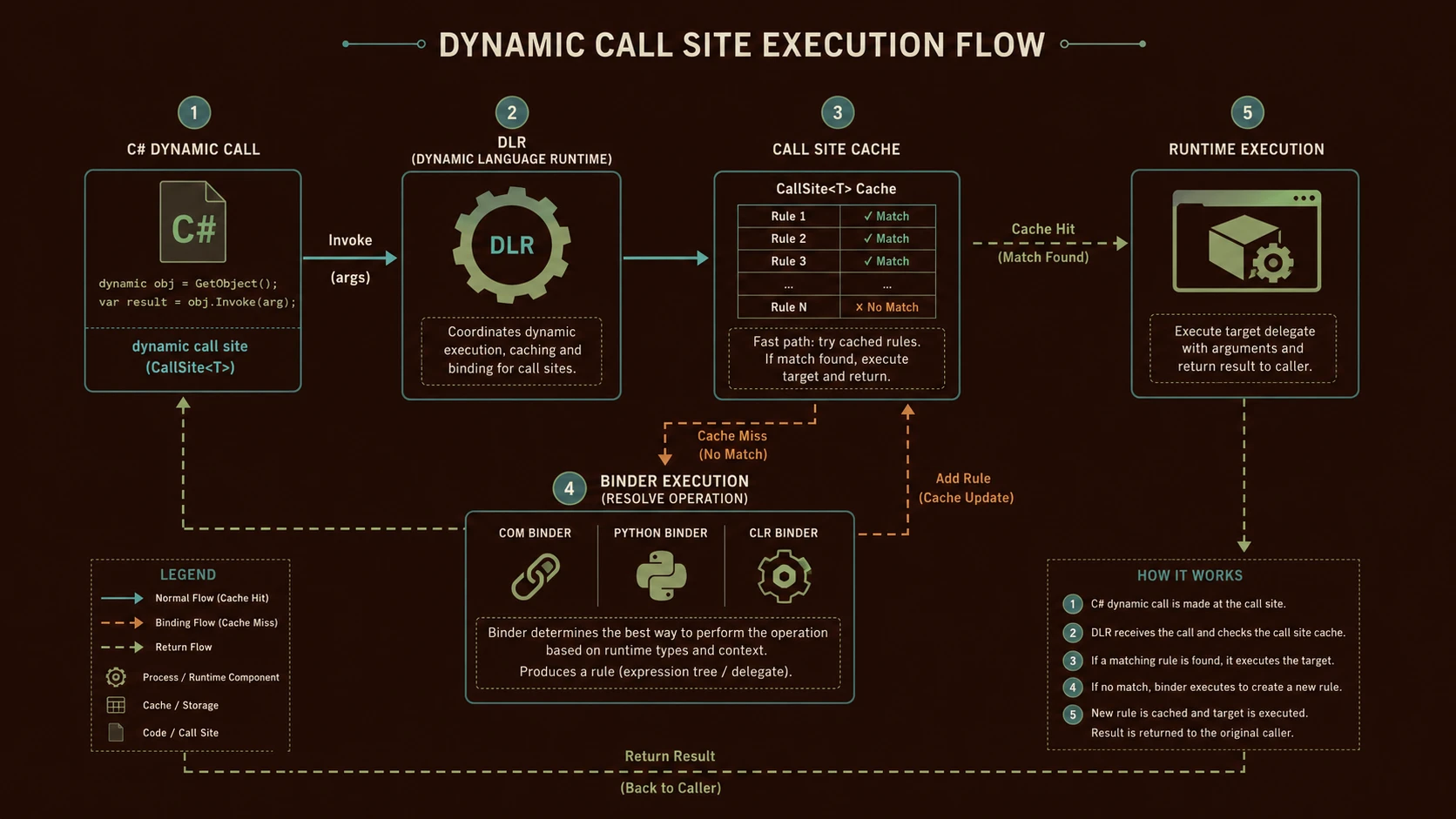
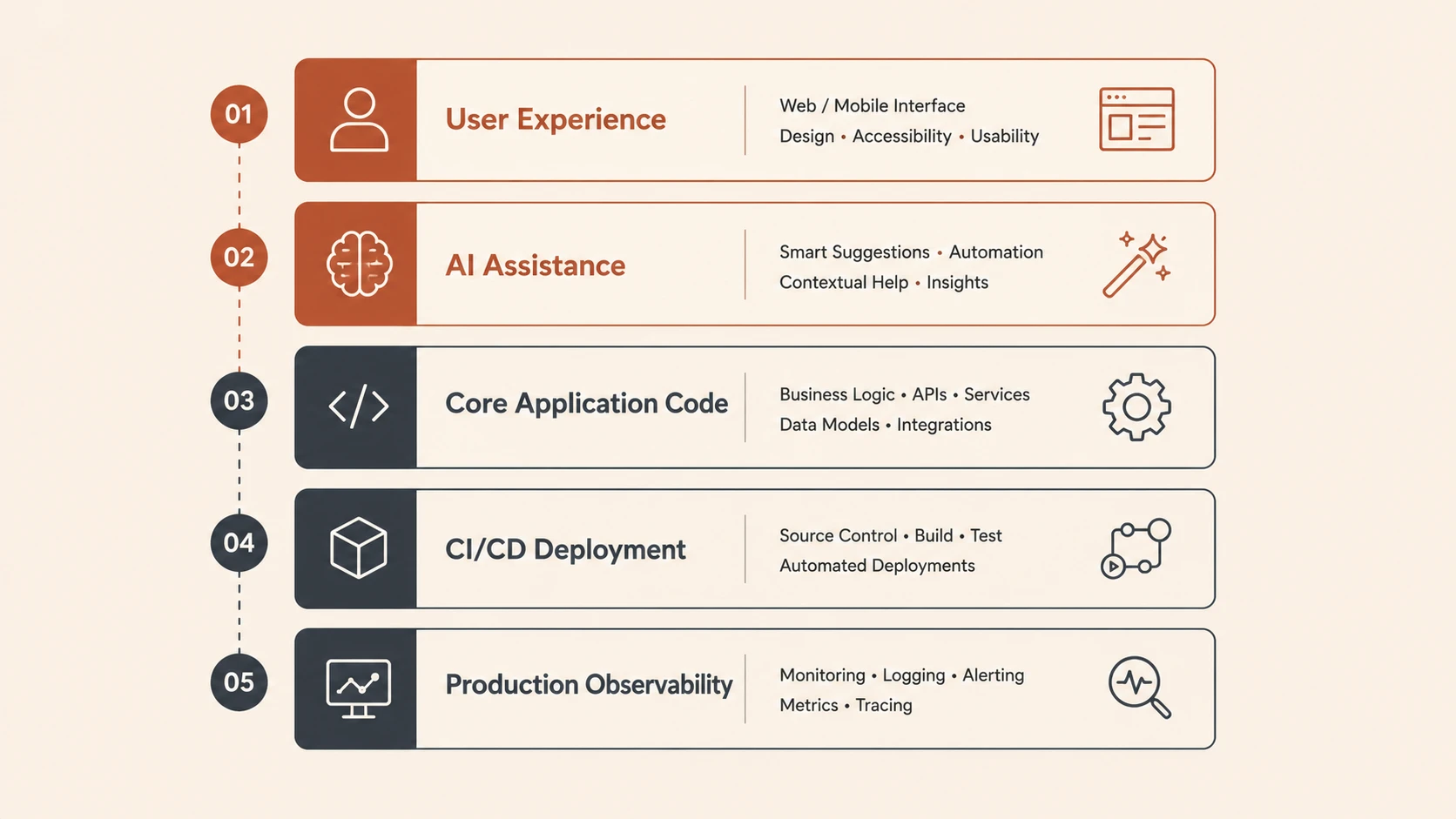
System architecture diagram and conceptual workflow layout for C# 4.0 and Dynamic Binding.
A typical architecture might resemble:
Presentation Layer
        |
Business Services
        |
Integration Layer
        |
-------------------------------
| COM Automation |
| Office APIs |
| Dynamic Scripts |
-------------------------------
        |
Enterprise Data Sources
The business layer remains strongly typed, while integration components selectively leverage dynamic capabilities.
Enterprise Use Cases
Microsoft Office Automation
Generating reports, invoices, spreadsheets, and presentations becomes significantly simpler.
Document Management Systems
Applications integrating with Office documents benefit from reduced interoperability complexity.
Reporting Solutions
Business intelligence systems producing Excel-based reports can leverage dynamic APIs.
Scripting Platforms
Organizations embedding scripting engines gain improved interaction between managed code and dynamic languages.
Legacy Integration
Applications interacting with COM-based business components can reduce implementation complexity.
Performance Considerations
Dynamic binding introduces runtime resolution.
While generally acceptable for integration scenarios, architects should recognize that:
- ◆Static typing remains faster.
- ◆Runtime errors replace some compile-time errors.
- ◆Excessive dynamic usage may complicate debugging.
Critical business logic should generally continue using strongly typed models.
Dynamic programming should be introduced where it provides measurable value.
Best Practices
Organizations adopting C# 4.0 should follow several recommendations.
- ◆Use dynamic selectively.
- ◆Keep core business logic strongly typed.
- ◆Validate runtime objects carefully.
- ◆Document integration assumptions.
- ◆Apply exception handling around runtime operations.
- ◆Continue leveraging compile-time checking whenever practical.
- ◆Use optional parameters to improve API readability.
- ◆Test COM automation thoroughly.
- ◆Maintain clear architectural boundaries.
Selective adoption maximizes flexibility without sacrificing maintainability.
Common Mistakes
Several implementation issues should be avoided.
Overusing dynamic
Replacing strongly typed code unnecessarily reduces compile-time safety.
Ignoring Runtime Validation
Runtime binding increases the importance of defensive programming and exception handling.
Mixing Business Logic with Integration Logic
Dynamic behavior should generally remain within infrastructure or integration layers.
Assuming Better Performance
Dynamic binding simplifies development but does not improve execution speed.
Poor Documentation
Developers maintaining dynamic code benefit from clear documentation describing expected runtime behavior.
Adoption Recommendations
Organizations evaluating C# 4.0 should adopt new language features incrementally.
Phase 1
- ◆Upgrade development environments to Visual Studio 2010.
- ◆Train developers on new language features.
- ◆Review existing COM automation projects.
Phase 2
- ◆Introduce optional parameters.
- ◆Modernize Office automation code.
- ◆Simplify interoperability layers.
Phase 3
- ◆Evaluate scripting integration opportunities.
- ◆Refactor reflection-heavy implementations where appropriate.
- ◆Update coding standards.
Phase 4
- ◆Continue favoring strong typing for core business systems.
- ◆Use dynamic selectively for integration scenarios.
- ◆Periodically review runtime performance and maintainability.
A measured adoption strategy enables organizations to gain productivity benefits while preserving long-term code quality.
Dynamic Does Not Replace Static Typing
One common misconception is that C# is transitioning toward dynamic programming.
In reality, C# remains fundamentally a statically typed language.
The dynamic keyword is an additional tool designed for specific scenarios where compile-time type information is unavailable or impractical.
For most enterprise applications, strong typing remains the preferred approach because it improves maintainability, tooling, and long-term reliability.
Looking Ahead
C# 4.0 represents an important evolution of the language by introducing carefully designed features that simplify interoperability without compromising the strengths of the existing type system. Dynamic binding, optional parameters, and improved COM interoperability reduce much of the complexity traditionally associated with Office automation and runtime object interaction.
As organizations continue modernizing .NET applications throughout 2010, enterprise architects should view the dynamic keyword as a targeted enhancement rather than a replacement for established development practices. By combining strong static typing with selective runtime flexibility, development teams can build cleaner integration solutions while maintaining the reliability, readability, and maintainability expected of enterprise software.