The End of Xamarin.Forms, the Dawn of .NET MAUI
In May 2022, Microsoft officially released .NET Multi-platform App UI — better known as .NET MAUI — as the successor to Xamarin.Forms. After years of Xamarin developers managing cumbersome multi-project solutions and fighting framework limitations, MAUI represents a ground-up rethinking of cross-platform development in the .NET ecosystem.
The core promise of MAUI is compelling: write your application logic once in C#, and deploy to iOS, Android, macOS, and Windows from a single project and codebase. One .csproj file. One deployment pipeline.
But MAUI is more than just a rebranding of Xamarin. It is a significant architectural evolution built on the unified .NET 6+ SDK, with a redesigned rendering architecture, improved developer tooling, and deep integration with the same dependency injection patterns used in ASP.NET Core.
The Problem MAUI Solves
Before Xamarin.Forms and now MAUI, enterprises had three approaches to mobile development:
- 1.Native per-platform: Separate Swift/Objective-C (iOS) and Kotlin/Java (Android) codebases with separate teams — maximum performance and platform integration, but 2x engineering cost and 2x maintenance burden
- 2.Web-based frameworks: JavaScript-based cross-platform with varying native fidelity — good for web teams, challenging for .NET shops
- 3.Xamarin.Forms: C# cross-platform with native rendering — compelling for .NET teams, but burdened with complex project structure, slow builds, and inconsistent platform support
MAUI targets Microsoft's existing .NET developer base — an enormous cohort of C# developers who know ASP.NET Core, Entity Framework, and the .NET ecosystem deeply. Rather than asking those developers to learn Swift, Kotlin, or JavaScript, MAUI lets them apply their existing skills to mobile and desktop app development.
How MAUI Works: The Rendering Architecture
Understanding MAUI's rendering model is key to understanding both its strengths and its limitations.
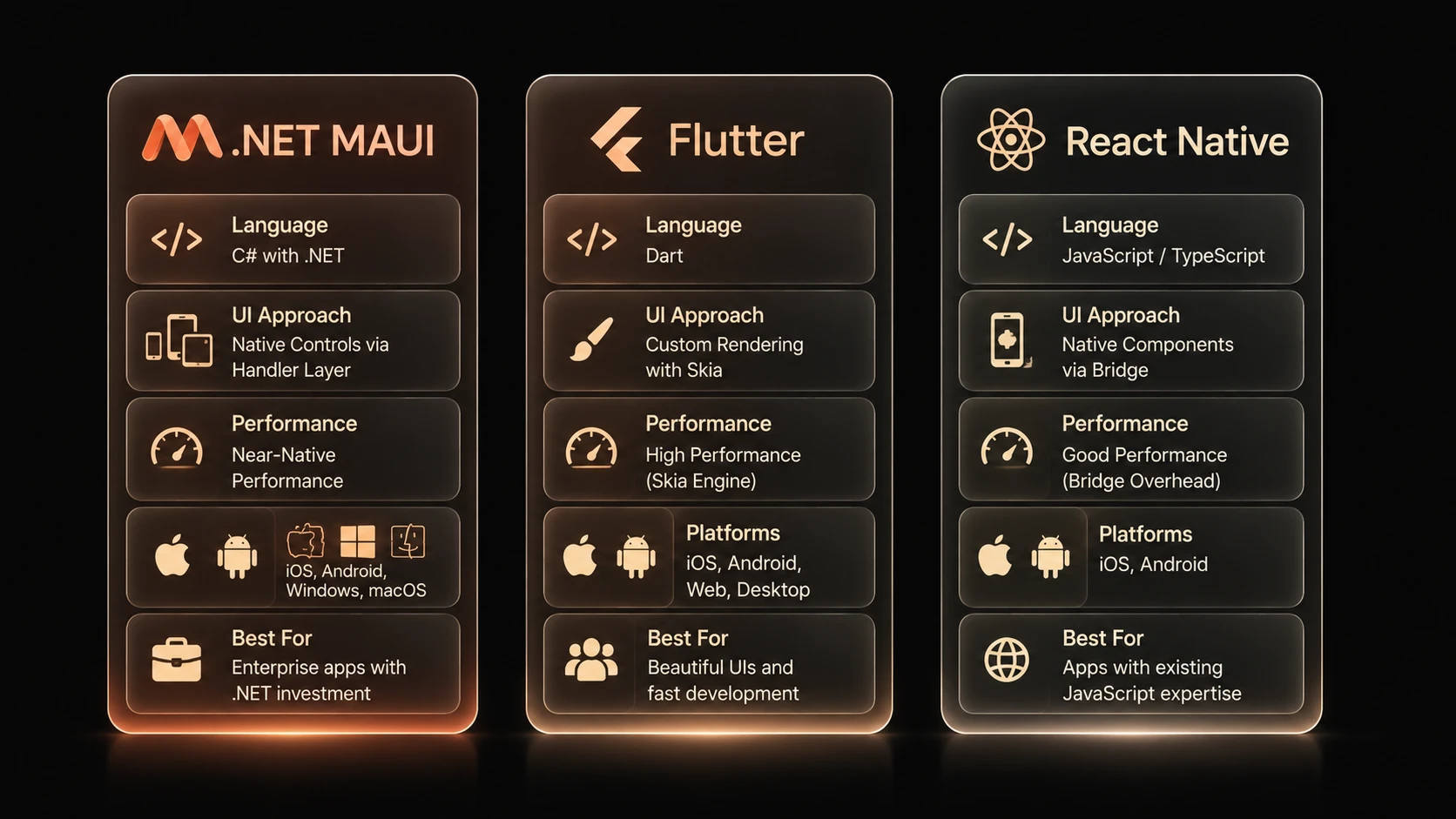
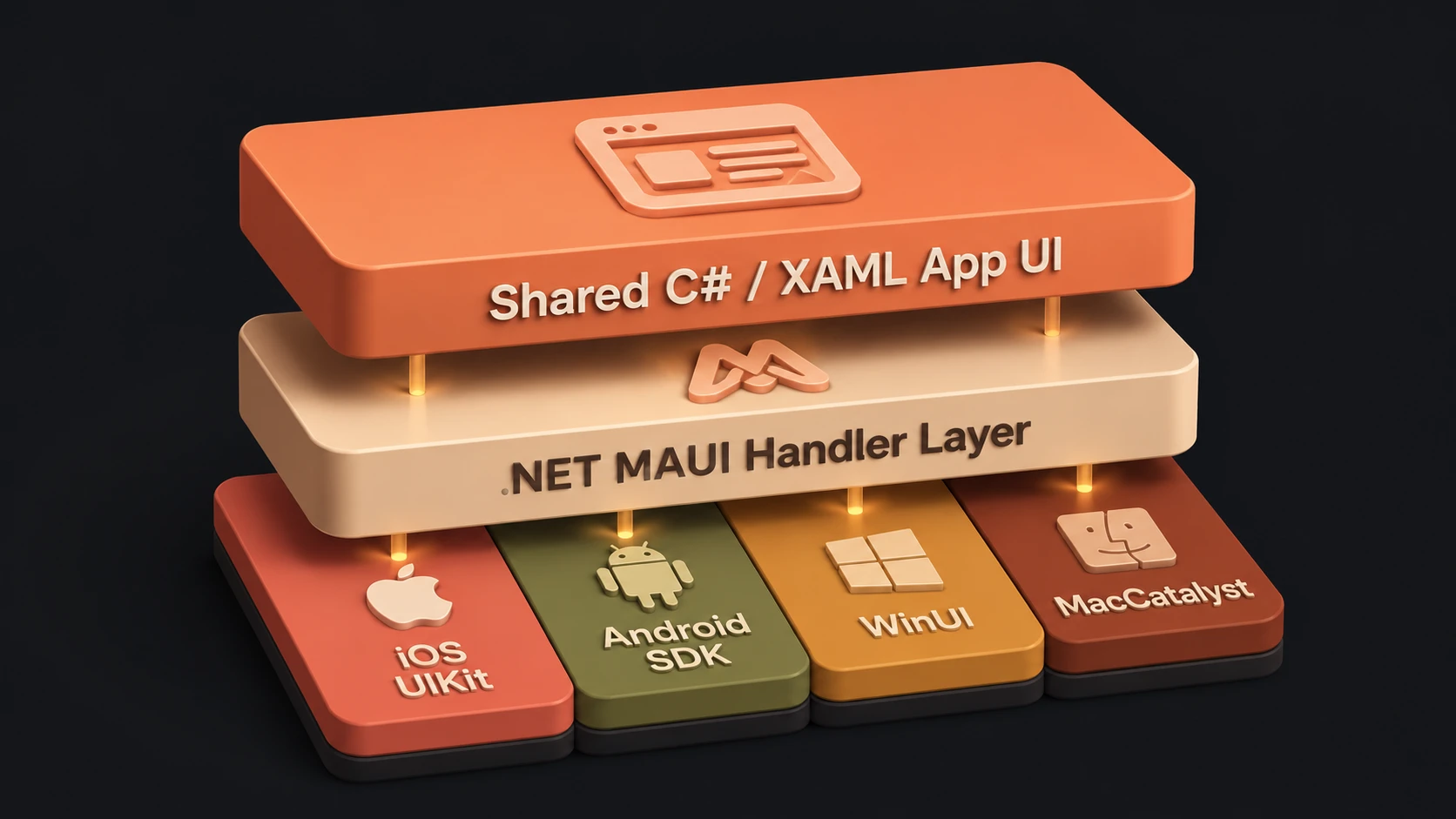
MAUI does not draw UI itself (unlike Flutter, which renders via its own Skia/Impeller engine). Instead, MAUI maps your XAML/C# UI descriptions to platform-native controls:
- ◆A MAUI
Buttonbecomes aUIButtonon iOS - ◆The same MAUI
Buttonbecomes an AndroidMaterialButtonon Android - ◆On Windows it becomes a
Microsoft.UI.Xaml.Controls.Button - ◆On macOS it becomes an
NSButton
This native rendering approach means MAUI apps automatically look and behave like native platform apps. iOS users get iOS-native scrolling physics, accessibility features, and visual conventions. Android users get Material Design behaviours. This is fundamentally different from frameworks that draw their own pixels — MAUI apps feel native because they *are* native at the rendering layer.
The mechanism MAUI uses to connect its abstract controls to platform implementations is called the Handler architecture, which replaces Xamarin.Forms' older Renderer system. Handlers are more lightweight, more performant, and easier to customise than renderers.
The Single Project Structure
One of the most praised improvements in MAUI over Xamarin.Forms is the unified project structure. A Xamarin.Forms solution typically had 3 to 5 projects. A MAUI project condenses this to a single project:
MyMauiApp/
├── Platforms/
│   ├── Android/           # Only Android-specific overrides
│   │   ├── AndroidManifest.xml
│   │   ├── MainActivity.cs
│   │   └── MainApplication.cs
│   ├── iOS/               # Only iOS-specific overrides
│   │   ├── AppDelegate.cs
│   │   └── Info.plist
│   ├── MacCatalyst/       # macOS
│   └── Windows/           # WinUI
├── Resources/
│   ├── Images/            # Source images — MAUI auto-scales per platform
│   ├── Fonts/             # TTF/OTF — auto-registered via MauiProgram.cs
│   ├── AppIcon/           # App icon source — MAUI generates all sizes
│   └── Raw/               # Arbitrary files copied to app bundle
├── MauiProgram.cs         # App startup, DI registration, handler customisation
├── App.xaml               # Application-level styles and resources
├── AppShell.xaml          # Navigation structure using Shell routing
└── Pages/                 # Your pages and components
The single project structure dramatically simplifies CI/CD pipelines, reduces merge conflicts, and makes it far easier for a single developer to understand the entire codebase.
Setting Up .NET MAUI Development
Setting up .NET MAUI requires target SDKs for each platform you plan to compile. You can verify your environment configuration and scaffold a new application using these CLI commands:
# Verify .NET 6+ is installed
dotnet --version

# Install MAUI workload (includes Android/iOS SDKs)
dotnet workload install maui

# Verify installation
dotnet workload list

# Create a new MAUI project
dotnet new maui -n MyCompanyApp
The dotnet workload command acts as a package manager to fetch development dependencies (like emulator runtimes and Android SDK platforms) in a modular way, setting up target tools automatically.
Application Entry Point: MauiProgram.cs
MAUI follows the same generic host builder pattern as ASP.NET Core, organizing app startup, font registration, handler mapping, and dependency injection in a centralized program block:
public static class MauiProgram
{
    public static MauiApp CreateMauiApp()
    {
        var builder = MauiApp.CreateBuilder();
        builder
            .UseMauiApp<App>()
            .ConfigureFonts(fonts =>
            {
                fonts.AddFont("OpenSans-Regular.ttf", "OpenSansRegular");
                fonts.AddFont("OpenSans-Semibold.ttf", "OpenSansSemibold");
            });

        // Register HTTP client (same pattern as ASP.NET Core)
        builder.Services.AddHttpClient<IApiService, ApiService>(client =>
        {
            client.BaseAddress = new Uri("https://api.mycompany.com/");
            client.Timeout = TimeSpan.FromSeconds(30);
        });

        // Register application services
        builder.Services.AddSingleton<ISettingsService, SettingsService>();
        builder.Services.AddSingleton<IAuthService, AuthService>();
        builder.Services.AddTransient<DashboardViewModel>();
        builder.Services.AddTransient<DashboardPage>();

        // Optional: MAUI Community Toolkit
        builder.UseMauiCommunityToolkit();

        return builder.Build();
    }
}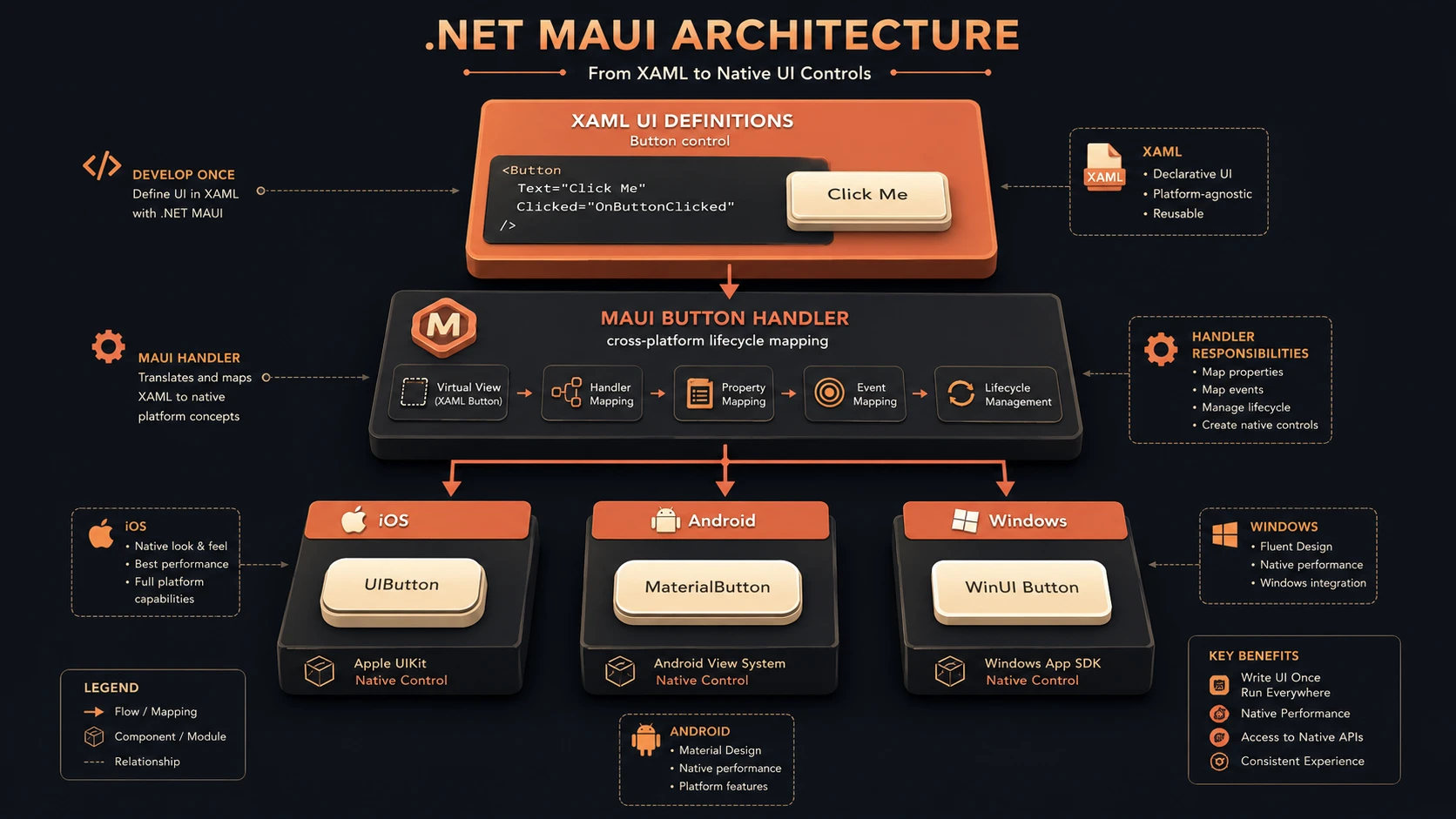
Architecture diagram showing how .NET MAUI maps abstract UI controls to platform-specific native controls.
By leveraging the MauiApp.CreateBuilder() architecture, backend .NET developers can build application services using familiar design patterns. ViewModels are registered as Transient to free up RAM when navigation changes occur, while core infrastructure classes are registered as Singletons.
Shell Navigation: The Recommended Architecture
To coordinate page transitions, menus, and layout grids, .NET MAUI introduces Shell navigation, which uses XML declarations and standard URI routing to build the application skeleton:
<!-- AppShell.xaml -->
<Shell xmlns="http://schemas.microsoft.com/dotnet/2021/maui"
       x:Class="MyCompanyApp.AppShell"
       FlyoutBehavior="Flyout">

    <!-- Tab-based navigation -->
    <TabBar>
        <ShellContent Title="Dashboard" Icon="dashboard.webp"
                      ContentTemplate="{DataTemplate pages:DashboardPage}" />
        <ShellContent Title="Reports" Icon="reports.webp"
                      ContentTemplate="{DataTemplate pages:ReportsPage}" />
        <ShellContent Title="Settings" Icon="settings.webp"
                      ContentTemplate="{DataTemplate pages:SettingsPage}" />
    </TabBar>
</Shell>// Navigate to a page by route
await Shell.Current.GoToAsync("//dashboard/orders");
await Shell.Current.GoToAsync($"orderdetail?id={order.Id}");
// Navigate back
await Shell.Current.GoToAsync("..");Using Shell routing, you can bind query parameters (such as id={order.Id}) directly into the constructor of destination ViewModels, simplifying view-state initialization across platforms.
MAUI vs Xamarin.Forms: Key Differences for Existing Teams
| Change | Xamarin.Forms | .NET MAUI |
|---|---|---|
| Namespace | Xamarin.Forms.* | Microsoft.Maui.* |
| Custom rendering | Renderer pattern | Handler pattern |
| Project structure | Multi-project solution | Single project |
| Navigation | NavigationPage / MasterDetailPage | Shell |
| Device detection | Device.RuntimePlatform | DeviceInfo.Platform |
| Main thread | Device.BeginInvokeOnMainThread | MainThread.BeginInvokeOnMainThread |
Blazor Hybrid: The Unique MAUI Superpower
One capability that sets MAUI apart from all other cross-platform mobile frameworks is Blazor Hybrid — the ability to host Blazor components inside a native MAUI app using a platform WebView:
<!-- Embed a Blazor app inside a native MAUI page -->
<BlazorWebView HostPage="wwwroot/index.html">
    <BlazorWebView.RootComponents>
        <RootComponent Selector="#app" ComponentType="{x:Type local:Main}" />
    </BlazorWebView.RootComponents>
</BlazorWebView>
This enables a powerful code sharing scenario: if you already have a Blazor web application, you can reuse those Razor components directly inside a MAUI app. Your web team's Blazor UI components become mobile app UI components. No framework duplication. No separate mobile UI codebase.
MAUI Community Toolkit
The MAUI Community Toolkit (available on NuGet as CommunityToolkit.Maui) provides a large collection of production-ready controls, behaviours, and converters that are not in the core framework:
- ◆Popup — native modal dialogs
- ◆Toast — native toast notifications
- ◆MediaElement — cross-platform video and audio playback
- ◆DrawingView — signature capture and free drawing
- ◆AnimationBehaviour — declarative animations without code-behind
- ◆Converters — InvertedBoolConverter, ColorToBlackOrWhiteConverter, and dozens more
Performance Characteristics
MAUI's use of native platform controls means performance is native — there is no JavaScript bridge, no extra rendering layer, no pixel-pushing overhead. Startup time is comparable to equivalent native apps. Memory usage is determined by .NET runtime overhead plus your app's allocations.
The main performance consideration for .NET MAUI is startup time on Android. The .NET runtime must initialise on the Android JVM (via Mono), which takes 1 to 3 seconds on first cold start. This is a known limitation and Microsoft continues to improve it with each .NET release through AOT compilation improvements and startup optimisation.
When Is .NET MAUI the Right Choice?
MAUI is the right choice for your organisation when:
- ◆Your development team is primarily .NET/C# focused — MAUI leverages existing skills completely
- ◆You need to deliver on iOS, Android, and Windows from a single team and budget
- ◆You are in the Microsoft ecosystem and want deep Azure Active Directory, Microsoft Graph, or Intune integration
- ◆You have an existing Blazor web app and want to share components with a mobile app via Blazor Hybrid
- ◆Enterprise features such as Intune MAM, Azure AD SSO, and enterprise data protection are requirements
- ◆You are migrating an existing Xamarin.Forms application — MAUI is the official migration path
Conclusion
.NET MAUI represents the most mature and well-integrated cross-platform option for .NET development teams. It solves the real problem that enterprise mobile development faces: needing to ship on multiple platforms without building and maintaining separate teams for each one.
For organisations already invested in the Microsoft ecosystem, MAUI provides integration depth that React Native and Flutter simply cannot match. And for teams that ship Blazor web apps, the Blazor Hybrid capability makes MAUI a genuinely compelling way to extend that investment to mobile without duplicating UI work.
The framework has matured significantly since its release. .NET 7 and .NET 8 brought performance improvements, broader platform API coverage, and tooling stability. If you evaluated MAUI in its first year and found it too rough around the edges, it is worth re-evaluating — the experience has changed substantially.