What We Are Building
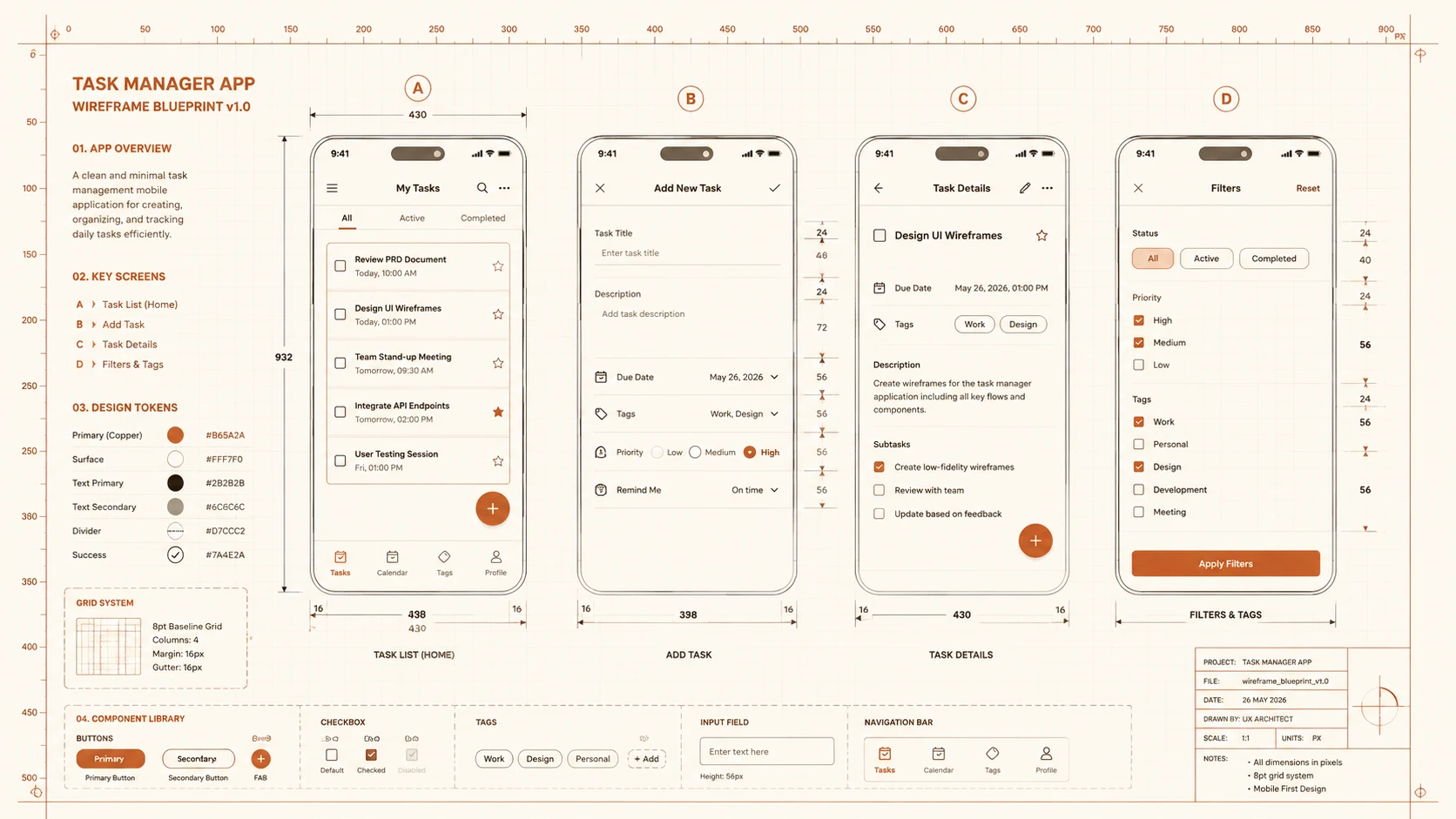
The best way to learn .NET MAUI is to build something real. In this guide, we will construct a fully functional Task Manager app from scratch — the kind of thing you might actually ship to colleagues. By the end, you will have an app running natively on iOS, Android, macOS, and Windows from a single C# codebase.
The app we are building will include:
- ◆Shell-based navigation with tab bar
- ◆A local SQLite database for task persistence (works offline)
- ◆MVVM architecture using CommunityToolkit.Mvvm (source-generated)
- ◆Pull-to-refresh on the task list
- ◆Swipe-to-delete with confirmation dialog
- ◆Priority-based task colouring
- ◆Platform-specific status bar styling
- ◆An HTTP API call to sync tasks with a remote server
Project Setup and Dependencies
Creating a production MAUI app starts by installing key dependencies. In this build, we use sqlite-net-pcl for localized database structures, SQLitePCLRaw to manage platforms, and the CommunityToolkit packages to handle MVVM source generation:
# Create the project
dotnet new maui -n MauiTaskManager
cd MauiTaskManager

# Install essential packages
dotnet add package CommunityToolkit.Mvvm
dotnet add package CommunityToolkit.Maui
dotnet add package sqlite-net-pcl
dotnet add package SQLitePCLRaw.bundle_green
dotnet add package Microsoft.Extensions.Http
To ensure target converters and visual helpers compile correctly, register the MAUI Community Toolkit in MauiProgram.cs:
builder.UseMauiApp<App>()
    .UseMauiCommunityToolkit()  // Add this
    .ConfigureFonts(fonts =>
    {
        fonts.AddFont("Inter-Regular.ttf", "InterRegular");
        fonts.AddFont("Inter-Bold.ttf", "InterBold");
    });
Domain Model
Our application uses a relational sqlite structure. The database engine maps class models directly to database tables. Attributes from sqlite-net-pcl define table indices, constraints, and auto-increment schemas:
// Models/TaskItem.cs
using SQLite;

[Table("tasks")]
public class TaskItem
{
    [PrimaryKey, AutoIncrement]
    public int Id { get; set; }

    [NotNull]
    public string Title { get; set; } = string.Empty;

    public string? Description { get; set; }

    [NotNull]
    public bool IsCompleted { get; set; }

    public int Priority { get; set; } = 1;  // 1=Low, 2=Medium, 3=High

    public DateTime CreatedAt { get; set; } = DateTime.UtcNow;

    public DateTime? DueDate { get; set; }

    // Computed properties (not stored in DB)
    [Ignore]
    public string PriorityLabel => Priority switch
    {
        1 => "Low",
        2 => "Medium",
        3 => "High",
        _ => "Unknown"
    };

    [Ignore]
    public Color PriorityColor => Priority switch
    {
        1 => Colors.Green,
        2 => Colors.Orange,
        3 => Colors.Red,
        _ => Colors.Gray
    };

    [Ignore]
    public bool IsOverdue => DueDate.HasValue && DueDate.Value < DateTime.Now && !IsCompleted;
}
By adding the [PrimaryKey] and [AutoIncrement] attributes, we instruct SQLite to generate unique IDs automatically. Properties marked with [Ignore] are calculated at runtime based on existing fields (like priority state), ensuring database structures remain lean and indexable.
SQLite Database Service
To abstract file paths and operations from UI controls, we build an asynchronous SQLite database service. We protect table instantiation using an initialization lock (SemaphoreSlim) to prevent race conditions during cold starts:
// Services/TaskDatabase.cs
public interface ITaskDatabase
{
    Task<List<TaskItem>> GetTasksAsync();
    Task<TaskItem?> GetTaskAsync(int id);
    Task<int> SaveTaskAsync(TaskItem task);
    Task<int> DeleteTaskAsync(TaskItem task);
    Task<int> GetIncompleteCountAsync();
}

public class TaskDatabase : ITaskDatabase
{
    private SQLiteAsyncConnection? _database;
    private readonly SemaphoreSlim _initLock = new(1, 1);

    private async Task EnsureInitialisedAsync()
    {
        if (_database is not null) return;

        await _initLock.WaitAsync();
        try
        {
            if (_database is not null) return;

            var dbPath = Path.Combine(
                FileSystem.AppDataDirectory,
                "tasks.db3"
            );

            _database = new SQLiteAsyncConnection(dbPath);
            await _database.CreateTableAsync<TaskItem>();
        }
        finally
        {
            _initLock.Release();
        }
    }

    public async Task<List<TaskItem>> GetTasksAsync()
    {
        await EnsureInitialisedAsync();
        return await _database!.Table<TaskItem>()
            .OrderByDescending(t => t.Priority)
            .ThenBy(t => t.CreatedAt)
            .ToListAsync();
    }

    public async Task<int> SaveTaskAsync(TaskItem task)
    {
        await EnsureInitialisedAsync();
        return task.Id != 0
            ? await _database!.UpdateAsync(task)
            : await _database!.InsertAsync(task);
    }

    public async Task<int> DeleteTaskAsync(TaskItem task)
    {
        await EnsureInitialisedAsync();
        return await _database!.DeleteAsync(task);
    }

    public async Task<int> GetIncompleteCountAsync()
    {
        await EnsureInitialisedAsync();
        return await _database!.Table<TaskItem>()
            .CountAsync(t => !t.IsCompleted);
    }
}
The local db file tasks.db3 is written to FileSystem.AppDataDirectory, which is the safe, sandbox-approved storage zone provided by target mobile operating systems. The EnsureInitialisedAsync method guarantees the connection and schema check executes exactly once.
ViewModels with CommunityToolkit.Mvvm
Traditional MVVM architectures require significant property notifier boilerplate. By leveraging the CommunityToolkit.Mvvm source generator package, we instruct the compiler to generate backing properties and commands automatically from simple class decorations:
// ViewModels/TaskListViewModel.cs
[ObservableObject]
public partial class TaskListViewModel
{
    private readonly ITaskDatabase _database;

    [ObservableProperty]
    [NotifyPropertyChangedFor(nameof(HasTasks))]
    private ObservableCollection<TaskItem> tasks = new();

    [ObservableProperty]
    private bool isLoading;

    [ObservableProperty]
    private bool isRefreshing;

    [ObservableProperty]
    private int incompleteCount;

    public bool HasTasks => Tasks.Any();

    public TaskListViewModel(ITaskDatabase database)
    {
        _database = database;
    }

    [RelayCommand]
    private async Task LoadTasksAsync()
    {
        if (IsLoading) return;
        IsLoading = true;

        try
        {
            var items = await _database.GetTasksAsync();
            Tasks = new ObservableCollection<TaskItem>(items);
            IncompleteCount = await _database.GetIncompleteCountAsync();
        }
        finally
        {
            IsLoading = false;
        }
    }

    [RelayCommand]
    private async Task DeleteTaskAsync(TaskItem task)
    {
        bool confirmed = await Shell.Current.DisplayAlert(
            "Delete Task",
            $"Are you sure you want to delete '{task.Title}'?",
            "Delete",
            "Cancel"
        );

        if (!confirmed) return;

        await _database.DeleteTaskAsync(task);
        Tasks.Remove(task);
        IncompleteCount = await _database.GetIncompleteCountAsync();
    }

    [RelayCommand]
    private async Task ToggleCompleteAsync(TaskItem task)
    {
        task.IsCompleted = !task.IsCompleted;
        await _database.SaveTaskAsync(task);
        IncompleteCount = await _database.GetIncompleteCountAsync();
    }

    [RelayCommand]
    private async Task NavigateToAddTaskAsync()
    {
        await Shell.Current.GoToAsync(nameof(AddTaskPage));
    }
}
The compiler parses the [ObservableProperty] tag on tasks and generates a public property Tasks with built-in change notification support. The [RelayCommand] decorator automatically wraps methods (like LoadTasksAsync) inside implementations of IRelayCommand, exposing them directly for XAML bindings.
The Task List Page (XAML)
With our data models and ViewModel bindings in place, we declare the page layout using XAML structure. Data triggers, layout grids, and interactive swipes coordinate native visual templates:
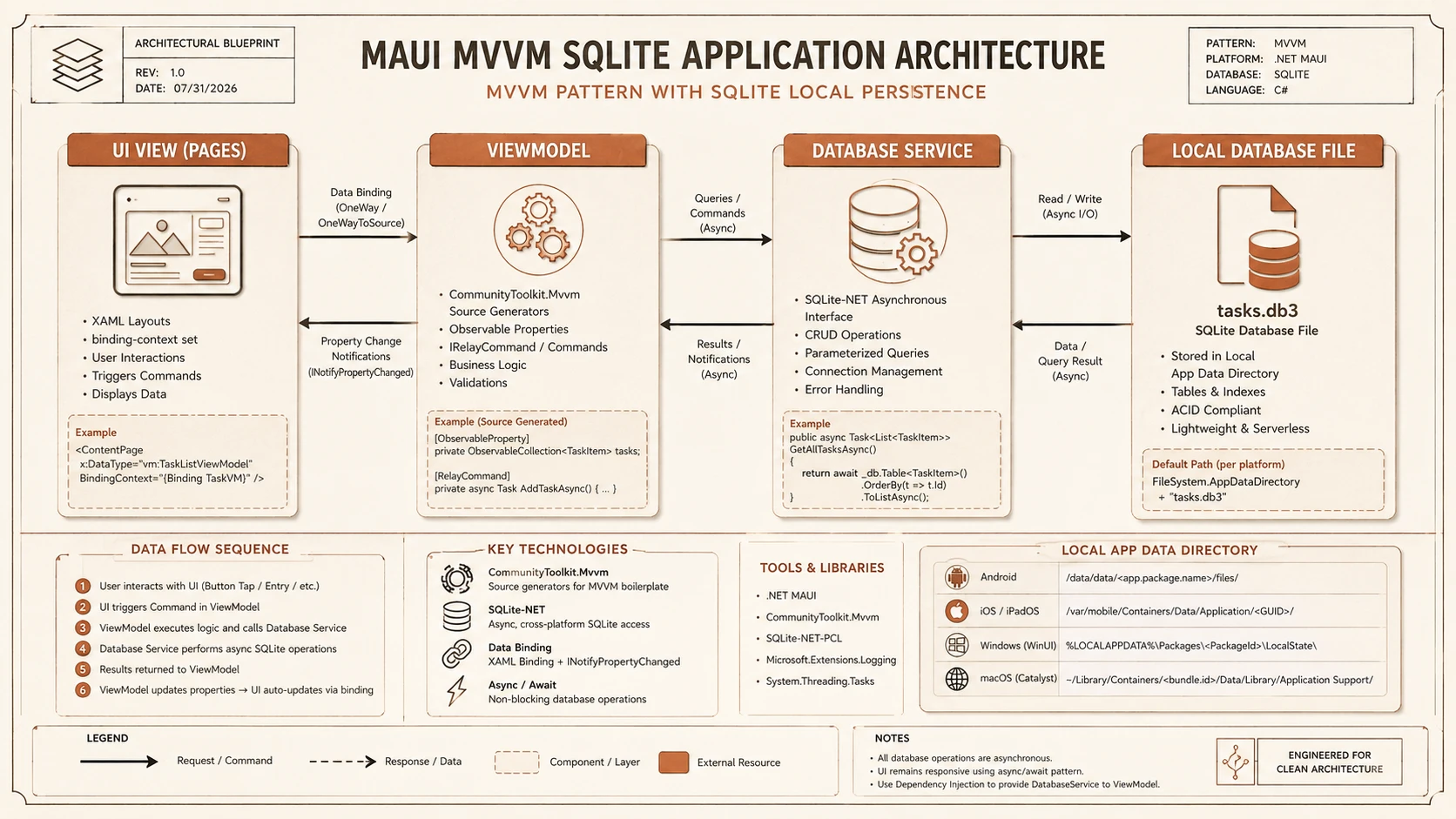
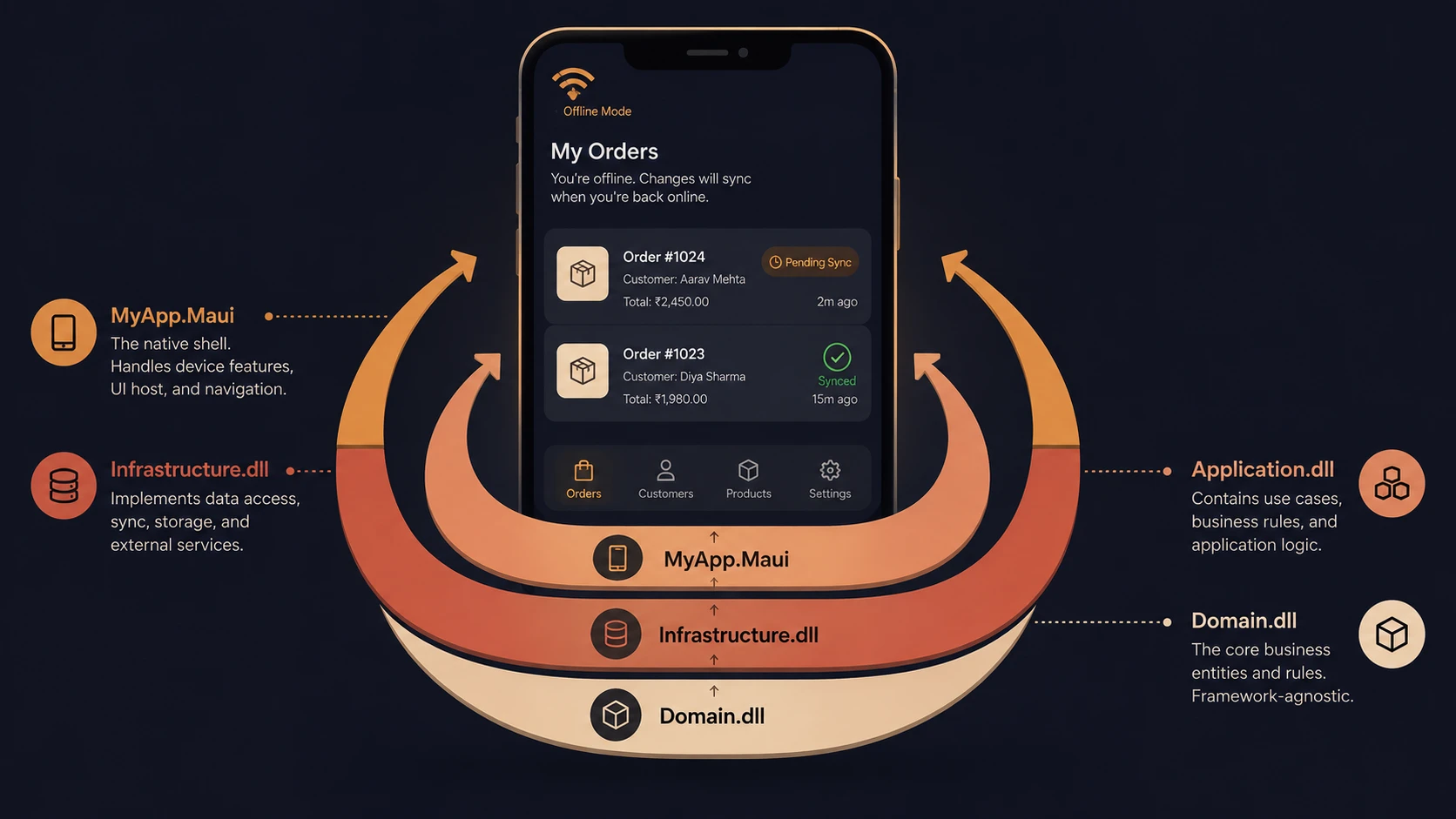
Architectural blueprint of a .NET MAUI MVVM application using SQLite local database storage.
<?xml version="1.0" encoding="utf-8" ?>
<ContentPage xmlns="http://schemas.microsoft.com/dotnet/2021/maui"
             xmlns:x="http://schemas.microsoft.com/winfx/2009/xaml"
             xmlns:vm="clr-namespace:MauiTaskManager.ViewModels"
             xmlns:models="clr-namespace:MauiTaskManager.Models"
             x:Class="MauiTaskManager.Pages.TaskListPage"
             x:DataType="vm:TaskListViewModel"
             Title="Tasks">

    <ContentPage.ToolbarItems>
        <ToolbarItem Text="+" Command="{Binding NavigateToAddTaskCommand}" />
    </ContentPage.ToolbarItems>

    <Grid RowDefinitions="Auto,*">

        <!-- Header with incomplete count -->
        <Frame Grid.Row="0" Padding="16" HasShadow="False" CornerRadius="0">
            <Label>
                <Label.FormattedText>
                    <FormattedString>
                        <Span Text="{Binding IncompleteCount}" FontAttributes="Bold" FontSize="24" />
                        <Span Text=" tasks remaining" FontSize="16" />
                    </FormattedString>
                </Label.FormattedText>
            </Label>
        </Frame>

        <!-- Task list with pull-to-refresh -->
        <RefreshView Grid.Row="1"
                     Command="{Binding LoadTasksCommand}"
                     IsRefreshing="{Binding IsRefreshing}">
            <CollectionView ItemsSource="{Binding Tasks}">
                <CollectionView.ItemTemplate>
                    <DataTemplate x:DataType="models:TaskItem">
                        <SwipeView>
                            <SwipeView.RightItems>
                                <SwipeItems Mode="Execute">
                                    <SwipeItem Text="Delete"
                                               BackgroundColor="Red"
                                               Command="{Binding Source={RelativeSource AncestorType={x:Type vm:TaskListViewModel}}, Path=DeleteTaskCommand}"
                                               CommandParameter="{Binding .}" />
                                </SwipeItems>
                            </SwipeView.RightItems>

                            <Grid Padding="16,12" ColumnDefinitions="Auto,*,Auto">
                                <CheckBox Grid.Column="0"
                                          IsChecked="{Binding IsCompleted}"
                                          Command="{Binding Source={RelativeSource AncestorType={x:Type vm:TaskListViewModel}}, Path=ToggleCompleteCommand}"
                                          CommandParameter="{Binding .}" />

                                <VerticalStackLayout Grid.Column="1" Margin="12,0" Spacing="2">
                                    <Label Text="{Binding Title}" FontSize="16" />
                                    <Label Text="{Binding Description}" FontSize="13"
                                           TextColor="Gray" MaxLines="1"
                                           IsVisible="{Binding Description, Converter={StaticResource IsNotNullConverter}}" />
                                </VerticalStackLayout>

                                <Label Grid.Column="2" Text="{Binding PriorityLabel}"
                                       TextColor="{Binding PriorityColor}" FontSize="11"
                                       FontAttributes="Bold" VerticalOptions="Center" />
                            </Grid>
                        </SwipeView>
                    </DataTemplate>
                </CollectionView.ItemTemplate>
            </CollectionView>
        </RefreshView>
    </Grid>
</ContentPage>
The XAML parser maps attributes like ItemsSource="{Binding Tasks}" directly to our ViewModel collection. The SwipeView container embeds native swipe actions inside the collection item template, executing the bound delete commands when triggered.
Registering Services and DI
To decouple our Views and ViewModels from each other, we register all application components inside the runtime dependency injection container during startup:
// MauiProgram.cs — complete registration
builder.Services.AddSingleton<ITaskDatabase, TaskDatabase>();

// ViewModels — transient so fresh state each navigation
builder.Services.AddTransient<TaskListViewModel>();
builder.Services.AddTransient<AddTaskViewModel>();

// Pages — transient to match ViewModel lifetime
builder.Services.AddTransient<TaskListPage>();
builder.Services.AddTransient<AddTaskPage>();

// Pages receive ViewModel through constructor injection:
// public TaskListPage(TaskListViewModel vm) { BindingContext = vm; }
We register the UI views and backing ViewModels as Transient, which instructs MAUI to allocate memory only when the page is actively pushed onto the navigation stack, and immediately garbage-collect it when popped, keeping app memory footprint optimized.
Platform-Specific Customisation
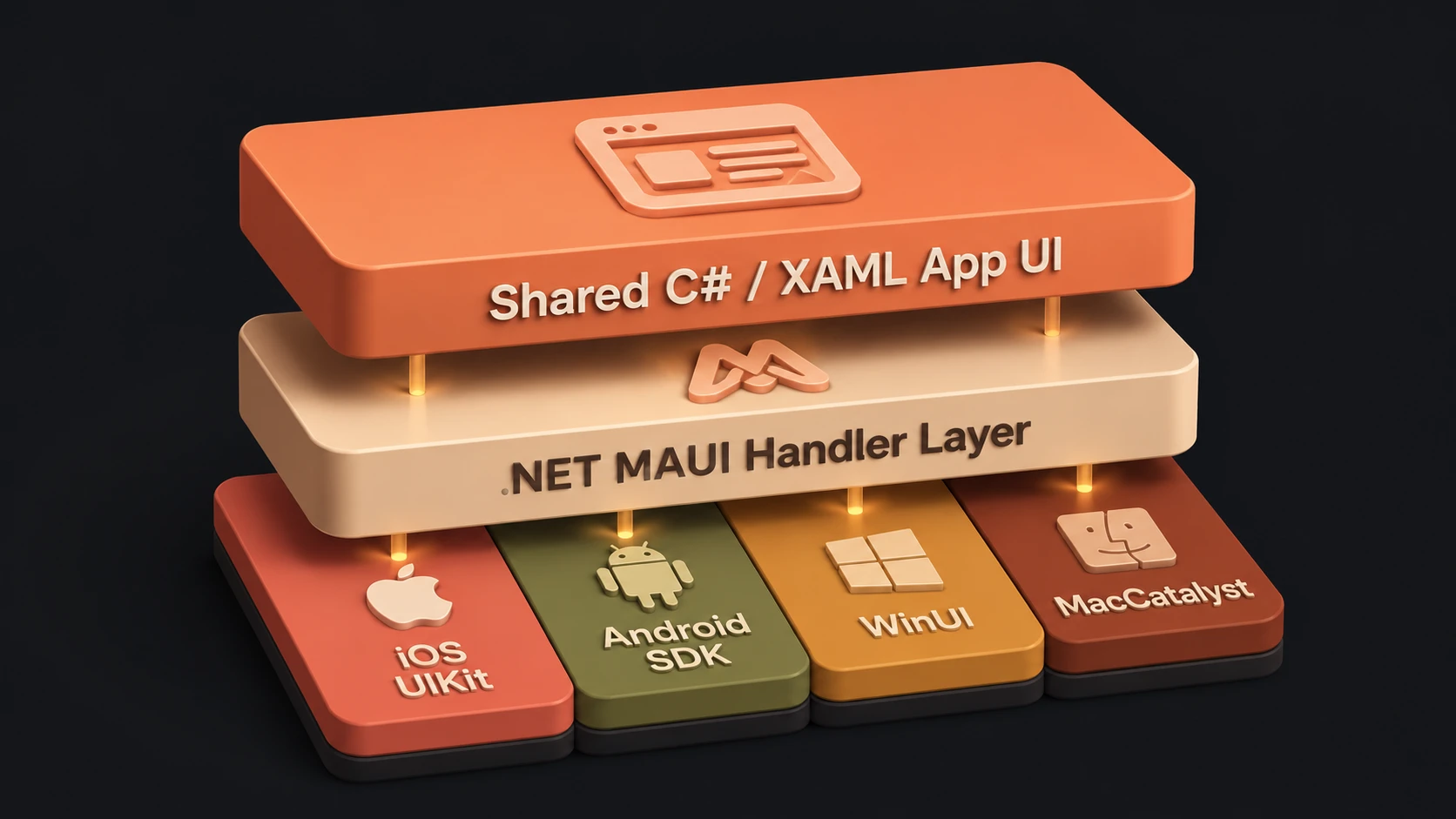
While .NET MAUI aims for full UI abstraction, real-world apps occasionally require platform-specific styling tweaks. We handle these exceptions using inline markup selectors in XAML, or system checking in C# backing code:
<!-- Different font sizes per platform -->
<Label Text="Task Manager">
    <Label.FontSize>
        <OnPlatform x:TypeArguments="x:Double"
                    Default="22"
                    iOS="28"
                    Android="24"
                    WinUI="32" />
    </Label.FontSize>
</Label>// Runtime platform checks
if (DeviceInfo.Current.Platform == DevicePlatform.iOS)
{
// iOS-specific logic
}The OnPlatform markup extension applies different font sizes to iOS, Android, and Windows layouts dynamically at compile time, preserving visual balance without requiring separate view definitions.
Running the App
To compile and launch the application on target emulators or physical testing hardware, use the standard .NET run commands, targeting specific SDK monikers:
# Run on Android emulator
dotnet run -f net6.0-android

# Run on iOS simulator (requires macOS)
dotnet run -f net6.0-ios --device "iPhone 14 Pro"

# Run on Windows
dotnet run -f net6.0-windows10.0.19041.0

# Run on macOS
dotnet run -f net6.0-maccatalyst
The -f flag tells the compiler to select the appropriate platform workload, compiling the Intermediate Language down to the corresponding native runtime library packages.
Publishing for Production
When development tasks are finished, we compile the app into standalone publication bundles configured for distribution channels (like the App Store or Google Play Store):
# Android release APK
dotnet publish -f net6.0-android -c Release

# iOS IPA (requires Apple Developer account)
dotnet publish -f net6.0-ios -c Release -p:ArchiveOnBuild=true

# Windows MSIX
dotnet publish -f net6.0-windows10.0.19041.0 -c Release
The dotnet publish command triggers target optimizer pipelines, strips debugging symbols, enables optimization flags, and outputs binary targets signed and ready for app store indexing.
Key Takeaways
Building a MAUI app feels remarkably familiar if you come from ASP.NET Core. The DI container, the configuration system, the IHostBuilder pattern — all carry over directly.
CommunityToolkit.Mvvm makes the MVVM pattern almost entirely boilerplate-free through source generation. SQLite integration is simple and the app works offline out of the box.
The most important architectural decision is embracing the single-project structure and Shell navigation from day one. Teams that try to replicate Xamarin.Forms' multi-project structure in MAUI create unnecessary complexity. Go single-project, go Shell, go CommunityToolkit — that is the happy path for productive .NET MAUI development.