Introduction: The Modern Enterprise Mobile Challenge
For modern enterprise applications, cross-platform mobile support is no longer a luxury—it is a core business requirement. However, building native applications for iOS and Android while maintaining a separate Web Admin portal typically results in duplicated efforts, split codebases, and fractured business logic. Historically, teams had to choose between the high productivity of web development and the access of native mobile systems.
When we designed ContactHub—an enterprise contact inquiry and tenant-aware message delivery suite—our goal was to achieve maximum code reuse without compromising performance or offline usability. We wanted to write our business rules, validation logic, and user interfaces once, yet deploy them onto the web, desktop, and mobile devices natively.
By leveraging .NET MAUI Blazor Hybrid alongside a shared Razor Class Library, we successfully shared 95% of our user interface between our desktop Blazor WebAssembly Admin panel and our cross-platform mobile apps. Furthermore, we integrated an offline-first caching system utilizing native device storage and reactive network triggers to guarantee a flawless user experience, even under zero-connectivity scenarios.
In this deep dive, we will explore the architecture of ContactHub, focusing on project topology, bootstrapping configurations, SQLite-based offline repositories, and real-time network sync triggers.
---
1. Clean Architecture & Project Structure
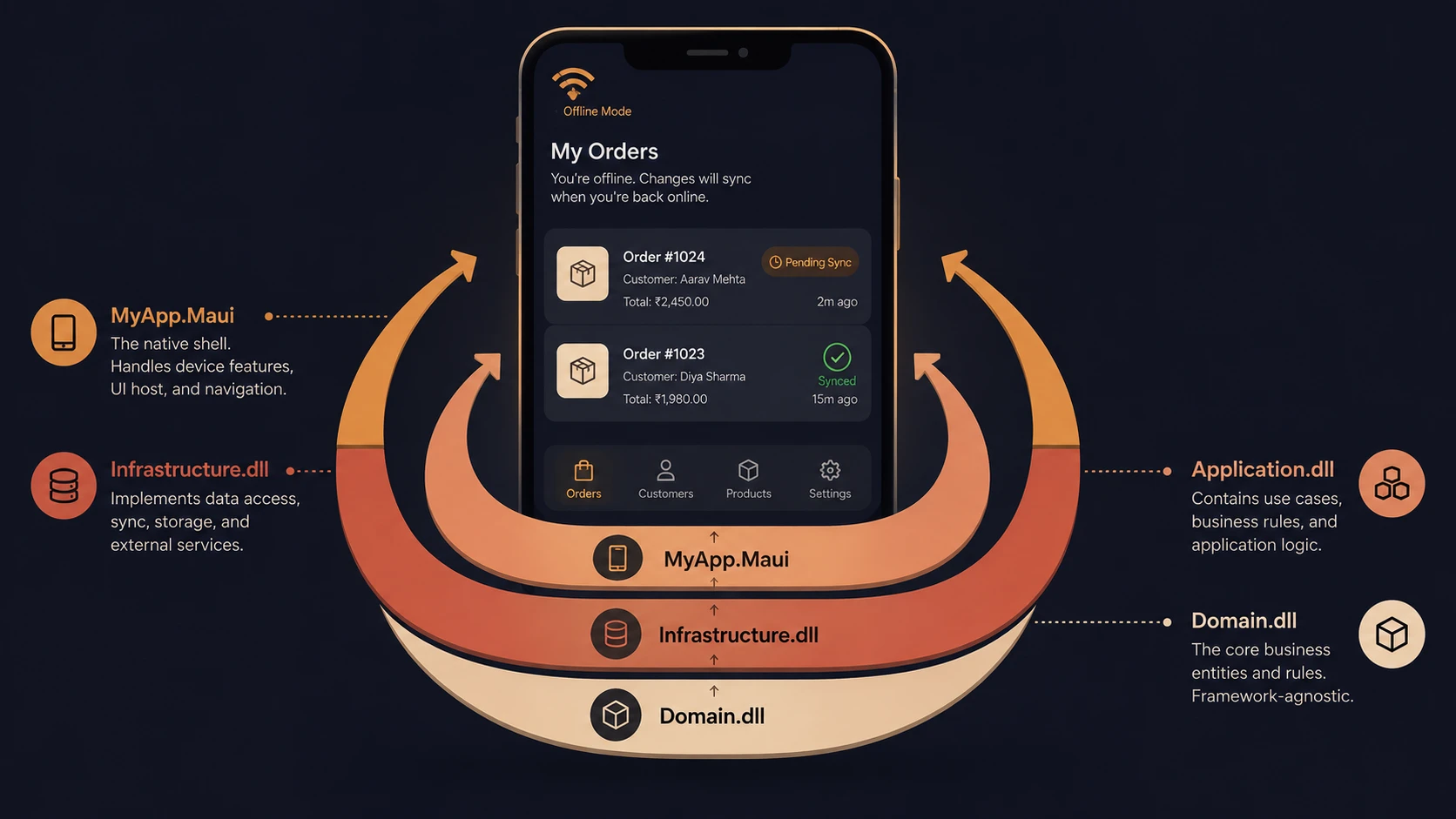
The ContactHub repository is structured into isolated projects to enforce boundary separation while allowing seamless code sharing:
ContactHub (Solution)
├── ContactApi (ASP.NET Core Minimal API)
├── ContactAdmin (Blazor WebAssembly Admin UI)
├── ContactHub.Mobile (.NET MAUI Blazor Hybrid App)
└── ContactHub.Shared (Razor Pages, Models, & Core Services)
Let's look at the project components in detail:
- ◆`ContactApi`: An ASP.NET Core Minimal API backend. It handles database persistence via Entity Framework Core, handles JWT authentication, enforces rate limiting, and spins up hosted background worker services for email processing and delivery retries.
- ◆`ContactHub.Shared`: A platform-agnostic class library. This holds the core domain models, DTO schemas, utility extensions, validation rules, and all Blazor Razor views (such as the interactive Dashboard, ContactList, and EmailFailure lists).
- ◆`ContactAdmin`: A lightweight Blazor WebAssembly container. It configures Tailwind CSS, builds PostCSS assets, and hosts the shared Razor components in a browser container.
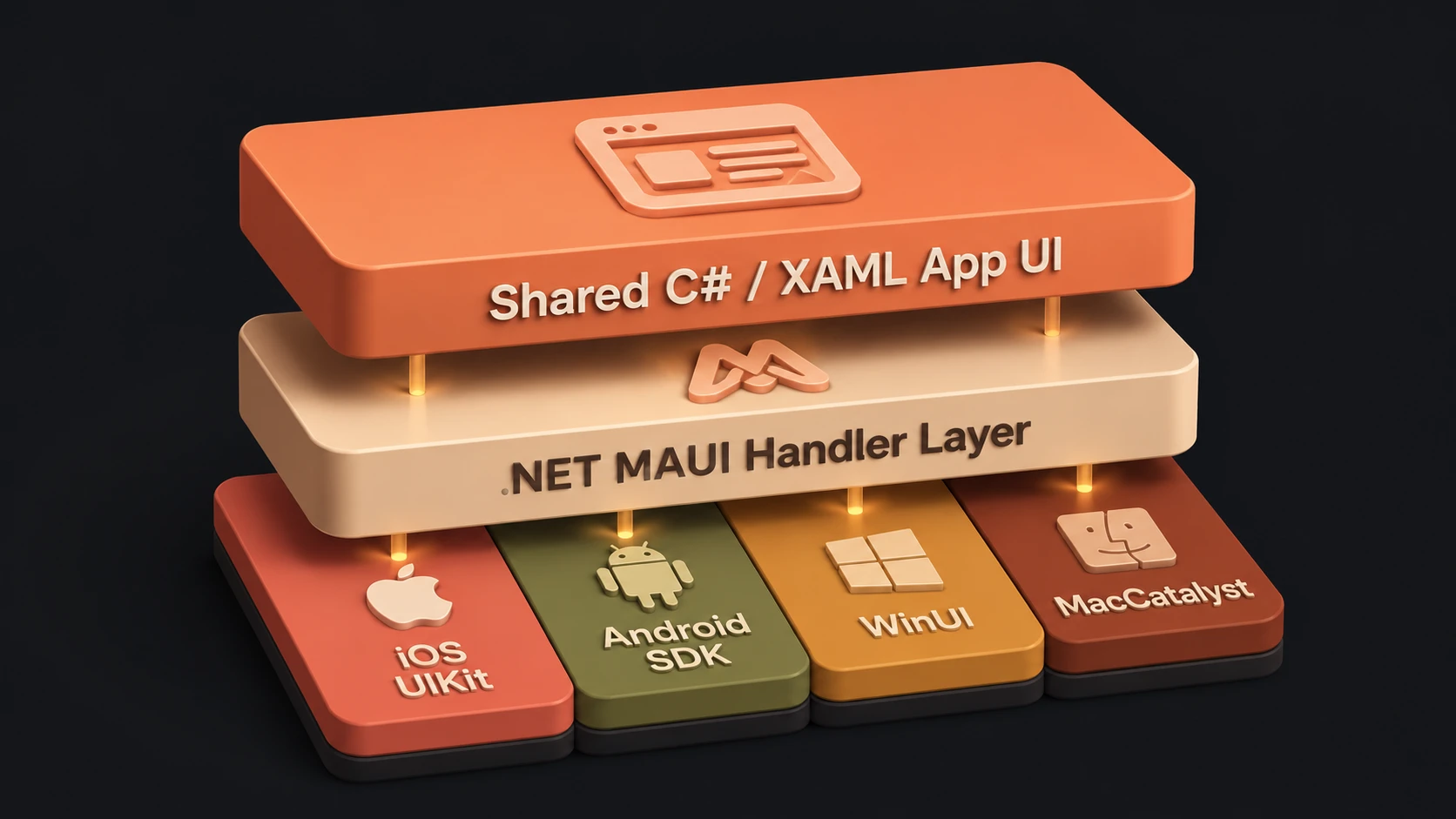
- ◆`ContactHub.Mobile`: A .NET MAUI native app targeting Android, iOS, macOS (macCatalyst), and Windows. It hosts a native web-view renderer (
BlazorWebView) and binds platform-specific system services (like secure token stores and network state adapters).
Why Blazor Hybrid?
In a traditional Blazor WebAssembly app, the code is compiled into WebAssembly (WASM) and executed in a browser sandbox. While highly portable, it lacks direct access to native operating system APIs.
Blazor Hybrid, on the other hand, runs the C# code natively inside the mobile app's process context. It uses the device's native web view wrapper (WKWebView on iOS/macOS, WebView2 on Windows, and WebKit on Android) solely to render the HTML/CSS markup. Because the C# code runs locally (not compiled to WASM or executed in a browser sandbox), it has full, unrestricted access to the underlying platform APIs, such as SQLite, filesystem directories, secure keystores, and network sockets.
---
2. Bootstrapping Blazor Hybrid in .NET MAUI
The entry point of our .NET MAUI application, MauiProgram.cs, configures the platform services and registers the Blazor Hybrid web view:
using ContactHub.Mobile.Offline.Database;
using ContactHub.Mobile.Offline.Services;
using ContactHub.Mobile.Services;
using ContactHub.Shared.Services;
using ContactHub.Shared.Services.Interfaces;
using Microsoft.Extensions.Logging;
using Microsoft.Maui.Networking;
using Syncfusion.Blazor;

namespace ContactHub.Mobile;

public static class MauiProgram
{
    public static MauiApp CreateMauiApp()
    {
        var builder = MauiApp.CreateBuilder();

        builder
            .UseMauiApp<App>()
            .ConfigureFonts(fonts =>
            {
                fonts.AddFont("OpenSans-Regular.ttf", "OpenSansRegular");
            });

        // Initialize Blazor Hybrid WebView
        builder.Services.AddMauiBlazorWebView();

#if DEBUG
        builder.Services.AddBlazorWebViewDeveloperTools();
        builder.Logging.AddDebug();
#endif

        // Platform-specific Keystore / Secure Storage registration
        builder.Services.AddSingleton<ITokenStorage, SecureTokenStorage>();
        builder.Services.AddSingleton<IAppStateStorage, MobileAppStateStorage>();

        // Core UI/State Synchronization Services
        builder.Services.AddSingleton<AuthStateService>();
        builder.Services.AddSingleton<DialogService>();
        builder.Services.AddSingleton<ToastService>();
        builder.Services.AddSingleton<RefreshService>();
        builder.Services.AddSingleton<NetworkStateService>();
        builder.Services.AddSingleton<AppLifecycleService>();
        builder.Services.AddSingleton<LoadingService>();
        builder.Services.AddScoped<LoadingHandler>();

        // Offline SQL Database & Cache Services
        builder.Services.AddSingleton<LocalDatabase>();
        builder.Services.AddScoped<IDashboardService, MobileDashboardService>();
        builder.Services.AddScoped<DashboardOfflineService>();
        builder.Services.AddScoped<IEmailFailureService, MobileEmailFailureService>();
        builder.Services.AddScoped<EmailFailureOfflineService>();
        builder.Services.AddScoped<ITenantService, MobileTenantService>();
        builder.Services.AddScoped<InquiryOfflineService>();
        builder.Services.AddScoped<IContactService, MobileContactService>();
        builder.Services.AddSingleton<SyncTimeService>();
        builder.Services.AddScoped<AuthApiClient>();
        builder.Services.AddScoped<AuthRefreshService>();
        builder.Services.AddScoped<ThemeService>();
        builder.Services.AddScoped<AuthHeaderHandler>();

        // Configure Authenticated HTTP Pipeline
        builder.Services.AddHttpClient("Api", client =>
        {
            client.BaseAddress = new Uri("https://cuapi.shivamitconsultancy.com/");
            client.Timeout = TimeSpan.FromSeconds(20);
        })
        .ConfigurePrimaryHttpMessageHandler(() => new SocketsHttpHandler
        {
            PooledConnectionLifetime = TimeSpan.FromMinutes(2),
            PooledConnectionIdleTimeout = TimeSpan.FromSeconds(30),
            MaxConnectionsPerServer = 20
        })
        .AddHttpMessageHandler<AuthHeaderHandler>()
        .AddHttpMessageHandler<LoadingHandler>();

        builder.Services.AddScoped(sp =>
            sp.GetRequiredService<IHttpClientFactory>().CreateClient("Api"));

        // Register Syncfusion Blazor UI Controls
        Syncfusion.Licensing.SyncfusionLicenseProvider.RegisterLicense("Ngo9BigBOggj...");
        builder.Services.AddSyncfusionBlazor();

        var app = builder.Build();

        // Boot and migrate SQLite Schema synchronously on startup
        using (var scope = app.Services.CreateScope())
        {
            var db = scope.ServiceProvider.GetRequiredService<LocalDatabase>();
            Task.Run(async () => await db.InitializeAsync()).Wait();
        }

        // Bridge App Lifecycle Events to UI state triggers
        var network = app.Services.GetRequiredService<NetworkStateService>();
        var lifecycle = app.Services.GetRequiredService<AppLifecycleService>();
        var refresh = app.Services.GetRequiredService<RefreshService>();

        lifecycle.OnResume += refresh.Trigger;

        return app;
    }
}
Architectural Decisions in DI Setup
- 1.SocketsHttpHandler Tuning: Mobile networks are unstable. We configure a high-efficiency
SocketsHttpHandlerwith a capped connection lifetime (PooledConnectionLifetimeof 2 minutes) to ensure DNS switches (e.g., transitioning from Wi-Fi to cellular data) don't lock connections. - 2.Synchronous DB Migration: We block the thread execution on
db.InitializeAsync()during the DI initialization container build. This guarantees that local database tables are successfully validated/created *before* Blazor routes render any elements that consume SQLite caches.
---
3. Designing a Lightweight SQLite Caching Engine
On mobile platforms, running a complete Entity Framework Core ORM layer can introduce substantial startup overhead, memory overhead, and large dependency binaries. To maintain sub-second startup times, we built a lightweight database layer using direct Microsoft.Data.Sqlite operations.
The LocalDatabase class is registered as a singleton. It stores SQLite connection states, creates database schemas dynamically, and handles batch operations inside safe database transactions.
Let's study the database repository implementation:
using Microsoft.Data.Sqlite;
using ContactHub.Mobile.Offline.Models;

namespace ContactHub.Mobile.Offline.Database;

public sealed class LocalDatabase
{
    private readonly string _dbPath;

    public LocalDatabase()
    {
        _dbPath = Path.Combine(FileSystem.AppDataDirectory, "contacthub.db");
    }

    // Dynamic schema validation & creation on app startup
    public async Task InitializeAsync()
    {
        using var conn = new SqliteConnection($"Data Source={_dbPath}");
        await conn.OpenAsync();

        var cmd = conn.CreateCommand();
        cmd.CommandText =
        """
        CREATE TABLE IF NOT EXISTS inquiries (
            Id TEXT PRIMARY KEY,
            SenderName TEXT,
            Email TEXT,
            Domain TEXT,
            Mobile TEXT,
            Subject TEXT,
            Message TEXT,
            Status TEXT,
            Company TEXT,
            ProjectType TEXT,
            MessageType TEXT,
            CreatedAt TEXT
        );

        CREATE TABLE IF NOT EXISTS dashboard_cache (
            Id INTEGER PRIMARY KEY CHECK (Id = 1),
            TotalContacts INTEGER,
            PendingContacts INTEGER,
            TodayContacts INTEGER,
            EmailFailures INTEGER,
            RecentContactsJson TEXT,
            LastUpdated TEXT
        );

        CREATE TABLE IF NOT EXISTS email_failures (
            Id TEXT PRIMARY KEY,
            ToEmail TEXT,
            Domain TEXT,
            ErrorMessage TEXT,
            RetryCount INTEGER,
            CreatedAt TEXT
        );
        """;
        await cmd.ExecuteNonQueryAsync();
    }

    // Save remote items locally with high-performance transactional batching
    public async Task SaveInquiriesAsync(IEnumerable<CachedInquiry> items)
    {
        using var conn = new SqliteConnection($"Data Source={_dbPath}");
        await conn.OpenAsync();

        using var tx = conn.BeginTransaction();

        foreach (var item in items)
        {
            var cmd = conn.CreateCommand();
            cmd.Transaction = tx;
            cmd.CommandText =
            """
            INSERT OR REPLACE INTO inquiries
            VALUES ($id, $name, $email, $domain, $mobile, $subject, $message, $status, $company, $project, $type, $created)
            """;

            cmd.Parameters.AddWithValue("$id", item.Id.ToString());
            cmd.Parameters.AddWithValue("$name", item.SenderName);
            cmd.Parameters.AddWithValue("$email", item.Email);
            cmd.Parameters.AddWithValue("$domain", item.Domain);
            cmd.Parameters.AddWithValue("$mobile", item.Mobile ?? "");
            cmd.Parameters.AddWithValue("$subject", item.Subject ?? "");
            cmd.Parameters.AddWithValue("$message", item.Message);
            cmd.Parameters.AddWithValue("$status", item.Status);
            cmd.Parameters.AddWithValue("$company", item.Company ?? "");
            cmd.Parameters.AddWithValue("$project", item.ProjectType ?? "");
            cmd.Parameters.AddWithValue("$type", item.MessageType);
            cmd.Parameters.AddWithValue("$created", item.CreatedAt.ToString("O"));

            await cmd.ExecuteNonQueryAsync();
        }

        await tx.CommitAsync();
    }

    // Fetch inquiries using structured command builders
    public async Task<List<CachedInquiry>> GetInquiriesAsync(string messageType)
    {
        var list = new List<CachedInquiry>();

        using var conn = new SqliteConnection($"Data Source={_dbPath}");
        await conn.OpenAsync();

        var cmd = conn.CreateCommand();
        cmd.CommandText = "SELECT * FROM inquiries WHERE MessageType = $type ORDER BY CreatedAt DESC";
        cmd.Parameters.AddWithValue("$type", messageType);

        using var reader = await cmd.ExecuteReaderAsync();
        while (await reader.ReadAsync())
        {
            list.Add(new CachedInquiry
            {
                Id = Guid.Parse(reader["Id"].ToString()!),
                SenderName = reader["SenderName"]?.ToString() ?? "",
                Email = reader["Email"]?.ToString() ?? "",
                Domain = reader["Domain"]?.ToString() ?? "",
                Mobile = reader["Mobile"]?.ToString() ?? "",
                Subject = reader["Subject"]?.ToString() ?? "",
                Message = reader["Message"]?.ToString() ?? "",
                Status = reader["Status"]?.ToString() ?? "",
                Company = reader["Company"]?.ToString() ?? "",
                ProjectType = reader["ProjectType"]?.ToString() ?? "",
                MessageType = reader["MessageType"]?.ToString() ?? "",
                CreatedAt = DateTimeOffset.TryParse(reader["CreatedAt"]?.ToString(), out var dt) ? dt : DateTimeOffset.MinValue
            });
        }

        return list;
    }
}
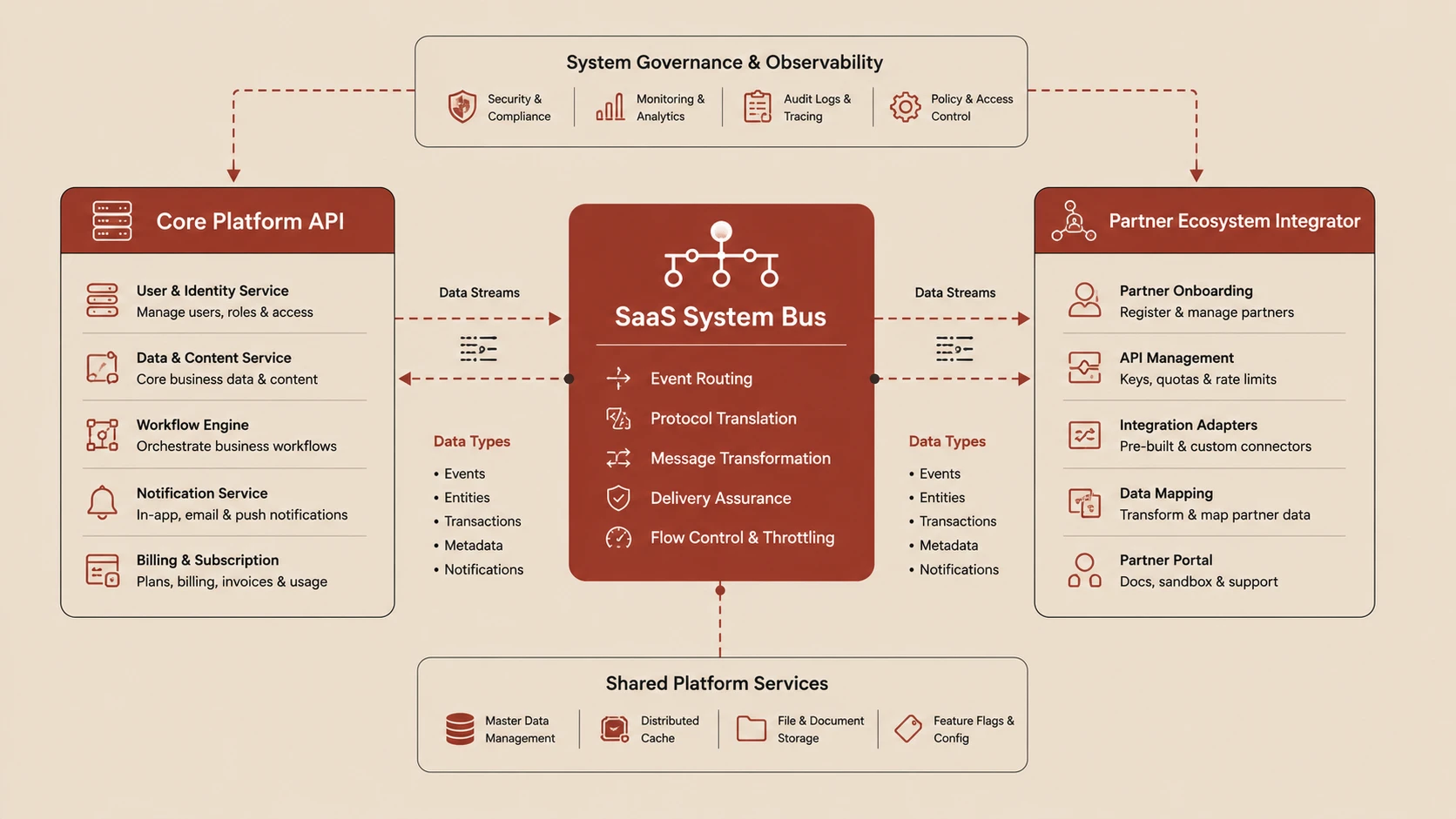
ContactHub System Architecture and Synchronization Flow Diagram
Critical Performance Tradeoffs
- 1.Write Performance & Transaction Scope: SQLite operates on file lock states. If we execute
INSERTstatements sequentially without an explicit transaction wrapper, SQLite opens and locks the database file *for each record*. Wrapping the loop insideconn.BeginTransaction()buffers the write updates in memory, executing them in a single batch operation. This reduces flash write cycles and cuts total write times for 100 entries from over 4 seconds to under 40 milliseconds. - 2.`INSERT OR REPLACE` vs. Upserts: The inquiries schema uses
Idas the primary key. If we fetch updated status indicators for existing entries from the API, SQLite'sINSERT OR REPLACEautomatically updates the target rows without requiring complex update/insert branch logic in C#.
---
4. The Offline-First Caching Pattern (InquiryOfflineService.cs)
When a mobile app operates on an unreliable network, users should be able to view, search, and page through their items seamlessly. We implemented a cache fallback repository pattern inside InquiryOfflineService.
If internet access is detected, the service queries the remote API. If the call succeeds, the data is pushed to SQLite cache, and returned. If the system is offline, or if the server returns a timeout error, the service falls back to local data, applying filtering, sorting, and pagination in-memory using LINQ.
using ContactHub.Mobile.Offline.Database;
using ContactHub.Mobile.Offline.Models;
using ContactHub.Shared.Models;
using System.Net.Http.Json;
using System.Text.Json;

namespace ContactHub.Mobile.Offline.Services;

public sealed class InquiryOfflineService
{
    private readonly HttpClient _http;
    private readonly LocalDatabase _db;
    private readonly SyncTimeService _syncTime;

    public InquiryOfflineService(HttpClient http, LocalDatabase db, SyncTimeService syncTime)
    {
        _http = http;
        _db = db;
        _syncTime = syncTime;
    }

    private bool IsOnline => Connectivity.Current.NetworkAccess == NetworkAccess.Internet;

    public Task<List<ContactListItem>> GetInquiriesAsync(
        int page, int pageSize, string? domain, string? status,
        string? search, DateTimeOffset? fromDate, DateTimeOffset? toDate)
        => GetMessagesAsync("Contact", page, pageSize, domain, status, search, fromDate, toDate);

    private async Task<List<ContactListItem>> GetMessagesAsync(
        string type, int page, int pageSize, string? domain,
        string? status, string? search, DateTimeOffset? fromDate, DateTimeOffset? toDate)
    {
        // -------------------------------------------------------------
        // ONLINE FLOW
        // -------------------------------------------------------------
        if (IsOnline)
        {
            try
            {
                var url = $"/api/contact?page={page}&pageSize={pageSize}&messageType={type}" +
                          $"{(string.IsNullOrWhiteSpace(domain) ? "" : $"&domain={domain}")}" +
                          $"{(string.IsNullOrWhiteSpace(status) ? "" : $"&status={status}")}" +
                          $"{(string.IsNullOrWhiteSpace(search) ? "" : $"&search={search}")}" +
                          $"{(fromDate.HasValue ? $"&fromDate={fromDate:O}" : "")}" +
                          $"{(toDate.HasValue ? $"&toDate={toDate:O}" : "")}";

                var res = await _http.GetFromJsonAsync<JsonElement>(url);

                if (res.TryGetProperty("items", out var items))
                {
                    var list = items.EnumerateArray().Select(MapToModel).ToList();

                    if (list.Count > 0)
                    {
                        // Update background SQLite cache asynchronously
                        await _db.SaveInquiriesAsync(list.Select(x => ToCache(x, type)));
                        _syncTime.SetNow();
                    }

                    return list;
                }
            }
            catch
            {
                // Network call failed or timed out — fall back to offline mode
            }
        }

        // -------------------------------------------------------------
        // OFFLINE FLOW (Local SQLite Cache Fallback)
        // -------------------------------------------------------------
        var local = await _db.GetInquiriesAsync(type);
        var filtered = ApplyFilters(local, domain, status, search, fromDate, toDate);

        // Mimic database pagination and sorting locally
        return filtered
            .OrderByDescending(x => x.CreatedAt)
            .Skip((page - 1) * pageSize)
            .Take(pageSize)
            .Select(ToModel)
            .ToList();
    }

    private static IEnumerable<CachedInquiry> ApplyFilters(
        IEnumerable<CachedInquiry> query, string? domain, string? status,
        string? search, DateTimeOffset? fromDate, DateTimeOffset? toDate)
    {
        if (!string.IsNullOrWhiteSpace(domain))
            query = query.Where(x => x.Company == domain);

        if (!string.IsNullOrWhiteSpace(status))
            query = query.Where(x => x.Status == status);

        if (!string.IsNullOrWhiteSpace(search))
            query = query.Where(x =>
                (x.Email?.Contains(search, StringComparison.OrdinalIgnoreCase) ?? false) ||
                (x.SenderName?.Contains(search, StringComparison.OrdinalIgnoreCase) ?? false) ||
                (x.Message?.Contains(search, StringComparison.OrdinalIgnoreCase) ?? false));

        if (fromDate.HasValue)
            query = query.Where(x => x.CreatedAt >= fromDate);

        if (toDate.HasValue)
            query = query.Where(x => x.CreatedAt <= toDate);

        return query;
    }

    // Object mappings
    private static ContactListItem MapToModel(JsonElement x) => new()
    {
        Id = x.GetProperty("id").GetGuid(),
        SenderName = x.TryGetProperty("senderName", out var n) ? n.GetString() : "",
        Email = x.TryGetProperty("email", out var e) ? e.GetString() : "",
        Domain = x.TryGetProperty("domain", out var d) ? d.GetString() : "",
        Mobile = x.TryGetProperty("mobile", out var m) ? m.GetString() : null,
        Subject = x.TryGetProperty("subject", out var s) ? s.GetString() : null,
        Message = x.TryGetProperty("message", out var msg) ? msg.GetString() : "",
        Status = x.TryGetProperty("status", out var st) ? st.GetString() : "",
        Company = x.TryGetProperty("company", out var c) ? c.GetString() : null,
        ProjectType = x.TryGetProperty("projectType", out var p) ? p.GetString() : null,
        CreatedAt = x.GetProperty("createdAt").GetDateTimeOffset()
    };

    private static CachedInquiry ToCache(ContactListItem x, string type) => new()
    {
        Id = x.Id,
        SenderName = x.SenderName ?? "",
        Email = x.Email ?? "",
        Mobile = x.Mobile,
        Subject = x.Subject,
        Message = x.Message ?? "",
        Status = x.Status ?? "",
        Company = x.Company,
        ProjectType = x.ProjectType,
        MessageType = type,
        CreatedAt = x.CreatedAt
    };

    private static ContactListItem ToModel(CachedInquiry x) => new()
    {
        Id = x.Id,
        SenderName = x.SenderName,
        Email = x.Email,
        Mobile = x.Mobile,
        Subject = x.Subject,
        Message = x.Message,
        Status = x.Status,
        Company = x.Company,
        ProjectType = x.ProjectType,
        CreatedAt = x.CreatedAt
    };
}
Design Highlights:
- ◆Decoupled Model States: We map our database schema models (
CachedInquiry) to public UI model DTOs (ContactListItem) dynamically. This decoupling ensures that database layout migrations don't impact the UI views. - ◆Resilience Over Strict Sync: By trapping HTTP errors in a general
try-catchscope, any server-side database locks, API request throttling, or slow responses degrade gracefully into offline cache retrieval. The user receives their data instantly, unaware of network anomalies.
---
5. Reactive Network Recovery Synchronization
An offline-first application must not require the user to trigger sync updates manually. In ContactHub, we built a reactive bridge that listens to system connectivity changes and automatically triggers data updates.
Inside the native bootstrap initialization, we monitor native network state changes. If the device reconnects to the internet, we signal a refresh event through the DI pipeline:
Connectivity.Current.ConnectivityChanged += async (s, e) =>
{
    var online = e.NetworkAccess == NetworkAccess.Internet;
    var wasOffline = !network.IsOnline;

    network.SetOnline(online);

    // Auto-sync trigger on reconnect
    if (online && wasOffline)
    {
        // Propagate sync trigger through App Lifecycle Service
        await lifecycle.RaiseResumeAsync();
    }
};
This lifecycle trigger links to our Blazor view models. When the event fires, the views refresh their components, pull updated pages from the API, and flush cached offline actions (like local email failures) back to the server:
// Inside Shared Blazor Component Pages (e.g., ContactList.razor)
protected override void OnInitialized()
{
    Lifecycle.OnResume += TriggerDataRefresh;
}

private async Task TriggerDataRefresh()
{
    await InvokeAsync(async () =>
    {
        IsLoading = true;
        StateHasChanged();

        await LoadContactsAsync(); // Pulls fresh data from InquiryOfflineService

        IsLoading = false;
        StateHasChanged();
    });
}

public void Dispose()
{
    Lifecycle.OnResume -= TriggerDataRefresh; // Unsubscribe to avoid memory leaks
}
Using Blazor's InvokeAsync wrapper ensures that state updates run on the UI rendering thread, avoiding cross-thread execution crashes during background sync cycles.
---
6. Performance Tuning & Best Practices in Blazor Hybrid
Throughout the lifecycle of ContactHub, we encountered and solved several hybrid performance challenges:
- 1.Component Event Debouncing: In mobile web views, fast scroll updates can flood the execution loop, leading to layout stutter. By implementing debounced event listeners and loading thresholds in Syncfusion grids, we capped render execution rates.
- 2.Reducing DOM Sizes: Blazor Hybrid runs inside a native web engine wrapper. Keeping HTML components simple and minimizing nested
divwrappers keeps memory consumption low, which is vital on memory-constrained mobile devices. - 3.UI Thread Safety: Since sync triggers occur asynchronously in background threads, UI updates must be invoked on the dispatcher context (
MainThread.BeginInvokeOnMainThread). If updates run on background threads, they will cause app crashes on Android and iOS. - 4.Static Asset Bundling: We load images and fonts directly from local resources (
wwwroot/) rather than fetching them from external CDNs, ensuring that the app's structural layout remains fully interactive even when offline.
---
Conclusion: The Blazor Hybrid Ecosystem
By combining .NET MAUI with Blazor Hybrid, we built an enterprise application that:
- ◆Deploys natively to Windows, macOS, iOS, and Android from a single project structure.
- ◆Shares all its layout markup, CSS, and validation rules with the desktop Blazor WebAssembly Admin application.
- ◆Implements an offline cache using SQLite, ensuring zero-latency responsiveness.
- ◆Features automatic database table migrations and reactive network synchronization.
For companies looking to modernize legacy C# codebases or build new cross-platform architectures, Blazor Hybrid provides a highly productive and performant alternative to fully custom native rewrites. It brings the speed of web development and the access of native APIs into one clean solution.