Introduction
React Native has become one of the most widely adopted cross-platform frameworks for enterprise mobile application development. Organizations building customer-facing applications, internal business tools, logistics platforms, healthcare solutions, and financial services increasingly rely on React Native to share application logic across iOS and Android while maintaining native user experiences.
As applications grow in complexity, development productivity depends not only on framework capabilities but also on the quality of debugging, inspection, profiling, and diagnostics available during development. Enterprise applications often integrate networking layers, local databases, push notifications, authentication systems, background synchronization, and complex component hierarchies. Diagnosing issues across these layers requires tooling that extends beyond simple console logging.
React Native 0.62 addresses this challenge by introducing Flipper as the default debugging platform. Rather than depending on multiple disconnected debugging utilities, developers gain a unified desktop application capable of inspecting application state, network requests, layouts, logs, databases, and React component rendering.
Combined with continued Fast Refresh improvements and numerous framework refinements, React Native 0.62 significantly strengthens the day-to-day development experience.
From the perspective of February 2020, React Native 0.62 represents one of the framework's most important releases for developer tooling and enterprise productivity.
Industry Background
Cross-platform mobile development continues expanding across industries.
Organizations increasingly develop:
- ◆Banking applications.
- ◆Healthcare platforms.
- ◆Retail commerce applications.
- ◆Logistics solutions.
- ◆Enterprise dashboards.
- ◆Customer self-service portals.
- ◆Field service applications.
Large mobile applications require:
- ◆Reliable debugging.
- ◆Efficient development workflows.
- ◆Native platform inspection.
- ◆Performance monitoring.
- ◆Component diagnostics.
- ◆Continuous Integration.
As engineering teams grow, consistent development tooling becomes increasingly valuable.
The Business Problem
Enterprise React Native projects frequently encounter several engineering challenges.
Organizations commonly experience:
- ◆Difficult component debugging.
- ◆Limited application inspection.
- ◆Multiple disconnected development tools.
- ◆Slow issue diagnosis.
- ◆Network troubleshooting complexity.
- ◆Database inspection difficulties.
- ◆Reduced developer productivity.
Traditional debugging approaches often require switching between platform-specific tools, browser developer tools, native IDEs, and console logging.
React Native 0.62 addresses these concerns through integrated tooling centered around Flipper.
Understanding the Technology
React Native 0.62 introduces several improvements focused on developer productivity.
Major enhancements include:
- ◆Native Flipper integration.
- ◆React Developer Tools integration.
- ◆Layout inspection.
- ◆Network request monitoring.
- ◆Database inspection.
- ◆Fast Refresh improvements.
- ◆Framework stability enhancements.
These capabilities simplify application debugging without altering the framework's programming model.
Core Architecture
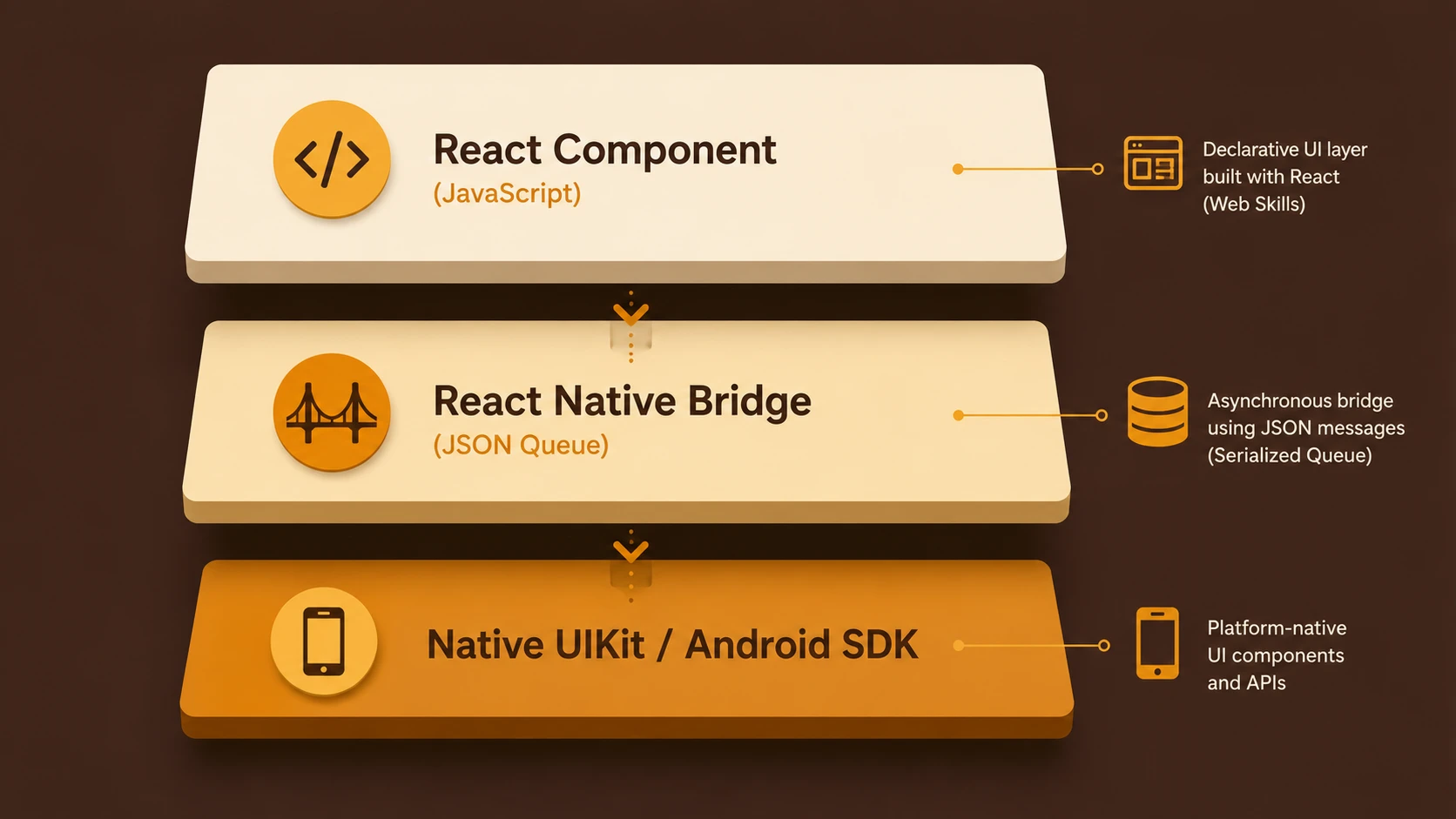
A simplified React Native 0.62 development architecture appears below.
| Component | Responsibility |
|---|---|
| React Components | User interface |
| JavaScript Runtime | Application logic |
| Native Bridge | Communication with native platforms |
| React Native Runtime | Framework execution |
| Flipper Desktop | Debugging and inspection |
| Android and iOS Platforms | Native execution |
Flipper connects to the running application and exposes diagnostics through an extensible plugin architecture.
Key Features
Native Flipper Integration
The defining enhancement in React Native 0.62 is native integration with Flipper.
Flipper becomes the primary debugging environment for React Native development, providing a centralized interface for inspecting multiple aspects of an application.
Instead of relying exclusively on browser-based developer tools, engineers gain a desktop application specifically designed for native mobile debugging.
Component Render Debugging
React component inspection becomes significantly more accessible through Flipper's React Developer Tools integration.
Developers can:
- ◆Inspect component hierarchies.
- ◆View properties.
- ◆Examine state.
- ◆Analyze rendering behavior.
- ◆Identify component update issues.
This simplifies troubleshooting within large React Native applications.
Network Monitoring
Flipper provides detailed visibility into application network activity.
Developers can inspect:
- ◆HTTP requests.
- ◆Response payloads.
- ◆Headers.
- ◆Request timing.
- ◆Error responses.
This capability accelerates debugging of backend integrations.
Layout Inspection
User interface debugging becomes easier through visual inspection of native layouts.
Developers can examine:
- ◆View hierarchy.
- ◆Layout structure.
- ◆Component positioning.
- ◆Interface organization.
These tools simplify diagnosis of complex rendering issues.
Database Inspection
Applications using local persistence can inspect supported database contents directly through Flipper plugins.
This reduces the need for custom diagnostic utilities.
Fast Refresh Improvements
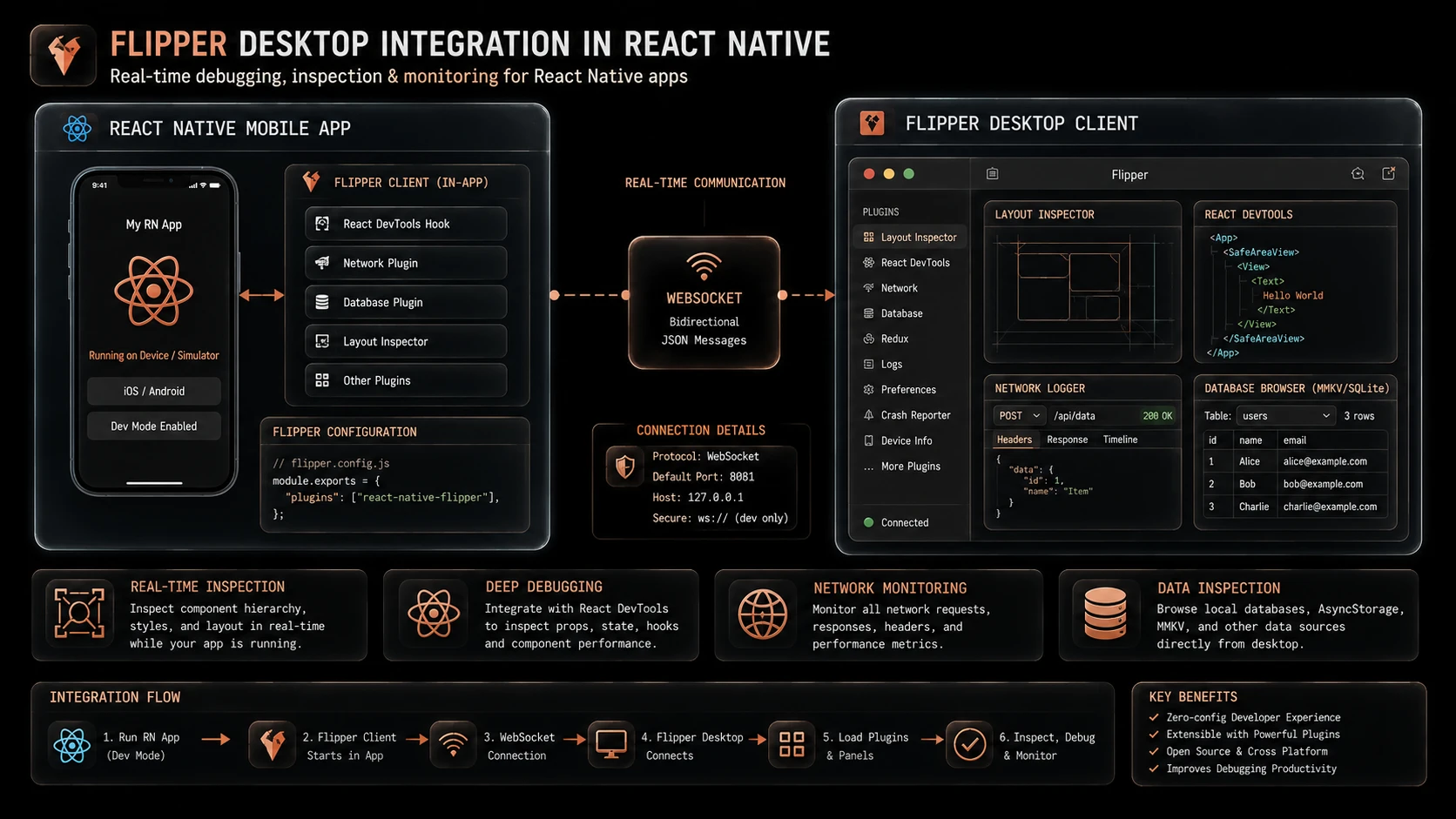
System architecture diagram and conceptual workflow layout for React Native 0.62.
React Native continues refining Fast Refresh, enabling developers to observe code changes rapidly while preserving application state whenever possible.
This significantly improves development iteration speed.
How It Works
A simplified debugging workflow appears below.
React Native Application
          |
Native Runtime
          |
Flipper Connection
          |
Plugins
          |
Component Tree
Network Requests
Database
Logs
Layout Inspector
Flipper collects runtime information through integrated plugins and presents diagnostics through a unified desktop interface.
Enterprise Use Cases
Enterprise Business Applications
Large mobile applications benefit from centralized debugging across networking, storage, and interface rendering.
Financial Services
Applications interacting with numerous backend APIs gain improved request visibility during development.
Healthcare Platforms
Complex mobile workflows become easier to validate through integrated component and layout inspection.
Retail Applications
Shopping experiences involving authentication, product catalogs, and local storage benefit from unified diagnostics.
Internal Productivity Tools
Development teams gain a consistent debugging workflow across multiple projects.
Performance Considerations
Flipper primarily improves development workflows rather than production runtime performance.
Organizations should evaluate:
- ◆Component rendering frequency.
- ◆Network latency.
- ◆Layout efficiency.
- ◆JavaScript execution.
- ◆Memory utilization.
- ◆Development iteration speed.
Performance optimization should continue using representative production workloads in addition to development diagnostics.
Security Considerations
Debugging tools should remain restricted to development environments.
Organizations should continue implementing:
- ◆Secure authentication.
- ◆Authorization.
- ◆HTTPS communication.
- ◆Secure local storage.
- ◆Dependency management.
- ◆Production build validation.
Diagnostic tooling should never expose sensitive production information.
Scalability
React Native 0.62 strengthens enterprise scalability through:
- ◆Unified debugging.
- ◆Faster issue diagnosis.
- ◆Improved developer productivity.
- ◆Better application visibility.
- ◆Consistent development workflows.
These improvements become increasingly valuable as engineering teams and application complexity continue growing.
Best Practices
Organizations adopting React Native 0.62 should:
- ◆Standardize Flipper across development teams.
- ◆Install appropriate Flipper plugins for application architecture.
- ◆Use component inspection before introducing custom debugging code.
- ◆Monitor network interactions during integration testing.
- ◆Continue using Fast Refresh throughout active development.
- ◆Separate development diagnostics from production builds.
- ◆Document debugging workflows within engineering standards.
Consistent tooling improves collaboration and reduces troubleshooting time.
Common Mistakes
| Mistake | Business Impact |
|---|---|
| Depending exclusively on console logging | Reduced debugging efficiency |
| Shipping debugging configurations in production builds | Increased operational risk |
| Ignoring layout inspection tools | Longer UI troubleshooting cycles |
| Skipping network analysis during API integration | Slower issue resolution |
| Treating Flipper as a production monitoring platform | Incorrect operational expectations |
| Using inconsistent debugging workflows across teams | Reduced engineering productivity |
Successful adoption depends on integrating Flipper into the standard development lifecycle rather than treating it as an optional utility.
Technology Comparison
| Characteristic | Earlier React Native Releases | React Native 0.62 |
|---|---|---|
| Primary Debugging | Multiple independent tools | Native Flipper integration |
| Component Inspection | React Developer Tools separately | Integrated through Flipper |
| Network Analysis | External utilities commonly used | Built-in Flipper plugins |
| Database Inspection | Platform-specific tools | Unified plugin support |
| Development Workflow | Fragmented | Centralized debugging environment |
React Native 0.62 simplifies enterprise development by consolidating diagnostics into a unified platform.
Adoption Strategy
Organizations should adopt React Native 0.62 through a structured upgrade process.
- 1.Upgrade React Native dependencies.
- 2.Install and configure Flipper across development environments.
- 3.Verify plugin compatibility with existing application architecture.
- 4.Train engineering teams on integrated debugging workflows.
- 5.Validate development and Continuous Integration environments.
- 6.Roll out upgrades incrementally following successful testing.
This phased approach minimizes disruption while allowing development teams to benefit from improved tooling.
Limitations
As of February 2020, organizations should recognize several considerations.
- ◆Existing projects should validate third-party library compatibility before upgrading.
- ◆Flipper primarily targets development diagnostics rather than production monitoring.
- ◆Development teams require familiarity with the new tooling ecosystem.
- ◆Native platform dependencies should be verified during migration.
- ◆Production validation remains essential before organization-wide deployment.
These considerations should guide enterprise upgrade planning.
Looking Ahead
From the perspective of February 2020, React Native 0.62 represents a significant investment in developer productivity rather than fundamental architectural change. Native Flipper integration provides a unified environment for inspecting component rendering, application state, networking, layouts, databases, and runtime behavior, allowing engineering teams to diagnose issues more efficiently across increasingly sophisticated mobile applications.
Combined with ongoing Fast Refresh improvements and framework refinements, React Native 0.62 strengthens the ecosystem for enterprise mobile development. Organizations building long-lived cross-platform applications should view this release as an opportunity to standardize debugging practices, improve developer workflows, and reduce the operational complexity associated with maintaining modern mobile software.