Introduction
Microsoft has entered a pivotal moment in the evolution of personal computing with the introduction of Windows 8 and the announcement of the Surface tablet family. Rather than delivering a traditional desktop operating system update, Microsoft is attempting to redefine Windows for a computing landscape increasingly influenced by tablets, touch interfaces, cloud services, and mobile productivity.
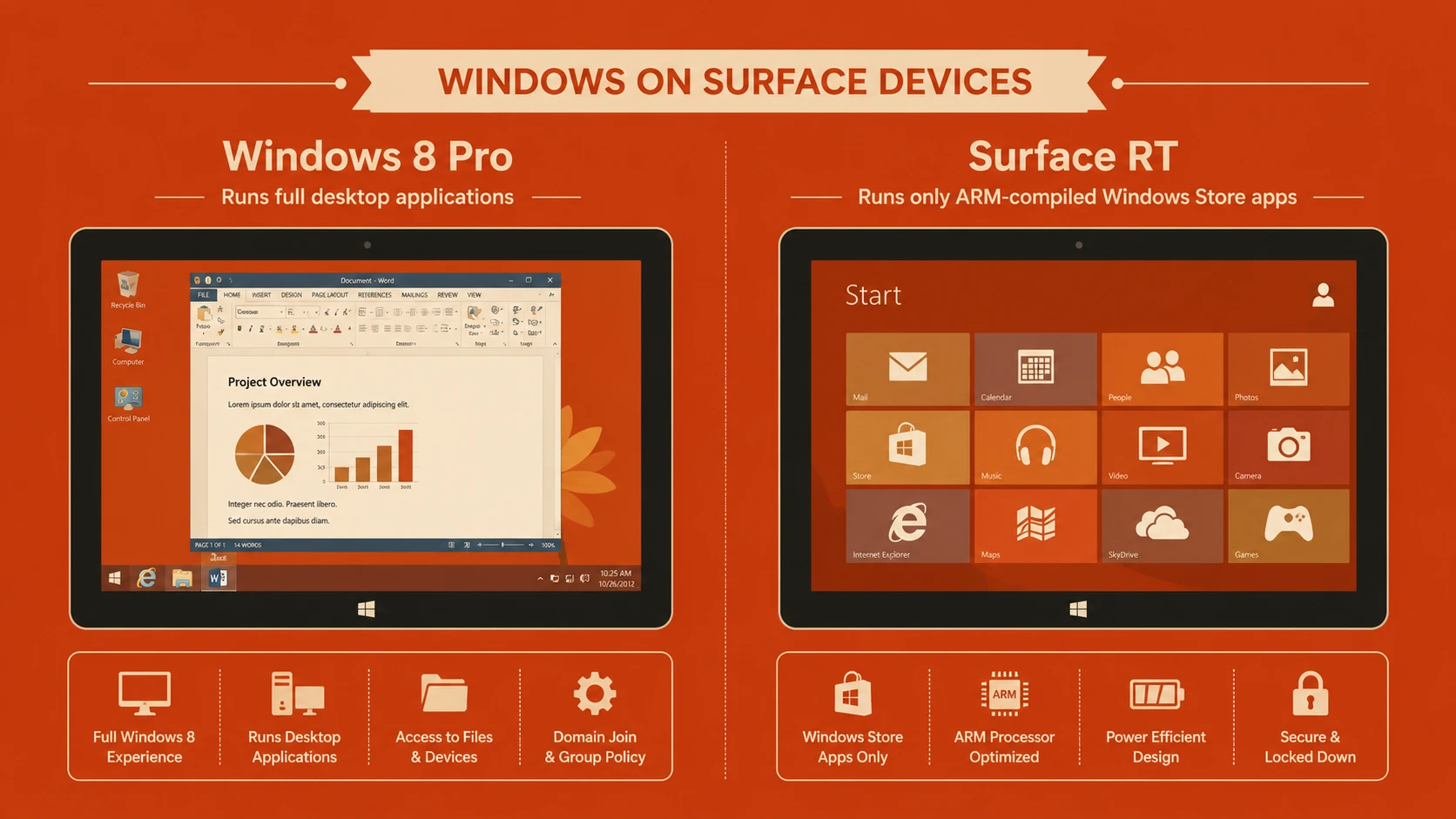
Perhaps the most significant aspect of this release is Microsoft's decision to launch two closely related operating systems: Windows 8 for x86 processors and Windows RT for ARM-based devices. Although both platforms share a similar user interface and application model, they differ substantially in software compatibility and hardware architecture.
For enterprise architects and IT decision-makers, understanding these differences is essential before planning desktop refreshes, tablet deployments, or application modernization initiatives.
Industry Background
The computing industry is undergoing a significant transition. Traditional desktop and notebook PCs remain critical business tools, but tablets and smartphones have rapidly become important productivity devices.
Apple's iPad has demonstrated strong market demand for lightweight touch-first computing, while Android tablets continue to expand hardware diversity. At the same time, enterprises increasingly expect employees to access business applications from multiple device categories.
Microsoft's response is Windows 8, an operating system designed to bridge conventional desktop computing with modern touch-enabled experiences while maintaining compatibility with existing enterprise infrastructure.
The Business Problem
Enterprise organizations face several technology challenges:
- ◆Managing desktop and mobile computing platforms separately
- ◆Supporting touch-enabled devices alongside traditional PCs
- ◆Maintaining compatibility with existing Windows software
- ◆Controlling deployment and management costs
- ◆Providing secure mobile productivity
- ◆Preparing applications for multiple hardware architectures
Windows 8 seeks to provide a common operating environment capable of supporting desktops, notebooks, convertibles, and tablets.
Understanding Windows 8 and Windows RT
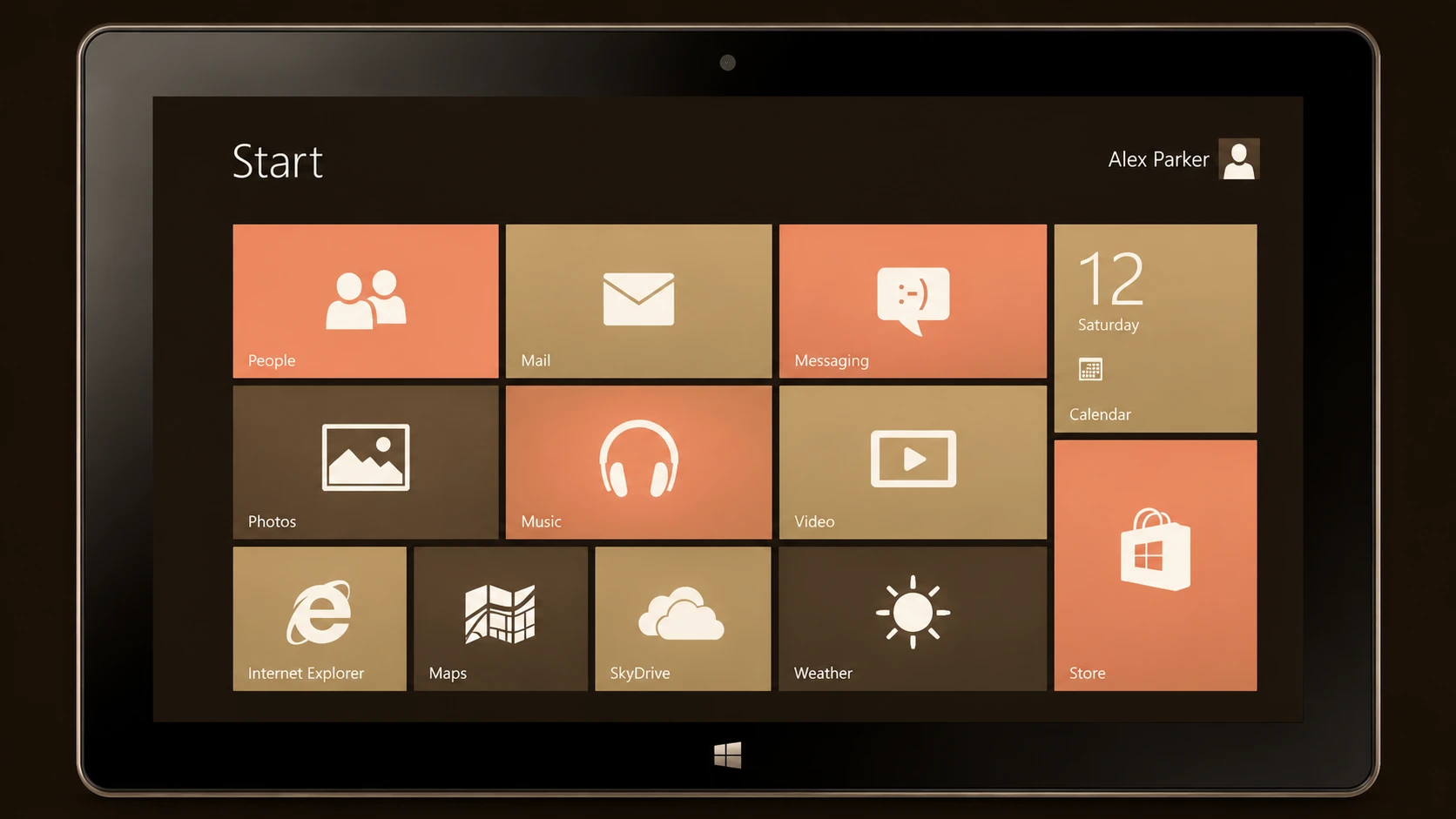
Windows 8 introduces a redesigned interface centered around the new Start screen and the Metro design language. Applications can operate either within the traditional desktop environment or as immersive full-screen Metro-style applications.
Windows RT shares much of the Windows 8 user experience but targets ARM-based hardware. Unlike Windows 8, Windows RT is not intended to execute existing x86 desktop applications, relying instead on applications developed for the new Windows Runtime platform.
This distinction creates a dual-platform ecosystem that developers and enterprise customers must carefully evaluate.
Core Architecture
Windows 8 combines established Windows technologies with a new application platform.
| Component | Responsibility |
|---|---|
| Windows Kernel | Core operating system services |
| Traditional Desktop | Supports conventional Windows applications |
| Metro Interface | Touch-first application experience |
| Windows Runtime (WinRT) | Modern application development platform |
| Windows Store | Centralized application distribution |
| Internet Explorer 10 | Updated web browsing platform |
| Device Drivers | Hardware integration |
| Security Framework | Identity, permissions, and system protection |
The coexistence of the desktop environment and Metro applications enables Windows to support both legacy software and new application models.
Surface Hardware Strategy
The introduction of Surface represents Microsoft's first major effort to design its own personal computing hardware.
Two hardware families have been announced:
- ◆Surface for Windows RT
- ◆Surface for Windows 8 Pro
This approach allows Microsoft to demonstrate its vision for Windows hardware while establishing a reference design for OEM partners.
Surface also introduces integrated features such as:
- ◆Touch-first display
- ◆Built-in kickstand
- ◆Optional keyboard covers
- ◆Thin tablet form factor
These design decisions position Surface as both a tablet and a productivity device.
How the Dual-OS Strategy Works
Microsoft's platform strategy separates devices according to processor architecture.
- 1.Traditional PCs continue using Intel or AMD x86 processors.
- 2.Windows 8 executes existing desktop applications while supporting Metro applications.
- 3.ARM-powered tablets run Windows RT.
- 4.Windows RT executes Metro applications but does not support traditional x86 desktop software.
- 5.Both platforms access the Windows Store for compatible applications.
Although the user interface remains largely consistent, software compatibility differs significantly.
Key Features
Metro User Interface
Windows introduces a touch-oriented interface emphasizing live tiles, simplified navigation, and immersive applications.
Windows Store
Microsoft launches a centralized marketplace for distributing Metro-style applications.
Windows Runtime
Developers receive a modern programming platform designed for touch-enabled applications.
Improved Touch Support
The operating system is optimized for gestures, touch interaction, and tablet hardware.
Faster Startup
System startup and resume performance receive architectural improvements intended to reduce waiting time.
Cloud Integration
User settings and selected data can synchronize through Microsoft online services, simplifying multi-device experiences.
Enterprise Use Cases
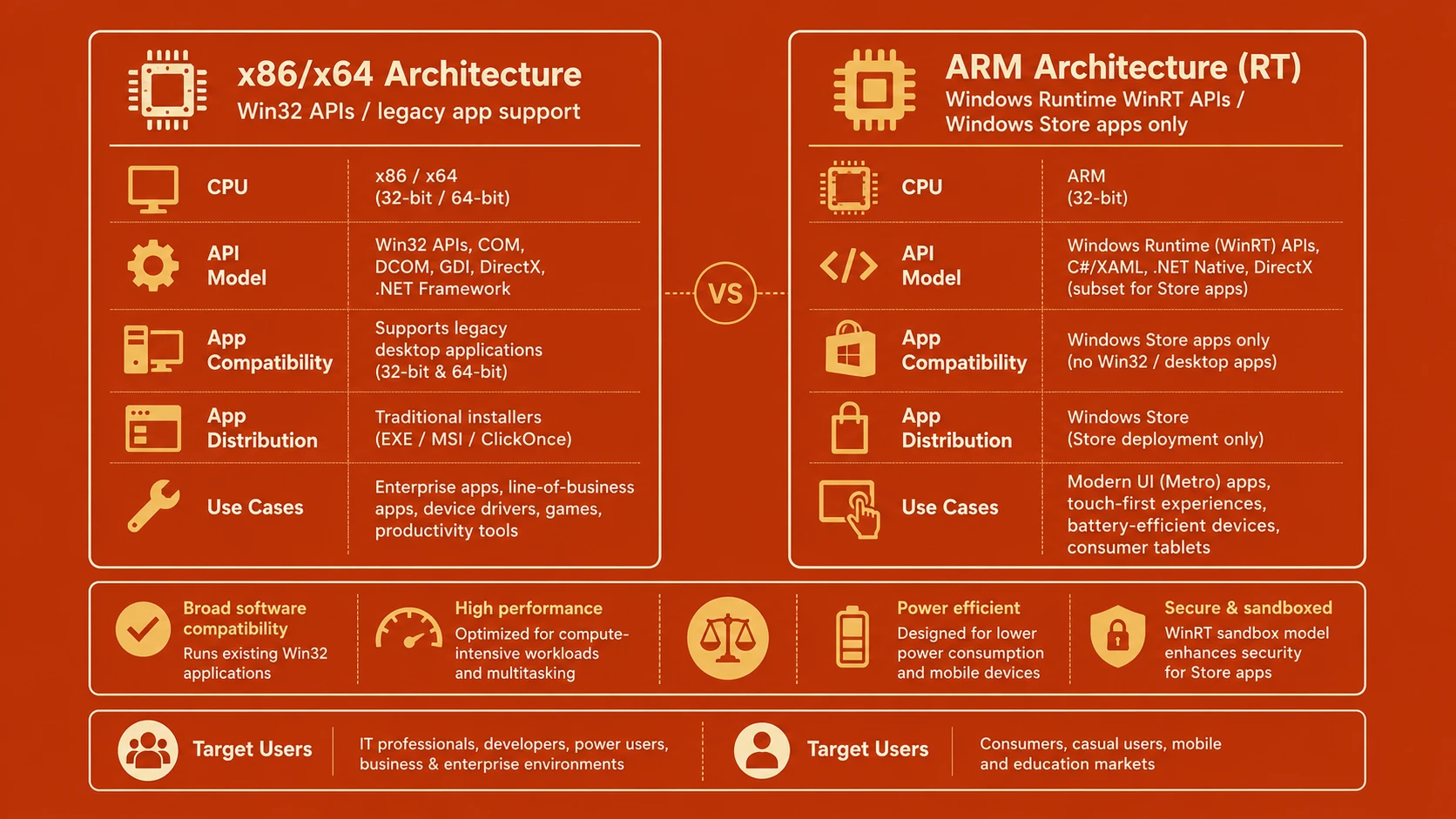
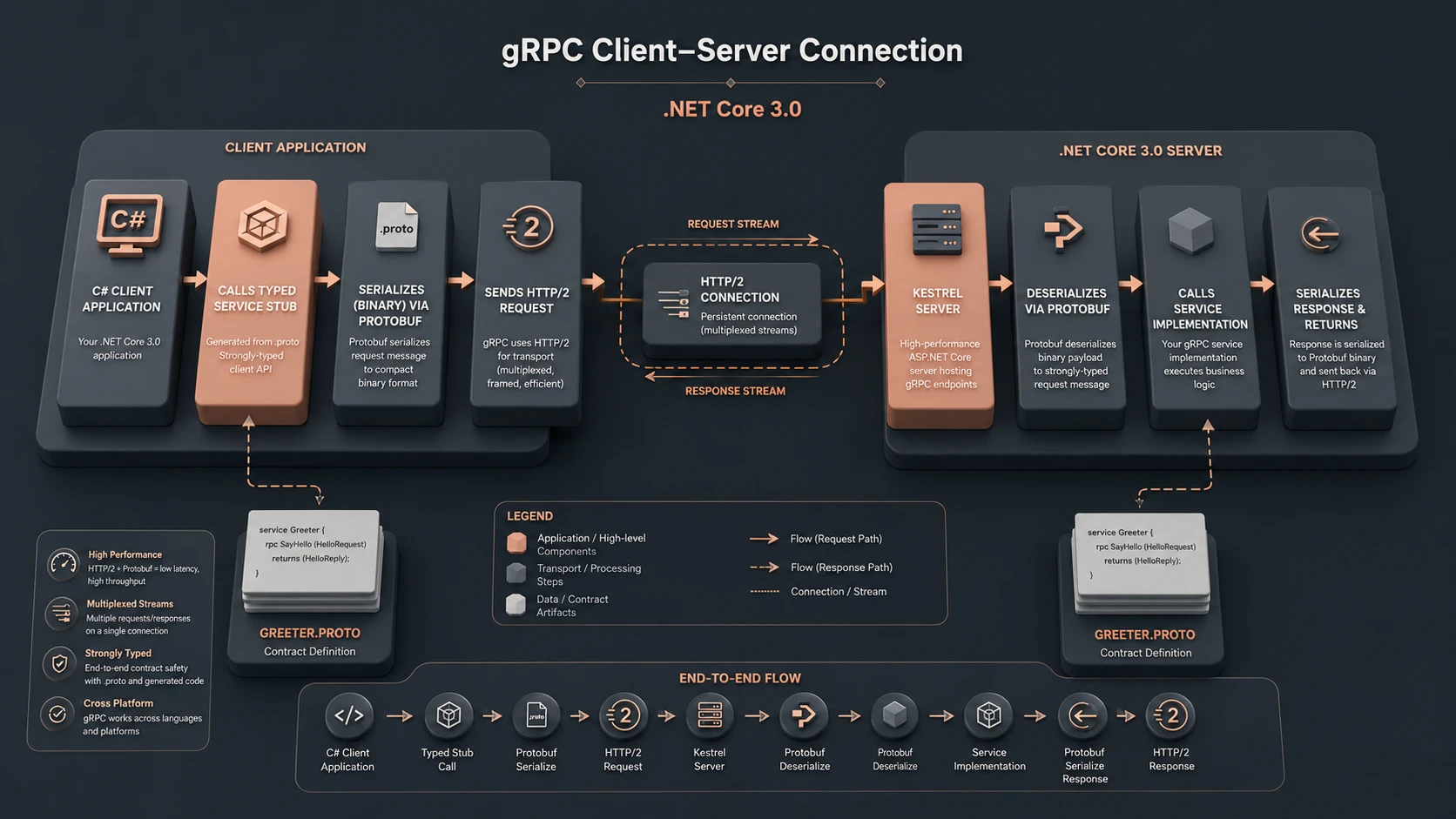
System architecture diagram and conceptual workflow layout for Windows 8 and Surface RT.
Windows 8 introduces opportunities across several business scenarios.
Executive Tablets
Surface devices provide mobile access to presentations, email, and business information.
Field Service Applications
Touch-enabled interfaces support technicians working outside traditional office environments.
Sales Mobility
Interactive product demonstrations benefit from tablet portability while maintaining Windows familiarity.
Information Kiosks
Metro applications provide simplified interfaces for customer-facing systems.
Desktop Modernization
Organizations refreshing aging Windows infrastructure can evaluate Windows 8 as part of broader hardware replacement initiatives.
Performance Considerations
Windows 8 includes several architectural optimizations.
Potential improvements include:
- ◆Faster system startup
- ◆Better memory utilization
- ◆Improved touch responsiveness
- ◆Enhanced battery efficiency on supported hardware
- ◆Optimized application suspension and resume
- ◆Better graphics acceleration
Actual performance depends upon hardware configuration, storage devices, processor capabilities, and application workloads.
Security Considerations
Security remains central to enterprise adoption.
Windows 8 incorporates several security enhancements including:
- ◆Secure Boot support on compatible hardware
- ◆Windows Defender integration
- ◆Improved application isolation for Metro applications
- ◆Enhanced user account protections
- ◆Trusted boot processes
Organizations should continue implementing established security policies covering authentication, endpoint management, encryption, and software deployment.
Scalability
Windows 8 is designed to support a broad range of hardware categories.
Supported deployment scenarios include:
- ◆Traditional desktops
- ◆Business notebooks
- ◆Convertible devices
- ◆Touch-enabled all-in-one systems
- ◆ARM-based tablets through Windows RT
This flexibility allows organizations to standardize on a common user experience while selecting hardware appropriate for different employee roles.
Best Practices
Organizations evaluating Windows 8 should consider the following recommendations.
- ◆Test existing desktop applications for compatibility.
- ◆Distinguish clearly between Windows 8 and Windows RT deployment scenarios.
- ◆Train users on the new interface.
- ◆Pilot touch-enabled business applications.
- ◆Evaluate Windows Store application policies.
- ◆Update desktop management procedures.
- ◆Review security baselines.
- ◆Plan phased migration strategies.
Common Mistakes
| Mistake | Enterprise Impact |
|---|---|
| Assuming Windows RT runs all Windows software | Deployment failures |
| Ignoring application compatibility testing | Business disruption |
| Underestimating user training requirements | Reduced productivity |
| Deploying tablets without management policies | Increased operational risk |
| Confusing Metro and desktop application models | Development complexity |
| Delaying infrastructure assessment | Migration challenges |
Understanding the distinction between Windows 8 and Windows RT is perhaps the most critical factor for successful adoption.
Technology Comparison
| Capability | Windows 8 | Windows RT |
|---|---|---|
| Processor Architecture | x86/x64 | ARM |
| Traditional Desktop Applications | Yes | Limited to included Microsoft desktop software |
| Metro Applications | Yes | Yes |
| Windows Store | Yes | Yes |
| Enterprise Desktop Compatibility | High | Limited |
| Tablet Optimization | Yes | Yes |
Although both operating systems appear similar, their software ecosystems differ substantially.
Adoption Strategy
Enterprises should approach Windows 8 deployment methodically.
Recommended steps include:
- 1.Inventory existing applications.
- 2.Identify hardware refresh opportunities.
- 3.Evaluate Windows RT separately from Windows 8.
- 4.Test Metro application development.
- 5.Conduct pilot deployments.
- 6.Train IT administrators.
- 7.Prepare user education programs.
- 8.Expand gradually after successful validation.
This phased approach minimizes disruption while allowing organizations to evaluate the practical benefits of Microsoft's new platform.
Limitations
Despite its ambitious goals, Microsoft's strategy introduces several uncertainties.
- ◆The new interface represents a significant learning curve.
- ◆Software compatibility differs between Windows 8 and Windows RT.
- ◆Developers must learn a new application model for Metro applications.
- ◆Enterprises must maintain compatibility with existing desktop software.
- ◆Hardware availability will influence adoption timelines.
Organizations should therefore evaluate both operating systems carefully before committing to large-scale deployments.
Looking Ahead
From the perspective of August 2012, Windows 8 and Surface represent one of Microsoft's most ambitious platform transitions since the introduction of Windows itself. By combining traditional desktop computing with a modern touch-first experience, while simultaneously entering the hardware market through Surface, Microsoft is attempting to redefine the Windows ecosystem for a new generation of computing devices.
The dual-operating-system strategy introduces additional complexity, particularly regarding application compatibility and processor architecture. However, if Microsoft succeeds in encouraging developer adoption of the Windows Runtime platform while maintaining enterprise confidence in Windows as a business operating system, Windows 8 could establish a unified foundation spanning desktops, notebooks, and tablets.