Introduction
Modern enterprise web applications have evolved far beyond static web pages. Rich dashboards, business intelligence portals, collaborative applications, real-time analytics, and browser-based productivity tools increasingly perform substantial computation within the client browser. While this shift improves responsiveness by reducing server round trips, it also introduces a significant challenge: JavaScript traditionally executes on a single user interface thread.
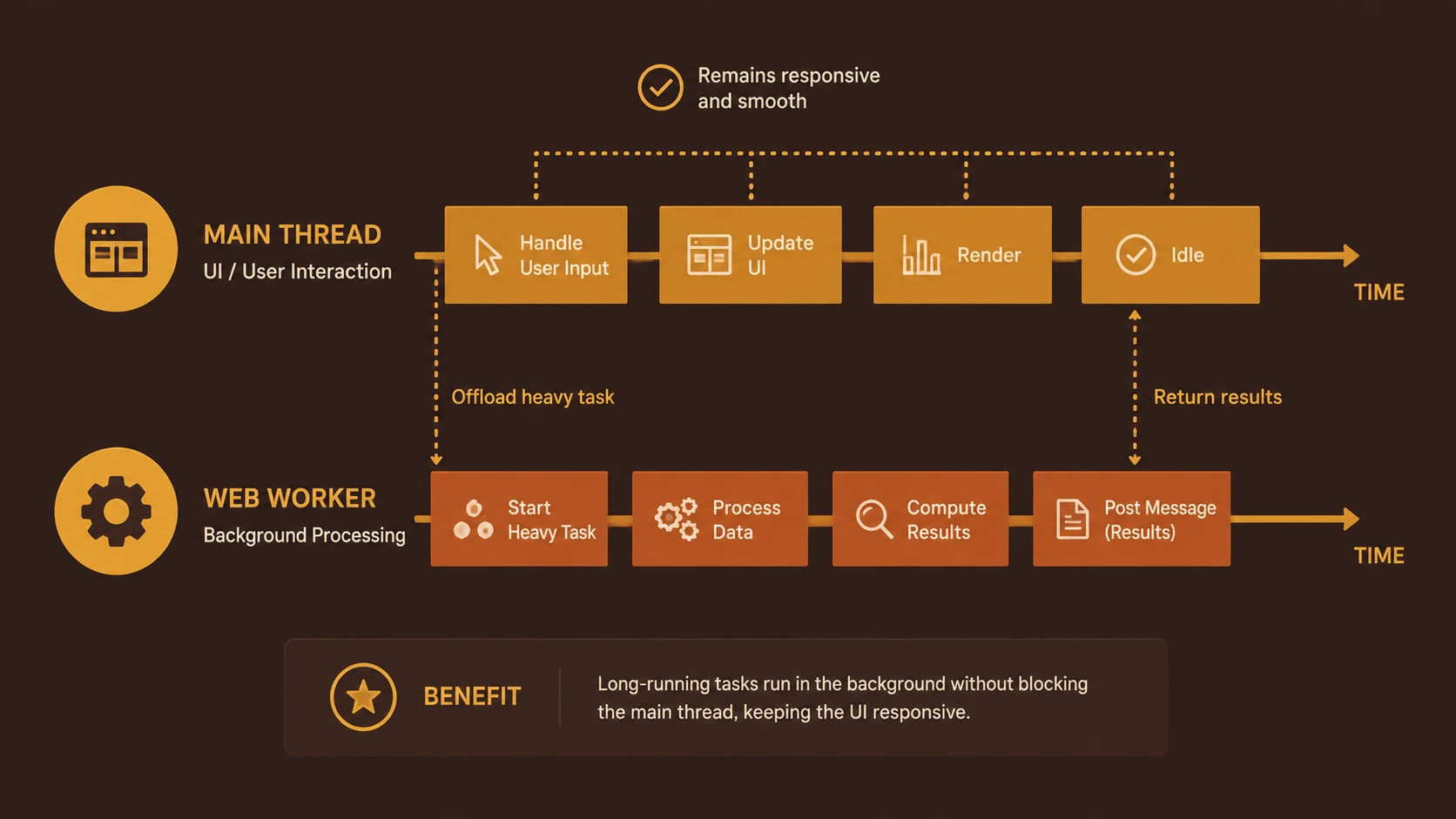
When expensive operations such as parsing large datasets, processing JSON documents, performing mathematical calculations, or manipulating large collections execute on the main thread, the browser becomes temporarily unresponsive. Users experience frozen interfaces, delayed input, interrupted animations, and poor overall usability.
HTML5 Web Workers address this limitation by allowing JavaScript code to execute in background threads separate from the main user interface. By moving computational workloads away from the rendering thread, Web Workers help enterprise developers build responsive applications without sacrificing client-side processing capabilities.
For enterprise architects and front-end engineers, Web Workers represent an important milestone in browser application architecture, enabling more sophisticated browser-based software while maintaining a responsive user experience.
Industry Background
The rapid adoption of HTML5, AJAX, and JavaScript frameworks has transformed browsers into full-featured application platforms.
Enterprise applications increasingly include:
- ◆Interactive dashboards
- ◆Data visualization
- ◆Financial reporting
- ◆Document editing
- ◆Geographic information systems
- ◆Business intelligence portals
- ◆Customer relationship management applications
- ◆Browser-based productivity software
As application complexity increases, browsers perform significantly more client-side computation than traditional web applications.
Maintaining interface responsiveness while processing large workloads has therefore become a primary engineering challenge.
The Business Problem
Organizations developing browser-based enterprise software frequently encounter:
- ◆Frozen user interfaces
- ◆Slow report generation
- ◆Delayed form interactions
- ◆Interrupted animations
- ◆Reduced employee productivity
- ◆Poor customer experience
Since JavaScript executes on a single thread by default, lengthy computations prevent browsers from updating the interface until processing completes.
This limitation becomes increasingly apparent in data-intensive enterprise applications.
Understanding Web Workers
Web Workers provide a standardized browser API that allows JavaScript code to execute independently from the primary user interface thread.
Rather than sharing execution with rendering and user interaction, a worker operates in its own background context.
Communication occurs through asynchronous message passing instead of direct access to shared variables or the Document Object Model (DOM).
Primary objectives include:
- ◆Background computation
- ◆Improved interface responsiveness
- ◆Parallel task execution
- ◆Reduced UI blocking
- ◆Better workload separation
- ◆Enhanced application scalability
This architecture enables browsers to continue rendering and processing user input while background tasks execute independently.
Core Architecture
Web Workers introduce a multi-context execution model.
| Component | Responsibility |
|---|---|
| Main UI Thread | User interface rendering and interaction |
| Worker Thread | Background JavaScript execution |
| Message Queue | Communication between threads |
| Event Loop | Processes asynchronous events |
| Browser Engine | Manages execution environments |
| JavaScript Runtime | Executes application logic |
The browser isolates worker execution from the main page while allowing structured communication through messaging.
How Web Workers Work
A typical processing workflow includes:
- 1.Main application creates a Web Worker.
- 2.Browser starts a separate JavaScript execution context.
- 3.Main thread sends data using asynchronous messages.
- 4.Worker performs computational processing.
- 5.Worker posts results back to the main application.
- 6.User interface updates after receiving completed results.
Because computation occurs independently, users can continue interacting with the application while background processing executes.
Key Features
Background JavaScript Execution
Long-running computations execute independently of the user interface.
Message-Based Communication
// main.js - Main Thread posting payload to worker
const worker = new Worker('worker.js');
worker.postMessage({ number: 42 });

worker.onmessage = function(event) {
  console.log('Result received from worker thread:', event.data.result);
};

// worker.js - Background Thread processing heavy calculation
self.onmessage = function(event) {
  const number = event.data.number;
  // Heavy calculation CPU task
  const result = number * number;
  self.postMessage({ result: result });
};
The main application and worker exchange information using asynchronous messaging.
Independent Execution Context
Workers maintain separate global execution environments, reducing unintended interaction with application code.
Non-Blocking User Interface
Rendering, animations, and user interactions continue while background processing executes.
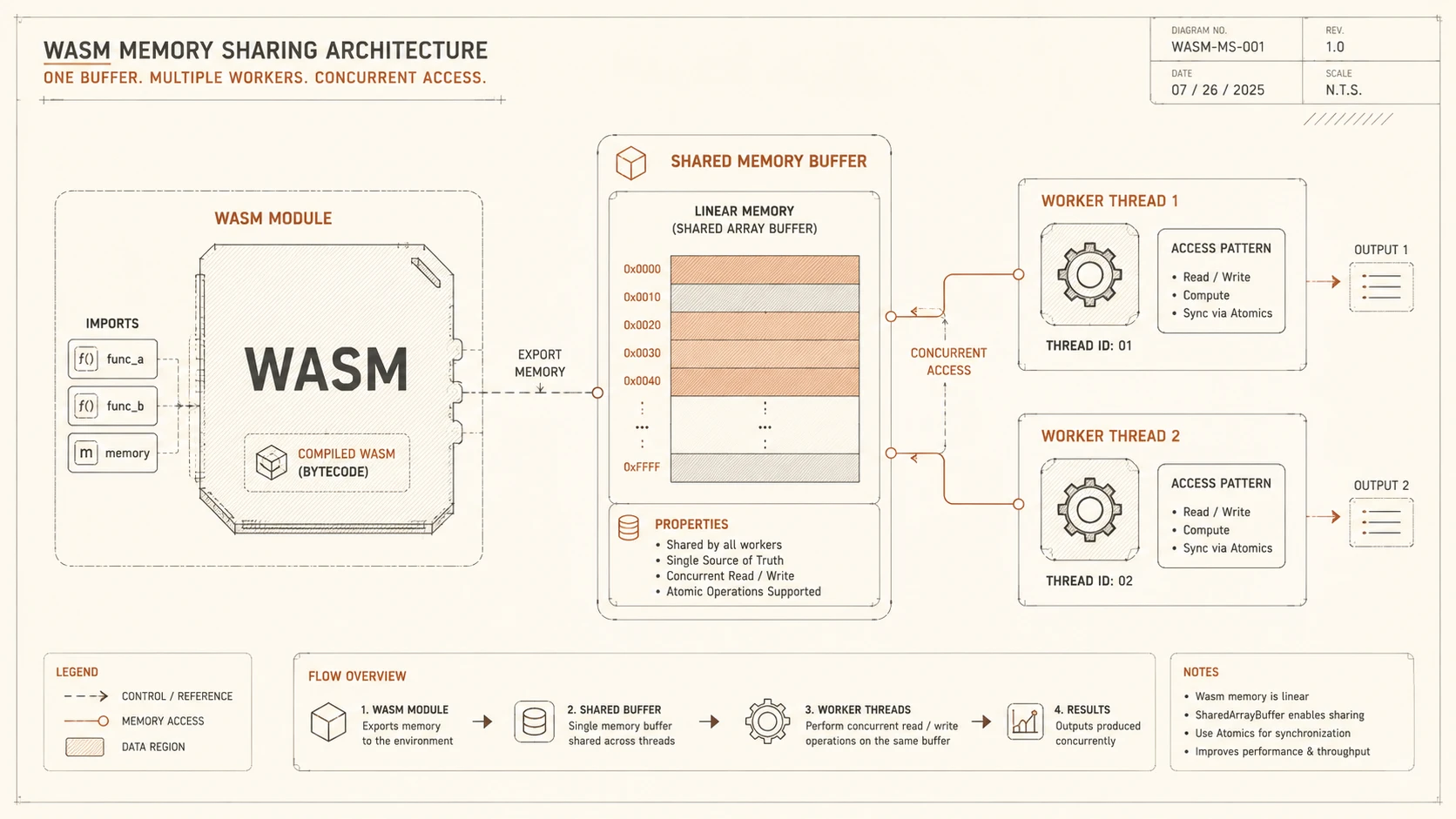
Multiple Workers
Applications may create several workers when independent computational tasks need concurrent execution.
Enterprise Use Cases
Web Workers are valuable across numerous enterprise scenarios.
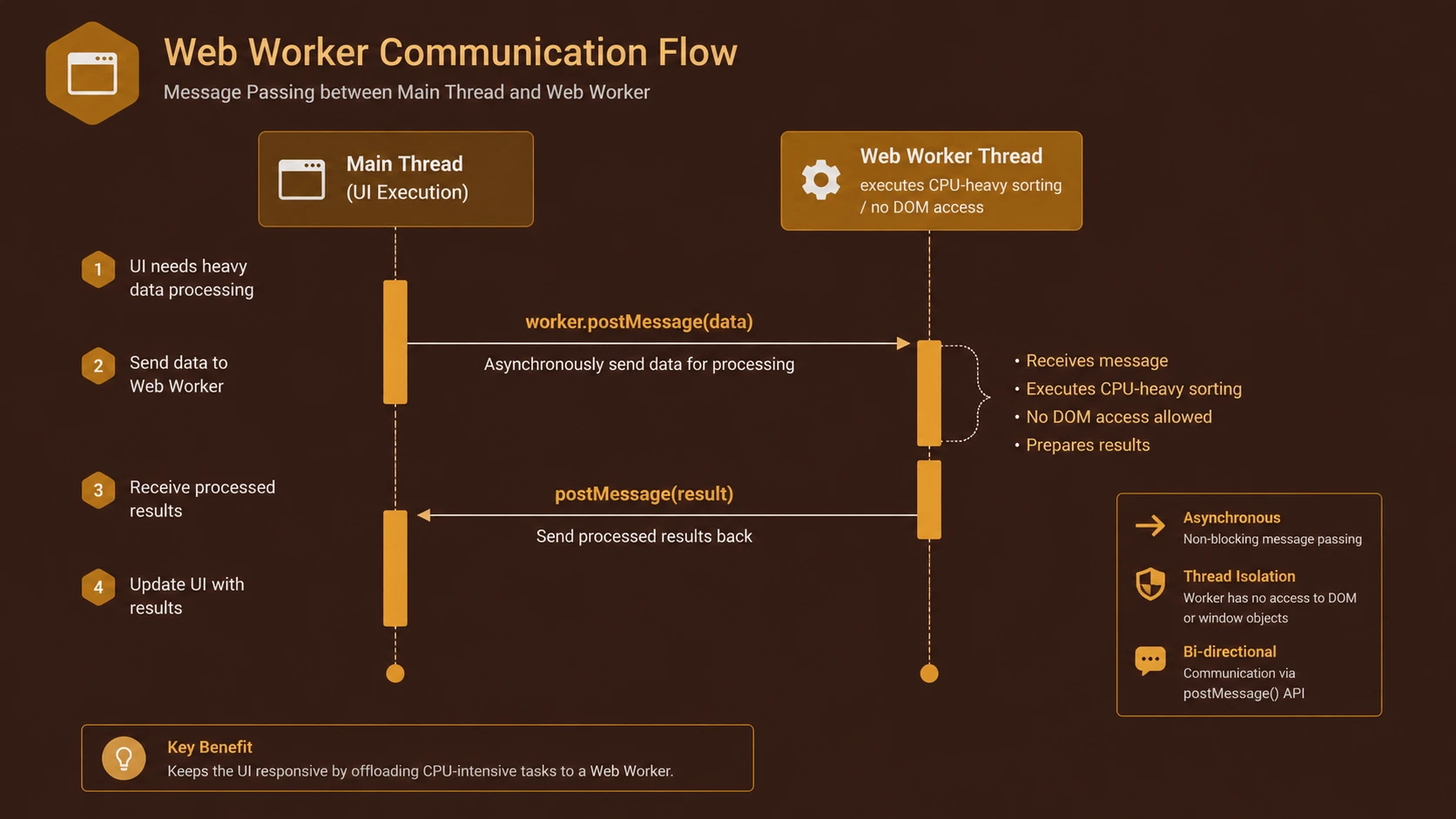
Event loop routing for non-blocking asynchronous I/O execution threads.
Business Intelligence Dashboards
Large analytical datasets can be processed without interrupting user interaction.
Financial Applications
Complex calculations execute in the background while users continue navigating reports.
Data Import Tools
CSV parsing, XML processing, and JSON transformation occur without freezing the browser.
Document Processing
Browser-based editors perform indexing and formatting tasks asynchronously.
Geographic Information Systems
Large spatial datasets benefit from background computation while maintaining responsive map navigation.
Performance Considerations
Web Workers primarily improve perceived application responsiveness rather than raw processing speed.
Performance benefits include:
- ◆Reduced UI blocking
- ◆Better user interaction
- ◆Improved responsiveness
- ◆Parallel workload execution
- ◆More efficient resource utilization
- ◆Smoother browser rendering
Developers should recognize that creating excessive workers introduces additional memory and scheduling overhead.
Choosing appropriate workload boundaries remains essential.
Security Considerations
Web Workers operate under the browser's existing security model.
Important considerations include:
- ◆Same-origin policy
- ◆Secure message validation
- ◆Controlled data exchange
- ◆Proper input validation
- ◆Protection against malicious scripts
- ◆Secure application architecture
Workers cannot directly manipulate the DOM, reducing opportunities for unintended interface modifications.
Scalability
Web Workers improve application scalability by separating computational tasks from interface rendering.
Benefits include:
- ◆Modular background processing
- ◆Better workload isolation
- ◆Reusable worker modules
- ◆Improved responsiveness under increasing computational demand
- ◆Simplified application architecture
Large enterprise applications benefit from assigning computationally intensive operations to dedicated workers while reserving the main thread for user interaction.
Best Practices
Organizations implementing Web Workers should consider the following recommendations.
- ◆Move only computationally intensive tasks into workers.
- ◆Keep worker communication lightweight.
- ◆Avoid unnecessary message transfers.
- ◆Design reusable worker modules.
- ◆Terminate workers after completing tasks.
- ◆Validate exchanged data.
- ◆Benchmark processing performance.
- ◆Profile browser responsiveness during development.
Common Mistakes
| Mistake | Enterprise Impact |
|---|---|
| Creating excessive workers | Higher memory usage |
| Sending unnecessarily large messages | Communication overhead |
| Attempting DOM manipulation inside workers | Runtime errors |
| Leaving idle workers running | Resource consumption |
| Ignoring browser compatibility testing | Deployment issues |
| Using workers for trivial operations | Unnecessary complexity |
Web Workers should be reserved for operations where background execution provides measurable user experience improvements.
Technology Comparison
| Capability | Traditional JavaScript | Web Workers |
|---|---|---|
| UI Responsiveness During Heavy Computation | Poor | Excellent |
| Background Processing | No | Yes |
| DOM Access | Direct | Not Available |
| Message Passing | Not Required | Required |
| Long-Running Computation | Blocks UI | Independent |
| Enterprise Scalability | Moderate | Improved |
Web Workers complement existing JavaScript development rather than replacing conventional application architecture.
Adoption Strategy
Organizations planning Web Worker adoption should proceed incrementally.
- 1.Identify computational bottlenecks.
- 2.Measure browser responsiveness.
- 3.Isolate background processing logic.
- 4.Develop reusable worker modules.
- 5.Validate asynchronous communication.
- 6.Benchmark production workloads.
- 7.Test across supported browsers.
- 8.Expand worker usage where measurable benefits exist.
Incremental adoption reduces architectural complexity while demonstrating clear performance improvements.
Limitations
Although Web Workers significantly improve responsiveness, several limitations remain.
- ◆Workers cannot directly access the DOM.
- ◆Communication relies entirely upon asynchronous message passing.
- ◆Additional execution contexts increase memory usage.
- ◆Shared application state requires careful synchronization.
- ◆Browser support should be validated for enterprise deployment.
Organizations should therefore reserve workers for workloads where computational isolation outweighs additional architectural complexity.
Looking Ahead
From the perspective of July 2014, Web Workers have become an important capability within the HTML5 platform, enabling browser applications to perform increasingly sophisticated client-side computation while preserving responsive user interfaces. As enterprise software continues shifting toward rich browser experiences, separating computational workloads from rendering will become an increasingly valuable architectural practice.
Combined with other HTML5 capabilities such as Web Storage, IndexedDB, Canvas, and WebSockets, Web Workers provide developers with another building block for creating browser-based applications that increasingly resemble traditional desktop software in both functionality and responsiveness.