
Introduction
Website performance has become one of the defining quality metrics of modern web applications. As organizations continue building increasingly sophisticated user experiences with high-resolution imagery, embedded media, analytics dashboards, interactive content, and responsive layouts, the amount of data transferred during the initial page load has steadily increased.
Traditionally, browsers requested every image embedded within an HTML document regardless of whether the resource was immediately visible to the user. Large landing pages, product catalogs, news portals, documentation sites, and social media applications frequently downloaded hundreds of images during initial rendering, consuming bandwidth while delaying meaningful content presentation.
To address this issue, front-end developers commonly relied on JavaScript-based lazy loading libraries. These solutions observed viewport visibility using scroll events or the Intersection Observer API before initiating image downloads. Although effective, they introduced additional JavaScript dependencies, increased implementation complexity, and required ongoing maintenance.
The emerging HTML loading="lazy" attribute introduces a browser-native alternative. Rather than requiring application code to determine when resources should load, developers can declare loading behavior directly in HTML while allowing the browser to optimize resource scheduling.
From the perspective of August 2019, native lazy loading represents an important evolution of the web platform by shifting a common optimization technique from JavaScript into standardized browser behavior.
Industry Background
Enterprise web applications increasingly emphasize:
- ◆Performance optimization.
- ◆Mobile-first design.
- ◆Reduced network utilization.
- ◆Faster page rendering.
- ◆Progressive loading.
- ◆Search engine accessibility.
- ◆Responsive user experiences.
Organizations developing:
- ◆E-commerce platforms.
- ◆News websites.
- ◆Documentation portals.
- ◆Enterprise dashboards.
- ◆Content management systems.
- ◆Marketing websites.
- ◆Progressive Web Applications.
must carefully balance visual richness with network efficiency.
Browser-native performance features reduce implementation complexity while improving consistency.
The Business Problem
Traditional image loading approaches introduce several engineering challenges.
Organizations commonly experience:
- ◆Large initial downloads.
- ◆Slower page rendering.
- ◆Increased bandwidth consumption.
- ◆JavaScript dependency growth.
- ◆Complex optimization logic.
- ◆Mobile performance degradation.
- ◆Higher infrastructure costs.
As websites continue growing, reducing unnecessary network requests becomes increasingly valuable for both user experience and operational efficiency.
Native lazy loading addresses these concerns by allowing browsers to determine when offscreen resources should be retrieved.
Understanding the Technology
The HTML loading attribute enables developers to provide hints about when browser resources should be loaded.
The primary values include:
- ◆
lazy - ◆
eager
When loading="lazy" is specified on supported elements such as images and iframes, browsers may postpone downloading those resources until they approach the user's viewport.
Unlike JavaScript implementations, this behavior is coordinated directly by the browser's rendering engine.
Core Architecture
A simplified native lazy loading architecture appears below.
| Component | Responsibility |
|---|---|
| HTML Document | Resource declarations |
| Browser Parser | HTML parsing |
| Rendering Engine | Layout calculation |
| Resource Scheduler | Download prioritization |
| Viewport Detection | Visibility estimation |
| Network Layer | Resource retrieval |
| Image Decoder | Image rendering |
The browser evaluates resource visibility before initiating downloads for lazily loaded assets.
Key Features
Native Lazy Loading
The defining capability is browser-managed deferred resource loading.
Instead of downloading every image during page initialization, browsers may postpone retrieval of resources outside the current viewport.
This reduces unnecessary network activity during initial page rendering.
Declarative HTML API
Developers simply specify:
<img src="product.jpg" loading="lazy" alt="Product">The browser determines the most appropriate loading schedule without requiring custom JavaScript.
This significantly simplifies implementation.
Reduced JavaScript Dependencies
Many traditional lazy loading libraries become unnecessary for straightforward image optimization scenarios.
Advantages include:
- ◆Smaller JavaScript bundles.
- ◆Reduced parsing overhead.
- ◆Lower maintenance costs.
- ◆Cleaner application architecture.
Browser Resource Scheduling
Because the browser controls resource prioritization internally, it can coordinate image loading alongside layout, rendering, and network management.
This enables optimization decisions that are difficult to reproduce entirely through application-level JavaScript.
Improved Mobile Performance
Mobile users often experience constrained bandwidth and higher network latency.
Lazy loading reduces initial network demand by delaying downloads for images that users may never view.
Iframe Optimization
The loading attribute also applies to supported iframe elements, allowing embedded external content to participate in deferred loading strategies.
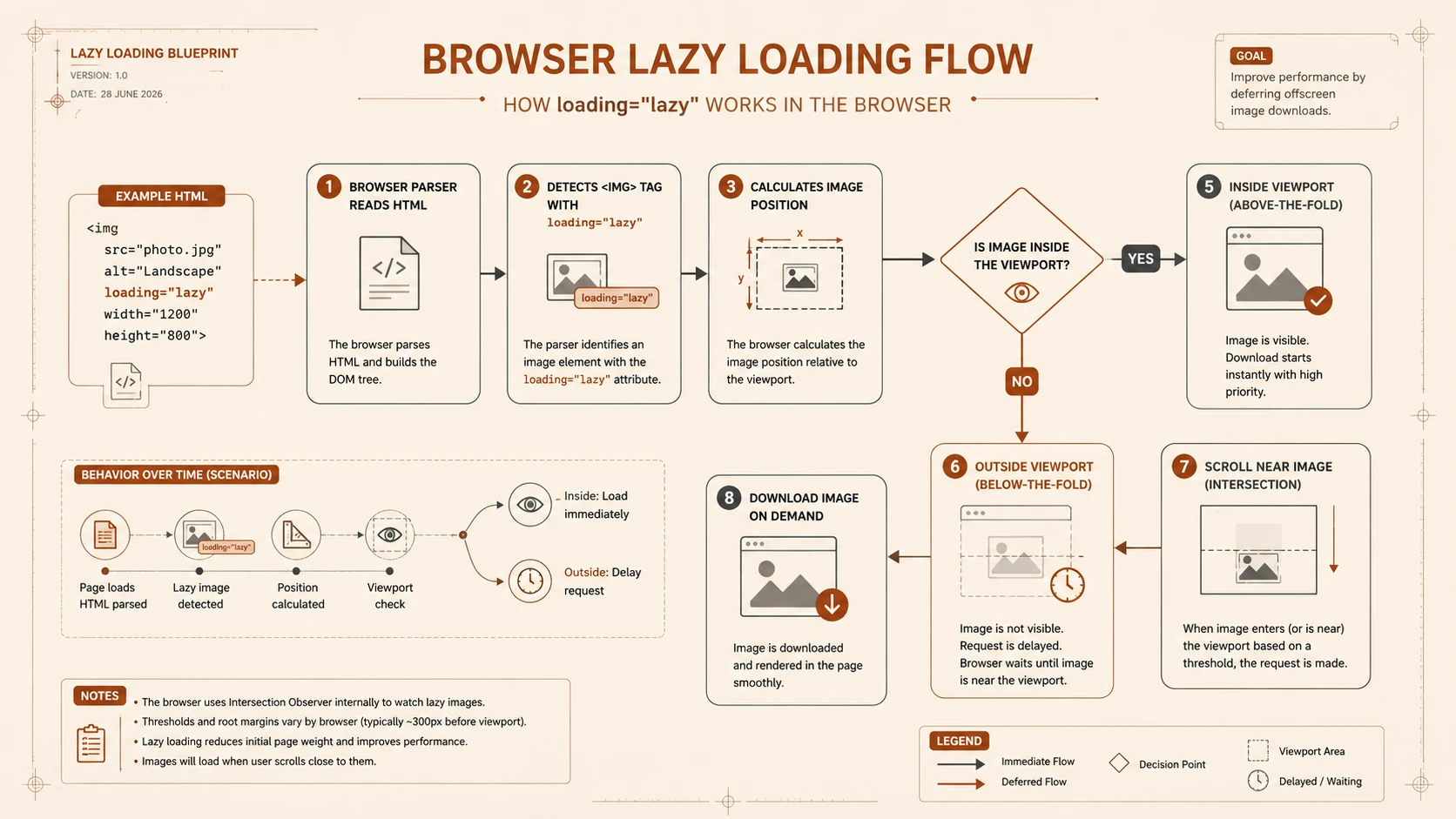
System architecture diagram and conceptual workflow layout for HTML5 Native Lazy Loading.
How It Works
A simplified loading workflow appears below.
Browser Parses HTML
         |
Image Found
         |
loading="lazy"?
      /       \
    Yes        No
     |          |
Viewport?   Download Immediately
     |
Near Viewport?
     |
Download Resource
     |
Render Image
The browser decides when deferred resources should begin downloading based on their proximity to the visible viewport.
Enterprise Use Cases
E-Commerce Platforms
Large product catalogs containing hundreds of product images benefit from reduced initial download sizes.
News Websites
Articles containing extensive inline photography can load visible content first while postponing lower-page assets.
Documentation Portals
Technical documentation often includes diagrams and screenshots positioned far below the initial viewport.
Native lazy loading reduces unnecessary downloads.
Enterprise Dashboards
Administrative interfaces containing numerous visualizations and reports benefit from deferred loading of secondary content.
Content Management Systems
Organizations publishing media-rich content can improve page responsiveness without integrating additional optimization libraries.
Performance Considerations
Native lazy loading primarily optimizes network behavior rather than rendering algorithms.
Organizations should evaluate:
- ◆Initial page load time.
- ◆Total network requests.
- ◆Image download timing.
- ◆Mobile bandwidth usage.
- ◆Layout stability.
- ◆Browser resource prioritization.
Performance improvements depend on page structure, image quantity, viewport behavior, and browser implementation.
Security Considerations
Native lazy loading introduces minimal direct security implications.
Organizations should continue implementing:
- ◆HTTPS.
- ◆Secure Content Security Policy.
- ◆Secure image hosting.
- ◆Input validation.
- ◆Authentication.
- ◆Authorization.
Performance optimization should complement broader secure application architecture.
Scalability
Native lazy loading improves front-end scalability through:
- ◆Reduced network utilization.
- ◆Simpler HTML implementation.
- ◆Lower JavaScript complexity.
- ◆Improved browser coordination.
- ◆Easier maintenance.
These characteristics benefit large enterprise websites serving millions of assets.
Best Practices
Organizations adopting native lazy loading should:
- ◆Apply
loading="lazy"primarily to below-the-fold images. - ◆Keep critical above-the-fold images loading normally.
- ◆Test browser compatibility across supported environments.
- ◆Measure real-world performance before large-scale rollout.
- ◆Combine lazy loading with responsive image techniques where appropriate.
- ◆Continue optimizing image formats and compression.
- ◆Validate user experience on mobile networks.
Native browser capabilities should be preferred where they satisfy performance requirements.
Common Mistakes
| Mistake | Business Impact |
|---|---|
| Applying lazy loading to critical hero images | Slower perceived page rendering |
| Assuming identical browser behavior everywhere | Inconsistent performance expectations |
| Ignoring browser compatibility testing | Unexpected user experience differences |
| Treating lazy loading as a substitute for image optimization | Excessive bandwidth usage |
| Deferring essential application assets | Reduced usability |
| Eliminating performance measurement after adoption | Missed optimization opportunities |
Successful implementations combine native lazy loading with broader web performance engineering practices.
Technology Comparison
| Characteristic | JavaScript Lazy Loading Libraries | Native HTML Lazy Loading |
|---|---|---|
| JavaScript Requirement | Required | Not required |
| Browser Coordination | Application controlled | Browser controlled |
| HTML Simplicity | Additional scripting | Declarative attribute |
| Bundle Size | Larger | Smaller |
| Maintenance | Library updates | Standards-based implementation |
| Performance Integration | External logic | Native rendering engine |
Native lazy loading simplifies common optimization scenarios while reducing dependency on client-side scripting.
Adoption Strategy
Organizations should adopt native lazy loading incrementally.
- 1.Identify pages with significant offscreen media.
- 2.Enable
loading="lazy"for non-critical images. - 3.Verify browser compatibility requirements.
- 4.Measure network and rendering improvements.
- 5.Maintain fallbacks where required.
- 6.Expand deployment following production validation.
This phased approach minimizes deployment risk while allowing engineering teams to evaluate measurable performance improvements.
Limitations
As of August 2019, organizations should recognize several considerations.
- ◆Browser support continues evolving and should be validated against target environments.
- ◆Browsers retain discretion over resource scheduling decisions.
- ◆Critical content should generally continue loading eagerly.
- ◆Existing JavaScript solutions may remain necessary for advanced loading behaviors.
- ◆Production performance should be verified through representative testing.
These considerations should guide enterprise adoption planning.
Looking Ahead
From the perspective of August 2019, the introduction of the loading="lazy" attribute demonstrates the continued evolution of the HTML platform toward providing native solutions for common performance optimization techniques. By allowing browsers to manage deferred image and iframe loading directly, developers can simplify application architecture while reducing reliance on JavaScript libraries.
For organizations focused on responsive design, mobile performance, and long-term maintainability, native lazy loading offers an attractive standards-based approach to optimizing media-rich web applications. As browser implementations continue maturing, browser-managed resource scheduling is positioned to become a fundamental component of modern web performance engineering.