Introduction
Web applications have evolved considerably over the past decade. Modern browsers now support sophisticated JavaScript execution, responsive layouts, client-side storage, and powerful APIs that allow developers to build increasingly capable applications without requiring traditional software installation.
Despite these advances, native mobile applications continue offering advantages in reliability, offline operation, performance, and user engagement. Enterprise organizations frequently maintain separate web and native applications to satisfy different user expectations, increasing development and maintenance costs.
Progressive Web Apps (PWAs) seek to narrow this gap by combining responsive web design with modern browser technologies such as Service Workers and the Cache API. Rather than creating a separate application platform, PWAs enhance existing web applications so they remain functional across varying network conditions while providing a more application-like experience.
For enterprise architects, Progressive Web Apps represent an emerging architectural approach that balances the reach of the web with capabilities traditionally associated with native applications.
Industry Background
Enterprise organizations increasingly deliver services through:
- ◆Customer portals
- ◆E-commerce platforms
- ◆Self-service applications
- ◆Field service systems
- ◆Mobile business applications
- ◆Internal productivity tools
- ◆Business dashboards
- ◆Collaboration platforms
Users increasingly expect these applications to remain responsive regardless of network quality.
Improving reliability without sacrificing the openness of the web has therefore become a significant engineering objective.
The Business Problem
Traditional web applications often depend upon continuous network connectivity.
Common challenges include:
- ◆Slow mobile networks
- ◆Temporary connection loss
- ◆Repeated downloading of static assets
- ◆Long application startup times
- ◆Reduced user engagement
- ◆Limited offline capability
Organizations require techniques that improve reliability while continuing to leverage existing web technologies.
Understanding Progressive Web Apps
A Progressive Web App is a web application that progressively enhances the user experience by taking advantage of browser features when available while remaining functional on browsers that do not support every capability.
Key principles include:
- ◆Progressive enhancement
- ◆Responsive design
- ◆Reliable operation
- ◆Offline capability
- ◆Secure delivery over HTTPS
- ◆Application-like interaction
Rather than replacing existing websites, PWAs build upon standard web technologies.
Core Architecture
| Component | Responsibility |
|---|---|
| Browser | Executes application |
| Service Worker | Background network and cache management |
| Cache API | Stores application resources |
| HTTPS | Secure communication |
| Web App Manifest | Describes application metadata |
| JavaScript Application | Business logic and interface |
Together these components create a more resilient web application architecture.
How Progressive Web Apps Work
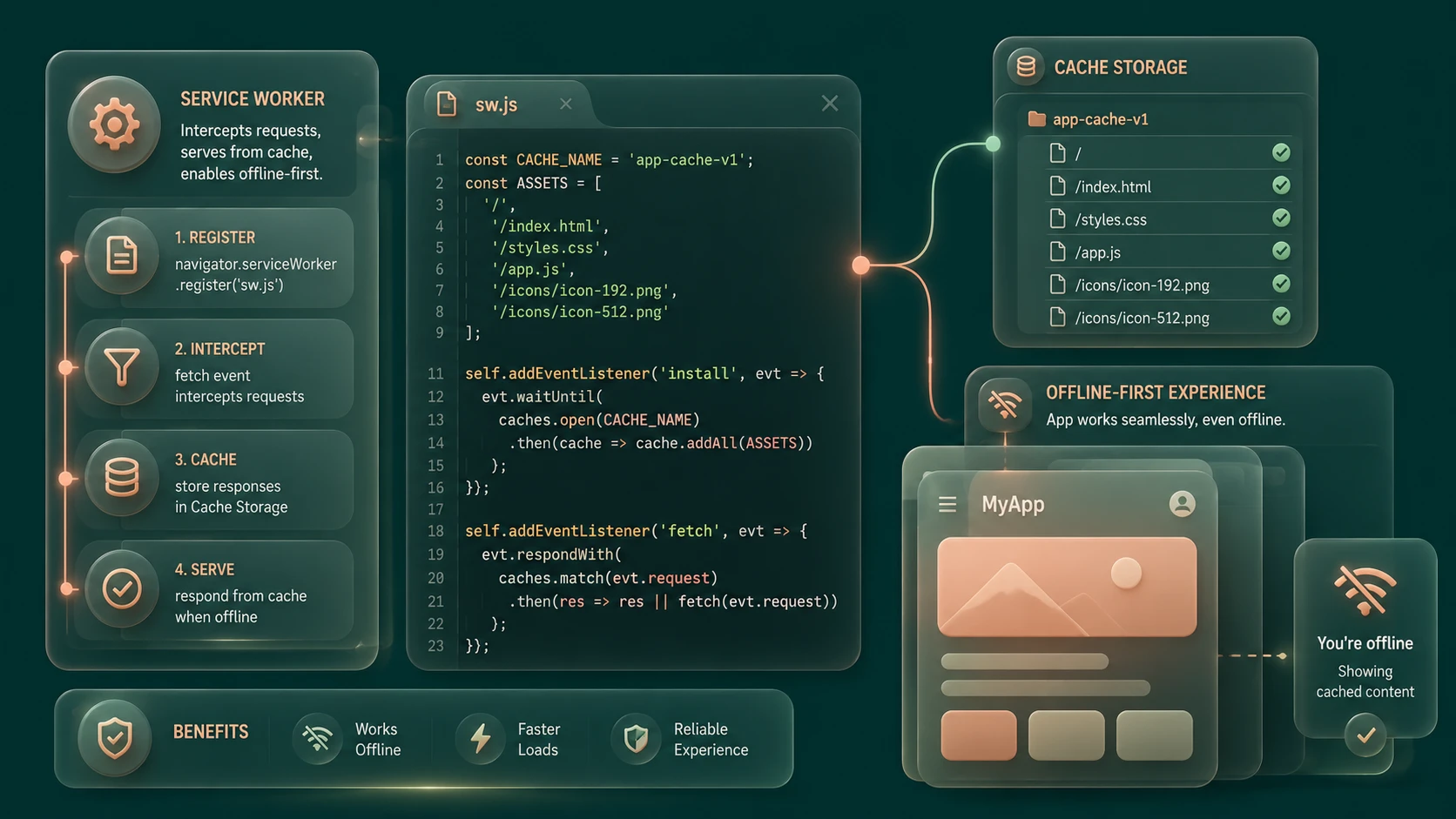
A simplified workflow includes:
- 1.User visits the application over HTTPS.
- 2.The browser downloads application assets.
- 3.A Service Worker is registered.
- 4.Static resources are stored using the Cache API.
- 5.Future requests are intercepted by the Service Worker.
- 6.Cached resources are returned when appropriate.
- 7.The application continues operating even during temporary network interruptions.
This architecture improves reliability while reducing unnecessary network requests.
Service Workers
// Basic Service Worker caching strategy: Cache First with Network Fallback
const CACHE_NAME = 'shivam-cache-v1';
const ASSETS = [
  '/',
  '/index.html',
  '/css/style.css',
  '/js/app.js'
];

self.addEventListener('install', event => {
  event.waitUntil(
    caches.open(CACHE_NAME).then(cache => cache.addAll(ASSETS))
  );
});

self.addEventListener('fetch', event => {
  event.respondWith(
    caches.match(event.request).then(response => {
      return response || fetch(event.request);
    })
  );
});
Service Workers are background scripts that execute independently from the web page.
Unlike traditional JavaScript running within the browser window, Service Workers can intercept network requests and determine how responses should be handled.
Typical responsibilities include:
- ◆Resource caching
- ◆Offline support
- ◆Request interception
- ◆Background synchronization when supported by the browser
- ◆Performance optimization
Service Workers execute separately from the user interface and therefore require explicit communication with the application.
Cache API
The Cache API enables applications to store HTTP responses locally within the browser.
Developers can cache:
- ◆HTML documents
- ◆JavaScript files
- ◆CSS stylesheets
- ◆Images
- ◆Fonts
- ◆API responses where appropriate
Combined with Service Workers, cached resources allow applications to remain functional during unreliable network conditions.
Offline-First Architecture
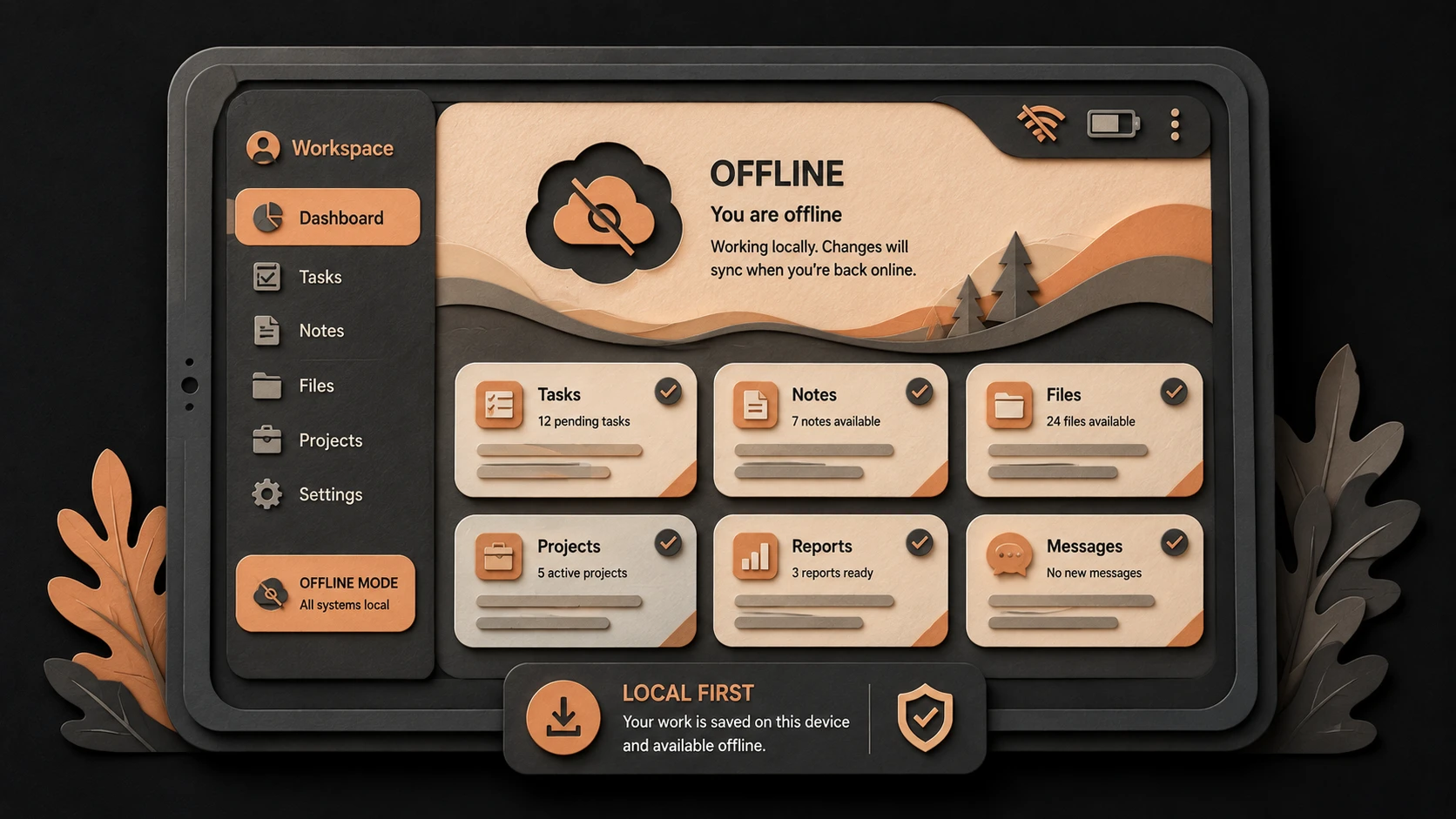
Offline-first design encourages developers to treat unreliable connectivity as a normal operating condition rather than an exception.
Instead of assuming every request succeeds immediately, applications prioritize locally available resources before requesting updated information from the network.
Benefits include:
- ◆Faster startup
- ◆Better user experience
- ◆Reduced bandwidth usage
- ◆Improved resilience
- ◆More consistent application behavior
This architectural approach is particularly valuable for mobile users operating on variable network connections.
Key Features
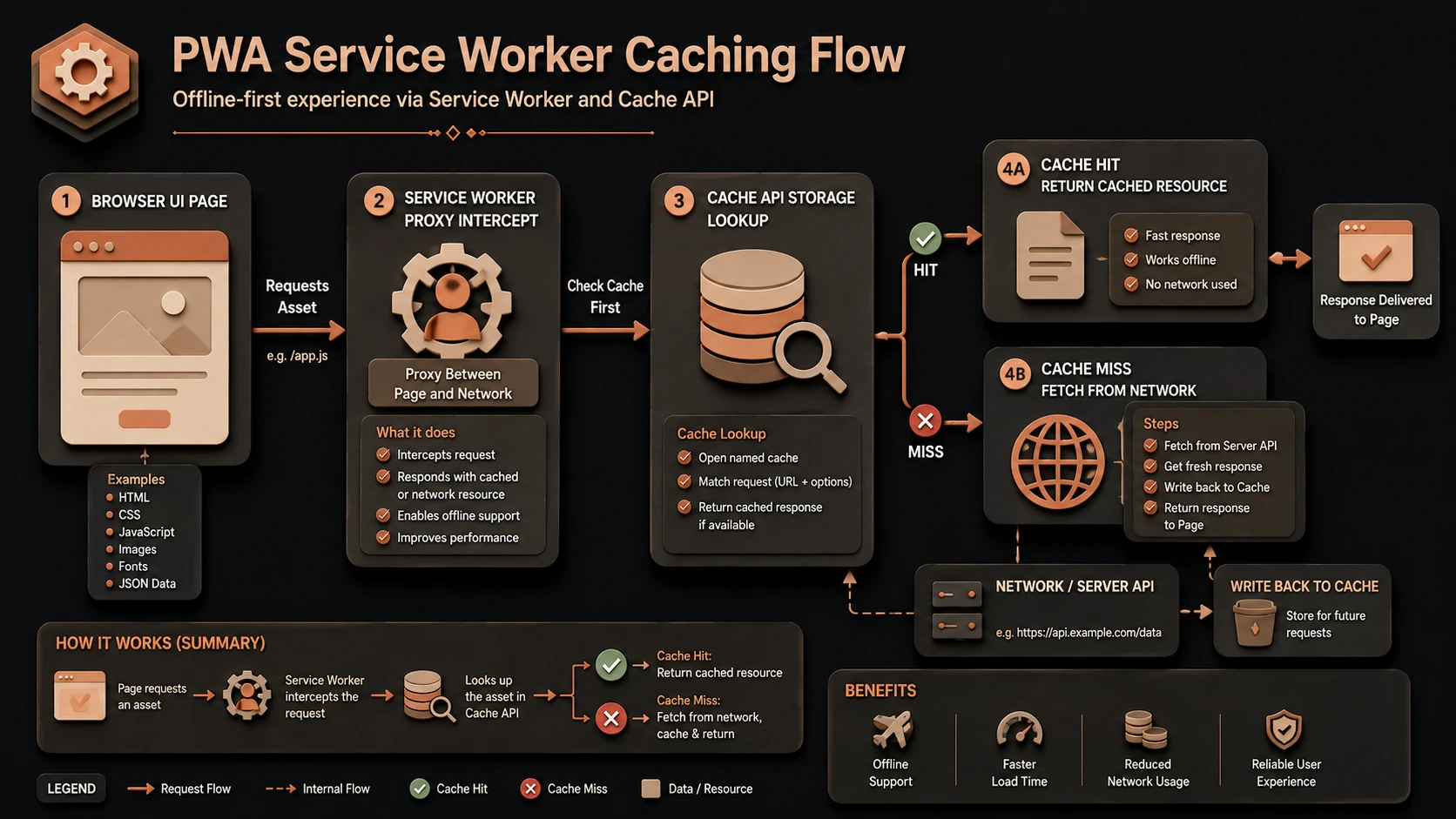
System architecture diagram and conceptual workflow layout for Progressive Web Apps.
Progressive Enhancement
Applications continue functioning across browsers while enabling advanced capabilities where supported.
Reliable Asset Delivery
Cached application resources reduce dependence on repeated network downloads.
Responsive User Experience
Applications remain usable during temporary connectivity interruptions.
Secure Delivery
Service Workers require HTTPS, encouraging secure deployment practices.
Installable Experience
Supporting browsers may present opportunities for users to add applications to their device without traditional application stores.
Enterprise Use Cases
Customer Self-Service Portals
Users benefit from improved reliability when accessing account information.
Field Service Applications
Workers operating in areas with inconsistent connectivity can continue accessing previously cached application resources.
Retail Applications
Product catalogs and shopping experiences benefit from reduced loading times.
Business Dashboards
Frequently accessed interface assets load quickly while reducing bandwidth consumption.
Corporate Portals
Employees experience improved responsiveness across desktop and mobile browsers.
Performance Considerations
PWAs can improve perceived application performance through:
- ◆Reduced network requests
- ◆Local resource caching
- ◆Faster application startup
- ◆Efficient asset reuse
- ◆Lower bandwidth consumption
Organizations should continue monitoring cache size, update strategies, and resource invalidation policies.
Security Considerations
Because Service Workers can intercept network requests, secure deployment practices are essential.
Enterprise organizations should implement:
- ◆HTTPS for all production deployments
- ◆Authentication
- ◆Authorization
- ◆Secure cache management
- ◆Input validation
- ◆Regular application updates
Caching strategies should avoid storing sensitive information unnecessarily.
Scalability
Progressive Web Apps support scalable enterprise deployment by reducing repeated downloads of static assets and improving client-side efficiency.
Benefits include:
- ◆Lower server load
- ◆Better bandwidth utilization
- ◆Improved user responsiveness
- ◆Reusable application assets
- ◆Consistent browser experience
These characteristics complement existing web infrastructure rather than replacing it.
Best Practices
- ◆Serve applications exclusively over HTTPS.
- ◆Cache static assets thoughtfully.
- ◆Design graceful offline behavior.
- ◆Keep Service Workers focused and maintainable.
- ◆Plan cache versioning strategies.
- ◆Test across supported browsers.
- ◆Monitor application performance.
- ◆Continue applying responsive design principles.
Common Mistakes
| Mistake | Enterprise Impact |
|---|---|
| Caching outdated resources indefinitely | Users receive stale content |
| Storing sensitive information unnecessarily | Increased security risk |
| Ignoring cache invalidation | Difficult updates |
| Assuming every browser supports identical features | Compatibility issues |
| Poor offline experience design | Reduced usability |
| Deploying without HTTPS | Service Workers unavailable |
Technology Comparison
| Capability | Traditional Web Application | Progressive Web App |
|---|---|---|
| Offline Capability | Limited | Supported Through Service Workers |
| Asset Caching | Browser Default | Cache API Control |
| Network Request Handling | Browser Managed | Service Worker Interception |
| Responsive Design | Supported | Supported |
| Installable Experience | Limited | Available on Supporting Browsers |
| Secure Deployment | Recommended | Required for Service Workers |
Adoption Strategy
- 1.Audit existing web applications.
- 2.Enable HTTPS across all environments.
- 3.Introduce a Service Worker.
- 4.Cache essential application assets.
- 5.Design offline behavior.
- 6.Test across supported browsers.
- 7.Measure performance improvements.
- 8.Expand Progressive Web App capabilities incrementally.
Limitations
As of May 2016, Progressive Web Apps remain an emerging architectural approach. Browser support for Service Workers and related APIs continues to evolve, and organizations should validate compatibility across their supported platforms before depending upon advanced capabilities. Traditional native applications may still be appropriate for workloads requiring platform-specific features unavailable through current web standards.
Looking Ahead
From the perspective of May 2016, Progressive Web Apps represent one of the most promising directions for modern web application development. By combining Service Workers, the Cache API, responsive design, and secure deployment practices, developers can build web applications that remain reliable under varying network conditions while delivering increasingly application-like user experiences. As browser implementations continue expanding support for these standards, enterprise organizations are expected to evaluate Progressive Web Apps as an important option for delivering scalable, maintainable, and highly accessible business applications.