Introduction
Modern web applications increasingly resemble desktop software. Rather than reloading an entire HTML document after every user interaction, applications now dynamically update portions of the interface while communicating with backend services through HTTP APIs. This architectural approach has given rise to the Single Page Application (SPA), where application logic, navigation, and rendering largely occur within the browser.
Frameworks such as AngularJS, Backbone.js, Ember.js, Knockout.js, and the emerging React.js ecosystem have accelerated this transition by encouraging richer client-side experiences. However, one significant challenge accompanies this shift: managing navigation while preserving the usability users expect from traditional websites.
Users still expect browser features such as the Back button, bookmarks, refresh, deep linking, and meaningful URLs to function correctly. Without careful routing architecture, client-side applications can lose these capabilities, resulting in poor usability and difficult maintenance.
The HTML5 History API addresses this challenge by allowing applications to manipulate browser history without forcing full page reloads. Combined with thoughtful route design, it enables enterprise applications to deliver responsive user experiences while preserving familiar navigation behavior.
Industry Background
Traditional web applications rely on server-side routing. Every navigation request results in a new HTTP request, server-side processing, and a complete HTML document returned to the browser.
Single Page Applications reverse much of this responsibility. After the initial page load, JavaScript manages interface rendering while backend services expose business functionality through RESTful APIs.
Earlier client-side routing solutions commonly depended on URL fragments using the hash (#) portion of a URL. Although functional, fragment-based navigation introduced limitations involving search engine indexing, URL consistency, browser behavior, and server integration.
The HTML5 History API offers a cleaner alternative by allowing applications to manage navigation using standard URLs while maintaining browser history.
The Business Problem
Enterprise SPA development introduces several navigation challenges.
Common issues include:
- ◆Broken browser Back and Forward navigation
- ◆Inconsistent URLs
- ◆Poor bookmark support
- ◆Difficult application state restoration
- ◆Limited deep linking
- ◆Duplicate routing logic
- ◆Reduced maintainability across growing applications
Without a structured routing architecture, large client-side applications become increasingly difficult to maintain and integrate with backend systems.
Understanding Client-Side Routing
Client-side routing allows navigation between application views without requesting an entirely new page from the server.
Instead of loading complete documents, the application:
- ◆Interprets the requested URL
- ◆Determines the appropriate view
- ◆Retrieves required data from APIs if necessary
- ◆Updates the interface dynamically
The browser continues displaying a single HTML document while JavaScript manages the visible application state.
Core Architecture
A typical SPA routing architecture separates navigation responsibilities across several components.
| Component | Responsibility |
|---|---|
| Browser | Maintains history and URL |
| HTML5 History API | Updates browser history |
| Router | Maps URLs to application views |
| View Layer | Renders user interface |
| REST API | Supplies business data |
| Application State | Maintains current user context |
This separation encourages modular application design and simplifies long-term maintenance.
HTML5 History API
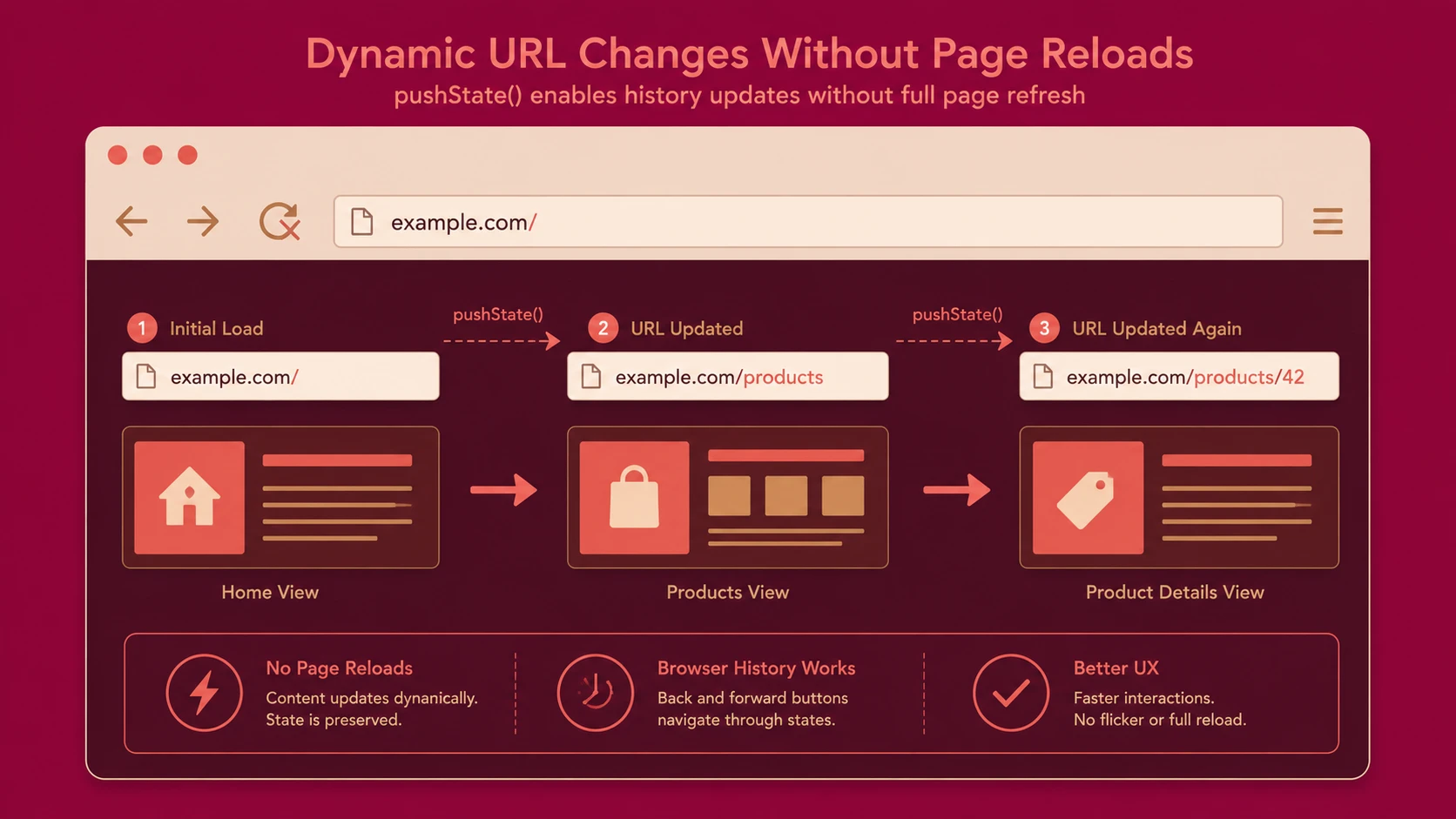
The HTML5 History API enables applications to modify browser history without forcing a full page refresh.
The primary capabilities include:
- ◆Adding history entries
- ◆Replacing the current history entry
- ◆Responding to browser navigation events
- ◆Preserving clean URLs
Unlike fragment-based routing, URLs remain conventional and easier to understand.
How Routing Works
A typical navigation sequence includes:
- 1.The user selects a link.
- 2.The router intercepts the navigation request.
- 3.The URL is updated using the History API.
- 4.The appropriate application view is identified.
- 5.Required data is requested from backend APIs.
- 6.The interface is updated dynamically.
- 7.Browser history records the navigation.
The browser behaves similarly to a traditional website while avoiding unnecessary document reloads.
Managing Application State
Routing is closely related to application state.
Each URL should represent a meaningful application state whenever practical.
Examples include:
- ◆Viewing a customer profile
- ◆Editing an order
- ◆Displaying a reporting dashboard
- ◆Viewing search results
Representing state through URLs allows users to bookmark, refresh, or share application locations.
Deep Linking
Deep linking enables users to navigate directly to a specific application state.
Examples include:
/customers/1205
/orders/814
/reports/monthly
/products/network-switches
Rather than opening only the application's home page, users access meaningful resources directly.
This capability improves both usability and integration with enterprise workflows.
Browser Navigation
One advantage of the History API is preserving expected browser behavior.
Applications should support:
- ◆Back navigation
- ◆Forward navigation
- ◆Refresh
- ◆Bookmarking
- ◆Direct URL entry
Users should not be required to understand application internals in order to navigate effectively.
Route Design
Well-designed routes should be:
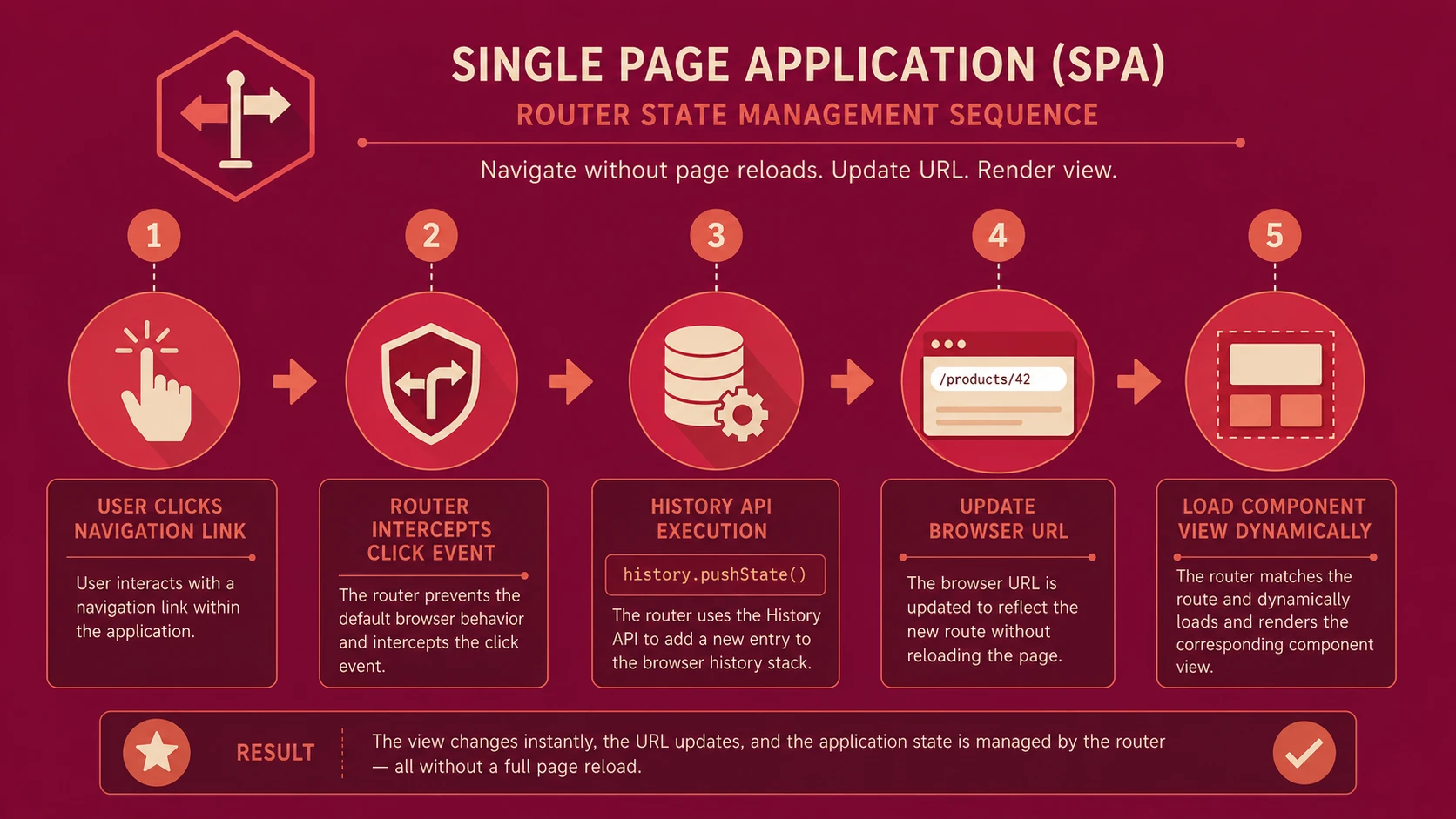
System architecture diagram and conceptual workflow layout for Single Page Application Routing.
- ◆Predictable
- ◆Human-readable
- ◆Stable
- ◆Resource-oriented
- ◆Consistent
Example routes include:
/dashboard
/projects
/projects/125
/users
/users/42/settings
Clear URL structures simplify development while improving usability.
Integration with RESTful APIs
Modern SPAs frequently consume RESTful APIs.
A common architectural separation includes:
- ◆Browser manages navigation.
- ◆Router manages views.
- ◆REST APIs provide business data.
- ◆Backend services remain independent of presentation.
This separation allows frontend and backend components to evolve independently.
Enterprise Use Cases
| Scenario | Benefit |
|---|---|
| Enterprise dashboards | Responsive navigation |
| CRM systems | Deep linking to customer records |
| ERP applications | Modular application structure |
| SaaS platforms | Improved user experience |
| Project management tools | Bookmarkable workspaces |
| Internal business portals | Faster navigation |
Organizations building rich browser applications benefit from structured routing strategies.
Performance Considerations
Client-side routing reduces unnecessary page reloads but should be implemented thoughtfully.
Performance recommendations include:
- ◆Load data only when needed.
- ◆Cache frequently accessed resources where appropriate.
- ◆Minimize unnecessary view rendering.
- ◆Organize routes modularly.
- ◆Reduce JavaScript payload size.
Efficient routing complements overall application architecture rather than replacing sound performance engineering.
Security Considerations
Client-side routing does not replace server-side security.
Organizations should continue enforcing:
- ◆Authentication
- ◆Authorization
- ◆Input validation
- ◆HTTPS
- ◆Server-side permission checks
Protected resources should never rely solely on client-side route restrictions.
Scalability
As applications expand, routing architecture should remain maintainable.
Scalable routing strategies typically include:
- ◆Modular route definitions
- ◆Separation of routing and business logic
- ◆Consistent URL conventions
- ◆Independent feature modules
- ◆Reusable navigation components
Well-organized routing simplifies long-term application evolution.
Best Practices
Organizations designing enterprise SPAs should:
- ◆Design meaningful URLs.
- ◆Support browser navigation consistently.
- ◆Keep routing independent of business logic.
- ◆Organize routes by application modules.
- ◆Preserve deep linking.
- ◆Validate route parameters.
- ◆Handle missing routes gracefully.
- ◆Integrate routing with RESTful service architecture.
- ◆Document routing conventions.
- ◆Test navigation across supported browsers.
These practices improve maintainability while enhancing the user experience.
Common Mistakes
Development teams frequently encounter several routing issues.
Common mistakes include:
- ◆Treating URLs as implementation details.
- ◆Breaking browser Back button behavior.
- ◆Embedding business logic within route handlers.
- ◆Ignoring refresh scenarios.
- ◆Creating inconsistent URL structures.
- ◆Depending exclusively on client-side authorization.
A disciplined routing architecture helps prevent these problems.
Technology Comparison
| Capability | Hash-Based Routing | HTML5 History API |
|---|---|---|
| Clean URLs | Limited | Yes |
| Browser History Integration | Basic | Native |
| Deep Linking | Supported with fragments | Fully supported |
| Bookmarkable Routes | Yes | Yes |
| Standard URL Structure | No | Yes |
| Enterprise-Friendly URL Design | Moderate | Excellent |
The History API provides a more natural navigation experience while maintaining compatibility with standard browser behavior.
Adoption Strategy
Organizations introducing SPA routing should proceed incrementally.
A recommended approach includes:
- 1.Define enterprise URL standards.
- 2.Implement centralized routing.
- 3.Integrate routing with backend REST APIs.
- 4.Support browser history consistently.
- 5.Validate deep linking across application modules.
- 6.Test refresh and bookmark scenarios.
- 7.Expand routing architecture as additional modules are introduced.
Planning navigation architecture early reduces long-term maintenance costs.
Limitations
Although the HTML5 History API significantly improves SPA navigation, organizations should recognize several considerations.
Current considerations include:
- ◆Server configuration must support direct requests for application routes.
- ◆Browser compatibility should be evaluated according to organizational requirements.
- ◆Client-side routing introduces additional JavaScript complexity.
- ◆Large applications require disciplined route organization and governance.
Technology selection should align with application architecture and deployment strategy.
Looking Ahead
As of May 2014, Single Page Applications continue to gain momentum across enterprise software development. Rich browser experiences increasingly depend on robust client-side routing that preserves familiar navigation while supporting modular application architectures.
The HTML5 History API provides a strong foundation for implementing clean URLs, deep linking, and browser history management without sacrificing responsiveness. Organizations investing in large-scale JavaScript applications should view routing as a core architectural concern, ensuring navigation, application state, and backend services remain clearly separated to support long-term scalability and maintainability.