Introduction
Enterprise mobility has become one of the defining priorities for software organizations during the past several years. Employees increasingly expect business applications to operate across smartphones and tablets running different operating systems, while development teams face growing pressure to deliver applications quickly without maintaining multiple independent codebases.
Cross-platform mobile development has emerged as an attractive alternative to fully native application development. PhoneGap has already demonstrated that web technologies such as HTML5, CSS3, and JavaScript can be packaged as native applications through Apache Cordova. PhoneGap Build extends this concept by moving the compilation process into the cloud.
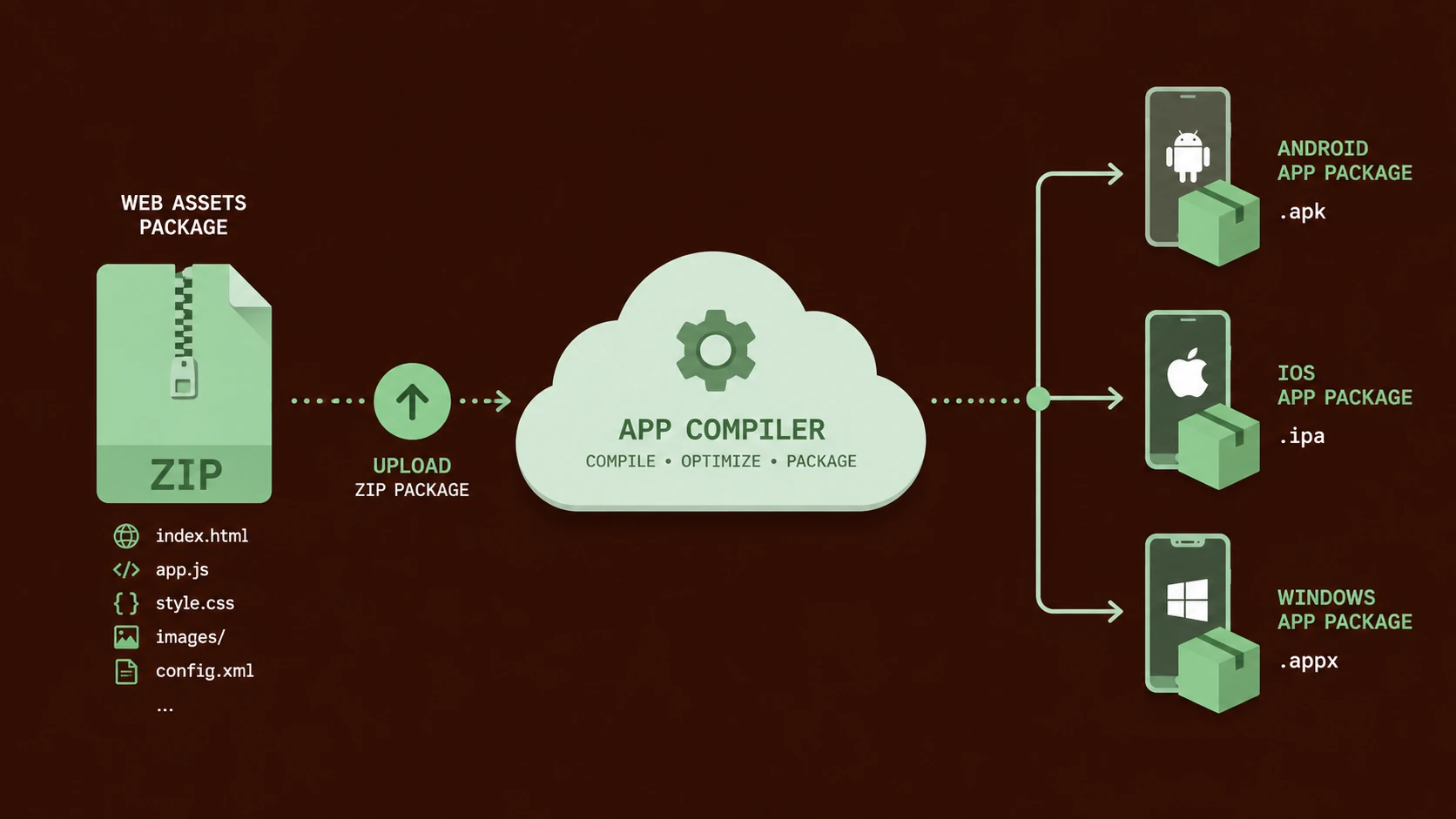
Rather than requiring developers to install multiple platform SDKs locally, PhoneGap Build allows application source code to be uploaded to Adobe's cloud infrastructure, where native application packages are generated for supported mobile platforms.
For enterprise architects, this service represents an important step toward simplifying mobile application delivery across increasingly diverse device ecosystems.
Industry Background
Mobile application development has become considerably more complex as organizations attempt to support multiple operating systems.
Developers commonly target:
- ◆Apple's iOS
- ◆Google Android
- ◆Windows Phone
- ◆BlackBerry
- ◆Other mobile platforms
Each platform traditionally requires its own software development kit, build tools, provisioning process, and packaging workflow.
Managing these environments increases development costs while slowing application delivery.
Cloud-based build services seek to simplify this process by centralizing compilation infrastructure.
The Business Problem
Enterprise mobility initiatives frequently encounter several operational challenges:
- ◆Multiple development environments
- ◆Platform-specific SDK installation
- ◆Hardware requirements for native compilation
- ◆Increasing maintenance costs
- ◆Complex release processes
- ◆Inconsistent build environments
Organizations developing applications for multiple platforms require more efficient deployment workflows while preserving application quality.
Understanding PhoneGap Build
PhoneGap Build is a cloud-hosted compilation service designed to package PhoneGap applications into native installation packages.
Developers create applications using familiar web technologies including HTML5, CSS3, and JavaScript. Instead of compiling locally, project files are uploaded to the PhoneGap Build service, which generates native application packages for supported mobile operating systems.
This approach enables development teams to focus primarily on application functionality while reducing infrastructure complexity.
Core Architecture
PhoneGap Build combines several components into a cloud-based development workflow.
| Component | Responsibility |
|---|---|
| HTML5 Application | User interface and content |
| CSS3 | Presentation layer |
| JavaScript | Application logic |
| PhoneGap APIs | Native device access |
| Cloud Build Service | Native package generation |
| Platform SDKs | Native compilation |
| Mobile Application Package | Deployable application |
The cloud service abstracts platform-specific compilation details while preserving compatibility with native deployment mechanisms.
How PhoneGap Build Works
A typical development workflow includes:
- 1.Developers create an application using HTML5, CSS3, and JavaScript.
- 2.PhoneGap APIs provide access to supported device capabilities.
- 3.Project files are uploaded to PhoneGap Build.
- 4.Cloud infrastructure performs platform-specific compilation.
- 5.Native application packages are generated.
- 6.Packages are downloaded for testing or distribution.
- 7.Applications are submitted to their respective application marketplaces.
This workflow reduces the need to maintain multiple native development environments.
Key Features
Cloud-Based Compilation
Developers no longer need to install every supported mobile SDK locally to generate application packages.
Cross-Platform Deployment
A single web application can be packaged for multiple mobile operating systems.
HTML5 Development
Teams leverage existing web development skills instead of learning multiple native programming languages.
Apache Cordova Integration
<!-- config.xml file defining parameters for PhoneGap Build compilation -->
<?xml version='1.0' encoding='utf-8'?>
<widget id="com.shivamitcs.mobileapp" version="1.0.0" xmlns="http://www.w3.org/ns/widgets">
    <name>Shivam ITCS Mobile Portal</name>
    <description>Enterprise PhoneGap Mobile Client</description>
    <author email="support@shivamitcs.in">Vijay Paliwal</author>
    <access origin="*" />
    <preference name="Orientation" value="portrait" />
    <plugin name="cordova-plugin-camera" source="npm" />
</widget>
PhoneGap Build continues using the PhoneGap framework's abstraction layer to access supported device capabilities.
Simplified Build Infrastructure
Cloud-hosted compilation reduces dependency on local build servers and development hardware.
Enterprise Use Cases
PhoneGap Build is particularly attractive for organizations seeking rapid mobile application delivery.
Employee Self-Service Applications
Internal business applications can be deployed across multiple device platforms using a common codebase.
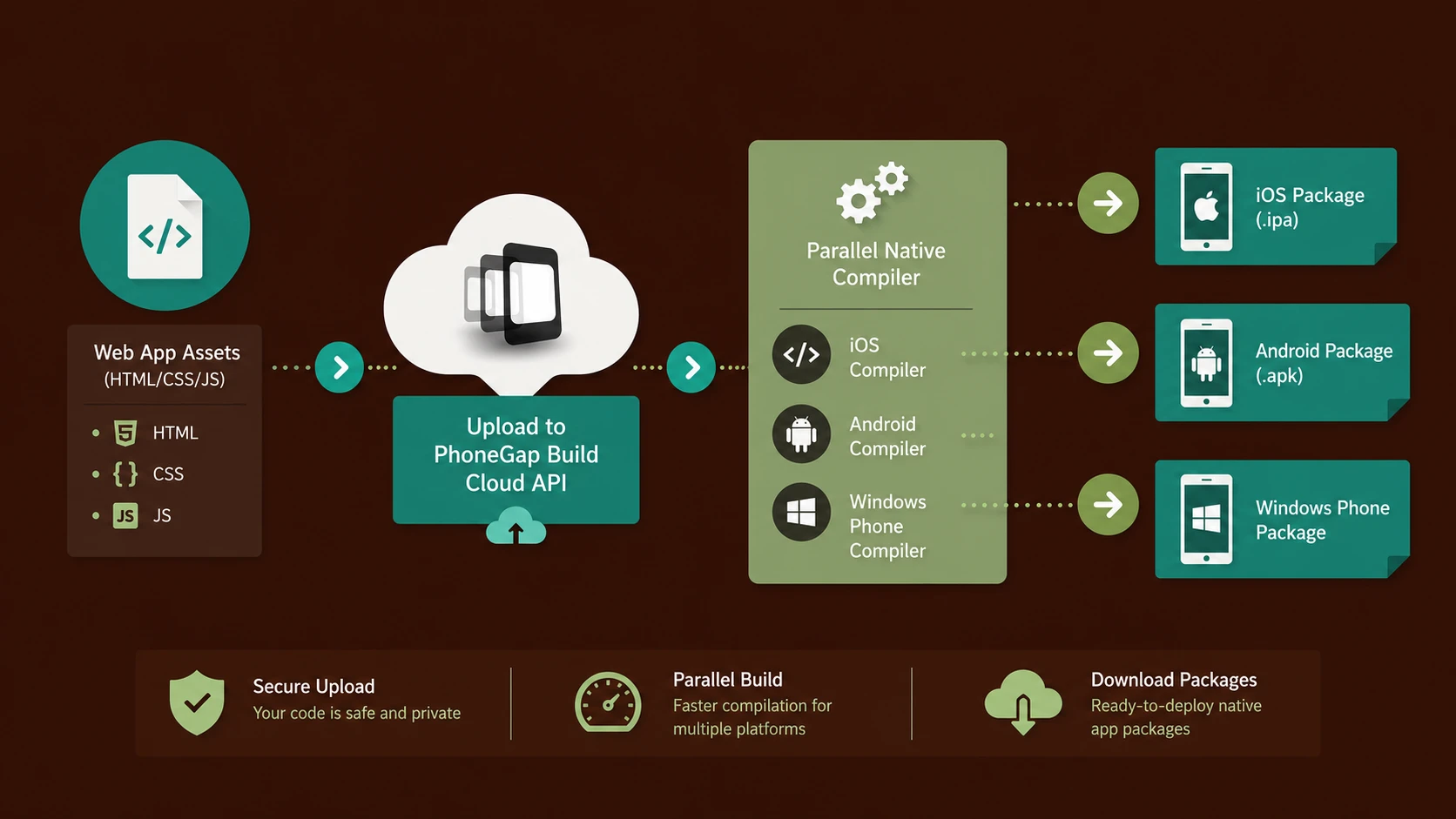
System architecture diagram and conceptual workflow layout for PhoneGap Build: Compiling Cross-Platform Native Packages in the Cloud.
Sales Mobility
Cross-platform applications simplify support for employees using different smartphones and tablets.
Customer Portals
Organizations can provide mobile access without maintaining several independent native projects.
Field Service Solutions
Technicians operating across diverse mobile hardware benefit from consistent application functionality.
Prototype Development
Rapid packaging accelerates proof-of-concept and pilot application development.
Performance Considerations
PhoneGap applications execute within a native application container while rendering user interfaces using web technologies.
Organizations should evaluate:
- ◆JavaScript execution performance
- ◆HTML rendering efficiency
- ◆Device memory usage
- ◆Startup time
- ◆Network latency
- ◆Native API utilization
Applications with graphics-intensive workloads may require additional performance testing before production deployment.
Security Considerations
Cloud-based build services introduce additional operational considerations.
Organizations should implement:
- ◆Secure source code management
- ◆Controlled build access
- ◆Application signing procedures
- ◆Secure credential management
- ◆Code review processes
- ◆Mobile device security policies
Sensitive enterprise applications should also undergo comprehensive security testing regardless of the build environment.
Scalability
PhoneGap Build primarily improves development scalability rather than application runtime scalability.
Benefits include:
- ◆Centralized build infrastructure
- ◆Consistent compilation environments
- ◆Reduced workstation requirements
- ◆Faster onboarding of development teams
- ◆Simplified release management
Development organizations supporting multiple mobile platforms may realize significant operational efficiencies.
Best Practices
Organizations evaluating PhoneGap Build should consider the following recommendations.
- ◆Design applications using responsive HTML5 principles.
- ◆Minimize unnecessary plugin dependencies.
- ◆Test on representative physical devices.
- ◆Optimize JavaScript performance.
- ◆Secure application signing keys.
- ◆Maintain version-controlled source repositories.
- ◆Validate platform-specific behavior.
- ◆Benchmark user experience before production deployment.
Common Mistakes
| Mistake | Enterprise Impact |
|---|---|
| Assuming identical behavior across every platform | Compatibility issues |
| Ignoring device testing | Production defects |
| Excessive JavaScript libraries | Reduced performance |
| Overusing plugins | Increased maintenance |
| Weak signing procedures | Security risks |
| Treating PhoneGap as identical to native development | Unrealistic expectations |
Cross-platform development reduces duplication but does not eliminate platform-specific validation requirements.
Technology Comparison
| Capability | Native Development | PhoneGap Build |
|---|---|---|
| Programming Languages | Platform Specific | HTML5, CSS3, JavaScript |
| Build Environment | Local SDKs | Cloud-Based |
| Cross-Platform Code Reuse | Limited | High |
| Native Device Access | Full | Through PhoneGap APIs |
| Development Complexity | Higher | Lower |
| Build Infrastructure | Developer Managed | Cloud Managed |
PhoneGap Build focuses on simplifying application packaging while leveraging established web development skills.
Adoption Strategy
Organizations considering PhoneGap Build should proceed with structured evaluation.
Recommended steps include:
- 1.Identify suitable mobile application candidates.
- 2.Evaluate existing web development expertise.
- 3.Develop a pilot application.
- 4.Test functionality across supported platforms.
- 5.Measure application performance.
- 6.Review security and compliance requirements.
- 7.Train development teams on PhoneGap APIs.
- 8.Expand deployment after successful validation.
This phased approach reduces project risk while allowing organizations to determine whether cross-platform development aligns with business objectives.
Limitations
Although PhoneGap Build significantly simplifies mobile application packaging, several considerations remain.
- ◆Some platform-specific features may require additional customization.
- ◆Performance depends upon application design and device capabilities.
- ◆Native user interface conventions vary across operating systems.
- ◆Cloud compilation introduces dependency on external build infrastructure.
- ◆Thorough device testing remains essential.
Organizations should therefore evaluate PhoneGap Build according to workload complexity and enterprise mobility requirements.
Looking Ahead
From the perspective of July 2013, PhoneGap Build represents an important advancement in cross-platform mobile development by reducing the operational complexity associated with native application compilation. By combining HTML5 development with cloud-hosted build infrastructure, Adobe has lowered the barrier for organizations seeking to deliver mobile applications across multiple operating systems.
As enterprise mobility continues expanding and organizations seek greater development efficiency, cloud-based build services and standards-based mobile development approaches are expected to receive increasing attention. PhoneGap Build demonstrates how cloud infrastructure can simplify software delivery while allowing development teams to leverage existing web technologies for modern mobile application development.