Enterprise desktop applications continue to play a vital role across industries such as finance, healthcare, manufacturing, government, logistics, and engineering. While web applications have gained significant momentum over the past decade, many business-critical systems still require the rich user experience, responsiveness, and hardware integration that desktop applications provide.
With the release of .NET Framework 4.0, Windows Presentation Foundation (WPF) has matured into Microsoft's primary platform for building modern Windows desktop applications. Compared to Windows Forms, WPF introduces a powerful rendering engine, rich styling capabilities, data binding, templates, animation support, and a declarative UI language through XAML.
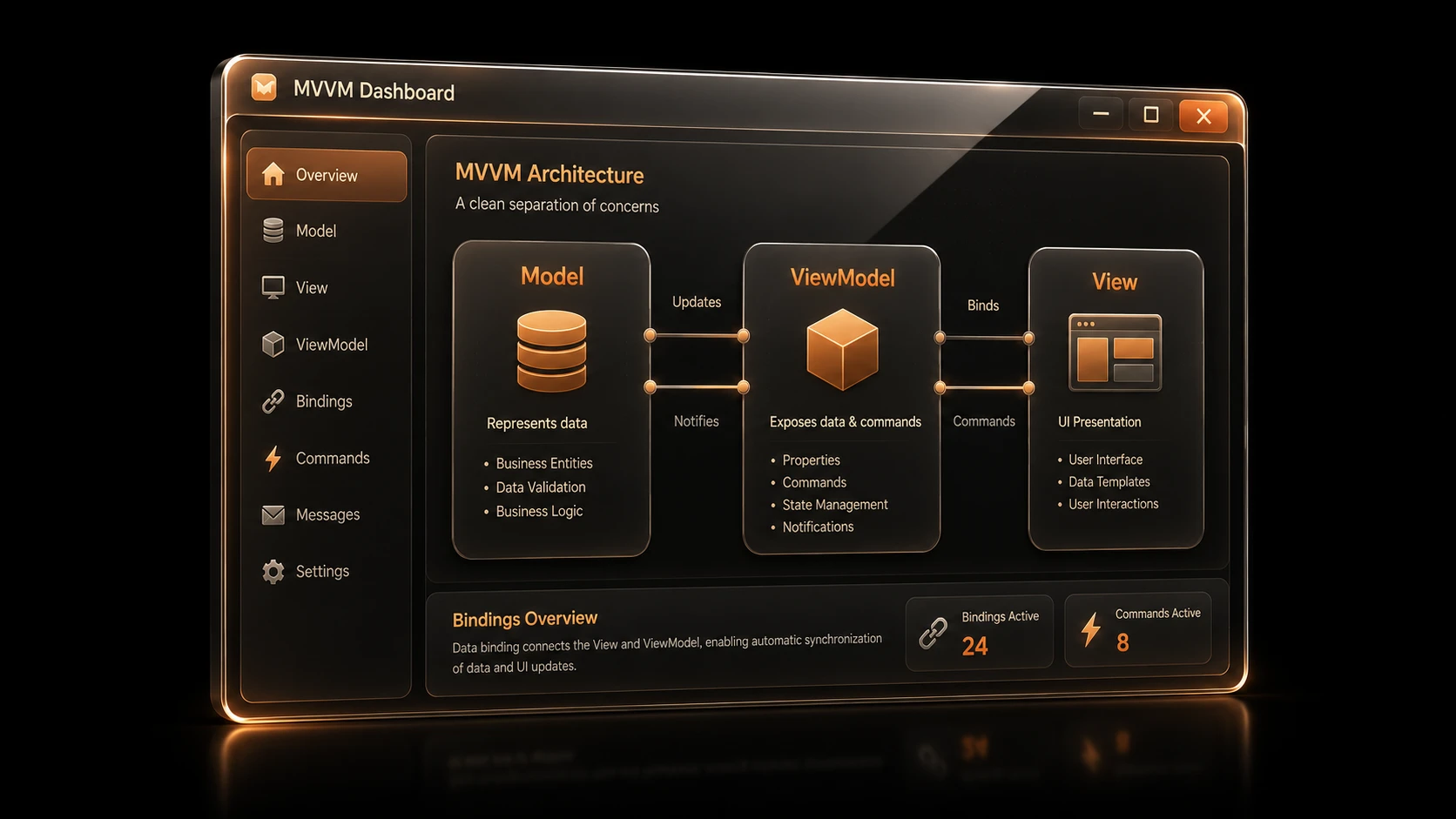
Equally important is the growing adoption of the Model-View-ViewModel (MVVM) architectural pattern. MVVM encourages clean separation between presentation and business logic, making applications easier to maintain, test, and extend.
For enterprise architects and development teams planning their next generation of Windows applications, understanding WPF 4.0 and MVVM is becoming increasingly important.
Why Enterprises Need Modern Desktop Architecture
Many enterprise desktop applications developed during the Windows Forms era have grown into large, tightly coupled codebases. Business logic often resides directly inside forms, making maintenance increasingly difficult as applications evolve.
Common challenges include:
- ◆Large code-behind files
- ◆Limited UI customization
- ◆Difficult automated testing
- ◆Tight coupling between business logic and presentation
- ◆Repetitive UI code
- ◆Poor scalability for large development teams
Organizations are looking for architectures that improve maintainability without sacrificing desktop performance.
WPF, combined with MVVM, addresses many of these concerns.
What Makes WPF Different?
Unlike Windows Forms, which relies heavily on the underlying Windows API controls, WPF introduces a retained-mode rendering system based on DirectX.
This enables richer graphics, smoother rendering, and greater flexibility when designing user interfaces.
Major WPF capabilities include:
- ◆Hardware-accelerated rendering
- ◆Rich data binding
- ◆Vector graphics
- ◆Templates and styles
- ◆Resource dictionaries
- ◆Animation support
- ◆Command infrastructure
- ◆Declarative UI using XAML
These features allow developers and designers to collaborate more effectively while producing highly customizable enterprise applications.
Understanding XAML
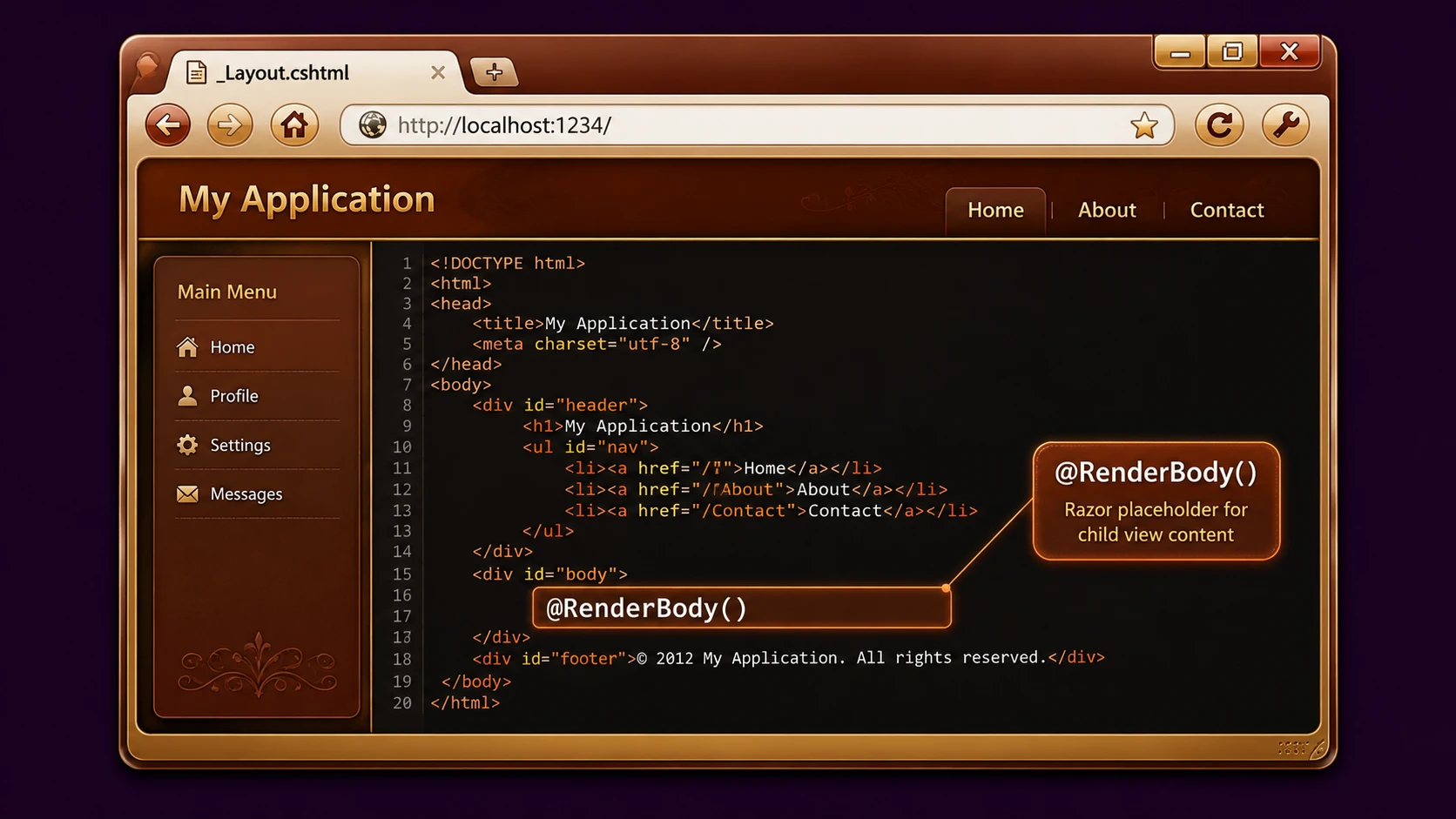
Extensible Application Markup Language (XAML) separates interface definition from application logic.
Instead of constructing every control programmatically, developers describe the interface declaratively.
Example:
<Window>
    <Grid>
        <Button
            Content="Save"
            Width="120"
            Height="35" />
    </Grid>
</Window>
This separation improves readability and enables UI modifications without extensive changes to application logic.
Designers can work on layouts while developers focus on application behavior.
Introducing the MVVM Pattern
MVVM is rapidly emerging as the preferred architectural pattern for WPF applications.
The pattern separates responsibilities into three distinct components.
| Component | Responsibility |
|---|---|
| Model | Business data and domain logic |
| View | User interface defined in XAML |
| ViewModel | Presentation logic and interaction between Model and View |
The View binds directly to properties exposed by the ViewModel rather than interacting with business objects directly.
This separation results in cleaner architecture and improved maintainability.
Typical MVVM Architecture
A well-structured enterprise application often follows this architecture.
User
   |
View (XAML)
   |
Data Binding
   |
ViewModel
   |
Business Services
   |
Repositories
   |
Database
Each layer has clearly defined responsibilities, reducing dependencies throughout the application.
Data Binding: The Foundation of WPF
One of WPF's most powerful capabilities is data binding.
Instead of manually synchronizing user interface controls with application data, developers bind UI elements directly to properties exposed by the ViewModel.
Example:
<TextBox Text="{Binding CustomerName}" />Whenever the underlying property changes, the user interface updates automatically.
Likewise, user input can update application data without requiring repetitive event-handling code.
Benefits include:
- ◆Reduced boilerplate code
- ◆Easier maintenance
- ◆Improved consistency
- ◆Better separation of concerns
Commands Instead of Events
Traditional desktop applications frequently rely on event handlers.
Example:
private void SaveButton_Click(...)MVVM encourages using commands instead.
<Button
    Content="Save"
    Command="{Binding SaveCommand}" />
Advantages include:
- ◆Cleaner code
- ◆Easier testing
- ◆Reduced coupling
- ◆Better reuse of business logic
Commands become part of the ViewModel rather than the View itself.
Data Templates and Control Templates
WPF introduces templating capabilities that dramatically improve UI customization.
Data Templates
Data templates define how business objects should appear.
For example, a customer object may automatically display:
- ◆Name
- ◆Customer ID
- ◆Account status
- ◆Contact information
without modifying the underlying business model.
Control Templates
Control templates redefine the visual appearance of existing controls while preserving their functionality.
Organizations can implement consistent branding without rewriting application logic.
Styling Enterprise Applications
Enterprise applications often require consistent visual identity across multiple products.
WPF styles enable organizations to standardize:
- ◆Fonts
- ◆Colors
- ◆Margins
- ◆Buttons
- ◆Input controls
- ◆Menus
- ◆Dialogs
Resource dictionaries further simplify reuse by centralizing visual definitions.
A single style update can propagate throughout an application.
What's New in WPF 4.0
The .NET Framework 4.0 release introduces several improvements that enhance the WPF development experience.
Improved Performance
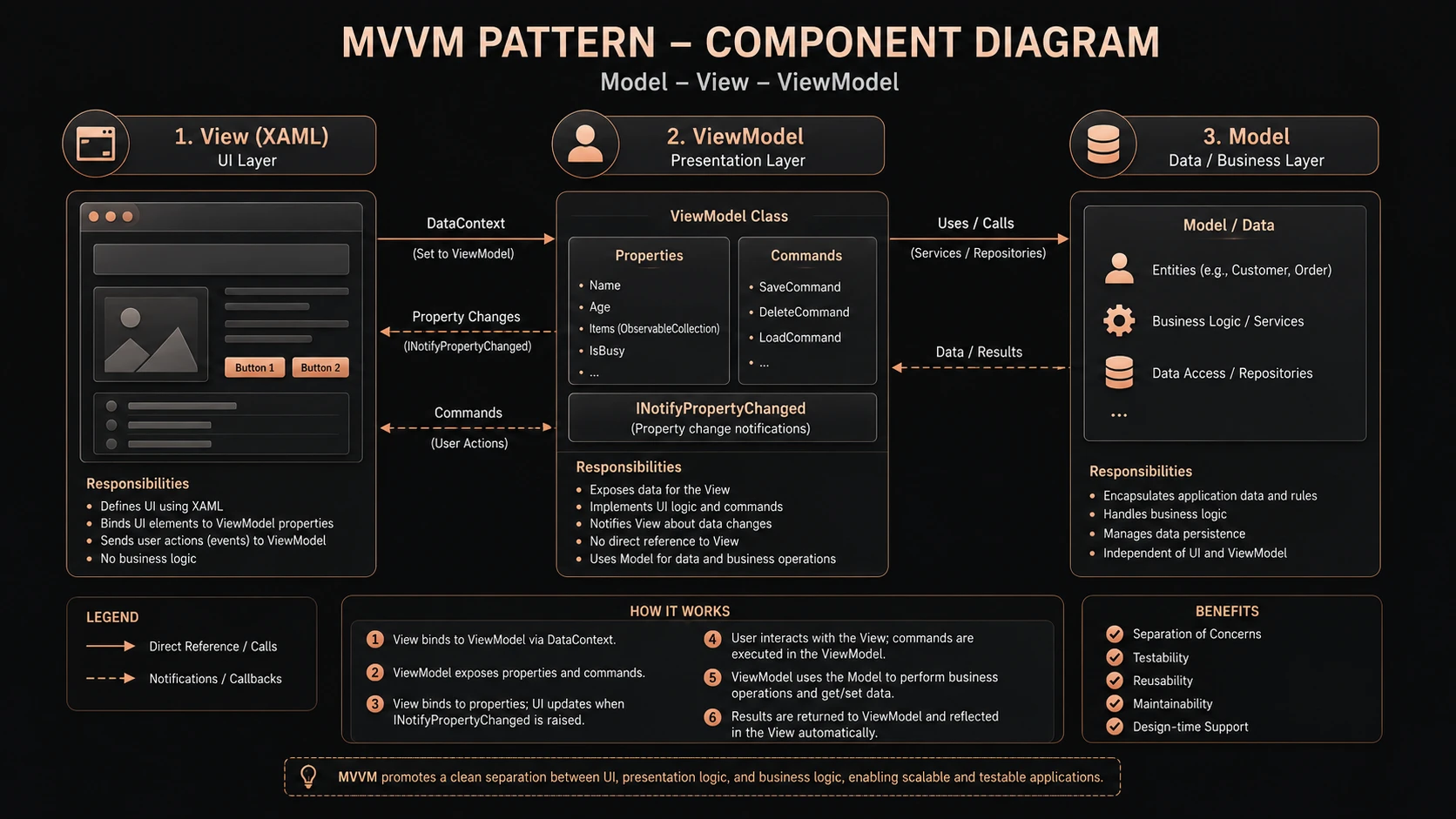
MVVM pattern bindings connecting XAML views with view-model property controllers.
Rendering performance has been refined, helping applications remain responsive when displaying complex user interfaces.
Better Text Rendering
Text clarity has been improved, particularly on modern LCD displays, making enterprise applications more readable during extended use.
Enhanced Data Binding
Data binding continues to mature with improvements that simplify application development and reduce common binding issues.
Windows 7 Integration
Developers can begin taking advantage of Windows 7 features such as taskbar integration, providing a more integrated desktop experience for supported environments.
Enterprise Use Cases
Financial Trading Systems
WPF's rendering capabilities make it suitable for applications displaying:
- ◆Live market data
- ◆Portfolio dashboards
- ◆Risk analysis
- ◆Order management
Healthcare Systems
Healthcare organizations benefit from:
- ◆Electronic patient records
- ◆Appointment scheduling
- ◆Medical imaging interfaces
- ◆Administrative dashboards
Manufacturing
Manufacturing environments often require:
- ◆Production monitoring
- ◆Equipment management
- ◆Inventory dashboards
- ◆Quality control systems
Engineering Applications
Rich visualization capabilities support:
- ◆CAD viewers
- ◆Scientific analysis
- ◆Simulation software
- ◆Industrial monitoring
Integrating WPF with Enterprise Services
WPF applications frequently communicate with distributed enterprise systems.
Common integrations include:
- ◆WCF services
- ◆SQL Server
- ◆Microsoft Office
- ◆Active Directory
- ◆Reporting systems
- ◆SharePoint
MVVM helps isolate service communication from presentation logic, simplifying future maintenance.
Best Practices for Enterprise Development
Development teams should consider the following recommendations.
Keep Business Logic Out of the View
The View should contain presentation markup rather than business rules.
Use ViewModels Consistently
Every significant screen should expose its functionality through a dedicated ViewModel.
Favor Data Binding
Whenever practical, bind UI controls rather than updating them manually.
Centralize Styles
Maintain consistent visual design through reusable resource dictionaries.
Organize Large Solutions
Enterprise applications should separate:
- ◆UI
- ◆Business logic
- ◆Data access
- ◆Service integration
- ◆Shared libraries
into independent projects.
Design for Testability
ViewModels should remain independent of user interface controls, allowing automated unit testing.
Common Mistakes
Many organizations adopting WPF encounter similar issues.
Large Code-Behind Files
Moving existing Windows Forms code directly into WPF code-behind limits the architectural advantages of MVVM.
Ignoring Data Binding
Manual synchronization between controls and business objects creates unnecessary complexity.
Mixing Business Logic with XAML
XAML should define presentation, not business rules.
Excessive Visual Effects
Animations and graphical effects should enhance usability rather than distract users or reduce application performance.
Inconsistent Naming
Clear naming conventions for Views, ViewModels, and Models simplify collaboration across development teams.
Migration Strategy from Windows Forms
Organizations rarely replace large applications all at once.
A phased migration often delivers better results.
Recommended approach:
- 1.Identify modules requiring modernization.
- 2.Introduce WPF for new functionality.
- 3.Adopt MVVM from the beginning.
- 4.Create reusable resource dictionaries.
- 5.Standardize application architecture.
- 6.Expand modernization incrementally.
- 7.Retire legacy Windows Forms components where practical.
This incremental strategy minimizes project risk while allowing teams to build expertise with WPF.
WPF Compared with Windows Forms
| Feature | Windows Forms | WPF 4.0 |
|---|---|---|
| Rendering | GDI/GDI+ | DirectX-based |
| UI Definition | Code-centric | XAML |
| Styling | Limited | Extensive |
| Data Binding | Basic | Advanced |
| Templates | Limited | Rich templating |
| Animation | Minimal | Built-in |
| MVVM Support | Indirect | Excellent |
| Designer Collaboration | Limited | Strong |
While Windows Forms remains suitable for many existing business applications, WPF provides a more flexible platform for organizations developing modern desktop solutions.
Adoption Recommendations
Organizations considering WPF adoption should begin by establishing architectural standards before development starts.
Recommended priorities include:
- ◆Adopt MVVM consistently.
- ◆Standardize project structure.
- ◆Use reusable styles and templates.
- ◆Define ViewModel naming conventions.
- ◆Establish code review guidelines.
- ◆Invest in developer training.
- ◆Build shared UI component libraries.
A disciplined approach will improve long-term maintainability and reduce technical debt as applications evolve.
Looking Ahead
Enterprise desktop applications continue to demand rich user experiences, responsive interfaces, and maintainable architectures. Windows Presentation Foundation 4.0, combined with the MVVM pattern and XAML, provides a compelling foundation for organizations building modern Windows applications.
As development teams evaluate new desktop projects, investing in clean architectural separation, reusable user interface components, and strong data-binding practices can significantly improve maintainability and scalability. While WPF introduces new concepts and design patterns, the long-term benefits of improved testability, flexibility, and collaboration make it a strong candidate for enterprise desktop development in the .NET 4.0 era.