Introduction
Enterprise web applications have evolved dramatically over the past several years. Rich client-side interfaces now power customer portals, enterprise dashboards, project management platforms, collaboration tools, and Software as a Service (SaaS) applications. Users increasingly expect desktop-like responsiveness while organizations continue demanding maintainable architectures capable of supporting long-lived applications.
JavaScript libraries such as jQuery have simplified DOM manipulation, while frameworks including Backbone.js, AngularJS, Ember.js, and Knockout.js have introduced structured approaches for building increasingly sophisticated applications. Despite these advances, maintaining complex user interfaces often remains challenging. Developers frequently struggle with large view hierarchies, manual DOM manipulation, state synchronization, and performance degradation as applications grow.
React.js, introduced by Facebook and recently released as open source, approaches these challenges from a different perspective. Rather than focusing primarily on complete application frameworks, React concentrates on building reusable UI components and efficiently updating the browser through a Virtual DOM abstraction.
Although still relatively new, React is attracting attention because of its unconventional rendering model and emphasis on component-driven development.
Industry Background
Client-side JavaScript has become one of the most important technologies in enterprise software development. HTML5, CSS3, AJAX, RESTful APIs, and increasingly capable browser engines have encouraged organizations to move substantial portions of application logic into the browser.
As applications become more interactive, developers must continuously synchronize application state with the Document Object Model (DOM). Traditional approaches often require explicit manipulation of individual elements after every state change.
Large applications frequently encounter:
- ◆Complex view management
- ◆Duplicate rendering logic
- ◆Difficult debugging
- ◆Performance bottlenecks
- ◆Tight coupling between interface components
React proposes a programming model in which developers describe how the interface should appear based on application state while the library manages efficient DOM updates.
The Business Problem
Enterprise development teams commonly encounter several user interface challenges.
These include:
- ◆Large and difficult-to-maintain JavaScript codebases
- ◆Repetitive DOM manipulation
- ◆Complex UI synchronization
- ◆Performance degradation during frequent updates
- ◆Limited component reuse
- ◆Inconsistent rendering logic
- ◆Increasing maintenance costs
Traditional approaches often require developers to manually determine how each interface element should be updated after every user interaction.
As applications become larger, this process becomes increasingly difficult to maintain.
Understanding React.js
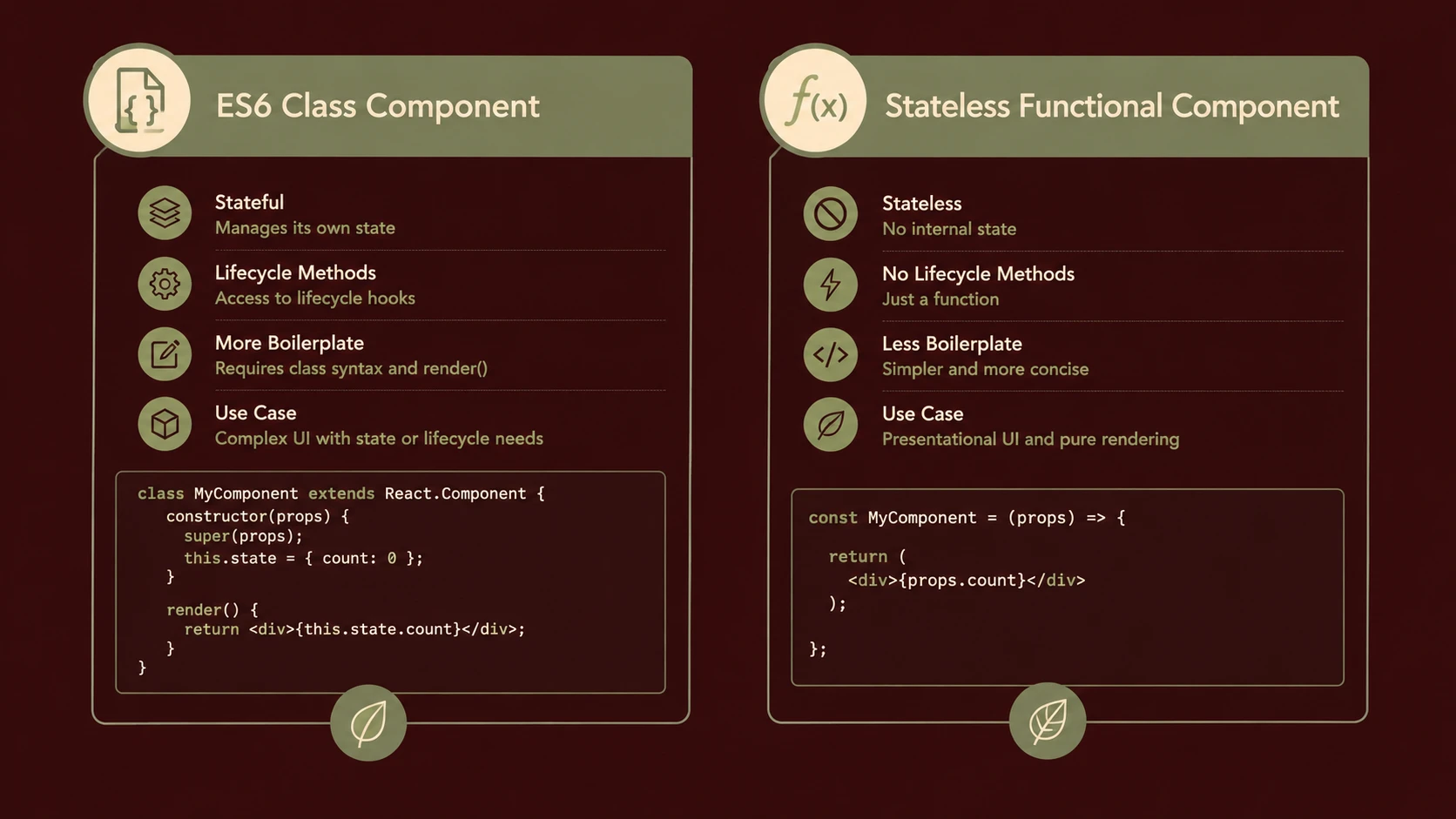
React is a JavaScript library designed for building user interfaces.
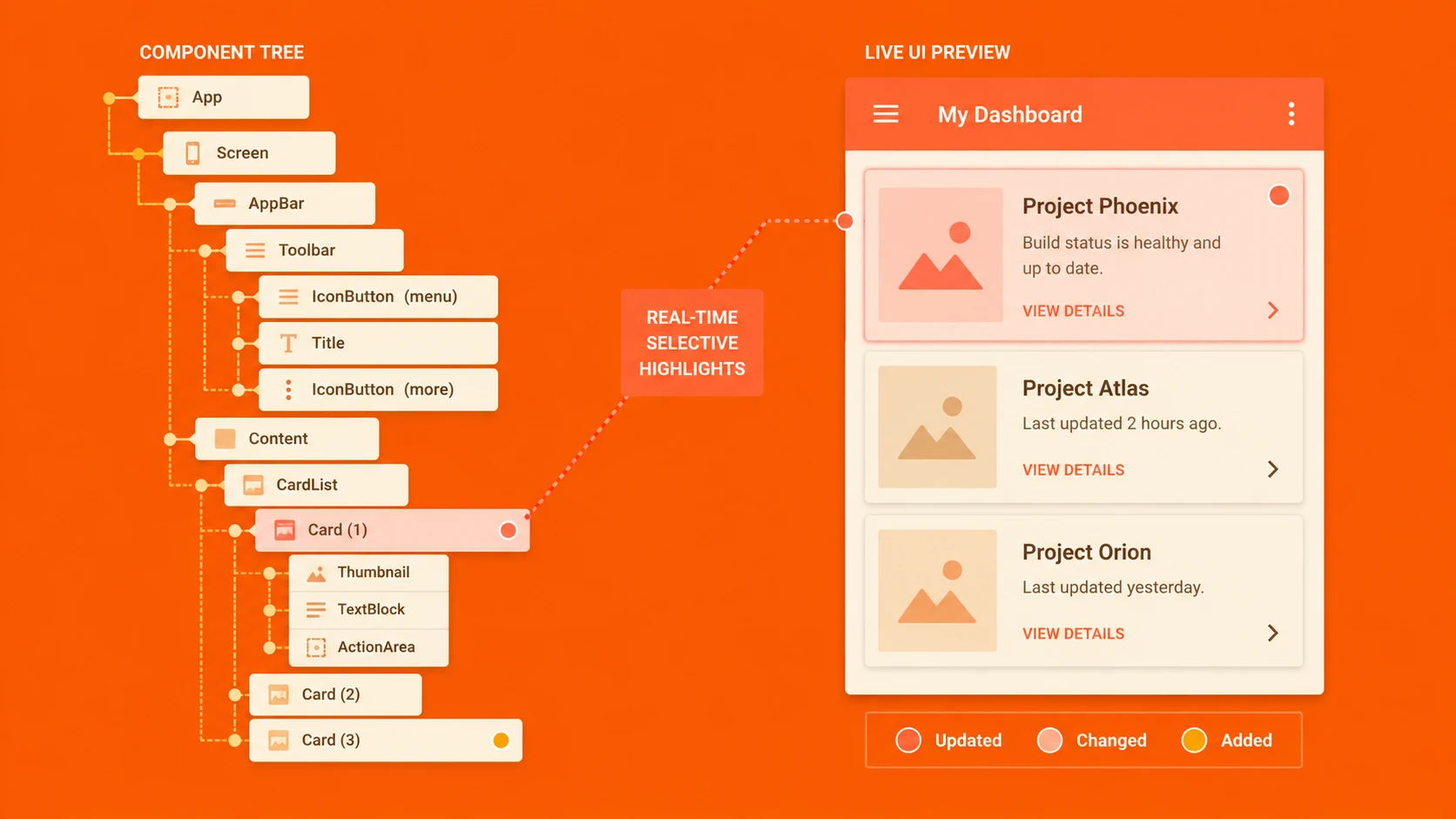
Rather than treating the user interface as a collection of manually updated DOM elements, React encourages developers to build applications from reusable components.
Each component defines how its portion of the interface should appear for a given state.
When application data changes, React determines the minimal DOM modifications required to produce the updated interface.
This declarative approach reduces the amount of manual rendering logic required within applications.
Core Architecture
React separates interface definition from browser rendering.
| Component | Responsibility |
|---|---|
| React Components | Encapsulate reusable UI behavior |
| Virtual DOM | Represents the desired interface in memory |
| Reconciliation Process | Determines interface differences |
| Browser DOM | Displays rendered content |
| Event System | Processes user interactions |
| Application State | Controls component rendering |
This architecture allows application logic to remain focused on state while React manages interface updates.
Component-Based Development
One of React's defining characteristics is its component model.
Rather than organizing applications primarily around pages, developers construct reusable interface components.
Examples include:
- ◆Navigation menus
- ◆Search boxes
- ◆Product cards
- ◆Dashboard widgets
- ◆User profile panels
- ◆Data tables
Each component encapsulates its rendering behavior while remaining composable with other components.
This modular structure encourages code reuse and improves maintainability.
The Virtual DOM
// Pure React createElement structure vs real DOM rendering representation
// React Virtual DOM representation:
const virtualNode = {
  type: 'div',
  props: {
    className: 'container',
    children: [
      { type: 'h1', props: { children: 'Hello React Virtual DOM' } },
      { type: 'p', props: { children: 'This is a lightweight JavaScript representation of standard UI.' } }
    ]
  }
};

// The reconciler compares this structure and renders updates to the actual browser DOM
The Virtual DOM is one of React's most widely discussed architectural concepts.
Instead of modifying the browser DOM directly after every application change, React maintains an in-memory representation of the desired interface.
When state changes:
- 1.Components produce an updated Virtual DOM.
- 2.React compares the new representation with the previous version.
- 3.Differences are identified.
- 4.Only necessary browser DOM updates are performed.
By minimizing direct DOM manipulation, React seeks to improve rendering efficiency while simplifying development.
Reconciliation
React's reconciliation process compares two Virtual DOM trees to determine which portions of the interface require updating.
Rather than rebuilding the complete page, React focuses only on affected components.
Potential advantages include:
- ◆Reduced browser work
- ◆Improved rendering performance
- ◆Simpler application code
- ◆Predictable updates
Developers describe the desired interface rather than manually coordinating every DOM operation.
Declarative Rendering
React encourages a declarative programming model.
Instead of issuing commands such as:
- ◆Find element
- ◆Update text
- ◆Modify attributes
- ◆Insert child nodes
Developers express how the interface should appear based upon current application data.
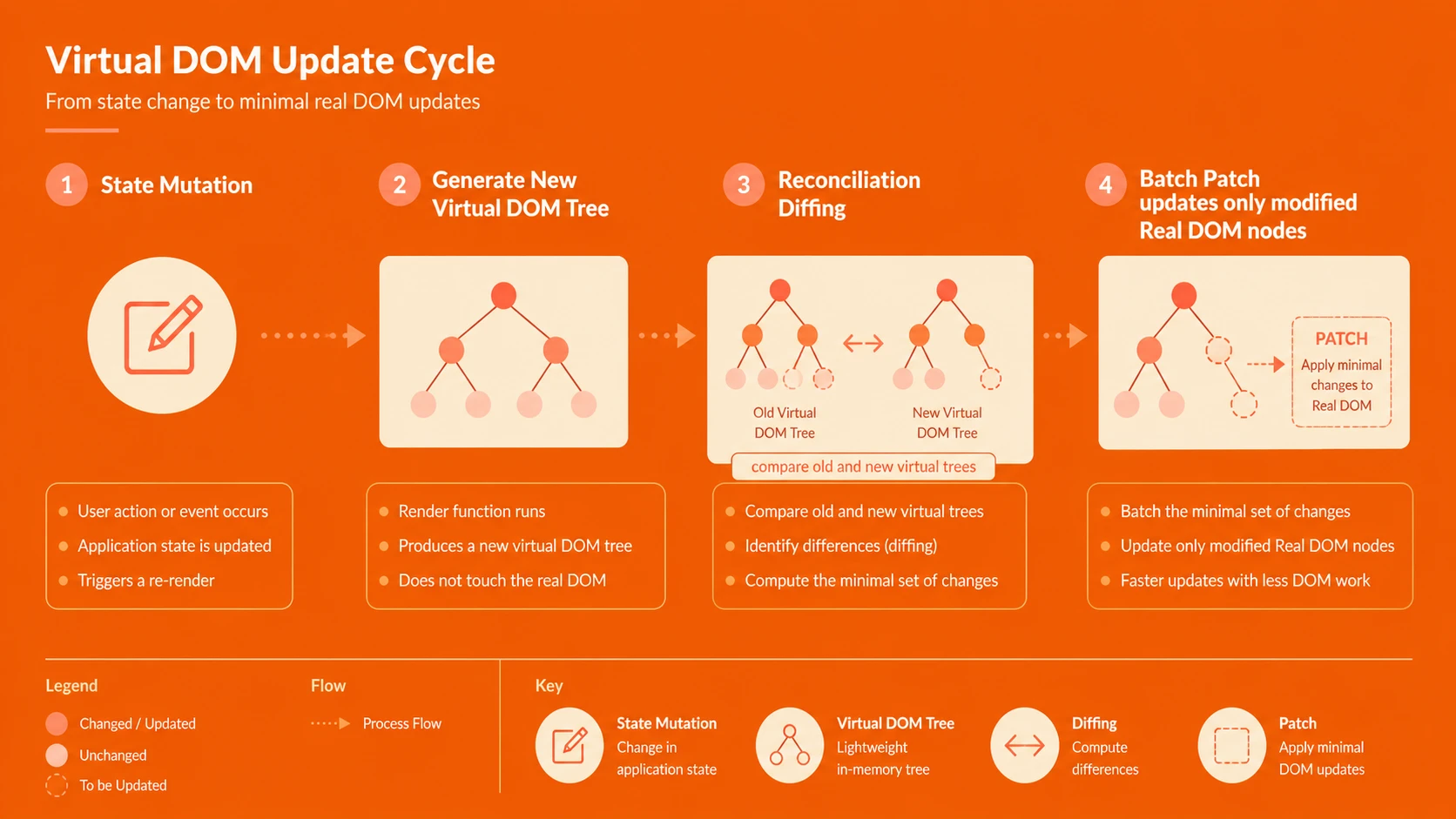
System architecture diagram and conceptual workflow layout for React.js: Understanding Virtual DOM and Component-Based UI Architectures.
React then determines the required DOM modifications.
This separation between application state and rendering logic contributes to cleaner code organization.
JSX
React introduces JSX as an optional syntax extension that allows developers to describe interface structures using HTML-like expressions within JavaScript.
JSX is transformed into standard JavaScript during the build process.
Potential benefits include:
- ◆Improved readability
- ◆Closer relationship between markup and component logic
- ◆Simplified interface definition
Organizations may evaluate whether JSX aligns with their existing JavaScript development practices.
Enterprise Use Cases
React supports numerous enterprise interface scenarios.
| Scenario | Benefit |
|---|---|
| Enterprise dashboards | Modular widgets |
| SaaS applications | Reusable interface components |
| Customer portals | Efficient rendering |
| Internal business systems | Maintainable UI architecture |
| Data-intensive applications | Predictable interface updates |
| Mobile-oriented web applications | Responsive user interactions |
Applications containing large numbers of reusable interface elements may particularly benefit from React's component model.
Performance Considerations
React's Virtual DOM is intended to reduce unnecessary browser updates, but application performance still depends on overall design.
Organizations should evaluate:
- ◆Component granularity
- ◆Rendering frequency
- ◆Browser performance
- ◆Memory usage
- ◆JavaScript execution time
Benchmarking representative workloads remains essential before large-scale adoption.
Security Considerations
React primarily addresses user interface development rather than application security.
Organizations should continue implementing:
- ◆Input validation
- ◆Authentication
- ◆Authorization
- ◆Secure communication using HTTPS
- ◆Protection against cross-site scripting
Client-side libraries should complement, not replace, secure application architecture.
Scalability
Component-based architectures naturally support growing applications.
Advantages include:
- ◆Reusable interface components
- ◆Improved code organization
- ◆Separation of responsibilities
- ◆Easier maintenance
- ◆Independent component evolution
Large development teams may benefit from clearly defined component ownership.
Best Practices
Organizations evaluating React should establish development standards.
Recommended practices include:
- ◆Build small, reusable components.
- ◆Separate presentation from business logic.
- ◆Keep components focused on single responsibilities.
- ◆Reuse components whenever practical.
- ◆Maintain predictable application state.
- ◆Benchmark rendering performance.
- ◆Test component behavior thoroughly.
- ◆Document shared UI components.
Consistent component design improves long-term maintainability.
Common Mistakes
Early React adopters should avoid several implementation issues.
Common mistakes include:
- ◆Building excessively large components.
- ◆Mixing unrelated responsibilities.
- ◆Assuming the Virtual DOM automatically solves every performance problem.
- ◆Ignoring application architecture.
- ◆Duplicating component functionality.
- ◆Treating React as a complete application framework.
Thoughtful architectural planning remains essential regardless of rendering technology.
Technology Comparison
| Capability | Traditional DOM Manipulation | React.js |
|---|---|---|
| Manual DOM Updates | Required | Abstracted |
| Component Model | Limited | Core architecture |
| Virtual DOM | No | Yes |
| Declarative Rendering | Limited | Yes |
| Reusable UI Components | Moderate | Excellent |
| Browser Update Optimization | Manual | Managed by React |
React emphasizes efficient rendering and component reuse while remaining focused specifically on the user interface layer.
Adoption Strategy
Organizations should evaluate React through incremental adoption.
A practical strategy includes:
- 1.Identify a self-contained user interface module.
- 2.Build reusable components.
- 3.Measure rendering performance.
- 4.Integrate with existing RESTful APIs.
- 5.Establish component design standards.
- 6.Expand adoption across additional application areas.
Because React focuses primarily on the view layer, it can often be introduced without replacing an entire application architecture.
Limitations
Although React introduces an innovative rendering model, organizations should evaluate several considerations.
Current observations include:
- ◆React focuses primarily on user interface rendering rather than complete application architecture.
- ◆Teams must learn a component-oriented development model.
- ◆JSX introduces an additional compilation step for projects choosing to use it.
- ◆Long-term ecosystem maturity is still developing.
Technology selection should align with organizational architecture and project requirements.
Looking Ahead
React.js presents a distinctive approach to enterprise user interface development by combining reusable components with an efficient Virtual DOM rendering strategy. Rather than emphasizing direct DOM manipulation, the library encourages developers to focus on application state and declarative interface definitions.
As of February 2014, React remains an emerging technology, but its architectural concepts are already influencing discussions around maintainable front-end development. Organizations building complex web applications should evaluate React alongside existing JavaScript frameworks to determine whether its component-based architecture and rendering model align with their long-term application strategy and development practices.