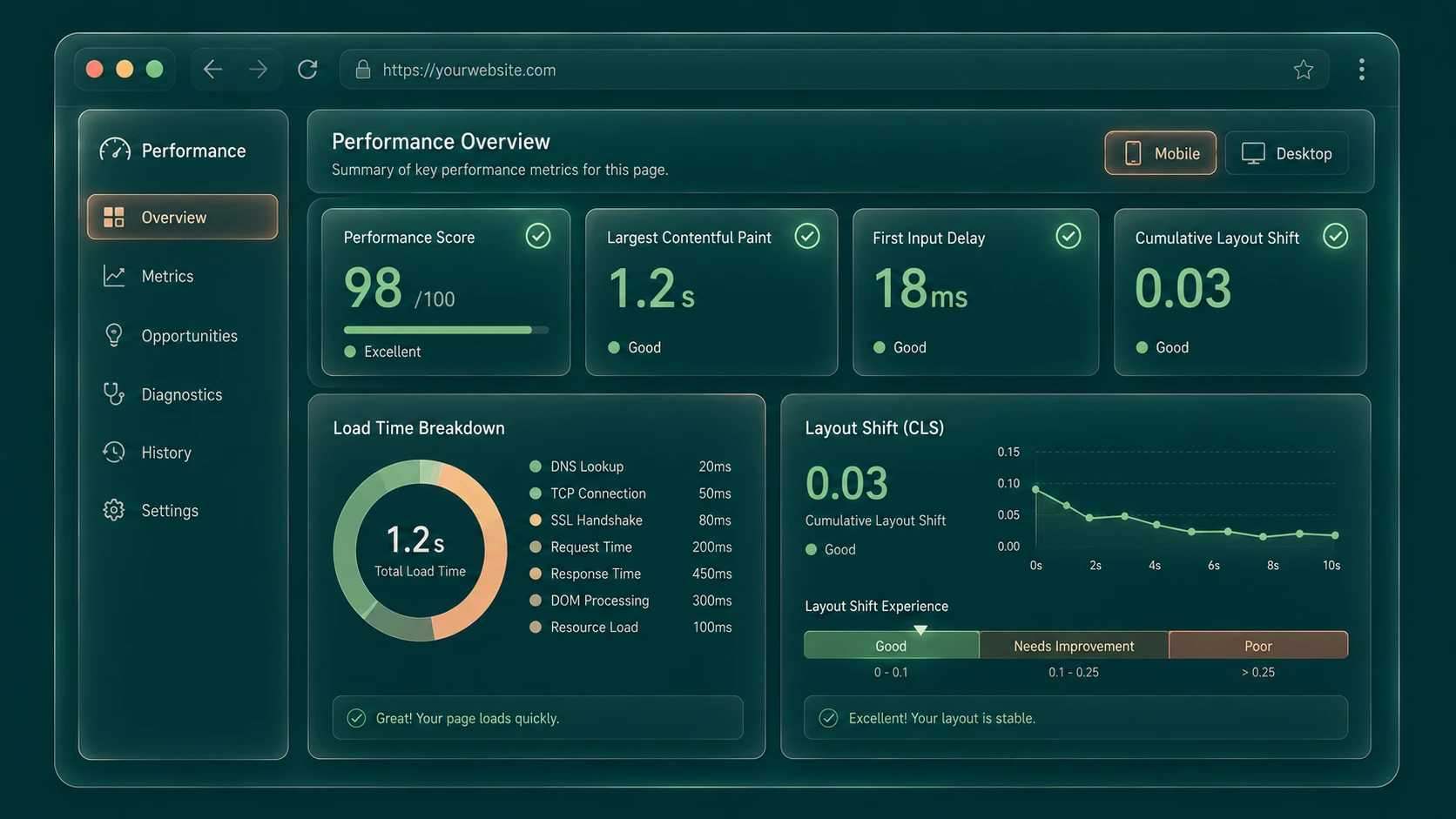
Introduction
Over the past decade, web performance optimization has evolved from simply reducing page load time into a broader discipline focused on delivering exceptional user experiences. Faster processors, modern JavaScript frameworks, responsive layouts, and sophisticated browser capabilities have enabled increasingly rich applications, but they have also introduced greater complexity. Enterprise websites frequently execute hundreds of network requests, load multiple JavaScript bundles, render dynamic content, and rely on third-party services before becoming fully interactive.
Although developers have traditionally measured performance using metrics such as Time to First Byte (TTFB), First Paint, DOMContentLoaded, and onLoad events, these measurements often fail to reflect what users actually experience.
To address this gap, Google has introduced Core Web Vitals, a standardized set of user-centric metrics that measure loading performance, interactivity, and visual stability. Rather than emphasizing browser events alone, these metrics focus on how quickly meaningful content appears, how responsive pages feel, and whether layouts remain stable during loading.
For enterprise architects, digital product teams, and front-end engineers, Core Web Vitals provide a common language for measuring and improving user experience across modern web applications.
Industry Background
Modern web platforms increasingly include:
- ◆Single Page Applications
- ◆Progressive Web Apps
- ◆Enterprise dashboards
- ◆E-commerce platforms
- ◆Customer portals
- ◆Content management systems
- ◆Marketing websites
- ◆Mobile-first experiences
These applications often execute significant client-side JavaScript, making user experience optimization more challenging.
The Business Problem
Enterprise websites commonly suffer from:
- ◆Slow content rendering
- ◆Large JavaScript bundles
- ◆Unresponsive interfaces
- ◆Unexpected layout movement
- ◆Poor mobile experiences
- ◆Difficult performance measurement
Without standardized metrics, engineering teams struggle to prioritize performance improvements consistently.
Understanding Core Web Vitals
Core Web Vitals introduce three primary metrics designed to measure essential aspects of page experience.
They include:
- ◆Largest Contentful Paint (LCP)
- ◆First Input Delay (FID)
- ◆Cumulative Layout Shift (CLS)
Together these metrics evaluate how users perceive application performance rather than simply measuring browser events.
Core Architecture
| Metric | Measures |
|---|---|
| Largest Contentful Paint (LCP) | Loading performance |
| First Input Delay (FID) | Input responsiveness |
| Cumulative Layout Shift (CLS) | Visual stability |
| Chrome User Experience Report | Real-world performance data |
| Lighthouse | Performance auditing |
| PageSpeed Insights | Performance analysis |
These tools and metrics work together to provide actionable performance insights.
How Core Web Vitals Work
- 1.A user visits a web page.
- 2.The browser records page rendering milestones.
- 3.Largest Contentful Paint measures when the primary visible content finishes rendering.
- 4.First Input Delay measures the delay between the user's first interaction and the browser's response.
- 5.Cumulative Layout Shift tracks unexpected layout movement during page loading.
- 6.Performance tools analyze these measurements.
- 7.Development teams optimize application behavior based on collected metrics.
Largest Contentful Paint (LCP)
Largest Contentful Paint measures how quickly the primary visible content appears within the viewport.
Unlike earlier loading metrics that focused on technical browser events, LCP attempts to capture when users perceive that the page has substantially loaded.
Common factors affecting LCP include:
- ◆Slow server responses
- ◆Large images
- ◆Render-blocking CSS
- ◆Excessive JavaScript execution
- ◆Inefficient resource prioritization
Optimizing LCP improves perceived loading speed.
First Input Delay (FID)
First Input Delay measures how responsive a page becomes after a user first interacts with it.
Typical interactions include:
- ◆Clicking buttons
- ◆Opening navigation menus
- ◆Selecting controls
- ◆Entering text
Heavy JavaScript execution may delay event processing, causing users to perceive applications as unresponsive.
Reducing unnecessary JavaScript execution improves responsiveness.
Cumulative Layout Shift (CLS)
Visual stability has become increasingly important as modern websites load advertisements, images, fonts, and dynamic content asynchronously.
CLS measures unexpected layout movement that occurs while pages load.
Common causes include:
- ◆Images without dimensions
- ◆Dynamically inserted content
- ◆Late-loading advertisements
- ◆Font loading changes
Reducing layout shifts improves usability and user confidence.
Key Features
User-Centric Measurements
// Monitoring Core Web Vitals directly inside browser client session
import { getLCP, getFID, getCLS } from 'web-vitals';

function sendToAnalytics({ name, delta, id }) {
  console.log(`[Web Vitals] Metric: ${name} | Value: ${delta} | Session ID: ${id}`);
}

getLCP(sendToAnalytics);
getFID(sendToAnalytics);
getCLS(sendToAnalytics);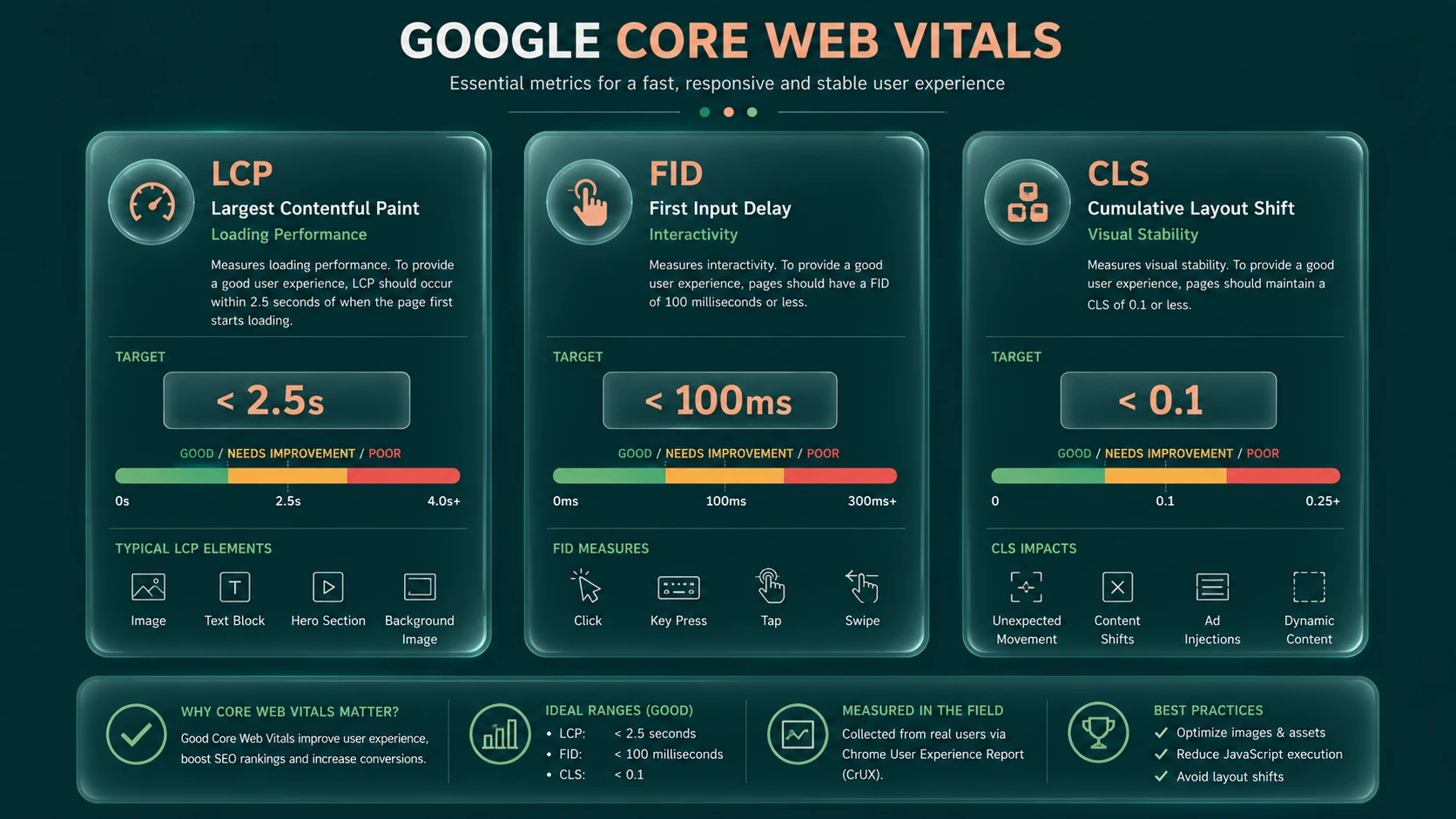
System architecture diagram and conceptual workflow layout for Google Core Web Vitals.
Metrics focus on real user experience rather than internal browser events.
Standardized Performance Targets
Engineering teams gain common performance objectives across projects.
Cross-Platform Evaluation
The same metrics apply to desktop and mobile browsing experiences.
Tool Integration
Core Web Vitals integrate with Lighthouse, Chrome DevTools, PageSpeed Insights, and other Google performance tooling.
Continuous Monitoring
Performance can be measured repeatedly as applications evolve.
Enterprise Use Cases
E-Commerce Platforms
Faster rendering and stable layouts improve customer confidence during shopping.
SaaS Applications
Responsive interfaces enhance productivity for enterprise users.
Customer Portals
Performance improvements reduce abandonment during authentication and navigation.
Media Platforms
Optimized loading improves user engagement with content.
Enterprise Dashboards
Lower interaction latency creates smoother business workflows.
Performance Considerations
Organizations should evaluate:
- ◆Server response time
- ◆JavaScript execution
- ◆CSS delivery
- ◆Image optimization
- ◆Resource prioritization
- ◆Third-party scripts
Performance optimization should be measured using representative production environments.
Security Considerations
Core Web Vitals measure user experience rather than security.
Organizations should continue implementing:
- ◆HTTPS
- ◆Content Security Policy
- ◆Secure authentication
- ◆Dependency management
- ◆Input validation
- ◆Secure API communication
Performance improvements should complement established security practices.
Scalability
Core Web Vitals support enterprise scalability through:
- ◆Consistent performance standards
- ◆Automated monitoring
- ◆Objective optimization goals
- ◆Improved collaboration between development and operations teams
- ◆Better release validation
These metrics enable organizations to maintain performance as applications grow.
Best Practices
- ◆Optimize server response time.
- ◆Compress and appropriately size images.
- ◆Reduce unnecessary JavaScript execution.
- ◆Eliminate render-blocking resources where practical.
- ◆Reserve layout space for images and advertisements.
- ◆Continuously monitor performance using Lighthouse.
- ◆Benchmark improvements before production deployment.
- ◆Include performance testing within Continuous Integration workflows.
Common Mistakes
| Mistake | Enterprise Impact |
|---|---|
| Measuring only synthetic benchmarks | Incomplete performance insights |
| Loading excessive third-party scripts | Increased page latency |
| Ignoring layout stability | Poor user experience |
| Shipping oversized JavaScript bundles | Reduced responsiveness |
| Optimizing only desktop performance | Poor mobile experience |
| Delaying performance testing until production | Increased remediation costs |
Technology Comparison
| Traditional Metric | Focus | Core Web Vital Equivalent |
|---|---|---|
| DOMContentLoaded | Document readiness | LCP emphasizes visible content |
| onLoad Event | Resource completion | LCP measures perceived loading |
| JavaScript Timing | Internal execution | FID measures user responsiveness |
| Visual Inspection | Subjective evaluation | CLS provides measurable stability |
Adoption Strategy
- 1.Establish baseline performance measurements.
- 2.Audit applications using Lighthouse and PageSpeed Insights.
- 3.Prioritize improvements affecting LCP.
- 4.Reduce JavaScript execution affecting FID.
- 5.Stabilize layouts to improve CLS.
- 6.Monitor performance continuously.
- 7.Integrate performance checks into CI/CD pipelines.
- 8.Educate engineering teams on user-centric optimization.
Limitations
As of May 2020, Core Web Vitals represent a newly introduced measurement framework. Organizations should view these metrics as complementary to existing performance monitoring rather than complete replacements for traditional diagnostics. While LCP, FID, and CLS capture critical aspects of user experience, application-specific performance analysis remains essential for comprehensive optimization.
Looking Ahead
From the perspective of May 2020, Core Web Vitals establish a unified framework for measuring real-world web performance. By emphasizing loading speed, responsiveness, and visual stability, Google is encouraging developers to optimize applications around user experience instead of isolated browser events. As web applications continue increasing in complexity, standardized, user-focused performance metrics are expected to become an increasingly important part of enterprise engineering, performance monitoring, and quality assurance strategies.