Introduction
The expectations for enterprise web applications have changed dramatically over the past several years. Users no longer expect static web pages that require full-page refreshes for every interaction. Instead, they expect responsive interfaces, interactive dashboards, live validation, expandable menus, drag-and-drop functionality, and smoother user experiences similar to traditional desktop applications.
Delivering these experiences with plain JavaScript, however, has historically been difficult. Developers have spent countless hours writing browser-specific code, handling inconsistent DOM implementations, and troubleshooting differences between Internet Explorer, Firefox, Safari, Opera, and the increasingly popular Google Chrome browser.
In this environment, jQuery has rapidly become one of the most influential JavaScript libraries available. Rather than replacing JavaScript, it provides a simpler, more consistent programming model that abstracts away many browser inconsistencies while significantly reducing development effort.
As of July 2010, jQuery has become a preferred choice for startups, enterprise software vendors, web agencies, and internal development teams alike. Its elegant syntax, rich plugin ecosystem, and strong community support are making it the dominant client-side scripting library for modern web applications.
This article explores why jQuery has gained widespread adoption, how it simplifies enterprise development, and what organizations should consider before standardizing on it.
The Challenges of Traditional JavaScript Development
Before libraries such as jQuery became popular, developers frequently encountered numerous browser compatibility issues.
Typical challenges included:
- ◆Different DOM implementations
- ◆Browser-specific event handling
- ◆Inconsistent AJAX APIs
- ◆Complex element selection
- ◆Manual animation logic
- ◆Cross-browser CSS manipulation
- ◆Different XMLHttpRequest implementations
A simple feature often required writing separate code paths for different browsers, increasing maintenance costs and introducing additional testing complexity.
Enter jQuery
jQuery addresses many of these problems through a concise API focused on simplicity.
Its design philosophy emphasizes:
- ◆Write less code
- ◆Simplify DOM traversal
- ◆Normalize browser behavior
- ◆Provide powerful selectors
- ◆Simplify AJAX
- ◆Enable plugin extensibility
Rather than forcing developers to understand browser-specific implementation details, jQuery provides a consistent programming interface across supported browsers.
Simplifying DOM Manipulation
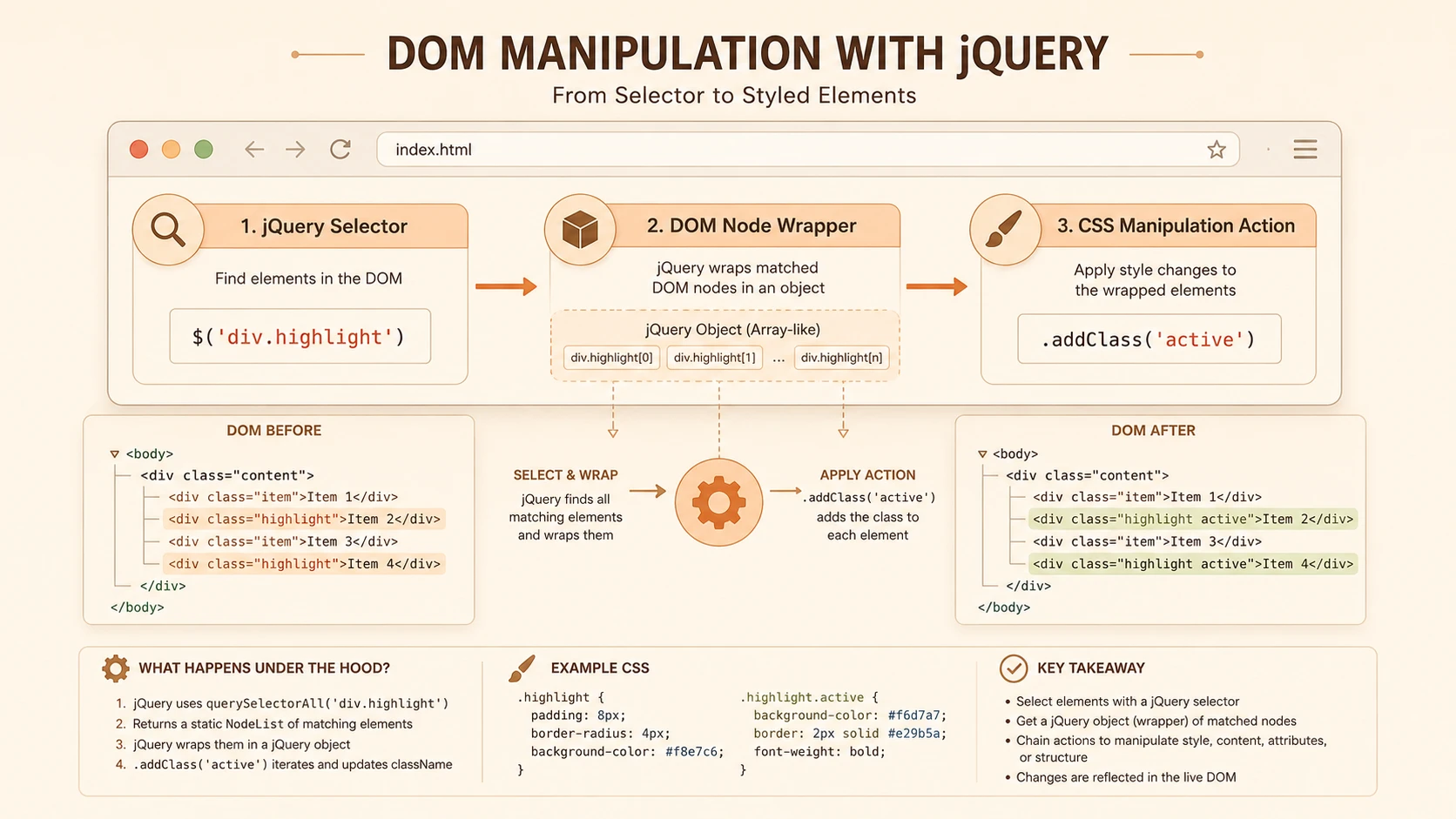
Manipulating the Document Object Model (DOM) is one of jQuery's greatest strengths.
Traditional JavaScript often requires multiple lines of code to locate and modify page elements.
Using jQuery, developers can perform the same tasks with concise, readable statements.
Example:
$("#welcome").text("Welcome to SHIVAMITCS");Changing styles becomes equally straightforward.
$(".error")
    .addClass("highlight")
    .show();
The resulting code is easier to read, easier to maintain, and generally requires fewer browser-specific adjustments.
Powerful CSS Selectors
One of jQuery's most attractive features is its selector engine.
Developers can locate elements using familiar CSS syntax.
Examples include:
$("div")
$("#menu")
$(".active")
$("table tr")
$("input:text")
Complex element selection that previously required multiple loops can often be reduced to a single expression.
Event Handling Made Simple
Handling browser events traditionally required different code depending on the browser.
jQuery provides a unified approach.
Example:
$("#saveButton").click(function(){
    alert("Data Saved");
});
Additional supported events include:
- ◆click
- ◆submit
- ◆focus
- ◆blur
- ◆change
- ◆keyup
- ◆keydown
- ◆mouseover
- ◆mouseout
This consistency significantly reduces browser compatibility testing.
AJAX Without Complexity
Asynchronous JavaScript and XML (AJAX) has become increasingly important for responsive web applications.
Traditional XMLHttpRequest programming often involves verbose code and browser-specific handling.
jQuery greatly simplifies AJAX requests.
Example:
$.get("customers.aspx", function(data){
    $("#results").html(data);
});
Other supported methods include:
- ◆$.ajax()
- ◆$.post()
- ◆$.getJSON()
- ◆$.load()
These abstractions encourage developers to build more responsive applications without unnecessary complexity.
Animation and User Experience
Modern web applications increasingly rely on subtle animations to improve usability.
jQuery includes built-in animation capabilities.
Examples include:
$("#panel").slideDown();
$("#menu").fadeIn();
$("#dialog").hide();
$("#dialog").show();
Although animations should be used judiciously, they can improve perceived responsiveness and guide user attention.
Comparing Traditional JavaScript and jQuery
| Feature | Traditional JavaScript | jQuery |
|---|---|---|
| DOM Selection | Verbose | Simple CSS Selectors |
| Browser Compatibility | Manual | Abstracted |
| Event Handling | Browser Specific | Unified API |
| AJAX | Complex | Simple Methods |
| Animation | Manual | Built-in |
| Code Readability | Moderate | High |
| Learning Curve | Steeper | Easier |
| Plugin Support | Limited | Extensive |
The reduction in development effort is one of the primary reasons many organizations are standardizing on jQuery.
Viewport grid rendering of touch interfaces across cross-platform screen resolutions.
Enterprise Architecture Considerations
Although jQuery operates on the client side, it influences overall application architecture.
A common enterprise architecture may resemble:
Web Browser
      |
HTML + CSS
      |
jQuery
      |
AJAX Requests
      |
ASP.NET / Java EE / PHP Application
      |
Business Logic
      |
Database
The server remains responsible for business rules, authentication, authorization, and persistence, while jQuery enhances the client-side experience.
Enterprise Use Cases
Customer Portals
Interactive dashboards, account management, and profile updates benefit from AJAX-based interactions powered by jQuery.
Internal Business Applications
Large forms, administrative consoles, and reporting interfaces become more responsive through dynamic updates rather than full page reloads.
E-Commerce Websites
Shopping carts, product filtering, image galleries, and checkout workflows can be improved using jQuery.
Content Management Systems
Editors, expandable navigation, modal dialogs, and content previews are easier to implement using jQuery's UI capabilities.
The Growing Plugin Ecosystem
Another significant factor behind jQuery's popularity is its growing collection of community-developed plugins.
Available plugins include:
- ◆Data grids
- ◆Calendars
- ◆Date pickers
- ◆Modal windows
- ◆Image galleries
- ◆Form validation
- ◆Menus
- ◆Charts
- ◆Tabs
- ◆Accordions
Rather than developing these components from scratch, organizations can often integrate well-tested plugins, reducing project timelines.
Performance Considerations
While jQuery improves developer productivity, teams should also consider application performance.
Recommended practices include:
- ◆Cache frequently used selectors.
- ◆Minimize unnecessary DOM updates.
- ◆Combine multiple operations where possible.
- ◆Avoid excessive animations.
- ◆Compress JavaScript for production deployments.
- ◆Load scripts after page content when appropriate.
Well-structured jQuery applications can remain responsive even as interfaces become increasingly dynamic.
Best Practices
Organizations adopting jQuery should establish consistent development guidelines.
- ◆Keep business logic on the server.
- ◆Use unobtrusive JavaScript.
- ◆Separate JavaScript from HTML markup.
- ◆Reuse common functions.
- ◆Test across supported browsers.
- ◆Validate user input on both client and server.
- ◆Organize scripts into logical modules.
- ◆Use plugins selectively.
- ◆Document custom JavaScript components.
These practices improve maintainability and reduce technical debt.
Common Mistakes
Despite its simplicity, improper use of jQuery can create maintainability issues.
Mixing Presentation and Business Logic
Client-side scripts should enhance user interaction rather than implement critical business rules.
Excessive DOM Manipulation
Repeated updates can negatively impact performance, particularly on complex pages.
Overusing Plugins
Including numerous plugins increases page size and maintenance complexity.
Ignoring Browser Testing
Although jQuery handles many compatibility issues, comprehensive testing across supported browsers remains essential.
Inline JavaScript
Embedding large amounts of JavaScript directly into HTML makes applications harder to maintain.
Adoption Recommendations
Organizations considering jQuery should adopt it systematically.
Phase 1
- ◆Standardize on a common jQuery version.
- ◆Train development teams.
- ◆Create coding standards.
Phase 2
- ◆Modernize existing web forms.
- ◆Introduce AJAX where appropriate.
- ◆Replace browser-specific scripts.
Phase 3
- ◆Develop reusable UI components.
- ◆Standardize plugin selection.
- ◆Optimize performance.
Phase 4
- ◆Incorporate jQuery into new enterprise application templates.
- ◆Continue reviewing browser compatibility as web standards evolve.
A structured adoption strategy helps organizations maximize productivity while maintaining consistency across projects.
Why Enterprise Teams Are Choosing jQuery
Several factors explain jQuery's rapid adoption during 2010.
- ◆Reduced development effort
- ◆Strong browser compatibility
- ◆Clear documentation
- ◆Active developer community
- ◆Extensive plugin ecosystem
- ◆Faster AJAX development
- ◆Improved maintainability
- ◆Easier onboarding for new developers
These advantages make it attractive not only for small web projects but also for large enterprise applications requiring long-term support.
Looking Ahead
Client-side development continues to evolve as browsers become more capable and users expect increasingly responsive web experiences. jQuery has established itself as a practical solution for overcoming browser inconsistencies while enabling richer interfaces with significantly less code.
As organizations continue building enterprise web applications throughout 2010, standardizing on jQuery can simplify development, improve maintainability, and accelerate delivery of interactive features. While careful architecture, disciplined coding practices, and performance optimization remain essential, jQuery provides a strong foundation for modern client-side scripting and is well positioned to support the next generation of enterprise web applications.