Introduction
Modern JavaScript applications have evolved far beyond simple browser scripts. Enterprise applications now consist of hundreds or thousands of modules, sophisticated dependency graphs, client-side routing, reusable component libraries, and increasingly complex build pipelines. Frameworks such as React, Angular, and Vue.js encourage modular application architectures that require efficient packaging before deployment.
While modular development improves maintainability, browsers still benefit from minimizing the number of network requests and reducing unnecessary execution overhead. A production-ready build system therefore becomes an essential component of modern frontend architecture.
Webpack has emerged as one of the leading module bundlers for JavaScript applications by transforming dependency graphs into optimized production bundles. Since its widespread adoption, it has introduced code splitting, dynamic loading, asset processing, and extensible plugin capabilities that support applications ranging from small websites to enterprise-scale Single Page Applications.
Webpack 3.0 continues this evolution by introducing Module Concatenation, commonly referred to as scope hoisting. Rather than wrapping every module within individual function closures, compatible modules can be concatenated into larger scopes, reducing execution overhead and producing smaller, more efficient bundles.
As of October 2017, Webpack 3.0 represents an important optimization release that helps enterprise teams improve application performance without fundamentally changing existing development workflows.
Industry Background
Modern frontend engineering increasingly emphasizes:
- ◆Component-based development
- ◆ES Modules
- ◆Single Page Applications
- ◆Continuous Integration
- ◆Progressive Web Applications
- ◆Production optimization
- ◆Automated deployment pipelines
Applications now commonly depend on hundreds of third-party packages managed through npm or Yarn. Efficient dependency packaging has therefore become an essential part of enterprise software delivery.
The Business Problem
Large JavaScript applications frequently encounter:
- ◆Large bundle sizes
- ◆Numerous module wrappers
- ◆Increased JavaScript parsing time
- ◆Slower browser startup
- ◆Complex dependency trees
- ◆Inefficient production builds
- ◆Long deployment pipelines
Development teams require build systems capable of optimizing delivery without sacrificing maintainability.
Understanding Webpack 3.0
Webpack analyzes application dependencies starting from one or more entry points.
Rather than processing JavaScript files independently, Webpack constructs a dependency graph representing every module required by the application.
Primary responsibilities include:
- ◆Module resolution
- ◆Dependency analysis
- ◆Bundle generation
- ◆Asset processing
- ◆Code splitting
- ◆Production optimization
Webpack remains configuration-driven while supporting extensive customization through loaders and plugins.
Core Architecture
| Component | Responsibility |
|---|---|
| Entry Point | Starting point of dependency graph |
| Module Graph | Represents application dependencies |
| Loader | Transforms source files |
| Plugin | Extends build process |
| Bundle | Optimized production output |
| Browser | Executes generated assets |
Together these components provide a flexible pipeline for transforming source code into deployable application bundles.
Module Concatenation (Scope Hoisting)
// webpack.config.js setting up ModuleConcatenationPlugin for Webpack 3 scope hoisting
const webpack = require('webpack');

module.exports = {
  entry: './src/index.js',
  output: {
    filename: 'bundle.js',
    path: __dirname + '/dist'
  },
  plugins: [
    // Hoists scopes to reduce function wrapper footprint and improve execution speed
    new webpack.optimize.ModuleConcatenationPlugin()
  ]
};
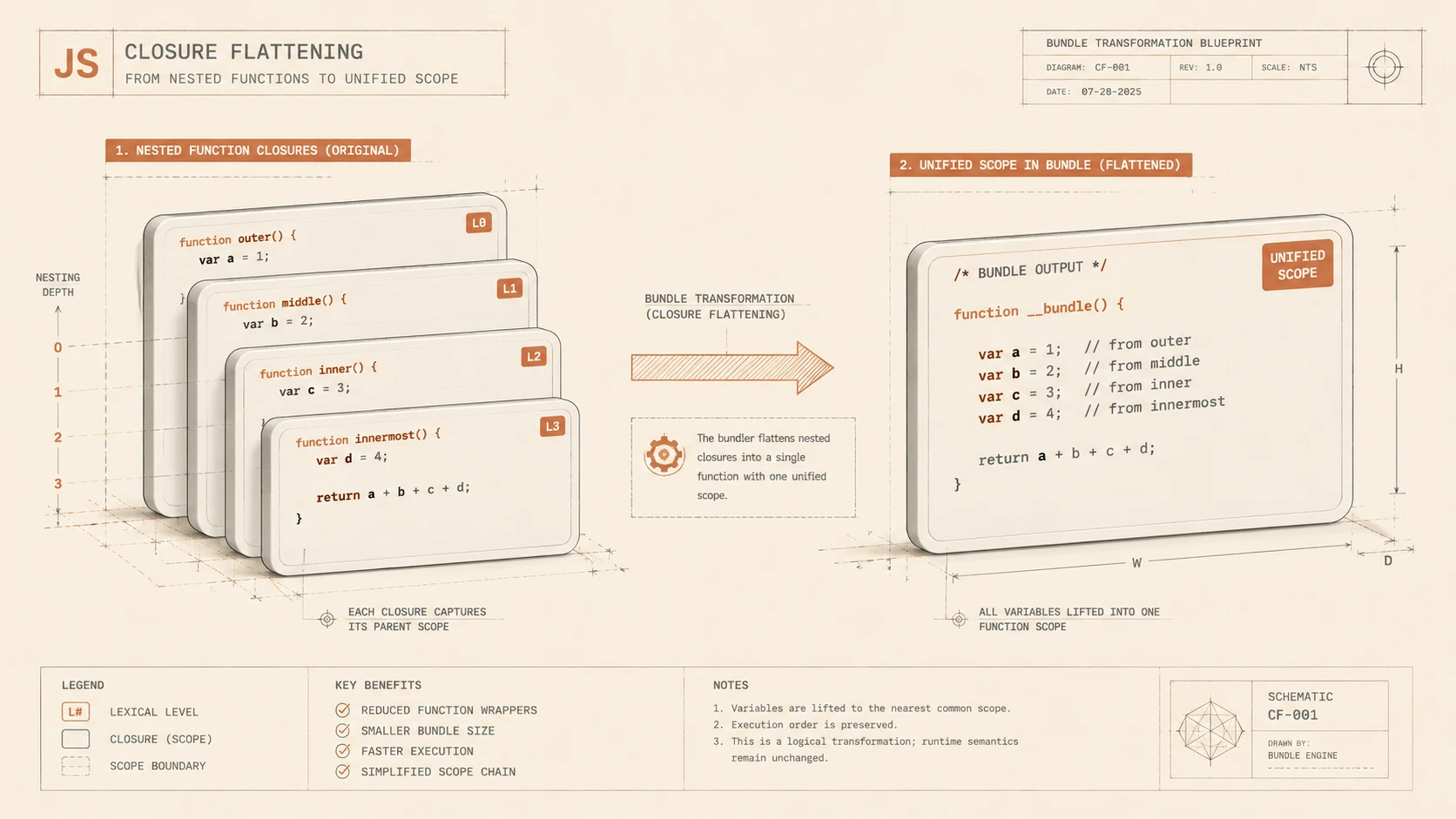
The defining enhancement in Webpack 3.0 is Module Concatenation.
Historically, each module within a bundle was typically wrapped in its own function. While this approach preserved module isolation, it also introduced additional function calls and wrapper overhead.
Module Concatenation combines compatible modules into a shared scope during bundling.
Potential advantages include:
- ◆Smaller bundle size
- ◆Fewer wrapper functions
- ◆Reduced runtime overhead
- ◆Faster JavaScript execution
- ◆Improved optimization opportunities for JavaScript engines
By reducing abstraction layers within generated bundles, Webpack enables browsers to execute application code more efficiently.
Understanding Scope Hoisting
Scope hoisting moves compatible modules into a larger shared execution scope.
Instead of maintaining separate wrapper functions for every dependency, multiple modules may execute together when dependency analysis determines that concatenation is safe.
A typical build process includes:
- 1.Analyze module graph.
- 2.Identify compatible modules.
- 3.Concatenate modules into shared scopes.
- 4.Generate optimized bundle.
- 5.Deliver minimized production assets.
The optimization occurs entirely during build time without requiring application code changes.
Bundle Loading Optimization
Webpack continues improving production bundle generation through efficient loading strategies.
Enterprise applications frequently consist of:
- ◆Initial application code
- ◆Feature modules
- ◆Administrative interfaces
- ◆Reporting dashboards
- ◆Shared utility libraries
Separating these assets into logical bundles allows applications to load only the code required for the current user experience.
Code Splitting
Code splitting remains one of Webpack's most valuable production capabilities.
Rather than delivering an entire application in a single bundle, Webpack can divide applications into multiple bundles that load independently.
Benefits include:
- ◆Faster initial page rendering
- ◆Reduced download size
- ◆Better browser caching
- ◆Improved scalability
Large enterprise applications benefit significantly from reducing the amount of JavaScript delivered during initial navigation.
Dynamic Imports
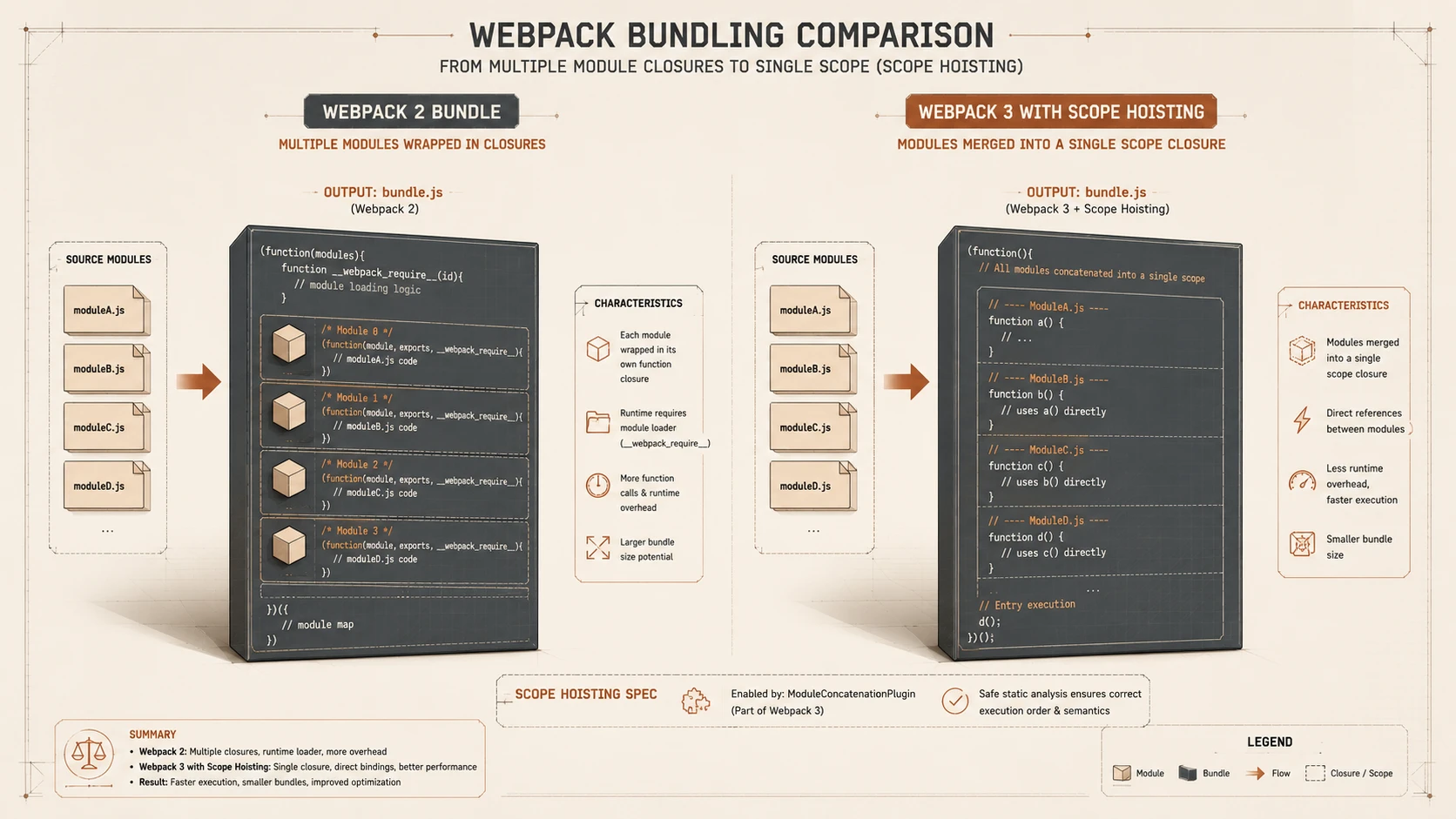
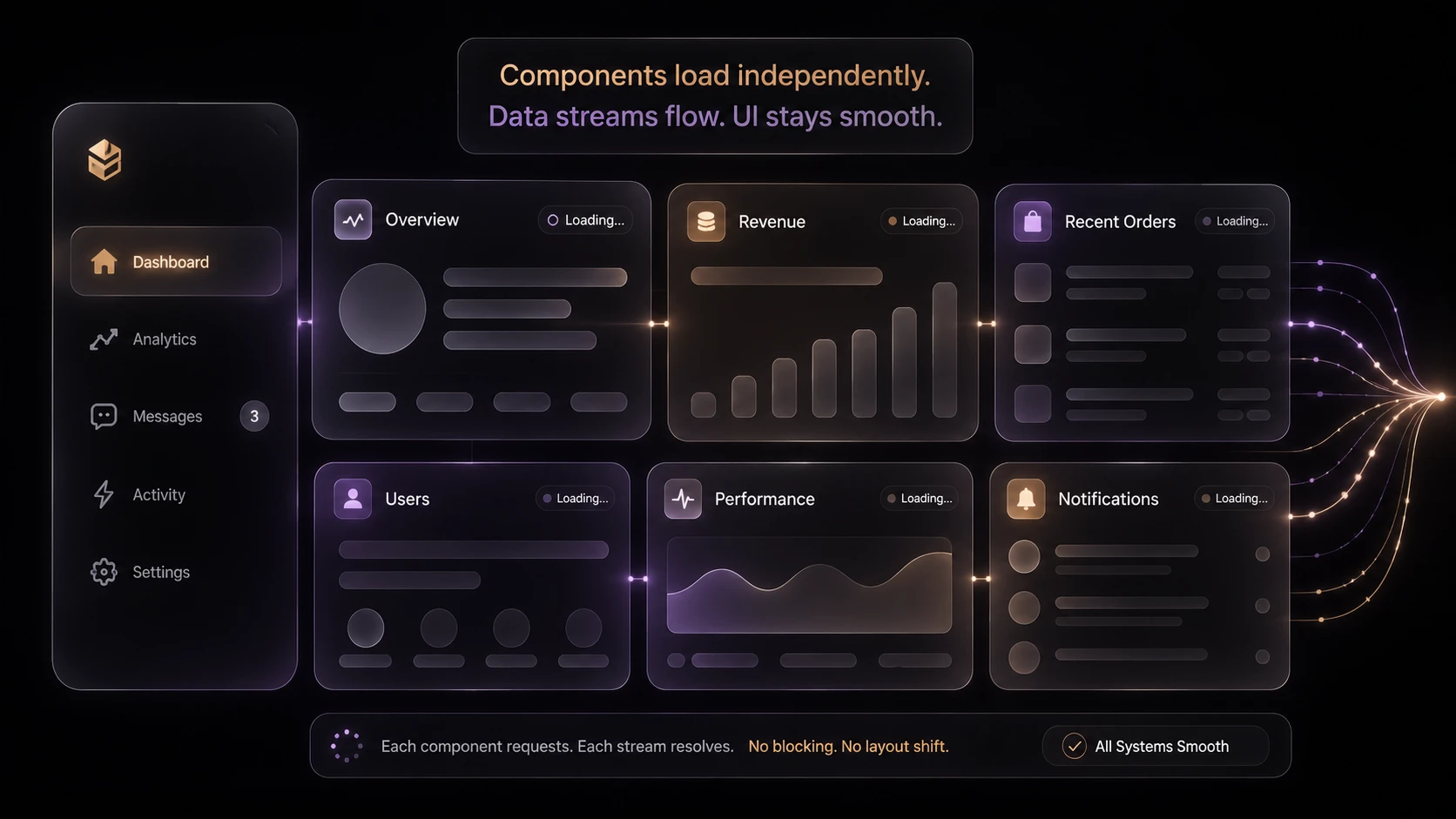
System architecture diagram and conceptual workflow layout for Webpack 3.0: Scope Hoisting and Bundle Loading Optimizations.
Webpack supports asynchronous loading patterns that allow application features to be retrieved only when required.
Typical scenarios include:
- ◆Administrative modules
- ◆Reporting features
- ◆Optional user workflows
- ◆Large visualization libraries
Dynamic loading complements code splitting by delaying downloads until users access specific functionality.
Production Build Pipeline
A typical enterprise Webpack workflow includes:
- 1.Resolve project dependencies.
- 2.Build the dependency graph.
- 3.Process source files through loaders.
- 4.Apply optimization plugins.
- 5.Perform Module Concatenation.
- 6.Generate production bundles.
- 7.Deploy compiled assets.
Automated build pipelines improve deployment consistency across development, testing, and production environments.
Enterprise Use Cases
| Scenario | Benefit |
|---|---|
| React Applications | Optimized production bundles |
| Angular Applications | Reduced application startup |
| Vue.js Projects | Efficient module packaging |
| Enterprise Dashboards | Improved initial load performance |
| SaaS Platforms | Better asset delivery |
| Progressive Web Applications | Smaller downloadable assets |
Organizations building large browser applications benefit from efficient dependency packaging and optimized bundle generation.
Performance Considerations
Webpack optimization should be evaluated alongside overall application architecture.
Development teams should monitor:
- ◆Bundle size
- ◆JavaScript parse time
- ◆Initial page rendering
- ◆Network transfer size
- ◆Module count
- ◆Build duration
Performance gains depend on application structure as well as bundler configuration.
Security Considerations
Webpack focuses on build automation rather than runtime security.
Organizations should continue implementing:
- ◆HTTPS deployment
- ◆Dependency auditing
- ◆Secure content delivery
- ◆Input validation
- ◆Authentication
- ◆Authorization
Build optimization complements secure software engineering but does not replace it.
Scalability
Webpack supports scalable frontend architecture through:
- ◆Modular application organization
- ◆Efficient dependency management
- ◆Incremental feature loading
- ◆Automated production builds
- ◆Plugin extensibility
These capabilities become increasingly valuable as enterprise applications continue expanding.
Best Practices
Organizations adopting Webpack 3.0 should:
- ◆Enable Module Concatenation for production builds.
- ◆Organize applications into reusable modules.
- ◆Use code splitting strategically.
- ◆Minimize unnecessary dependencies.
- ◆Profile bundle size regularly.
- ◆Separate development and production configurations.
- ◆Automate production builds within continuous integration.
- ◆Measure application performance after deployment.
Consistent build practices maximize the benefits of Webpack optimization.
Common Mistakes
Development teams should avoid:
- ◆Assuming smaller bundles guarantee faster applications.
- ◆Bundling unrelated features together.
- ◆Ignoring browser caching strategies.
- ◆Including unused dependencies.
- ◆Optimizing without performance measurement.
- ◆Treating build tooling as a substitute for sound application architecture.
Successful optimization requires disciplined engineering and continuous performance evaluation.
Technology Comparison
| Capability | Earlier Webpack Releases | Webpack 3.0 |
|---|---|---|
| Module Bundling | Yes | Yes |
| Code Splitting | Yes | Yes |
| Dynamic Loading | Yes | Yes |
| Module Concatenation | No | Yes |
| Scope Hoisting | No | Yes |
| Production Optimization | Good | Improved |
Webpack 3.0 extends the existing build pipeline with optimizations that reduce execution overhead while preserving familiar development workflows.
Adoption Strategy
Organizations should evaluate Webpack 3.0 through incremental upgrades.
A practical migration strategy includes:
- 1.Upgrade build dependencies.
- 2.Validate existing loader compatibility.
- 3.Enable production optimization plugins.
- 4.Measure bundle sizes before and after migration.
- 5.Review code splitting strategy.
- 6.Benchmark application startup performance.
- 7.Roll out updated build pipelines across projects.
Incremental adoption minimizes deployment risk while allowing engineering teams to measure optimization benefits.
Limitations
As of October 2017, organizations should recognize several considerations.
Current observations include:
- ◆Scope hoisting applies only when module relationships permit safe concatenation.
- ◆Build configuration continues to influence optimization effectiveness.
- ◆Large dependency graphs still require careful architectural planning.
- ◆Production performance should always be validated through representative workloads.
Webpack remains a powerful build tool, but application architecture continues to be the primary factor influencing overall performance.
Looking Ahead
Webpack 3.0 reinforces its position as a leading module bundler for modern JavaScript applications by introducing Module Concatenation, improving production bundle generation, and reducing runtime overhead through scope hoisting. These enhancements build upon an already mature ecosystem that supports modular development, automated optimization, and scalable deployment workflows.
As of October 2017, enterprise architects and frontend engineering teams should evaluate Webpack 3.0 as a natural evolution of existing build pipelines. Organizations that combine modular application design, disciplined dependency management, and continuous performance measurement will be well positioned to deliver fast, maintainable web applications while accommodating the continued growth of JavaScript ecosystems.