Database performance is rarely determined by hardware alone. In enterprise environments, carefully designed indexes often make the difference between applications that respond in milliseconds and systems that struggle under increasing workloads. As organizations continue to collect larger volumes of transactional and analytical data in 2010, database administrators and developers must understand how indexing strategies influence query performance, scalability, and overall system efficiency.
An index is much more than a performance feature. It is a critical database structure that enables the query optimizer to locate rows efficiently while minimizing disk I/O and CPU utilization. Poor indexing decisions can result in unnecessary table scans, excessive maintenance overhead, slower write operations, and inconsistent application performance.
This guide explores the principles of enterprise SQL index design from the perspective of early 2010, focusing on relational database platforms commonly deployed in enterprise environments, including Microsoft SQL Server 2005 and SQL Server 2008, Oracle Database 10g and Oracle Database 11g, IBM DB2, and MySQL.
Understanding Database Indexes
An index is a data structure that allows the database engine to locate records without scanning every row in a table. Much like the index of a technical book, a database index enables quick navigation to the required information.
Without appropriate indexes, queries often perform full table scans, reading every row before returning results. As database sizes grow from thousands to millions of records, full scans become increasingly expensive.
Proper indexing helps:
- ◆Reduce disk I/O
- ◆Improve query response time
- ◆Minimize CPU utilization
- ◆Increase application scalability
- ◆Support concurrent workloads
- ◆Improve reporting performance
The database query optimizer evaluates available indexes and determines the most efficient execution plan based on statistics and estimated costs.
How the Query Optimizer Uses Indexes
Modern relational database management systems include sophisticated cost-based optimizers.
Rather than executing SQL statements exactly as written, the optimizer evaluates multiple execution strategies and chooses the plan with the lowest estimated cost.
Typical optimization decisions include:
- ◆Index seek versus table scan
- ◆Join algorithms
- ◆Sort operations
- ◆Predicate evaluation
- ◆Aggregation strategies
- ◆Parallel execution where supported
Well-designed indexes provide the optimizer with efficient access paths that significantly reduce resource consumption.
Clustered Indexes
A clustered index determines the physical ordering of data rows within a table.
Because the data itself follows the clustered index order, only one clustered index can exist per table.
Clustered indexes work particularly well for:
- ◆Primary keys
- ◆Sequential identifiers
- ◆Date-based queries
- ◆Range searches
- ◆Frequently sorted columns
Example:
CREATE CLUSTERED INDEX IX_OrderDate
ON Orders (OrderDate);
Benefits include:
- ◆Efficient range retrieval
- ◆Reduced sorting operations
- ◆Faster sequential access
- ◆Improved reporting queries
However, selecting an inappropriate clustered key can increase page splits and fragmentation.
Nonclustered Indexes
A nonclustered index stores key values separately from the table data while maintaining references to the corresponding rows.
Unlike clustered indexes, multiple nonclustered indexes may exist on a single table.
Typical use cases include:
- ◆Search columns
- ◆Frequently filtered fields
- ◆Join columns
- ◆Foreign keys
- ◆Lookup queries
Example:
CREATE INDEX IX_Customer_LastName
ON Customers (LastName);
These indexes provide flexibility but introduce additional storage and maintenance costs.
Selecting the Right Columns
Choosing the correct indexed columns requires understanding application behavior rather than simply indexing every field.
Columns commonly considered for indexing include:
- ◆Primary keys
- ◆Foreign keys
- ◆Columns used in WHERE clauses
- ◆JOIN predicates
- ◆ORDER BY clauses
- ◆GROUP BY operations
Before creating an index, database administrators should analyze:
- ◆Query frequency
- ◆Data distribution
- ◆Table size
- ◆Update activity
- ◆Selectivity
Highly selective columns generally provide greater performance benefits.
Composite Indexes
Many enterprise queries filter using multiple columns simultaneously.
Composite indexes combine multiple columns into a single index.
Example:
CREATE INDEX IX_Order_CustomerDate
ON Orders (CustomerID, OrderDate);
Benefits include:
- ◆Faster multi-column searches
- ◆Improved join performance
- ◆Reduced sorting
- ◆Better optimizer choices
Column order is critical.
The leading column should generally be the one most frequently used in search predicates and with higher selectivity.
Covering Queries
One of the most effective indexing techniques is designing indexes that satisfy an entire query without requiring additional table lookups.
When all required columns exist within the index structure, the database engine can avoid extra data retrieval operations.
This approach significantly reduces disk activity for high-frequency queries.
Database administrators should identify:
- ◆Frequently executed reports
- ◆Dashboard queries
- ◆High-volume search operations
- ◆Customer lookup screens
These workloads often benefit from carefully designed covering indexes.
Index Selectivity
Selectivity measures how effectively an indexed column narrows search results.
Examples of high-selectivity columns include:
- ◆Employee ID
- ◆Customer Number
- ◆Invoice Number
- ◆Order Identifier
Examples of low-selectivity columns include:
- ◆Gender
- ◆Country in small datasets
- ◆Boolean status fields
- ◆Yes/No indicators
Indexes on low-selectivity columns may provide little benefit and sometimes increase overhead.
Balancing Read and Write Performance
Indexes improve read performance but introduce additional work during INSERT, UPDATE, and DELETE operations.
Every modification must also update affected indexes.
Enterprise architects should balance:
| Read-Heavy Systems | Write-Heavy Systems |
|---|---|
| More indexes | Fewer indexes |
| Faster reporting | Faster transactions |
| Analytical workloads | High-volume OLTP |
| Complex searches | Frequent updates |
Understanding workload characteristics is essential when designing indexing strategies.
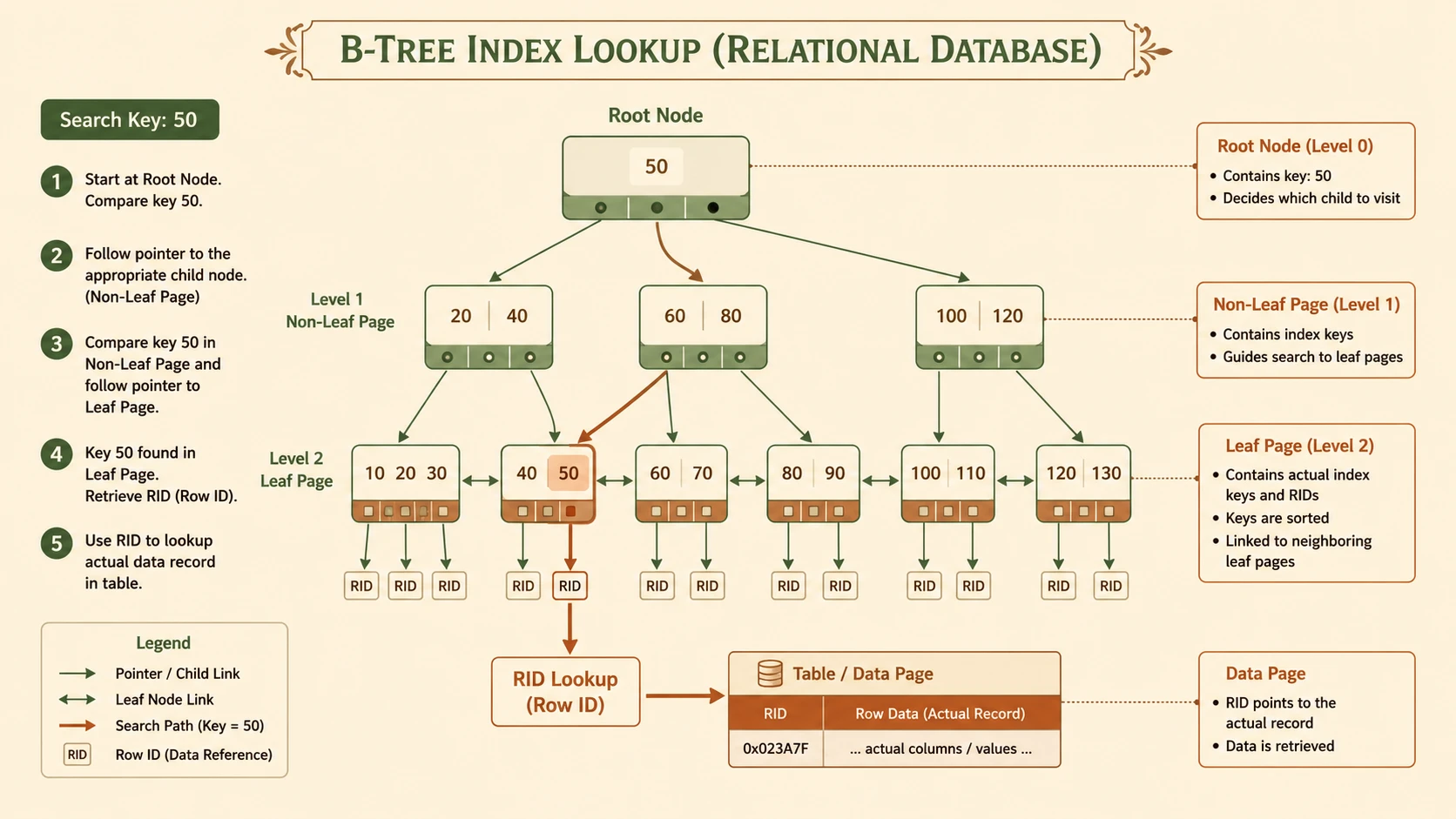
System architecture diagram and conceptual workflow layout for Designing High-Performance SQL Indexes.
Indexes and JOIN Operations
Enterprise applications frequently join multiple tables.
Indexes on join columns reduce the cost of these operations.
Example:
SELECT o.OrderID,
       c.CustomerName
FROM Orders o
INNER JOIN Customers c
ON o.CustomerID = c.CustomerID;
Indexes on both CustomerID columns enable the optimizer to locate matching rows efficiently.
Foreign key columns are especially strong candidates for indexing in transactional systems.
Supporting ORDER BY and GROUP BY
Sorting large datasets can be expensive.
Appropriate indexes often allow the database engine to return rows in the required order without performing additional sort operations.
This is particularly valuable for:
- ◆Financial reports
- ◆Customer lists
- ◆Operational dashboards
- ◆Management reporting
Similarly, GROUP BY operations may benefit when grouped columns are supported by suitable indexes.
Understanding Fragmentation
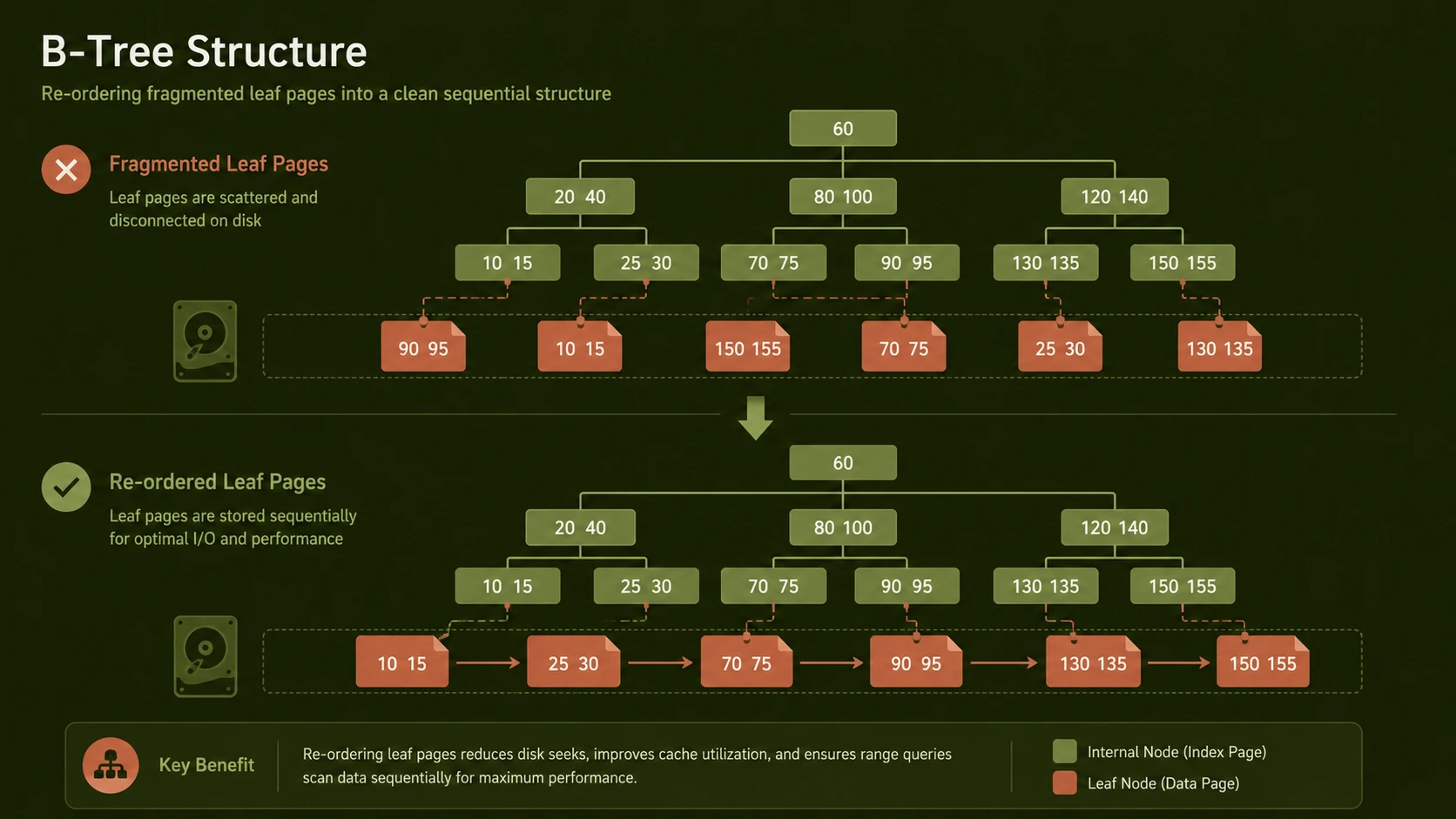
As tables grow and data changes, indexes become fragmented.
Fragmentation increases:
- ◆Disk reads
- ◆Page splits
- ◆Storage inefficiency
- ◆Query response times
Regular index maintenance helps maintain optimal performance.
Typical maintenance activities include:
- ◆Rebuilding indexes
- ◆Reorganizing indexes where supported
- ◆Updating optimizer statistics
- ◆Monitoring fragmentation levels
Maintenance schedules should be aligned with business activity to minimize operational impact.
Statistics and the Query Optimizer
The optimizer relies on statistics describing data distribution.
Outdated statistics can cause inefficient execution plans even when indexes exist.
Database administrators should ensure statistics remain current, particularly after:
- ◆Large data imports
- ◆Significant updates
- ◆Bulk deletes
- ◆Major maintenance operations
Accurate statistics enable better cardinality estimates and more efficient execution plans.
Common Indexing Mistakes
Several indexing mistakes repeatedly appear in enterprise environments.
Creating Too Many Indexes
Every additional index consumes storage and increases maintenance overhead.
Excessive indexing often slows write performance without providing proportional query improvements.
Ignoring Workload Analysis
Indexes should support actual application behavior rather than hypothetical scenarios.
Monitoring production workloads provides valuable insight into indexing priorities.
Choosing Poor Clustered Keys
Frequently changing clustered keys increase fragmentation and maintenance costs.
Stable, narrow, and sequential values generally make better clustered index candidates.
Neglecting Index Maintenance
Indexes require ongoing care.
Ignoring fragmentation and stale statistics gradually reduces performance.
Indexing Low-Value Columns
Columns with very low selectivity often contribute little to query optimization.
Careful analysis should precede index creation.
Enterprise Best Practices
Organizations should establish consistent indexing standards across development teams.
Recommended practices include:
- ◆Analyze execution plans before adding indexes.
- ◆Index columns used by frequent search predicates.
- ◆Monitor index usage regularly.
- ◆Remove unused indexes where appropriate.
- ◆Review indexes after major application changes.
- ◆Update statistics as part of routine maintenance.
- ◆Balance reporting requirements against transaction performance.
- ◆Document indexing decisions for future administrators.
Comparing Common Index Types
| Index Type | Best Use Case | Advantages | Considerations |
|---|---|---|---|
| Clustered | Primary access path | Fast range queries | Only one per table |
| Nonclustered | Searches and joins | Flexible | Additional storage |
| Composite | Multi-column filtering | Supports complex queries | Column order matters |
Enterprise Use Cases
Well-designed indexes support numerous enterprise workloads.
Financial Systems:
- ◆Transaction lookups
- ◆Account reporting
- ◆Audit queries
Customer Relationship Management:
- ◆Customer searches
- ◆Contact history
- ◆Territory reporting
Inventory Management:
- ◆Product lookups
- ◆Warehouse reporting
- ◆Order processing
Business Intelligence:
- ◆Historical reporting
- ◆Operational dashboards
- ◆Executive summaries
Each workload requires indexing strategies tailored to its specific query patterns and transaction characteristics.
Performance Monitoring
Index design is an iterative process rather than a one-time activity.
Database administrators should regularly monitor:
- ◆Query execution time
- ◆Execution plans
- ◆Index usage statistics
- ◆Table scan frequency
- ◆Disk I/O activity
- ◆CPU utilization
- ◆Fragmentation levels
Continuous monitoring enables proactive optimization before performance issues affect users.
Looking Ahead
As enterprise databases continue to grow in both size and complexity, effective indexing will remain one of the most valuable skills for database professionals. Advances in hardware alone cannot compensate for poorly designed database structures or inefficient query execution plans.
Organizations that invest in disciplined index design, workload analysis, and regular maintenance are better positioned to deliver responsive applications, support increasing transaction volumes, and control infrastructure costs. By understanding how relational database engines use indexes and by aligning indexing strategies with real-world business workloads, enterprise teams can achieve significant performance improvements while maintaining scalability for future growth.
In 2010, successful database optimization is not about creating more indexes—it is about creating the right indexes based on sound architectural principles, measurable workload analysis, and ongoing operational discipline.