Introduction
For decades, software interfaces have followed a predictable interaction model. Users navigate menus, complete forms, click buttons, search through documentation, and manually execute workflows designed by product teams. While these interfaces have continuously improved through responsive design, accessibility, personalization, and mobile-first development, they have largely remained deterministic.
The widespread adoption of Generative AI throughout 2024 has introduced an entirely new interaction paradigm. Applications are no longer passive tools waiting for user input. Instead, they actively participate in workflows by generating content, explaining complex information, recommending actions, automating repetitive tasks, adapting layouts, and collaborating with users to accomplish business objectives.
This evolution has given rise to Generative UX, a design philosophy where interfaces become intelligent collaborators rather than static presentation layers. Instead of asking users to adapt to software, software increasingly adapts to users.
For enterprise organizations, Generative UX extends beyond conversational chat interfaces. It integrates AI throughout entire applications, transforming dashboards into advisors, forms into assistants, reports into interactive conversations, and productivity tools into collaborative workspaces.
Industry Background
Modern AI-native applications increasingly leverage:
- ◆Large Language Models (LLMs)
- ◆Retrieval-Augmented Generation (RAG)
- ◆Agentic AI
- ◆Vector Databases
- ◆Real-Time Analytics
- ◆Design Systems
- ◆AI Copilots
- ◆Multi-Modal AI
Together these technologies enable software to become adaptive, context-aware, and collaborative.
The Business Problem
Traditional enterprise applications often experience:
- ◆Complex navigation
- ◆High training requirements
- ◆Information overload
- ◆Manual workflow execution
- ◆Static dashboards
- ◆Limited personalization
- ◆Slow decision-making
As software capabilities expand, organizations require interfaces capable of simplifying complexity while improving productivity.
Understanding Generative UX
Generative UX combines user-centered design principles with Generative AI to create interfaces that actively assist users throughout their workflows.
Its primary objectives include:
- ◆Human-AI collaboration
- ◆Context-aware assistance
- ◆Adaptive interfaces
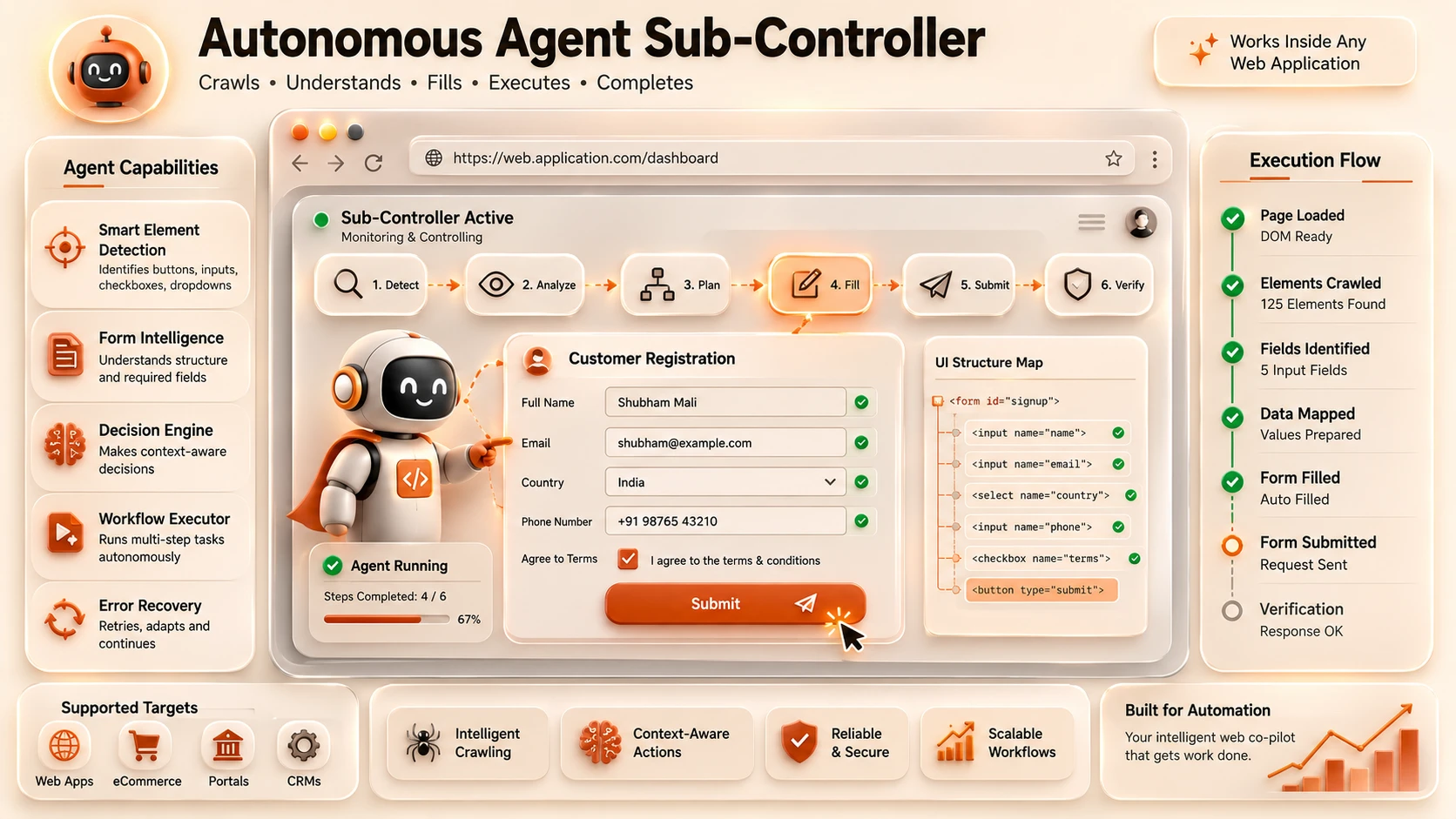
- ◆Intelligent automation
- ◆Personalized experiences
- ◆Reduced cognitive load
- ◆Improved productivity
Rather than replacing traditional UI elements, Generative UX augments them with AI-powered intelligence.
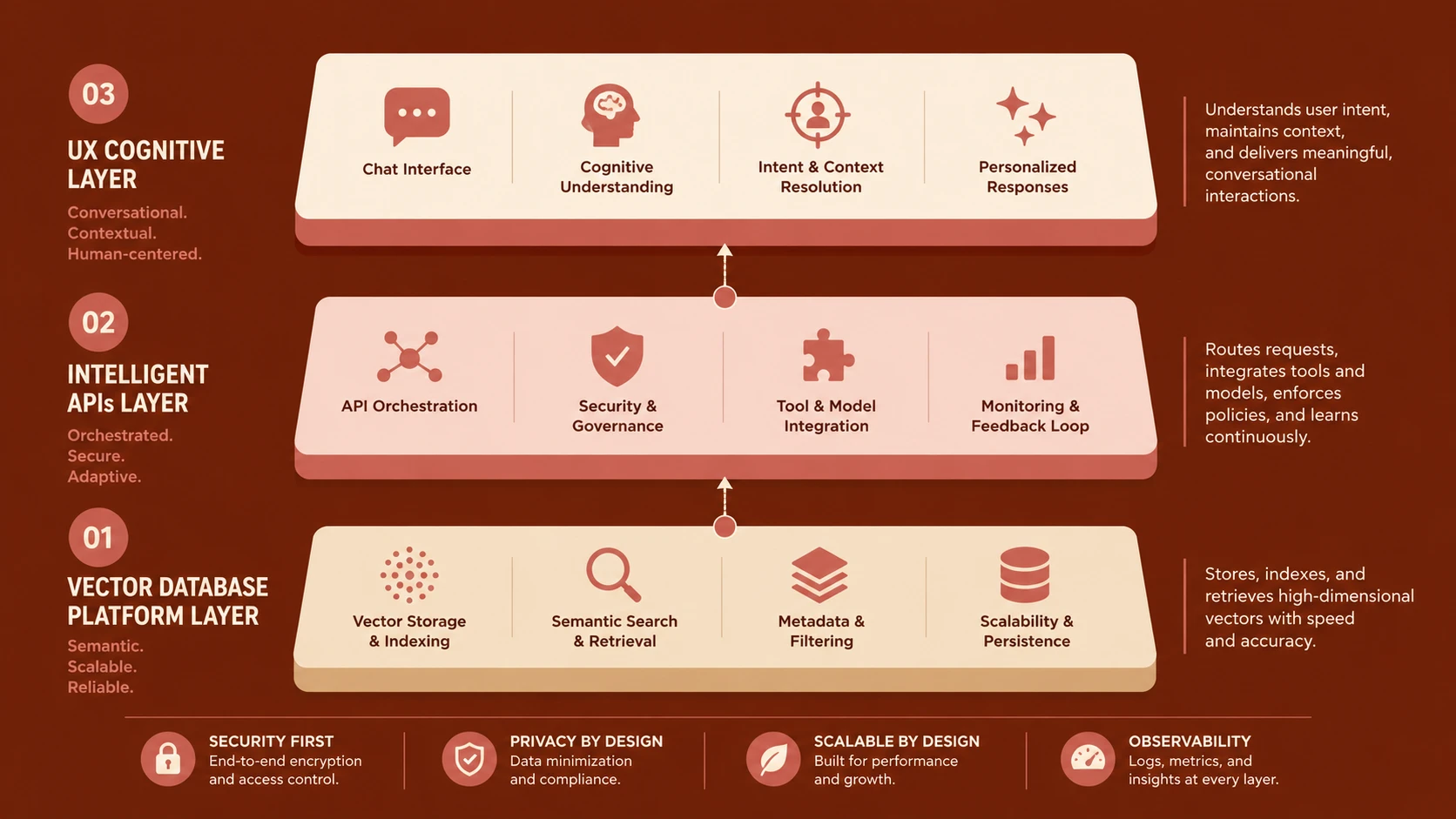
Core Architecture
| Component | Responsibility |
|---|---|
| User Interface | Visual interaction layer |
| AI Interaction Layer | Intent understanding and orchestration |
| Large Language Model | Reasoning and content generation |
| Enterprise APIs | Business operations |
| Knowledge Platform | Organizational information retrieval |
| Vector Database | Semantic search |
| Workflow Engine | Business process automation |
| Analytics Platform | Usage insights and optimization |
These components create intelligent applications capable of collaborative interaction.
How Generative UX Works
- 1.Users interact through conventional UI components or natural language.
- 2.Context is collected from the current workflow, enterprise data, and user preferences.
- 3.AI interprets user intent.
- 4.Knowledge systems retrieve relevant business information.
- 5.Enterprise APIs execute business operations.
- 6.AI generates recommendations, summaries, or content.
- 7.Users review, modify, approve, or reject AI suggestions.
- 8.Feedback continuously improves future interactions.
This collaborative loop places users in control while allowing AI to reduce repetitive work.
Beyond Chat Interfaces
Generative UX extends well beyond standalone chatbots.
Modern enterprise applications increasingly embed AI into:
- ◆Dashboards
- ◆Forms
- ◆Search experiences
- ◆Reports
- ◆Documentation
- ◆Data analysis
- ◆Workflow automation
AI becomes a natural part of the interface instead of a separate feature.
Adaptive User Interfaces
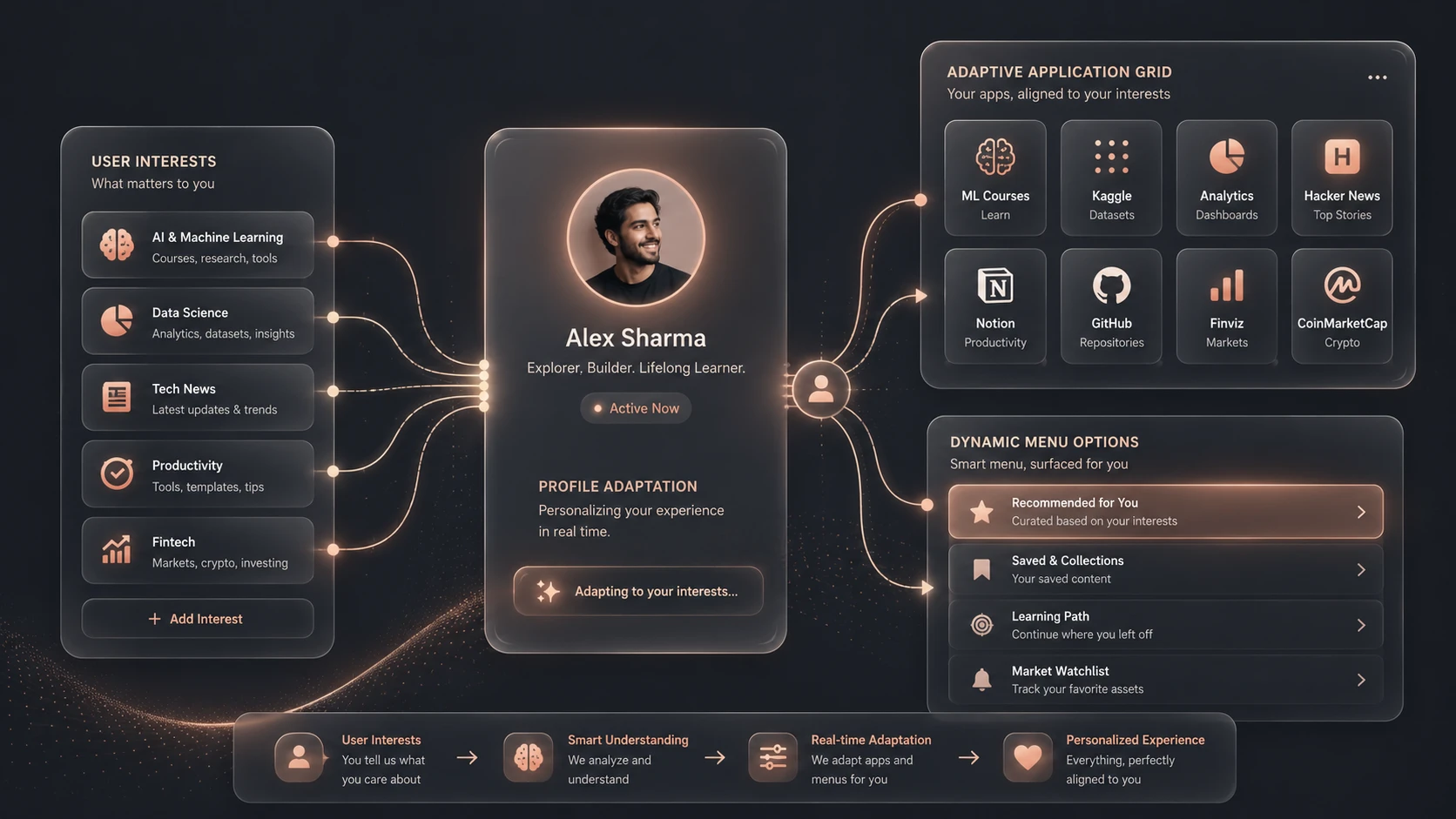
Generative systems dynamically adjust experiences based on:
- ◆User roles
- ◆Current objectives
- ◆Historical interactions
- ◆Business context
- ◆Application state
- ◆Organizational knowledge
Adaptive interfaces reduce unnecessary complexity while presenting information that is immediately relevant.
AI as a Collaborative Partner
Instead of automating entire workflows, Generative UX emphasizes collaboration.
AI increasingly assists by:
- ◆Drafting documents
- ◆Explaining analytics
- ◆Generating reports
- ◆Summarizing meetings
- ◆Creating code snippets
- ◆Recommending next actions
Final decisions remain under human control, ensuring accountability and trust.
Context-Aware Experiences
Modern AI systems understand significantly more context than previous generations of software.
Context may include:
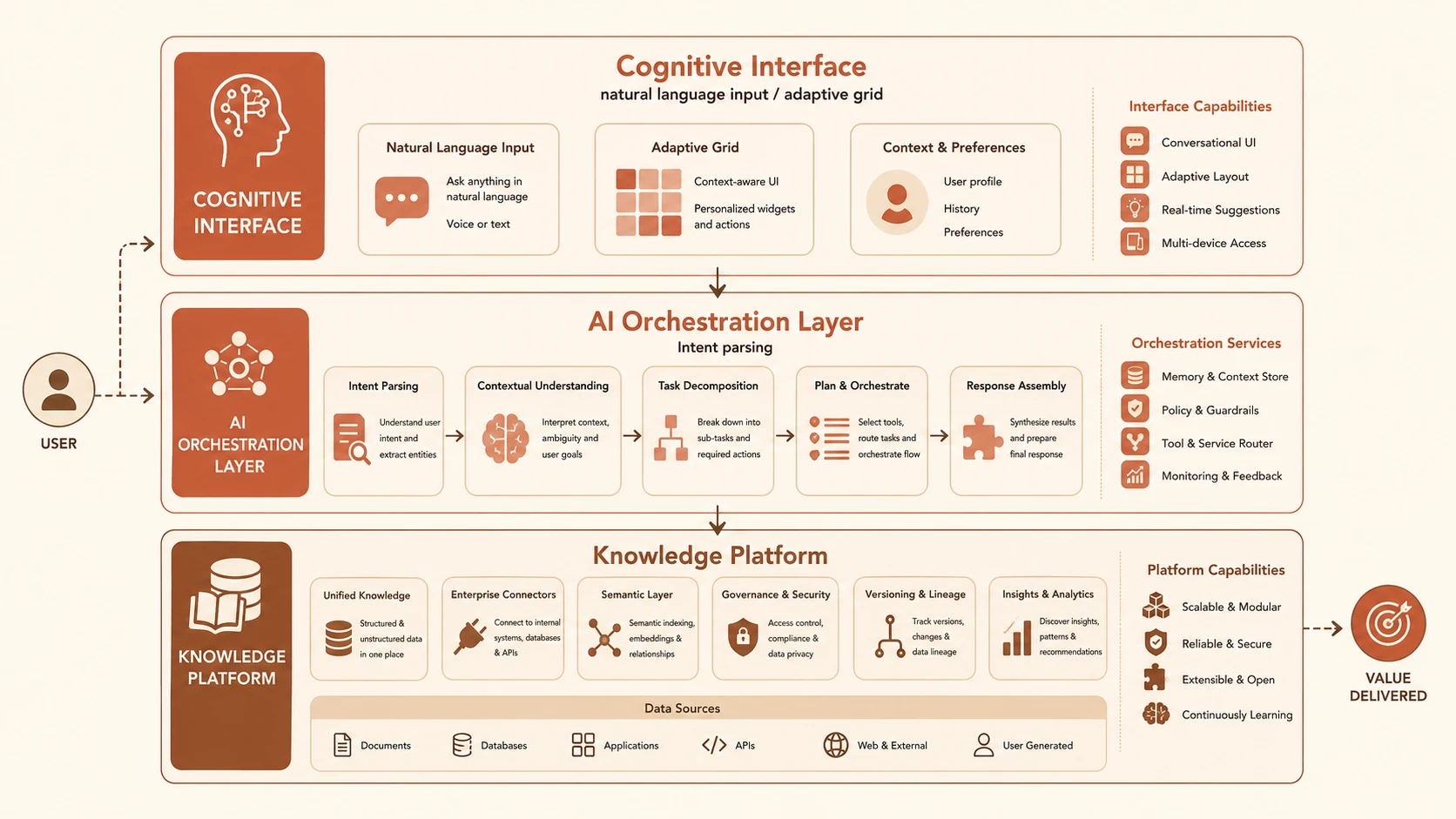
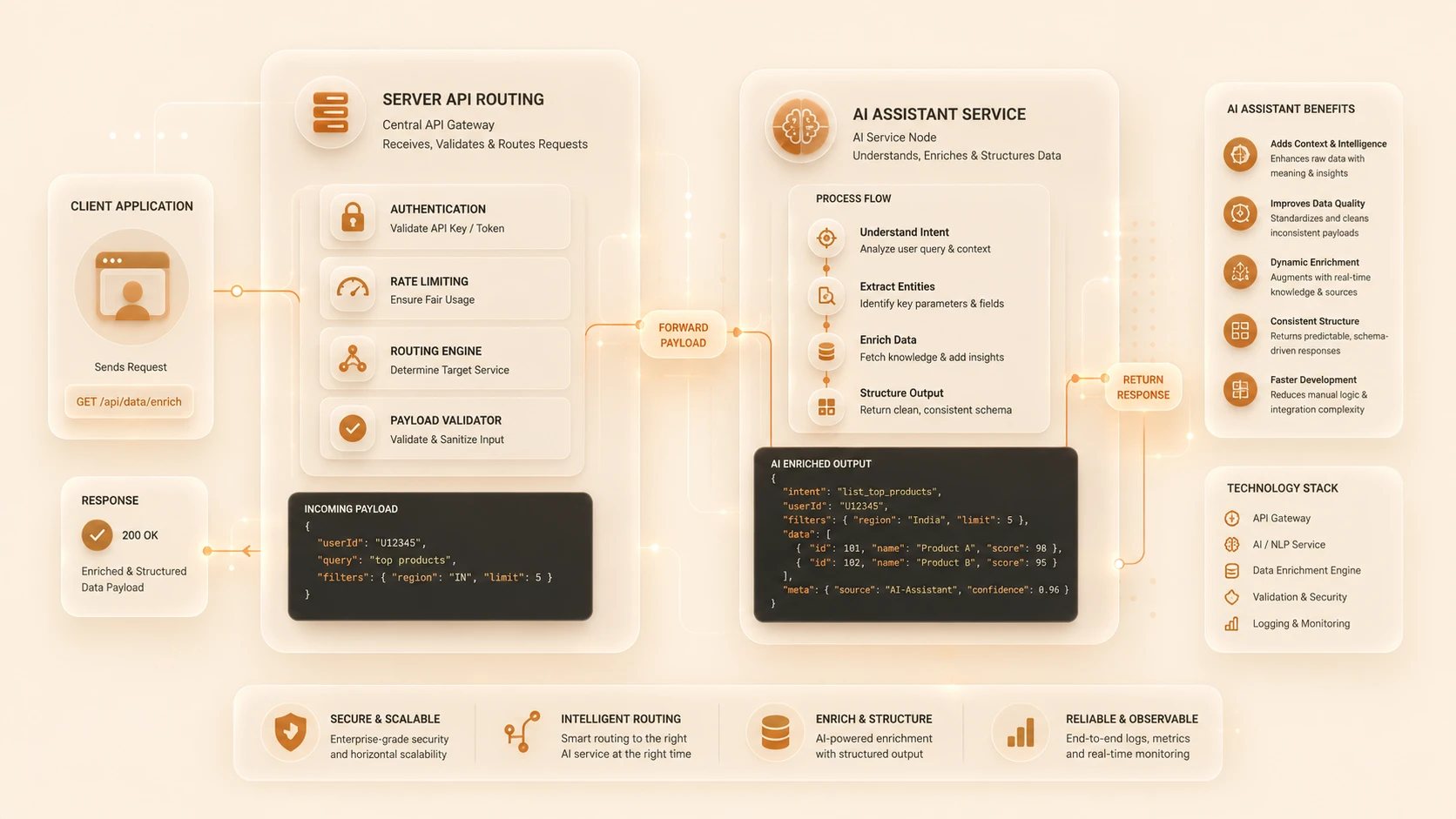
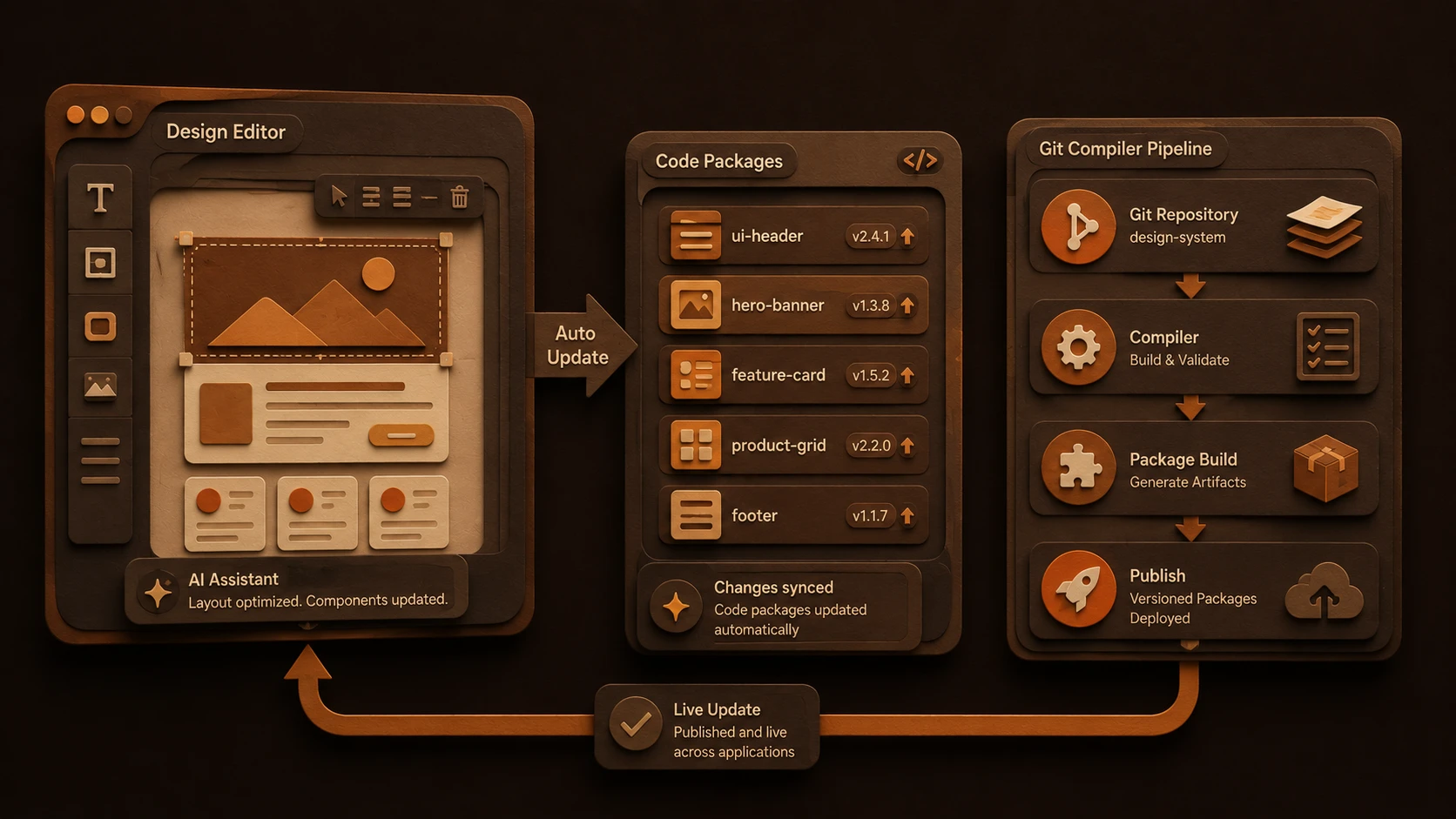
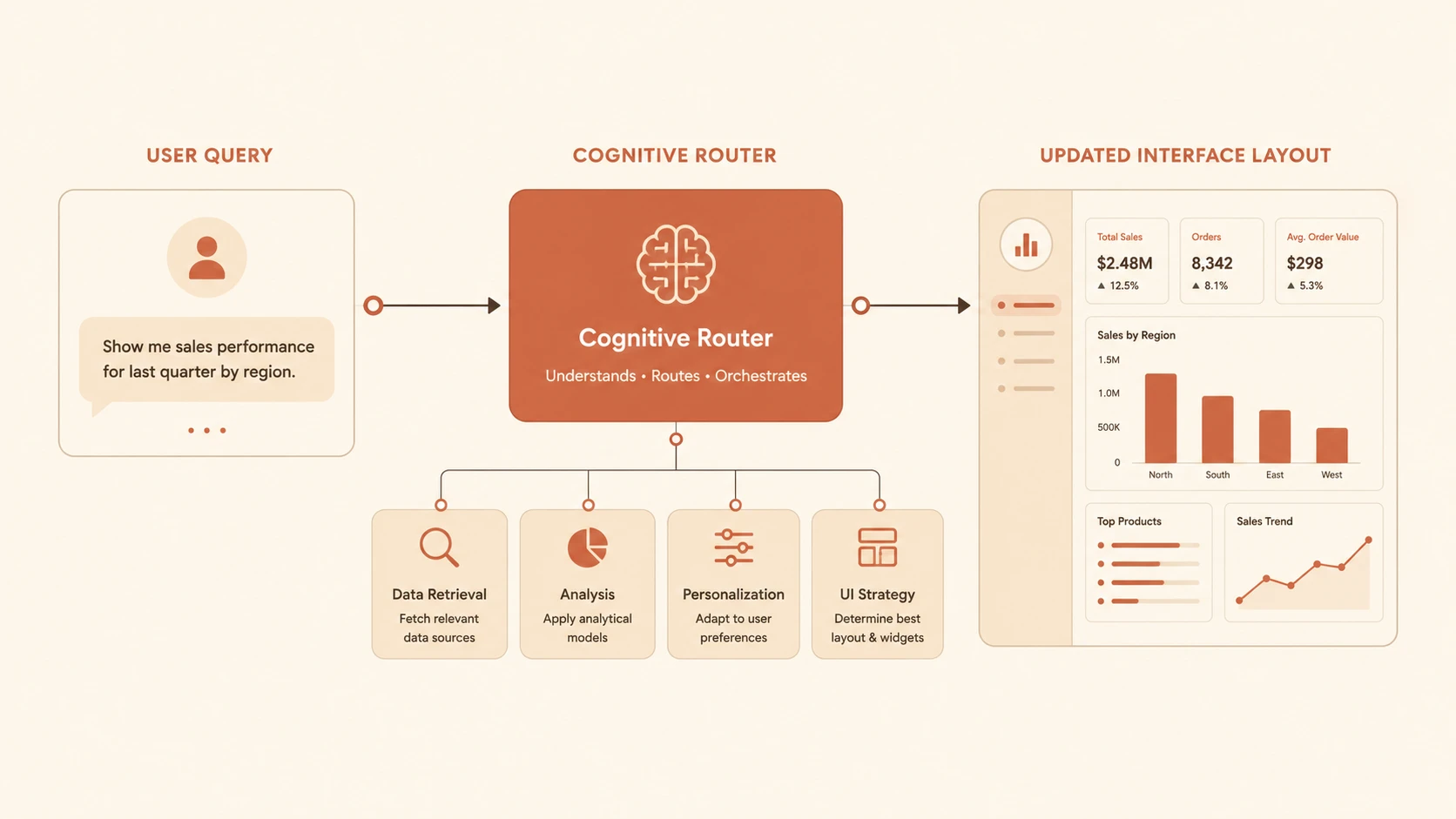
System architecture diagram and conceptual workflow layout for Generative UX: Designing Interfaces That Co-Create with AI.
- ◆User identity
- ◆Current project
- ◆Organizational policies
- ◆Historical activity
- ◆Connected enterprise systems
- ◆Retrieved knowledge
Context awareness enables more accurate and relevant assistance.
Multi-Modal Interaction
By late 2024, enterprise interfaces increasingly support multiple interaction methods, including:
- ◆Text conversations
- ◆Voice commands
- ◆Images
- ◆Documents
- ◆Structured forms
- ◆Visual dashboards
Combining multiple modalities enables richer and more natural user experiences.
Enterprise Use Cases
Enterprise Productivity
Generate reports, summarize documents, automate repetitive tasks, and assist employees throughout daily workflows.
Customer Service
Provide AI-assisted support agents with contextual recommendations, conversation summaries, and response suggestions.
Healthcare
Assist clinicians by summarizing medical records, generating documentation drafts, and retrieving relevant clinical knowledge while preserving human oversight.
Financial Services
Support analysts with intelligent reporting, risk summaries, regulatory documentation, and investment research assistance.
Software Development
Embed AI throughout development environments to generate code, explain architectures, review pull requests, create documentation, and recommend improvements.
Performance Considerations
Organizations should monitor:
- ◆AI response latency
- ◆Model inference performance
- ◆Token utilization
- ◆Context retrieval speed
- ◆User interaction quality
- ◆Workflow completion time
Performance should be measured using both technical metrics and user productivity outcomes.
Security Considerations
Generative UX introduces additional governance requirements.
Organizations should implement:
- ◆Zero Trust Architecture
- ◆Identity-aware AI access
- ◆Prompt validation
- ◆Secure Retrieval-Augmented Generation
- ◆Data classification
- ◆Encryption
- ◆Audit logging
- ◆Responsible AI governance
AI interactions should follow the same security standards as all enterprise business systems.
Scalability
Generative UX platforms improve scalability through:
- ◆Cloud-native AI infrastructure
- ◆Distributed inference services
- ◆Shared enterprise knowledge platforms
- ◆API-first integration
- ◆Modular AI services
- ◆Centralized governance
These capabilities allow organizations to extend AI consistently across numerous applications.
Best Practices
- ◆Design AI as a collaborative assistant rather than a replacement for users.
- ◆Preserve user control over important decisions.
- ◆Use Retrieval-Augmented Generation to improve factual accuracy.
- ◆Provide transparency when content is AI-generated.
- ◆Integrate AI into existing workflows instead of forcing new interaction models.
- ◆Continuously evaluate usability through real user feedback.
- ◆Monitor model quality alongside business outcomes.
- ◆Establish governance for prompts, models, and enterprise knowledge sources.
Common Mistakes
| Mistake | Enterprise Impact |
|---|---|
| Replacing every interface with chat | Reduced usability |
| Ignoring human review | Lower trust and accountability |
| Building AI without enterprise context | Generic and inaccurate responses |
| Hiding AI limitations | Reduced user confidence |
| Treating AI as a standalone feature | Poor workflow integration |
| Neglecting governance and privacy | Compliance and security risks |
Technology Comparison
| Capability | Traditional UX | Generative UX |
|---|---|---|
| Interaction Model | Menu and Form Driven | Conversational and Context-Aware |
| Content | Static | Dynamically Generated |
| User Assistance | Help Documentation | AI Collaboration |
| Personalization | Rule-Based | Contextual and Adaptive |
| Workflow Execution | Manual | AI-Assisted |
| Learning | Limited | Continuously Improving |
Adoption Strategy
- 1.Identify workflows with high cognitive load or repetitive tasks.
- 2.Introduce AI assistance incrementally instead of redesigning entire applications.
- 3.Connect AI to trusted enterprise knowledge sources.
- 4.Build secure Retrieval-Augmented Generation pipelines.
- 5.Establish Responsible AI governance policies.
- 6.Measure productivity improvements through user analytics.
- 7.Continuously refine prompts, workflows, and AI interactions.
- 8.Expand Generative UX capabilities across enterprise applications based on measurable business value.
Limitations
As of November 2024, Generative UX is rapidly maturing but remains an emerging design discipline. AI-generated content may occasionally produce inaccurate, incomplete, or contextually inappropriate responses. Organizations should continue emphasizing human oversight, transparent AI interactions, responsible governance, and continuous evaluation. Generative UX should enhance human capabilities rather than reduce user agency or accountability.
Looking Ahead
From the perspective of November 2024, Generative UX represents one of the most significant shifts in software design since the introduction of responsive web applications. By combining Large Language Models, enterprise knowledge, adaptive interfaces, conversational workflows, and intelligent automation, organizations can create applications that actively collaborate with users rather than simply responding to commands. As multimodal AI, autonomous agents, and enterprise reasoning systems continue advancing, Generative UX is expected to become the defining interaction model for next-generation digital platforms, fundamentally changing how people work with software across every industry.