Introduction
JavaScript has evolved from a simple scripting language into the foundation of modern web applications. Enterprise applications now routinely consist of hundreds or even thousands of JavaScript modules distributed across user interface components, business logic, networking layers, and shared utility libraries.
For many years, developers relied on non-standard module systems such as CommonJS, AMD, and bundler-specific solutions to organize large applications. While these approaches solved immediate engineering problems, they also fragmented the JavaScript ecosystem and introduced additional build complexity.
The arrival of native ECMAScript Modules (ES Modules) in Chrome 61 marks an important milestone toward a standardized module system built directly into browser engines. Developers can now organize applications using the official JavaScript import and export syntax without relying on runtime loaders.
For enterprise development teams, this advancement represents a significant step toward cleaner application architecture, improved interoperability, and simplified long-term maintenance.
Industry Background
Modern web applications increasingly rely upon:
- ◆Component-based user interfaces
- ◆Single Page Applications
- ◆Progressive Web Apps
- ◆Shared JavaScript libraries
- ◆Build automation
- ◆Continuous Integration pipelines
- ◆Enterprise design systems
- ◆Modular application architectures
As applications grow larger, modular organization becomes essential for maintainability and team collaboration.
The Business Problem
Before standardized browser modules, enterprise development teams frequently encountered:
- ◆Multiple incompatible module formats
- ◆Runtime dependency loaders
- ◆Complex build configurations
- ◆Vendor-specific tooling
- ◆Difficult code reuse
- ◆Reduced interoperability
Organizations required a common module standard supported directly by browsers.
Understanding ES Modules
ECMAScript Modules define the official JavaScript module system standardized by ECMAScript.
Modules expose functionality using export statements while consuming dependencies using import statements.
Unlike previous approaches, module relationships are statically defined before execution.
Core objectives include:
- ◆Standardized modules
- ◆Better code organization
- ◆Explicit dependency management
- ◆Improved interoperability
- ◆Static dependency analysis
- ◆Native browser support
Core Architecture
| Component | Responsibility |
|---|---|
| Browser Engine | Loads and executes modules |
| Module Loader | Resolves module dependencies |
| Import Statement | References external modules |
| Export Statement | Exposes reusable functionality |
| Module Graph | Represents application dependencies |
| JavaScript Engine | Executes module code |
Together these components provide a standardized execution model for modular JavaScript applications.
How ES Modules Work
A simplified execution workflow includes:
- 1.Browser downloads the entry module.
- 2.Import statements are analyzed.
- 3.Module dependencies are resolved.
- 4.Required modules are requested.
- 5.Dependency graph is constructed.
- 6.Modules are evaluated in dependency order.
- 7.Application execution begins.
Because module relationships are explicit, browsers can understand application structure before execution.
Native Browser Support
Chrome 61 provides native execution of JavaScript modules without requiring proprietary runtime loaders.
Developers can define modular applications using standardized language syntax rather than framework-specific solutions.
Benefits include:
- ◆Reduced runtime complexity
- ◆Standardized application structure
- ◆Better interoperability
- ◆Consistent language behavior
Import and Export
Modules communicate using two fundamental language constructs.
Import
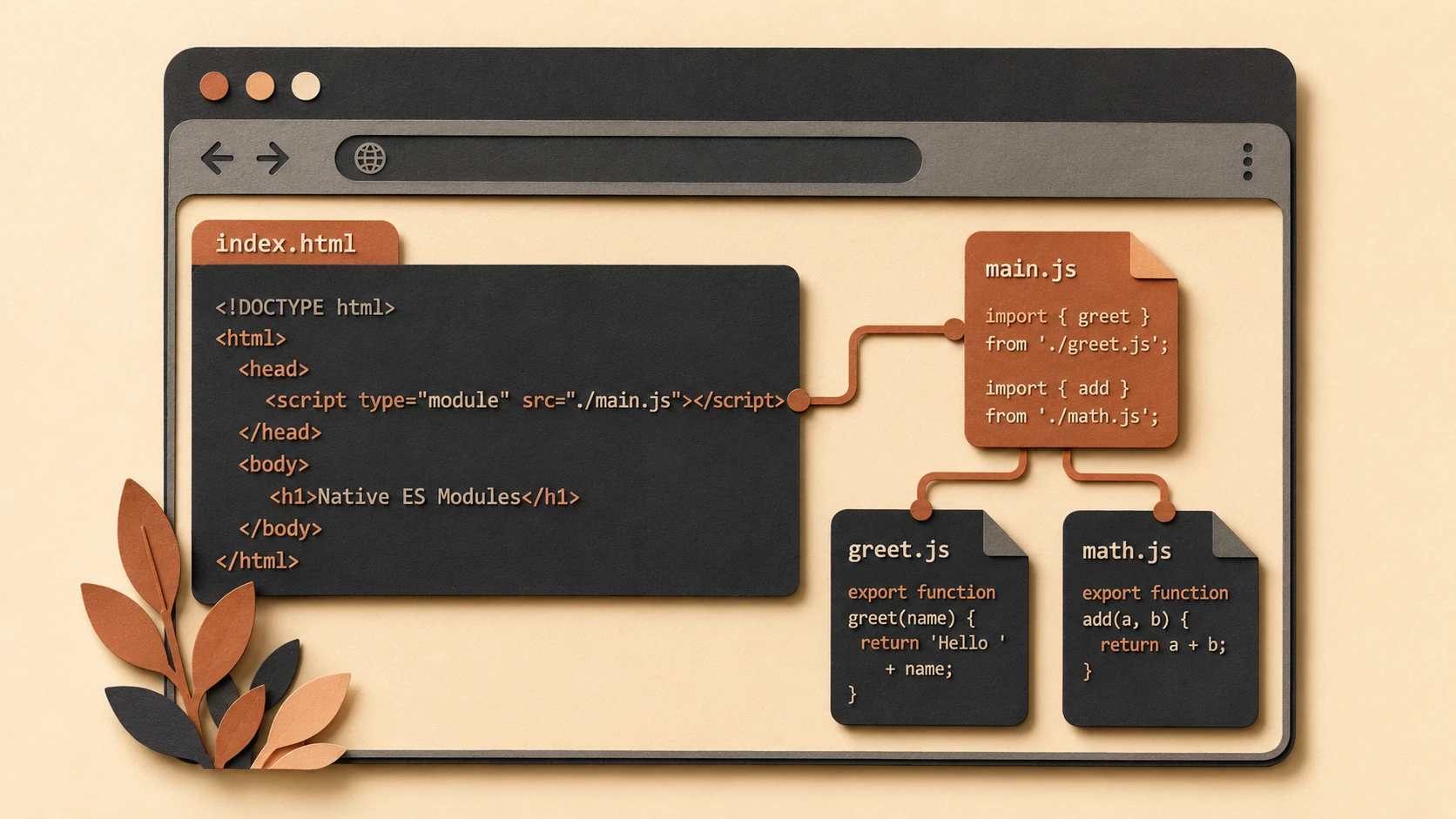
<!-- Loading native ES Modules in browser index.html -->
<script type="module">
  import { calculateTax } from './utils/tax.js';
  const tax = calculateTax(100);
  console.log('Calculated Tax:', tax);
</script>
The import statement allows one module to consume exported functionality from another module.
Advantages include:
- ◆Explicit dependencies
- ◆Improved readability
- ◆Better tooling support
- ◆Modular application design
Export

System architecture diagram and conceptual workflow layout for ES Modules in Chrome 61.
The export statement defines reusable functions, objects, constants, and classes.
Applications become easier to organize into reusable components while minimizing global namespace pollution.
Enterprise Use Cases
Large Single Page Applications
Modular organization simplifies maintenance across large engineering teams.
Enterprise Design Systems
Reusable UI libraries can expose standardized components through ES Modules.
Internal JavaScript Libraries
Business logic can be shared consistently across multiple applications.
Progressive Web Applications
PWAs benefit from standardized module loading while continuing to leverage modern browser capabilities.
Cross-Team Development
Clear module boundaries simplify collaboration across distributed development teams.
Performance Considerations
Native module loading introduces several opportunities for browser optimization.
Enterprise teams should evaluate:
- ◆Dependency graph organization
- ◆Network request behavior
- ◆Browser caching
- ◆Bundle size
- ◆Module granularity
- ◆Build optimization
Because browsers perform module resolution, application architecture remains important for efficient delivery.
Security Considerations
ES Modules improve code organization but do not replace secure software engineering.
Organizations should continue implementing:
- ◆HTTPS deployment
- ◆Content Security Policy
- ◆Input validation
- ◆Dependency governance
- ◆Secure build pipelines
- ◆Package auditing
Module boundaries should not be treated as security boundaries.
Scalability
Native ES Modules support long-term application scalability through:
- ◆Standardized architecture
- ◆Explicit dependency management
- ◆Improved maintainability
- ◆Reusable libraries
- ◆Better tooling integration
- ◆Simplified collaboration
These characteristics benefit enterprise applications maintained over multiple release cycles.
Best Practices
- ◆Organize modules around business domains.
- ◆Keep exported APIs focused.
- ◆Avoid unnecessary circular dependencies.
- ◆Use consistent module naming conventions.
- ◆Maintain clear dependency hierarchies.
- ◆Integrate module validation into build pipelines.
- ◆Continue optimizing production bundles.
- ◆Test across supported browsers.
Common Mistakes
| Mistake | Enterprise Impact |
|---|---|
| Creating excessively large modules | Reduced maintainability |
| Circular module dependencies | Initialization complexity |
| Exposing unnecessary exports | Poor API design |
| Ignoring browser compatibility | Deployment issues |
| Mixing multiple module strategies unnecessarily | Increased complexity |
| Treating native modules as a replacement for build optimization | Reduced production efficiency |
Technology Comparison
| Capability | CommonJS | AMD | ES Modules |
|---|---|---|---|
| Standardized by ECMAScript | No | No | Yes |
| Native Browser Support | No | No | Chrome 61 |
| Static Dependency Analysis | Limited | Partial | Yes |
| Runtime Loader Required | Yes | Yes | No |
| Tooling Integration | Good | Good | Excellent |
| Long-Term Standardization | Community Driven | Community Driven | Language Standard |
Adoption Strategy
- 1.Evaluate existing JavaScript module organization.
- 2.Introduce ES Module syntax into new projects.
- 3.Continue using build tools where appropriate.
- 4.Validate browser compatibility requirements.
- 5.Refactor shared libraries incrementally.
- 6.Standardize import and export conventions.
- 7.Benchmark production performance.
- 8.Expand adoption as browser support continues growing.
Limitations
As of August 2017, native ES Module support is newly available in Chrome 61, and cross-browser adoption remains in progress. Enterprise organizations supporting multiple browsers should continue relying on build tools and transpilation strategies where necessary while gradually introducing standardized module syntax into development workflows.
Looking Ahead
From the perspective of August 2017, native ES Modules represent one of the most significant improvements to the JavaScript language and browser platform in recent years. By bringing standardized module loading directly into browser engines, Chrome 61 reduces dependence on proprietary runtime loaders while encouraging a more consistent and maintainable architecture for modern web applications. As additional browsers adopt the ECMAScript module standard, enterprise development teams can expect JavaScript application architecture to become increasingly aligned around a common, language-defined module system.