Introduction
For decades, enterprise computing has revolved around the desktop operating system. Whether organizations standardized on Microsoft Windows, deployed Linux workstations for technical teams, or maintained Apple Macintosh systems for creative professionals, the operating system has traditionally served as the primary platform for running business applications.
The rapid growth of cloud computing is beginning to challenge this long-standing model. Business software is steadily moving from locally installed applications toward browser-based services. Email, document collaboration, customer relationship management, project management, and business intelligence increasingly operate through web browsers rather than native desktop software.
Google's introduction of the Chromebook marks one of the most ambitious attempts yet to embrace this transition. Instead of treating the browser as just another application, Chrome OS places Google Chrome at the center of the computing experience, with web applications replacing many traditional desktop programs.
As of May 2011, Chromebooks are still an emerging category. Enterprise architects, IT managers, and CIOs are evaluating whether browser-first computing can satisfy business requirements while reducing desktop management complexity.
This article explores the Chromebook architecture, examines its strengths and limitations, compares it with traditional enterprise desktops, and discusses practical adoption strategies from today's perspective.
The Evolution of Enterprise Computing
Enterprise desktops have traditionally required:
- ◆Operating system installation
- ◆Application deployment
- ◆Software updates
- ◆Antivirus management
- ◆Hardware drivers
- ◆Local storage management
- ◆Backup procedures
Managing thousands of desktops often demands significant IT resources.
Cloud computing presents an opportunity to simplify this model by shifting applications and data toward centralized online services.
What Is a Chromebook?
A Chromebook is a notebook computer designed to run Chrome OS, an operating system built around the Google Chrome browser.
Rather than emphasizing locally installed software, Chrome OS encourages users to access applications through the web.
Core characteristics include:
- ◆Browser-centric user experience
- ◆Fast startup
- ◆Automatic software updates
- ◆Cloud-based applications
- ◆Integrated security features
- ◆Simplified administration
This represents a significant departure from conventional desktop computing.
Browser as the Primary Platform
Traditional operating systems launch applications installed on local storage.
Chrome OS instead assumes that many daily tasks can be performed through browser-based applications.
Typical activities include:
- ◆Document editing
- ◆Calendar management
- ◆Collaboration
- ◆Web conferencing
- ◆Customer relationship management
- ◆Project management
As web technologies continue to mature, browser applications are becoming increasingly capable of supporting enterprise workflows.
Cloud Computing and Chrome OS
The Chromebook vision aligns closely with the broader trend toward cloud computing.
Rather than storing information exclusively on local devices, organizations increasingly rely on centralized services.
Potential advantages include:
- ◆Simplified backup
- ◆Easier collaboration
- ◆Centralized updates
- ◆Reduced local administration
- ◆Consistent user environments
These benefits may reduce operational complexity for IT departments.
Comparing Traditional Laptops and Chromebooks
| Feature | Traditional Laptop | Chromebook |
|---|---|---|
| Primary Applications | Installed Software | Web Applications |
| Software Updates | Manual or Managed | Automatic |
| Data Storage | Primarily Local | Primarily Cloud |
| Startup Time | Variable | Fast |
| Administration | Higher | Simplified |
| Browser Role | Application | Primary Platform |
| Hardware Requirements | Varies | Optimized for Web Computing |
The differences reflect a broader shift from device-centric computing toward service-centric computing.
Enterprise Architecture
A browser-centric enterprise environment may resemble:
Chromebook
      |
Google Chrome
      |
Internet
      |
Cloud Applications
      |
Enterprise Services
      |
Corporate Databases
Business logic remains within centralized services while the browser provides the user interface.
Enterprise Use Cases
Call Centers
Customer service representatives primarily using browser-based CRM applications may benefit from simplified desktop management.
Education
Educational institutions increasingly rely on web-based collaboration, making browser-centric devices attractive for classrooms and computer laboratories.
Retail
Store associates accessing inventory systems and point-of-sale support portals through web applications may require little locally installed software.
Sales Teams
Sales professionals using cloud-based CRM platforms can access customer information from lightweight devices.
Field Employees
Workers who primarily interact with web portals may find browser-first computing sufficient for daily operations.
Security Considerations
Security remains a critical factor in enterprise adoption.
Chrome OS emphasizes:
- ◆Automatic updates
- ◆Application isolation
- ◆Reduced reliance on locally installed software
- ◆Simplified patch management
Organizations should continue implementing:
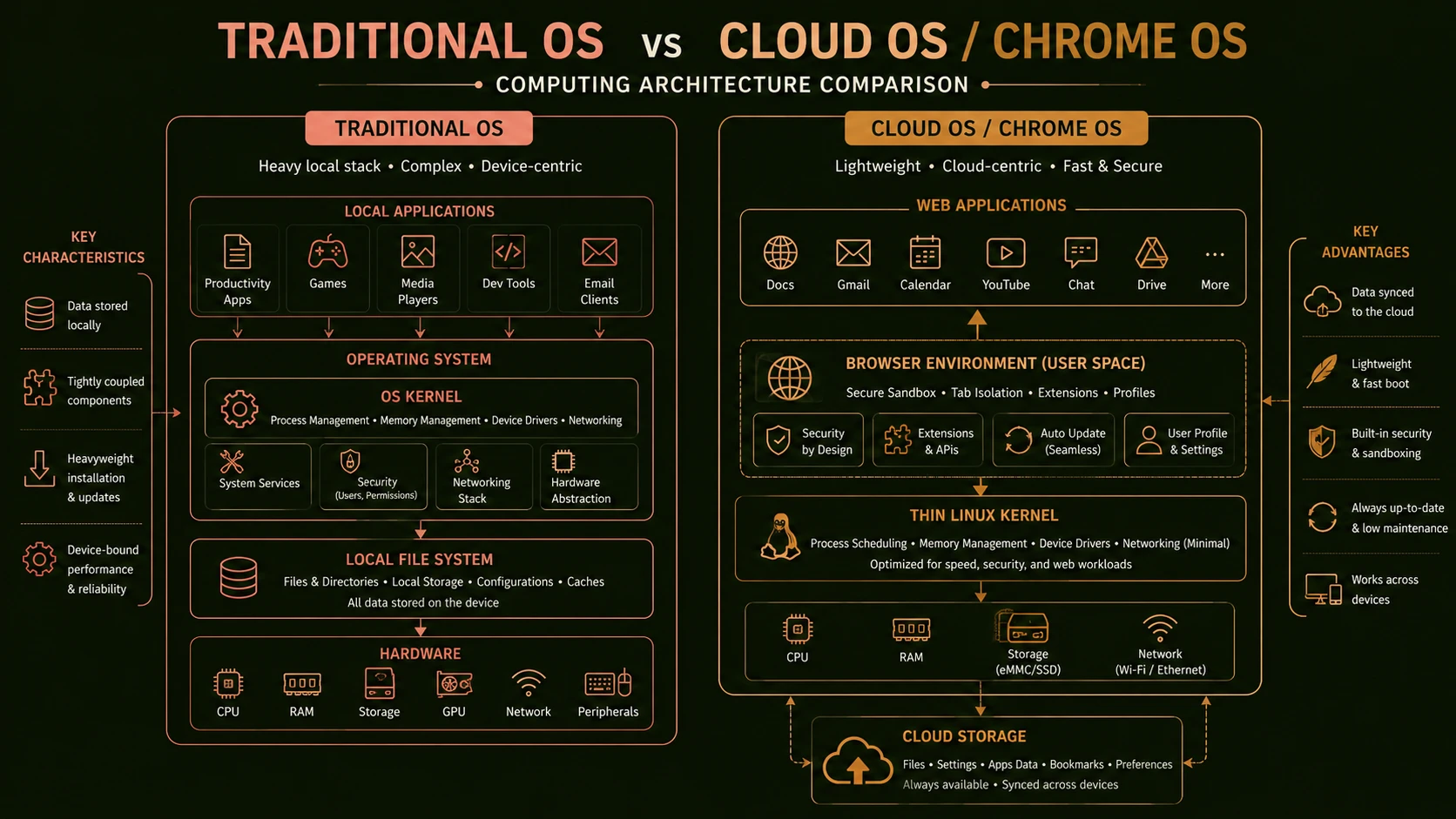
System architecture diagram and conceptual workflow layout for The Chromebook Era.
- ◆Strong authentication
- ◆Secure network communication
- ◆Access controls
- ◆Data protection policies
Security remains a shared responsibility between the platform and enterprise administrators.
Performance Considerations
Browser-based computing depends heavily on:
- ◆Reliable Internet connectivity
- ◆Responsive web applications
- ◆Efficient backend services
- ◆Network bandwidth
Organizations should evaluate whether business applications perform adequately under expected operating conditions.
Challenges Enterprises Must Consider
Despite its innovative approach, Chromebook adoption presents several questions.
Application Compatibility
Many enterprise organizations continue relying on desktop software unavailable through web browsers.
Offline Usage
Employees working in locations with limited connectivity may require local application capabilities.
Existing Infrastructure
Organizations with substantial investments in Windows desktop software may face migration challenges.
User Expectations
Employees accustomed to traditional desktop environments may require training during transition.
Integration
Existing identity management, printing, file sharing, and enterprise applications should be evaluated before deployment.
Best Practices
Organizations evaluating Chromebooks should consider several recommendations.
- ◆Inventory existing desktop applications.
- ◆Identify browser-based workloads.
- ◆Evaluate cloud readiness.
- ◆Pilot deployments with selected departments.
- ◆Train end users.
- ◆Monitor network performance.
- ◆Secure user identities.
- ◆Validate application compatibility.
- ◆Measure administrative savings.
A structured evaluation minimizes deployment risk.
Common Mistakes
Several implementation issues should be avoided.
Assuming Every Workload Is Browser-Based
Many organizations continue relying on specialized desktop software that cannot easily be replaced.
Ignoring Network Reliability
Cloud-centric computing depends upon dependable connectivity.
Skipping User Training
Even simple interface changes may affect employee productivity.
Underestimating Integration Requirements
Existing enterprise systems should be evaluated carefully before large-scale deployment.
Migrating Too Quickly
Incremental adoption allows organizations to validate assumptions while minimizing disruption.
Adoption Recommendations
Organizations should approach browser-centric computing through measured experimentation.
Phase 1
- ◆Assess current desktop application usage.
- ◆Identify browser-centric workflows.
- ◆Evaluate network readiness.
Phase 2
- ◆Launch pilot programs.
- ◆Gather user feedback.
- ◆Measure productivity.
Phase 3
- ◆Expand deployments where browser applications meet business needs.
- ◆Refine administration practices.
- ◆Continue evaluating compatibility.
Phase 4
- ◆Establish long-term endpoint management strategies.
- ◆Continue monitoring the evolution of browser technologies.
- ◆Review cloud adoption progress.
This phased approach enables organizations to evaluate Chromebook suitability while maintaining business continuity.
Browser-Based Computing and Enterprise Strategy
The Chromebook represents more than simply another notebook computer. It reflects a broader shift toward cloud services, centralized management, and browser-delivered applications.
Whether this model becomes appropriate for every enterprise workload remains uncertain. However, organizations already investing in Software-as-a-Service, web applications, and cloud infrastructure may find browser-centric computing increasingly attractive for selected user groups.
Rather than replacing every traditional desktop immediately, Chromebooks should be evaluated according to workload characteristics, application compatibility, and operational objectives.
Looking Ahead
The introduction of Chromebooks marks an important milestone in the evolution of enterprise computing. By treating the browser as the primary application platform, Chrome OS challenges long-standing assumptions about desktop software, operating system management, and endpoint administration.
As enterprises continue evaluating cloud strategies throughout 2011, browser-centric computing deserves careful consideration alongside traditional desktop environments. Organizations that begin experimenting with Chromebooks today will gain valuable insight into how web applications, centralized services, and simplified endpoint management may influence future enterprise IT strategies while continuing to assess where conventional desktop operating systems remain the most appropriate choice.