Introduction
Artificial Intelligence has become a foundational capability across modern enterprise software. From intelligent customer experiences and predictive maintenance to document processing, computer vision, and generative AI assistants, organizations increasingly depend on machine learning to automate decisions and improve operational efficiency.
For many years, AI architectures followed a centralized model. Devices collected information, transmitted data to cloud platforms, executed inference remotely, and returned results to users or operational systems. While cloud infrastructure continues providing unmatched scalability for model training, orchestration, and large-scale analytics, this architecture also introduces challenges including network latency, connectivity dependency, bandwidth consumption, privacy concerns, and increasing inference costs.
Recent advances in mobile processors, NPUs (Neural Processing Units), embedded GPUs, optimized inference runtimes, lightweight language models, and efficient computer vision architectures have expanded the practical capabilities of edge devices. Smartphones, industrial gateways, autonomous robots, medical equipment, vehicles, retail terminals, cameras, and IoT platforms can now execute increasingly sophisticated AI workloads locally.
This shift has accelerated the adoption of Edge AI, an architectural approach that distributes machine learning inference closer to where data is generated while retaining cloud platforms for centralized management, model lifecycle operations, governance, and large-scale training.
As of October 2024, Edge AI has become a strategic enterprise architecture pattern for organizations seeking lower latency, improved privacy, operational resilience, and scalable intelligent systems.
Industry Background
Several technology trends continue accelerating Edge AI adoption:
- ◆Artificial Intelligence
- ◆Edge Computing
- ◆Internet of Things (IoT)
- ◆TinyML and optimized inference
- ◆Foundation models
- ◆Cloud-native platforms
- ◆5G connectivity
- ◆Intelligent industrial automation
Organizations increasingly seek architectures that combine centralized cloud intelligence with autonomous edge decision-making.
The Business Problem
Traditional cloud-centric AI architectures commonly experience:
- ◆High inference latency
- ◆Continuous network dependency
- ◆Rising cloud inference costs
- ◆Large bandwidth requirements
- ◆Privacy concerns for sensitive information
- ◆Operational challenges in disconnected environments
- ◆Centralized processing bottlenecks
Businesses require intelligent systems capable of making decisions locally while remaining integrated with enterprise AI platforms.
Understanding Edge AI
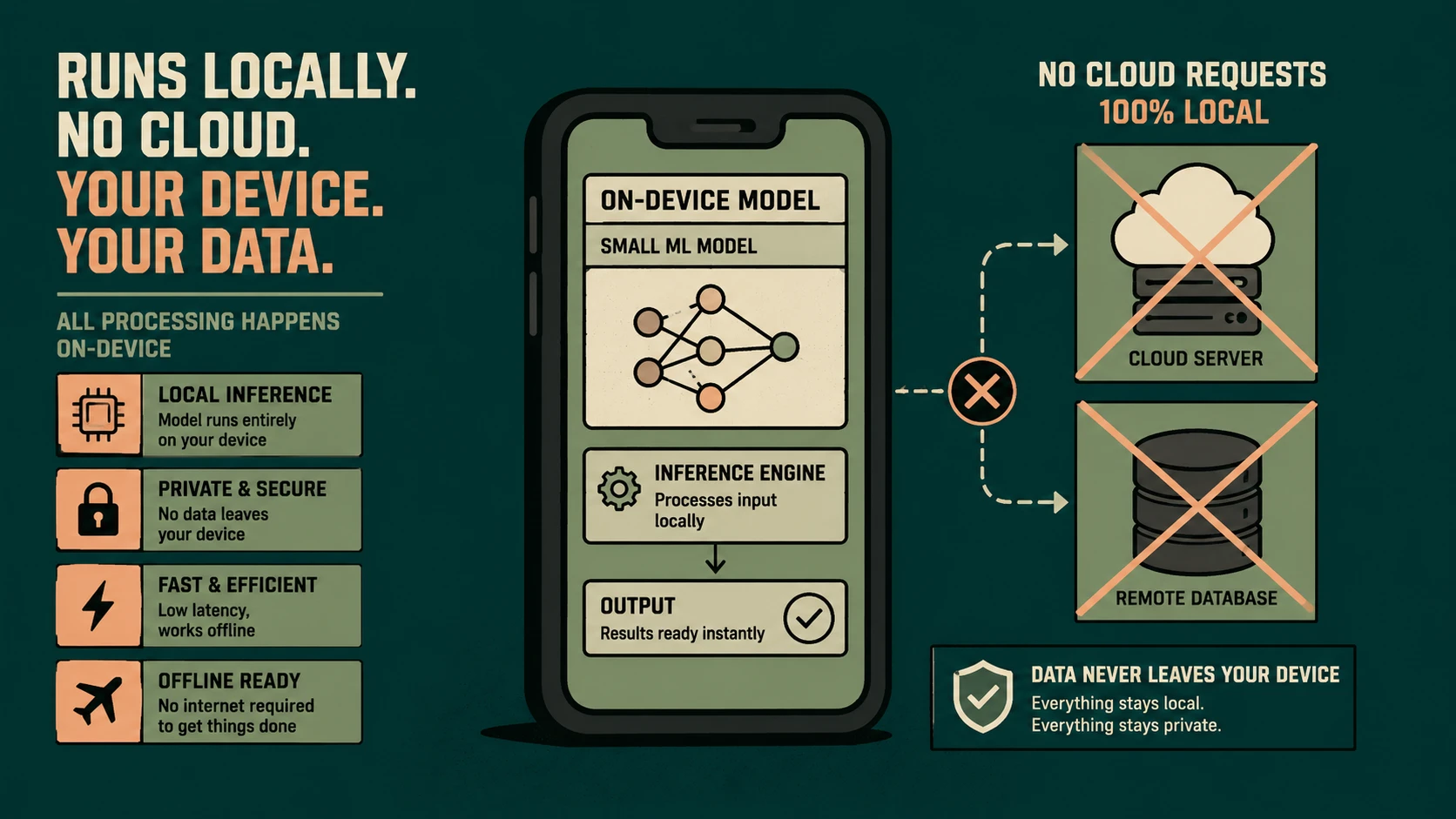
Edge AI distributes machine learning inference across intelligent devices located near data sources.
Instead of transmitting every request to centralized cloud infrastructure, edge devices execute trained models locally and communicate with cloud platforms only when necessary.
Typical capabilities include:
- ◆Computer vision
- ◆Speech recognition
- ◆Object detection
- ◆Predictive maintenance
- ◆Local anomaly detection
- ◆Personalization
- ◆Sensor intelligence
The cloud remains responsible for large-scale model training, governance, analytics, deployment coordination, and fleet management.
Core Architecture
| Component | Responsibility |
|---|---|
| Edge Device | Collects data and executes local inference |
| AI Runtime | Executes optimized machine learning models |
| Edge Application | Coordinates business logic and device interaction |
| Device Management Platform | Deploys and monitors edge workloads |
| Cloud AI Platform | Model training, governance, and orchestration |
| Data Platform | Stores telemetry and operational insights |
| Observability Platform | Monitors distributed AI operations |
This hybrid architecture enables localized intelligence while maintaining centralized operational control.
Separating Training from Inference
One of the defining characteristics of modern Edge AI architectures is separating model training from model inference.
Model training generally remains cloud-based because it requires:
- ◆Large datasets
- ◆High-performance accelerators
- ◆Distributed compute infrastructure
- ◆Experiment management
Inference increasingly executes on edge devices where immediate decisions are required.
Potential benefits include:
- ◆Faster response times
- ◆Reduced network traffic
- ◆Improved privacy
- ◆Lower operational costs
- ◆Better offline capabilities
This separation allows enterprises to leverage cloud scalability without sacrificing real-time responsiveness.
Model Optimization
# PyTorch post-training static quantization for lightweight Edge-AI execution
import torch

# Define baseline float32 model
float_model = MyVisionModel()
float_model.eval()

# Set quantization configuration for edge CPUs
float_model.qconfig = torch.quantization.get_default_qconfig('fbgemm')
prepared_model = torch.quantization.prepare(float_model, inplace=False)

# Calibrate using real workload validation data
calibrate(prepared_model)

# Convert to quantized int8 model reducing footprint by 4x
quantized_model = torch.quantization.convert(prepared_model, inplace=False)
torch.save(quantized_model.state_dict(), 'edge_quantized.pt')
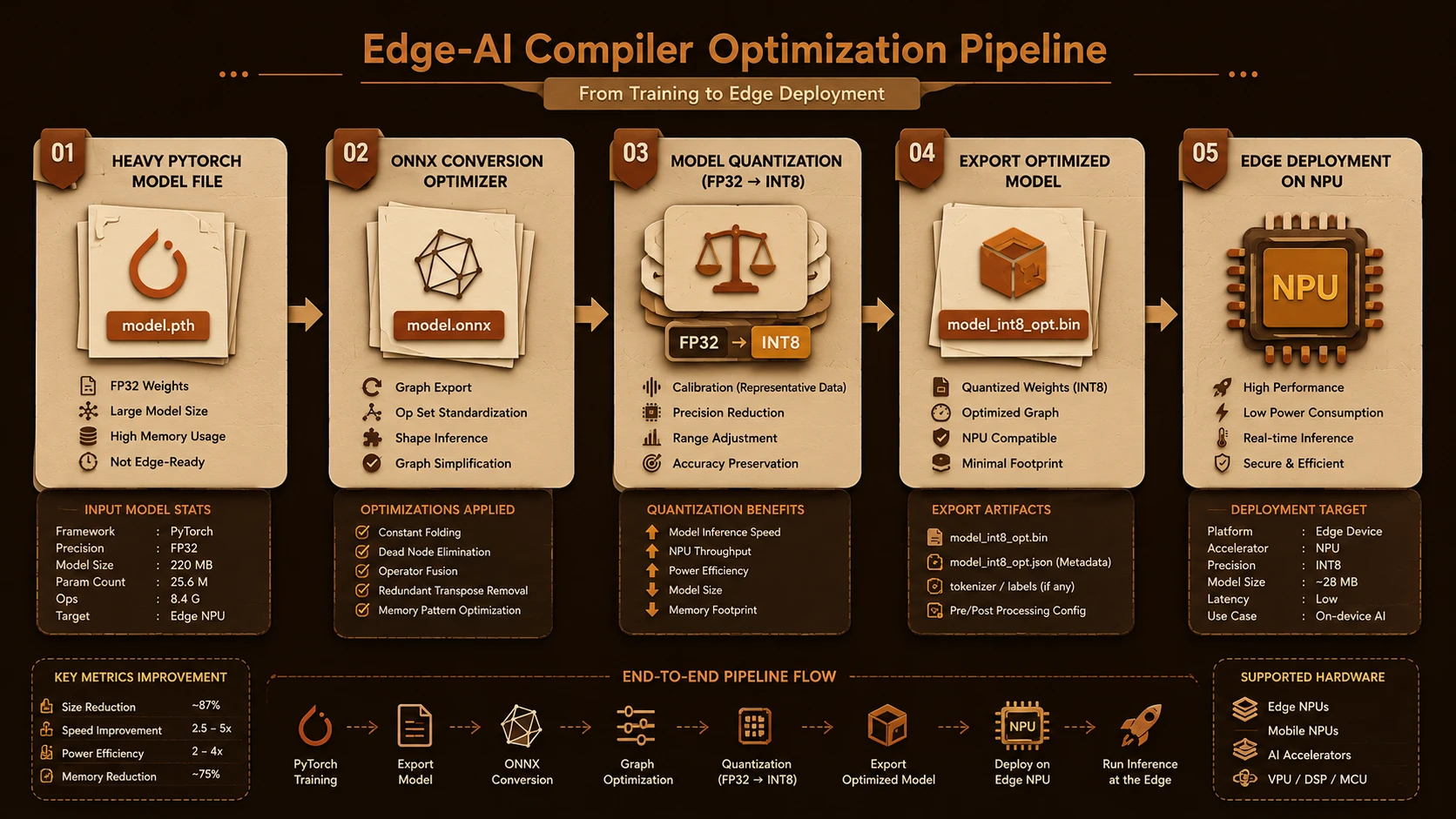
Edge devices typically possess fewer computational resources than cloud servers.
Organizations therefore optimize models through techniques such as:
- ◆Quantization
- ◆Pruning
- ◆Knowledge distillation
- ◆Architecture optimization
- ◆Hardware-specific acceleration
Model optimization improves execution efficiency while balancing accuracy, latency, and resource consumption.
Edge Data Processing
Rather than transmitting raw information continuously, devices increasingly perform intelligent preprocessing.
Typical workloads include:
- ◆Event detection
- ◆Feature extraction
- ◆Image preprocessing
- ◆Sensor fusion
- ◆Local filtering
- ◆Intelligent compression
Only relevant insights or aggregated information may be transmitted to centralized systems.
Distributed Intelligence Workflow
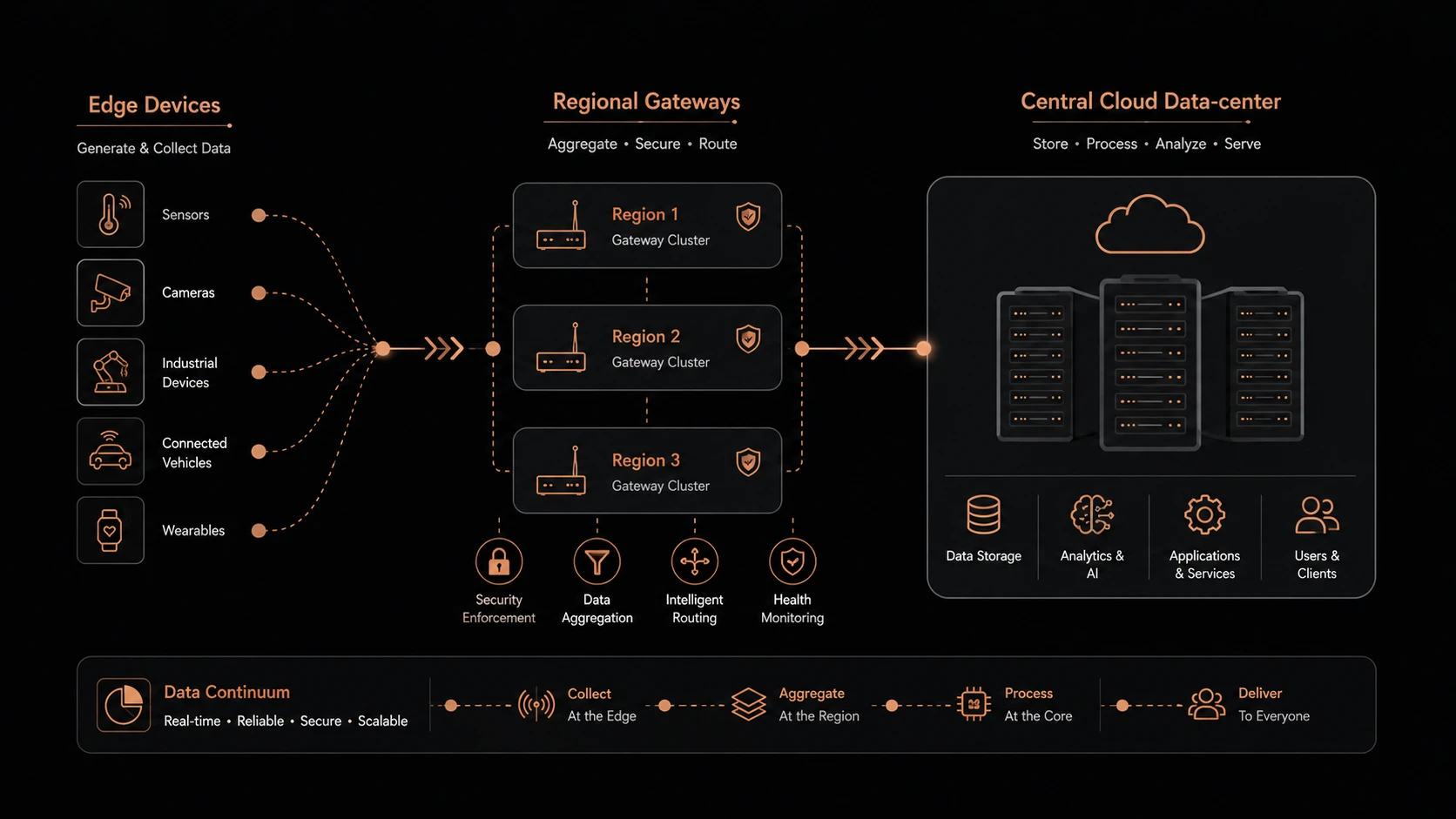
A common enterprise Edge AI workflow includes:
- 1.Device captures operational data.
- 2.Optimized AI model performs local inference.
- 3.Immediate business actions occur locally.
- 4.Important events are transmitted to cloud platforms.
- 5.Cloud infrastructure aggregates enterprise-wide insights.
- 6.Improved models are validated and deployed back to devices.
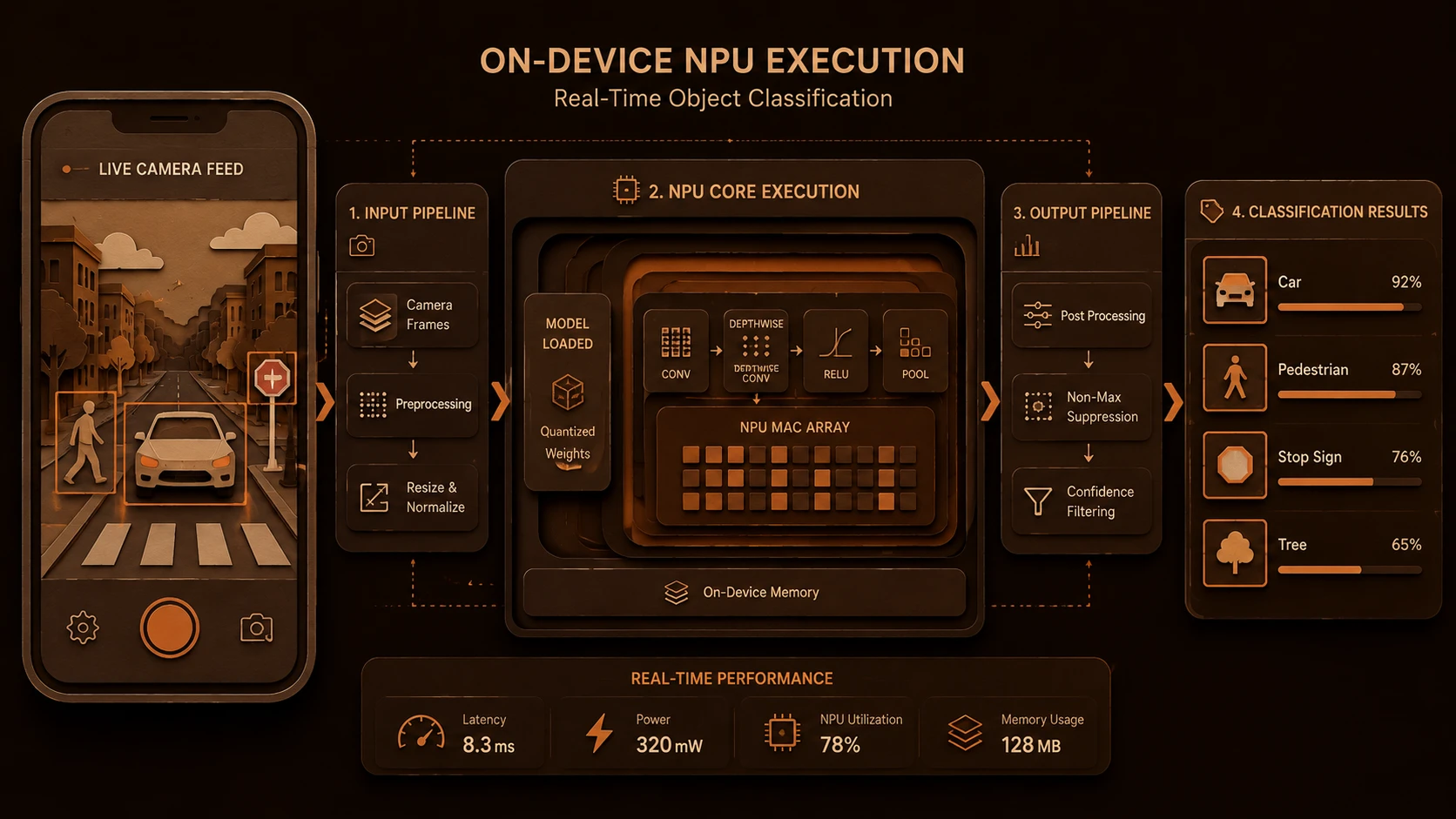
System architecture diagram and conceptual workflow layout for Edge-AI Workloads.
This feedback loop supports continuous improvement while minimizing latency.
Enterprise Use Cases
| Scenario | Benefit |
|---|---|
| Smart Manufacturing | Real-time defect detection |
| Healthcare Devices | Local patient monitoring and alerts |
| Retail Stores | Intelligent inventory and checkout systems |
| Autonomous Vehicles | Low-latency environmental perception |
| Smart Cities | Distributed traffic and infrastructure monitoring |
| Energy Utilities | Local predictive maintenance and fault detection |
Organizations requiring real-time decisions or operating in bandwidth-constrained environments often gain the greatest value from Edge AI.
Performance Considerations
Engineering teams should measure:
- ◆Inference latency
- ◆Frames processed per second
- ◆Device CPU, GPU, or NPU utilization
- ◆Memory consumption
- ◆Energy efficiency
- ◆Network bandwidth savings
- ◆Model loading time
Performance optimization should align with workload characteristics and hardware capabilities.
Security Considerations
Distributed AI introduces additional operational responsibilities.
Organizations should continue implementing:
- ◆Device identity management
- ◆Secure boot processes
- ◆Hardware-backed security where available
- ◆Model integrity verification
- ◆Encrypted communications
- ◆Secure over-the-air updates
- ◆Zero Trust access policies
- ◆Continuous device monitoring
Security should protect both AI models and the operational environments where they execute.
Model Lifecycle Management
Operating thousands of intelligent devices requires disciplined AI governance.
Organizations should establish processes for:
- ◆Model versioning
- ◆Validation and testing
- ◆Deployment approval
- ◆Rollback strategies
- ◆Drift detection
- ◆Performance monitoring
Model lifecycle management becomes increasingly important as Edge AI deployments expand across enterprise environments.
Scalability
Edge AI architectures support enterprise growth through:
- ◆Distributed inference
- ◆Reduced cloud resource consumption
- ◆Autonomous local decision-making
- ◆Fleet-wide model deployment
- ◆Elastic cloud coordination
This approach enables organizations to scale intelligent services across geographically distributed environments.
Best Practices
Organizations implementing Edge AI should:
- ◆Deploy only latency-sensitive inference to edge devices.
- ◆Keep model training centralized.
- ◆Optimize models for target hardware.
- ◆Design applications for intermittent connectivity.
- ◆Implement secure model update mechanisms.
- ◆Continuously monitor inference quality.
- ◆Establish strong AI governance processes.
- ◆Evaluate business outcomes alongside technical metrics.
A balanced architecture combines localized intelligence with centralized operational management.
Common Mistakes
Organizations should avoid:
- ◆Deploying unnecessarily large models to constrained devices.
- ◆Assuming every AI workload belongs at the edge.
- ◆Ignoring model lifecycle governance.
- ◆Neglecting hardware compatibility testing.
- ◆Treating edge deployments as isolated from enterprise platforms.
- ◆Failing to monitor model drift and operational performance after deployment.
Successful Edge AI initiatives balance responsiveness, maintainability, security, and operational visibility.
Technology Comparison
| Capability | Cloud-Centric AI | Edge AI Architecture |
|---|---|---|
| Inference Location | Central cloud | Local device |
| Response Time | Network dependent | Near real-time |
| Connectivity | Continuous internet often required | Can tolerate intermittent connectivity |
| Privacy | Data frequently transmitted | Sensitive processing can remain local |
| Bandwidth Usage | Higher | Reduced through local inference |
| Cloud Resource Consumption | Higher | Lower for inference workloads |
Edge AI complements centralized AI platforms by moving appropriate inference workloads closer to operational environments.
Adoption Strategy
Organizations should implement Edge AI incrementally.
A recommended roadmap includes:
- 1.Identify latency-sensitive AI use cases.
- 2.Assess edge hardware capabilities.
- 3.Optimize machine learning models for target devices.
- 4.Deploy pilot workloads.
- 5.Establish centralized model management.
- 6.Monitor inference quality and operational performance.
- 7.Expand deployment based on measurable business value and operational maturity.
Incremental adoption reduces deployment risk while enabling engineering teams to refine architecture and governance.
Limitations
As of October 2024, organizations should recognize several considerations.
Current observations include:
- ◆Edge devices continue to have finite computational resources compared to cloud infrastructure.
- ◆Model optimization remains essential for efficient deployment.
- ◆Distributed device management introduces operational complexity.
- ◆Successful Edge AI architectures depend on close integration between cloud services, edge infrastructure, AI governance, and platform engineering.
Organizations should therefore evaluate Edge AI according to latency requirements, privacy objectives, infrastructure maturity, and long-term operational strategy.
Looking Ahead
As of October 2024, Edge AI is becoming one of the defining architectural trends in enterprise artificial intelligence. By combining optimized machine learning models, intelligent edge devices, cloud-native orchestration, and secure distributed infrastructure, organizations can deliver faster responses, stronger privacy protections, lower operational costs, and more resilient intelligent systems.
For enterprise architects, AI platform engineers, cloud teams, and technology leaders, the strategic objective is to determine where intelligence creates the greatest business value rather than assuming every workload belongs in the cloud. Organizations that invest in model lifecycle management, secure device operations, hybrid cloud-edge architectures, and measurable AI governance will be well positioned to build scalable intelligent systems for the next generation of enterprise applications.